1. Introducció
The JOYING ELM 327 V2.1 Bluetooth OBD2 Diagnostic Scanner is a vehicle interface tool designed to communicate with your car's On-Board Diagnostics (OBD-II) system. It allows users to read and clear diagnostic trouble codes (DTCs), view live sensor data, and monitor various vehicle parameters using a compatible Android device and application. This manual provides instructions for the proper setup, operation, and maintenance of your diagnostic tool.

Figura 1: Frontal view of the JOYING ELM 327 V2.1 Bluetooth OBD2 Diagnostic Scanner, showing the "ELM327 MINI Interface Supports all OBDII protocols" label.
2. Característiques del producte
- Reads and clears diagnostic trouble codes (DTCs).
- Displays the meaning of diagnostic trouble codes.
- Turns off the Malfunction Indicator Light (MIL), also known as the "Check Engine" light.
- Shows current sensor data in real-time.
- Bluetooth connectivity for wireless communication with Android devices.
- Supports various OBD-II protocols.
3. Especificacions
| Paràmetre | Valor |
|---|---|
| Processador | ELM327 v2.1 |
| Vol. Operatiutage | 12V (with internal protection from short circuits/overvoltagés) |
| Nominal Idle Current | 45 mA |
| Contrasenya Bluetooth | 1234 |
| Interfície de sortida | Bluetooth |
| Àmbit d'aplicació | 5-10 m / 16.4-32.8 peus |
| Pes de l'article | 23 g (0.81 oz) |
| Dimensions del producte | 6.3 x 4.72 x 1.97 polzades (aproximadament) |
| Número de peça del fabricant | 5824090411 |
Supported OBDII Protocols:
- ISO 9141-2 (inici de 5 bauds, 10.4 kbauds)
- ISO 14230-4 KWP (inici de 5 bauds, 10.4 kbauds)
- ISO 14230-4 KWP (inici ràpid, 10.4 kbaud)
- ISO 15765-4 CAN (ID de 11 bits, 500 kbaud)
- ISO 15765-4 CAN (ID de 29 bits, 500 kbaud)
- ISO 15765-4 CAN (ID de 11 bits, 250 kbaud)
- ISO 15765-4 CAN (ID de 29 bits, 250 kbaud)
Avís: Aquest dispositiu NO POT work for PWM or VPW (SAE J1850) protocols.

Figura 2: lateral view of the diagnostic scanner showing approximate dimensions: 1.95 inches length, 1 inch width, 1.25 inches height.
4. Guia de configuració
4.1. Instal·lació
- Locate your vehicle's OBD-II port. This port is typically found under the dashboard on the driver's side, but its exact location may vary by vehicle model. Refer to your vehicle's owner's manual if you cannot find it.
- Ensure your vehicle's ignition is turned off before plugging in the device.
- Firmly plug the JOYING ELM 327 V2.1 scanner into the OBD-II port. Do not force the connection.
- Once plugged in, turn your vehicle's ignition to the "ON" position (engine does not need to be running). The device should power on, indicated by an LED light.

Figura 3: Angle view of the diagnostic scanner, highlighting the 16-pin OBD-II connector.
4.2. Bluetooth Pairing with Android Device
- On your Android device, go to "Settings" and enable Bluetooth.
- Cerca available Bluetooth devices. The scanner should appear as "OBDII" or a similar identifier.
- Select the device to pair. When prompted for a password, enter 1234.
- Once paired, your Android device is ready to connect with a compatible OBD2 application.
4.3. Instal·lació de programari
This diagnostic tool requires a third-party OBD2 application to function. Popular applications include "Torque Pro" (often preinstalled on JOYING car radios as "Torque_pro apk") or other compatible apps available on the Google Play Store.
- Download and install your preferred OBD2 application from the Google Play Store.
- Open the application and navigate to its settings.
- In the application settings, select "Bluetooth" as the connection type and choose the paired "OBDII" device.
- Follow the in-app instructions to establish a connection with the scanner.
5. Instruccions de funcionament
Once the JOYING ELM 327 V2.1 scanner is connected to your vehicle and paired with your Android device and OBD2 application, you can begin diagnostics.
- Connectar: Ensure the app indicates a successful connection to the OBD2 adapter and your vehicle's ECU.
- Llegir codis d'error: Navigate to the "Fault Codes" or "DTCs" section within the app to scan for stored diagnostic trouble codes. The app will display the codes and their descriptions.
- Esborrar codis d'error: If applicable, the app will provide an option to clear the fault codes. Clearing codes will also turn off the Malfunction Indicator Light (MIL). Note that if the underlying issue is not resolved, the codes may reappear.
- View Dades en directe: Access the "Realtime Information" or "Live Data" section to monitor various sensor readings such as engine RPM, vehicle speed, coolant temperature, fuel system status, and more.
- Altres funcions: Depending on your chosen app, additional features like performance monitoring, fuel economy tracking, and graphing of sensor data may be available.
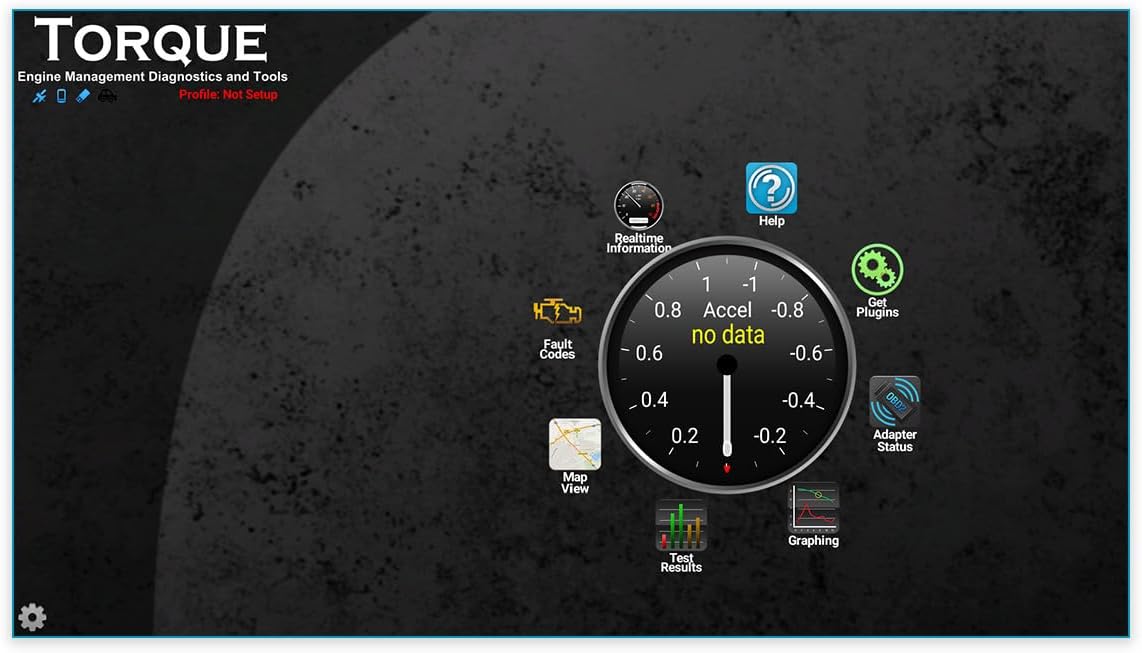
Figura 4: Example interface of a compatible OBD2 application (Torque Pro), showing options for Realtime Information, Fault Codes, Adapter Status, and Graphing.
For detailed instructions on specific features, please refer to the user manual or help section of your chosen OBD2 application.
6. Manteniment
The JOYING ELM 327 V2.1 diagnostic scanner requires minimal maintenance.
- Neteja: Netegeu el dispositiu amb un drap suau i sec. No utilitzeu netejadors líquids ni dissolvents.
- Emmagatzematge: Guardeu el dispositiu en un lloc fresc i sec, allunyat de la llum solar directa i de temperatures extremes quan no l'utilitzeu.
- Manipulació: Eviteu deixar caure el dispositiu o sotmetre-lo a forts impactes.
7. Solució De Problemes
If you encounter issues with your JOYING ELM 327 V2.1 diagnostic scanner, refer to the following common troubleshooting steps:
- El dispositiu no s'encén:
- Ensure the device is firmly plugged into the vehicle's OBD-II port.
- Verifiqueu que el contacte del vehicle estigui en la posició "ON".
- Check your vehicle's fuse box for any blown fuses related to the OBD-II port (consult your vehicle's manual).
- Problemes de vinculació de Bluetooth:
- Assegureu-vos que el Bluetooth estigui activat al vostre dispositiu Android.
- Assegureu-vos que l'escàner estigui engegat.
- Try unpairing and re-pairing the device. The default Bluetooth password is 1234.
- Ensure no other devices are actively connected to the scanner via Bluetooth.
- App Not Connecting to Scanner:
- Confirm that the scanner is successfully paired with your Android device via Bluetooth settings.
- In your OBD2 application's settings, verify that "Bluetooth" is selected as the connection type and the correct "OBDII" device is chosen.
- Try restarting both the app and your Android device.
- Some apps may require specific settings or configurations. Consult the app's documentation.
- Ensure the app is compatible with ELM327 v2.1 devices.
- Sense dades o lectures incorrectes:
- Verify that your vehicle supports the OBD-II protocols listed in the specifications. This device does not support PWM or VPW (SAE J1850) protocols.
- Ensure the app is correctly configured for your vehicle's protocol (if applicable).
- Check if your vehicle's engine is running or ignition is in the "ON" position.
- Device Not Compatible with iOS:
- This device is designed for use with Android operating systems only and is not compatible with iOS devices.
If problems persist after attempting these steps, please contact JOYING customer support or refer to their official weblloc per obtenir més ajuda.
8. Garantia i Suport
For information regarding warranty coverage, technical support, or service inquiries, please refer to the documentation included with your purchase or visit the official JOYING weblloc.
Fabricant: ALEGRANT
Weblloc: JOYING Official Store on Amazon (or refer to product packaging for direct manufacturer contact information)


