1. Introducció
This manual provides essential information for the safe and efficient operation of your InFocus IN112XV Presentation Projector. The IN112XV is designed for business presentations and educational use, offering a long lamp life, high brightness, and clear image quality.
- L ampliadaamp Vida: Enjoy over 15,000 hours of viewing.
- Alt Brillantor: 3800 lumens for clear images in various lighting conditions.
- Relació de contrast: 26000:1 for distinct whites and blacks.
- Flexible Viewing: Projects images from 28 inches to 300 inches diagonally.
- Connectivitat: Features HDMI input and SVGA (800 x 600) resolution.
2. Contingut del paquet
Verifiqueu que tots els elements que s'enumeren a continuació s'inclouen al vostre paquet:
- InFocus IN112XV Projector
- Cable d'alimentació
- Control remot
- Cable VGA
- Documentació (aquest manual i altres guies)
3. Producte acabatview
Familiarize yourself with the components and controls of your InFocus IN112XV projector.
3.1 Davant View
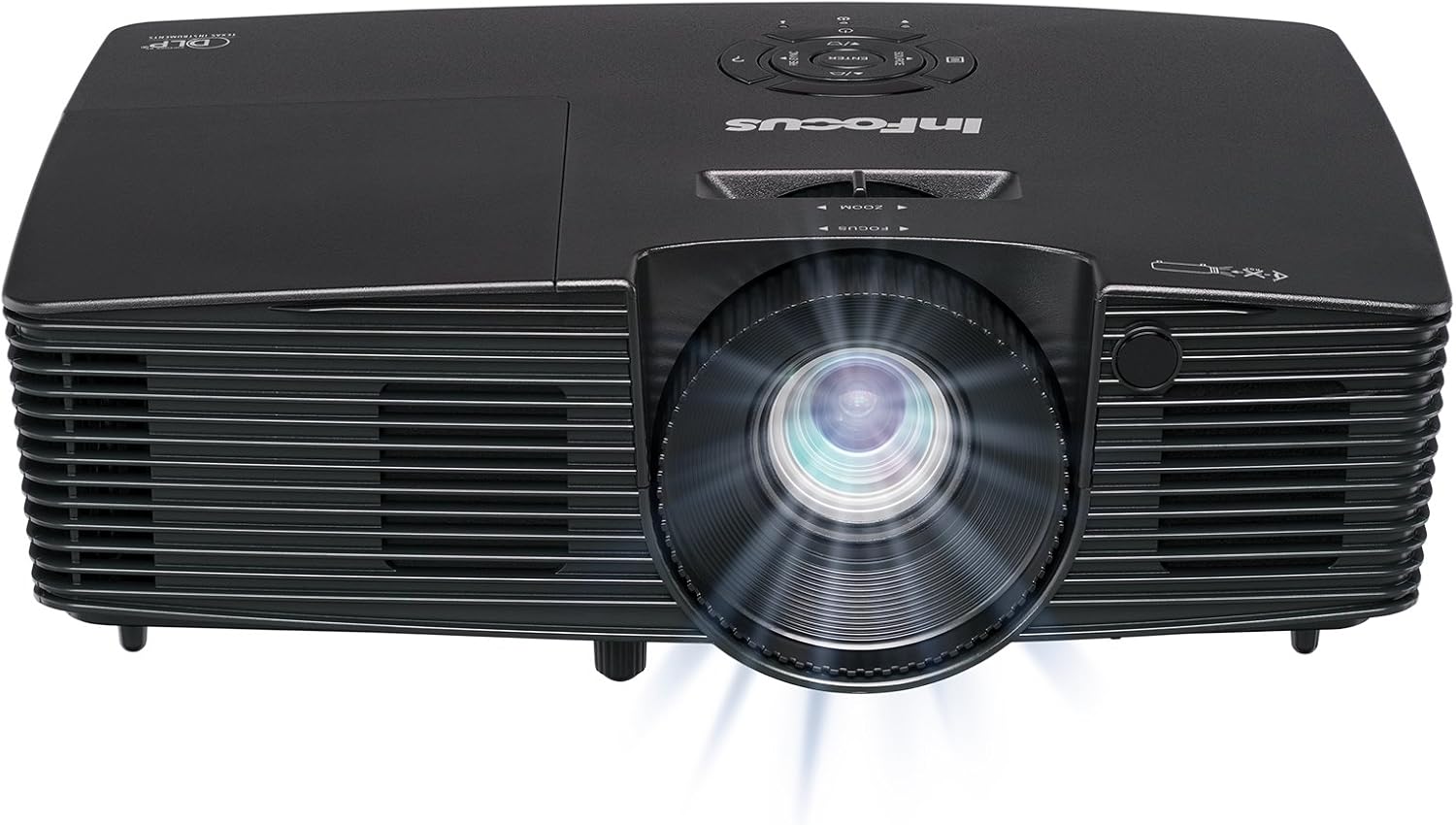
Imatge 3.1: Davant view of the InFocus IN112XV projector. This image highlights the main projection lens and the front ventilation grilles.
3.2 Amunt View i Panell de control

Imatge 3.2: A dalt view of the InFocus IN112XV projector. The control panel is visible on the right, featuring buttons for power, source selection, menu navigation, keystone adjustment, and volume. The focus and zoom adjustment rings are located around the lens.
The control panel on the top of the projector allows for basic operation without the remote. Key buttons include:
- Potència: Encén o apaga el projector.
- Font: Passa ciclicament per les fonts d'entrada disponibles.
- Menú: Accedeix al menú de visualització en pantalla (OSD).
- Introduïu: Confirma les seleccions del menú OSD.
- Tecles de fletxa: Navega per les opcions del menú i ajusta la configuració.
- Re-Sync: Synchronizes the image.
3.3 Darrera View i ports de connexió

Imatge 3.3: posterior view of the InFocus IN112XV projector. This image displays the available connection ports, including Video In, S-Video In, Computer In (VGA), HDMI, and the power input.
The rear panel provides various ports for connecting external devices:
- Vídeo d'entrada: For composite video sources.
- Entrada de S-vídeo: For S-Video sources.
- Entrada d'ordinador (VGA): For connecting to computers via VGA cable.
- HDMI: For digital video and audio sources.
- Servei: Per a finalitats de servei i manteniment.
- Entrada d'alimentació: Connects the power cord to an electrical outlet.
3.4 Control remot

Imatge 3.4: Remote control for the InFocus IN112XV projector. The remote provides full control over the projector's functions, including power, source selection, menu navigation, keystone correction, and volume.
The remote control offers convenient access to all projector functions. Ensure batteries are correctly installed.
4. Configuració
4.1 Col·locació
Position the projector on a stable, flat surface or mount it securely. Ensure there is adequate space around the projector for ventilation.
4.2 Connexió d'alimentació
- Connecteu el cable d'alimentació al port d'entrada d'alimentació del projector.
- Connecteu l'altre extrem del cable d'alimentació a una presa de corrent amb connexió a terra.
4.3 Connexió de fonts d'entrada
The projector supports various input sources. Choose the appropriate cable for your device:
- HDMI: Connect an HDMI cable from your source device (e.g., laptop, media player) to the projector's HDMI port.
- VGA (entrada d'ordinador): Connect a VGA cable from your computer to the projector's Computer In port. This is a plug-and-play connection.
- Video In / S-Video In: Use composite video or S-Video cables for older video sources.
- Dispositius mòbils: To connect an iPad or smartphone, a LightCast Key (sold separately) is required.
5. Instruccions de funcionament
5.1 Engegada/apagada
- Per encendre: Premeu el botó Poder button on the projector's control panel or the remote control. The power indicator light will change.
- Per apagar: Premeu el botó Poder button again. A confirmation message may appear. Press again to confirm shutdown. Allow the projector to cool down before unplugging.
5.2 Selecting an Input Source
After connecting your source device, select the correct input:
- Premeu el botó Font button on the projector's control panel or the remote control to cycle through available inputs (HDMI, VGA, Video, S-Video).
- Alternatively, use the dedicated input buttons (HDMI, VGA, Video) on the remote control.
5.3 Ajust de l'enfocament i el zoom
For a clear and appropriately sized image, adjust the lens rings:

Imatge 5.1: Manual Focus Adjustment. This image illustrates the effect of adjusting the focus ring, transforming a blurry projection into a clear and sharp image.
- Focus: Gira el Focus ring on the projector lens until the image appears sharp and clear.
- Zoom: Gira el Zoom ring on the projector lens to adjust the size of the projected image.
5.4 Correcció Keystone
If the projected image appears trapezoidal (wider at the top or bottom), use keystone correction to square it:
- Premeu el botó Keystone+ or Keystone- buttons on the remote control to adjust the image geometry.
5.5 Navegació de menús
Access the On-Screen Display (OSD) menu for advanced settings:
- Premeu el botó Menú button on the remote or control panel.
- Use the arrow keys to navigate through menu options.
- Premeu Entra per seleccionar una opció o confirmar una configuració.
- Premeu Menú again to exit the OSD.
6. Manteniment
6.1 Lamp La vida
El projector lamp has an estimated life of over 15,000 hours. When the lamp reaches the end of its life, the projector may display a warning message or the image brightness may significantly decrease. Refer to the full service manual for lamp replacement procedures if necessary.
6.2 Neteja
- Projector Casing: Use a soft, dry cloth to wipe the exterior of the projector. Do not use abrasive cleaners or solvents.
- Lent: Gently clean the lens with a lens cleaning cloth and specialized lens cleaning solution. Avoid touching the lens surface with your fingers.
- Obertures de ventilació: Periodically check and clean the ventilation openings to ensure proper airflow and prevent overheating. Use a soft brush or compressed air to remove dust.
7. Solució De Problemes
Aquesta secció tracta problemes comuns que podeu trobar amb el vostre projector.
| Problema | Causa possible | Solució |
|---|---|---|
| No es mostra cap imatge |
|
|
| La imatge és borrosa |
|
|
| La imatge és trapezoïdal |
|
|
| Projector runs hot or smells of burning plastic |
|
|
| Sense àudio |
|
|
Nota important: This projector is not recommended for high-definition movie viewing. While it can accept a 1080p input signal, it projects at its native SVGA (800 x 600) resolution.
8. Especificacions
| Característica | Detall |
|---|---|
| Número de model | IN112XV |
| Tecnologia de visualització | DLP |
| Resolució nativa | SVGA (800 x 600) |
| Brillantor | 3800 lúmens |
| Relació de contrast | 26000:1 |
| Lamp La vida | Fins a 15,000 hores |
| Connectivitat | HDMI, VGA (Computer In), Video In, S-Video In |
| Característica especial | Preparat per a 3D |
| Usos recomanats | Negocis, Educació |
| Dimensions del producte | 8.8 x 12.4 x 4 polzades |
| Pes de l'article | 5.5 lliures |
9. Garantia i Suport
9.1 Informació de la garantia
The InFocus IN112XV projector is backed by a 2 any de garantiaAquesta garantia cobreix els defectes de materials i de fabricació en condicions d'ús normal. Si us plau, conserveu el comprovant de compra per a reclamacions de garantia.
9.2 Atenció al client
For technical assistance, troubleshooting beyond this manual, or warranty service, please contact InFocus customer support. Contact information can typically be found on the official InFocus weblloc web o a la documentació inclosa amb el producte.


