Introducció
This manual provides essential information for setting up, operating, maintaining, and troubleshooting your Microsoft Surface Book 2 15-inch device. The Surface Book 2 is a versatile device designed to function as a robust laptop, a portable tablet, and a creative studio, offering powerful performance and a high-resolution PixelSense display.
Què hi ha a la caixa
- Surface Book 2 - 15" PixelSense™ Display
- 95W Power Supply with USB-A (5W) charging port
- Guia d'inici ràpid
- Documents de seguretat i garantia
Producte acabatview
Característiques clau
- 8th generation Intel Quad Core i7 Processor
- 512 GB of storage and 16 GB RAM
- Up to 17 hours of video playback battery life
- Enhanced Graphics performance with NVIDIA GeForce GTX 1060 discrete GPU with 6GB GDDR5 Graphics Memory
- Vibrant 15" PixelSense touchscreen display
- Four versatile modes of use (Laptop, Tablet, View, Studio)
- Integrated USB-C port
Identificació de components

Figure 1: Microsoft Surface Book 2 in its standard laptop configuration, showcasing the keyboard and display.
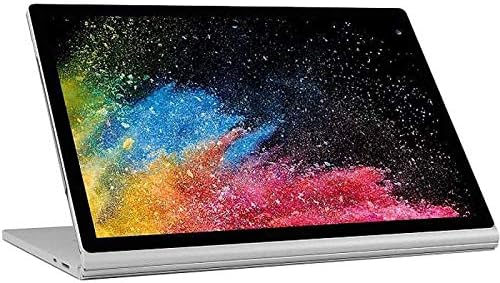
Figure 2: The display unit detached from the keyboard base, functioning as a standalone tablet.

Figura 3: Un pro lateralfile of the Surface Book 2, illustrating the device's thickness and port locations.
Configuració
- Desempaquetar el dispositiu: Carefully remove the Surface Book 2 and all accessories from the packaging.
- Connectar l'alimentació: Plug the 95W Power Supply into a wall outlet and connect the magnetic charging connector to the charging port on your Surface Book 2. Allow the device to charge fully before initial use.
- Encès: Press and hold the power button located on the side of the display unit until the Microsoft logo appears.
- Configuració inicial: Seguiu les instruccions que apareixen a la pantalla per completar la configuració del Windows 10 Pro, inclosa la selecció d'idioma, la connexió de xarxa i la creació d'un compte d'usuari.
Instruccions de funcionament
Encès/Apagat
- Per encendre: Press the power button on the display unit.
- Per apagar: Select the Start button, then Power > Shut down.
- Per reiniciar: Select the Start button, then Power > Restart.
- Per dormir: Briefly press the power button. Press it again to wake the device.
Detaching and Attaching the Display (Tablet Mode)
The Surface Book 2 allows you to detach the display to use it as a tablet. To ensure proper detachment, always use the dedicated detach key on the keyboard.
- Separació: Press and hold the detach key (usually F12 or a dedicated key with an upward arrow icon) on the keyboard. Wait for the 'Ready to Detach' notification to appear on the screen. Once notified, gently pull the display upwards from the keyboard base.
- Adjunt: Align the display with the keyboard base and gently push it down until it clicks into place. The device will confirm that the display is attached.
Ús de la pantalla tàctil
The PixelSense display supports multi-touch gestures. You can interact with the screen using your fingers for navigation, zooming, and scrolling. For precise input and creative tasks, the Surface Pen (sold separately) can be used.
Il·luminació de fons del teclat
To adjust the keyboard backlight, press the F7 key (often marked with a sun icon). Repeatedly pressing this key will cycle through different brightness levels or turn the backlight off.
Ajust de volum
Volume controls are located on the side of the display unit. Press the volume up or volume down buttons to adjust the audio output. Alternatively, you can use the volume controls in the Windows taskbar.
Manteniment
- Neteja de la pantalla: Utilitzeu un drap suau i sense pelusa lleugerament dampened with water or an approved screen cleaner. Avoid harsh chemicals.
- Neteja del cos: Wipe the device's exterior with a soft, damp cloth. Do not allow moisture to enter openings.
- Cura de la bateria: To prolong battery life, avoid extreme temperatures and allow the battery to discharge partially before recharging. Regular full discharge cycles are not necessary for modern lithium-ion batteries.
- Actualitzacions de programari: Regularly check for and install Windows updates to ensure optimal performance, security, and compatibility.
- Emmagatzematge: Guardeu el dispositiu en un lloc fresc i sec, allunyat de la llum solar directa i de temperatures extremes.
Resolució de problemes
El dispositiu no s'encén
- Ensure the device is fully charged. Connect the power adapter and wait a few minutes before attempting to power on.
- Perform a force restart by holding the power button for 10-15 seconds, then release and press it again briefly.
Display Issues (Flickering, No Image)
- Ensure the display is securely attached to the keyboard base. Detach and reattach if necessary.
- Actualitzeu els controladors de pantalla mitjançant Windows Update o el suport tècnic de Microsoft weblloc.
La bateria no es carrega
- Verify that the power adapter is correctly connected to both the device and the power outlet.
- Comproveu si l'adaptador de corrent presenta algun dany visible.
- Ensure the charging port on the device is clean and free of debris.
El teclat o el touchpad no responen
- Ensure the display is properly attached to the keyboard base.
- Reinicieu el dispositiu.
- Check for any pending Windows updates that might include driver fixes.
Especificacions
| Característica | Detall |
|---|---|
| Nom del model | Microsoft Surface Book |
| Número de model de l'article | FUX-00001 |
| Mida de la pantalla | 15 polzades |
| Resolució de pantalla | 2560 x 1600 píxels |
| Resolució de pantalla màxima | 3260 x 2160 píxels |
| Processador | 1.9 GHz Core_i7_860 (8th Gen Intel Quad Core i7) |
| RAM | 16 GB LPDDR3 |
| Velocitat de memòria | 1866 MHz |
| Disc dur | SSD de 512 GB |
| Coprocessador gràfic | NVIDIA GeForce GTX 1060 |
| Mida de la RAM de la targeta gràfica | 6 GB |
| Sistema operatiu | Windows 10 Pro |
| Tipus sense fil | 802.11abg |
| Ports USB 2.0 | 1 |
| Ports USB 3.0 | 2 |
| Durada mitjana de la bateria | 13.5 hores (fins a 17 hores de reproducció de vídeo) |
| Pes de l'article | 4.2 lliures |
| Dimensions del producte | 13.5 x 9.87 x 0.9 polzades |
| Color | Plata |
| posterior WebResolució de la càmera | 8 MP |
Garantia i Suport
Your Microsoft Surface Book 2 comes with a limited hardware warranty. Please refer to the 'Safety and Warranty documents' included in your product packaging for detailed information regarding warranty coverage, terms, and conditions.
For technical assistance, driver downloads, or additional support resources, please visit the official Microsoft Support website. You can also find FAQs and community forums there to help resolve common issues.
Note: The provided video content was not embedded as it was not identified as official seller-created content. For official product videos and tutorials, please refer to the Microsoft Support weblloc.


