Introducció
This manual provides comprehensive instructions for the setup, operation, and maintenance of your Juwel 76 Jewel Safe. Please read this manual carefully before using the safe to ensure proper functionality and security.
The Juwel 76 safe features an electronic combination lock with motor-driven opening, battery operation, and an emergency external power supply option. It includes one internal shelf for organized storage.
Producte acabatview
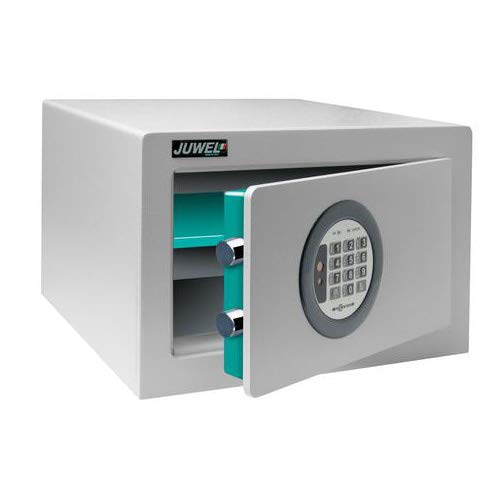
Figura 1: Juwel 76 Jewel Safe with its door open, revealing the electronic keypad on the exterior of the door and the internal shelf. The safe's interior is a distinct teal color, contrasting with the grey exterior.
The Juwel 76 safe is designed for secure storage of valuables. It features a robust metal construction and an advanced electronic locking mechanism. The safe is equipped with mounting holes on the back wall for secure installation.
Configuració
1. Desembalatge i col·locació
- Carefully remove the safe from its packaging.
- Place the safe on a flat, stable surface. Consider mounting it to a wall or floor using the pre-drilled holes for enhanced security.
2. Instal·lació de la bateria
The safe operates on batteries. Locate the battery compartment, typically inside the door or on the back of the keypad. Insert the required batteries, ensuring correct polarity.
- Obriu la tapa del compartiment de la bateria.
- Insert the specified number and type of batteries (e.g., AA batteries), observing the (+) and (-) markings.
- Tanqueu bé la tapa del compartiment de la bateria.
3. Configuració inicial del codi
Upon first use, you will need to set your personal access code. Refer to the specific instructions provided with your safe for the exact procedure, as it may vary slightly.
- With the safe door open, locate the reset button (often a small button inside the door or near the battery compartment).
- Press the reset button. The safe's indicator light or display should confirm it's ready for a new code.
- Enter your desired new code (typically 4-8 digits) on the keypad.
- Confirm the code by pressing the 'Enter' or '#' button.
- Proveu el nou codi amb la porta oberta per assegurar-vos que funciona correctament abans de tancar la caixa forta.
Instruccions de funcionament
1. Obrir la caixa forta
- Enter your personal access code on the keypad.
- Press the 'Enter' or '#' button.
- The safe's motor will activate, and the door will unlock. Turn the handle (if present) or pull the door open.
2. Tancament i bloqueig de la caixa forta
- Tanqueu bé la porta de la caixa forta.
- Turn the handle (if present) to the locked position. The safe will automatically engage its locking bolts.
- Ensure the door is fully secured by gently attempting to open it without entering the code.
3. Changing Your Access Code
To change your code, follow the same steps as the initial code setting, ensuring the door is open during the process.
- With the safe door open, press the reset button.
- Introduïu el vostre nou codi desitjat.
- Confirm the new code by pressing 'Enter' or '#'.
- Verify the new code works before closing the door.
Manteniment
1. Substitució de la bateria
When the battery power is low, the safe may indicate this with a warning light or sound. Replace batteries promptly to avoid being locked out.
- Obre la caixa forta.
- Replace all batteries with new ones of the specified type and size.
- Desfeu-vos de les piles velles de manera responsable.
2. External Power Supply (Emergency)
In case of complete battery discharge or failure, the safe is equipped with an external power supply option. This typically involves connecting a battery pack (often 9V) to external terminals on the keypad.
- Locate the external power terminals on the keypad (e.g., two metal contacts).
- Connect a fresh 9V battery (or specified external power source) to these terminals, ensuring correct polarity.
- While holding the external power source in place, enter your access code to open the safe.
- Once open, replace the internal batteries immediately.
3. Neteja
Netegeu l'exterior de la caixa forta amb un drap suau iamp drap. No utilitzeu productes de neteja abrasius ni dissolvents, ja que poden danyar l'acabat o els components electrònics.
Resolució de problemes
- La caixa forta no s'obre amb el codi:
- Ensure batteries are fresh and correctly installed. Try replacing them.
- Verify you are entering the correct code.
- If batteries are completely dead, use the external emergency power supply.
- Ensure no keys or objects are obstructing the locking mechanism.
- El teclat no respon:
- Check battery connection and power.
- Ensure the keypad is clean and free of debris.
- La porta no tanca correctament:
- Comproveu si hi ha obstruccions dins de la caixa forta o al voltant del marc de la porta.
- Assegureu-vos que la caixa forta estigui sobre una superfície plana.
Especificacions
| Característica | Detall |
|---|---|
| Marca | Juwel |
| Model | 76 |
| Tipus de bloqueig | Electronic Combination with Motor |
| Font d'alimentació | Battery Operated (with external emergency power supply option) |
| Internal Shelf | 1 |
| External Dimensions (H x L x P) | 235 mm x 365 mm x 200 mm |
| Color | RAL 7035 (Gray-blue) |
| Pes | 17.5 kg |
| Material | Metall |
| Muntatge | Mounting holes in the back wall (Shelf Mount) |
| Característiques especials | Passcode Unlock, Indicator value memory €2,500 |
Garantia i Suport
For warranty information and customer support, please refer to the documentation provided at the time of purchase or contact Juwel customer service directly. Keep your purchase receipt as proof of purchase.
This manual is intended for informational purposes only. The manufacturer reserves the right to make changes to the product without prior notice.


