Introducció
The Techly IDATA DP-KVM2 is a 2x1 DisplayPort and USB KVM switch designed to allow two computers to share a single DisplayPort monitor, USB keyboard, and USB mouse. This device supports resolutions up to 3840x2160@30Hz and includes additional USB 2.0 ports for peripheral sharing. It also supports audio and microphone sharing, and features a durable metal housing.
Informació important de seguretat
- Ensure the device is used indoors only and in a dry environment.
- Avoid exposing the KVM switch to water, moisture, or extreme temperatures.
- No intenteu obrir ni fer el manteniment de la unitat. Demaneu totes les tasques de manteniment a personal qualificat.
- Utilitzeu només l'adaptador d'alimentació subministrat.
- Assegureu-vos que hi hagi una ventilació adequada al voltant del dispositiu per evitar el sobreescalfament.
Contingut del paquet
Please verify that the following items are included in your package. If any items are missing or damaged, please contact your vendor.
- Techly IDATA DP-KVM2 KVM Switch Unit
- Adaptador de corrent continu de 5 V
- USB Type A to Type B Cables (x2)
- Manual d'usuari (aquest document)
Producte acabatview
The Techly IDATA DP-KVM2 KVM switch features a robust design with clearly labeled ports and indicators for ease of use.
Panell frontal
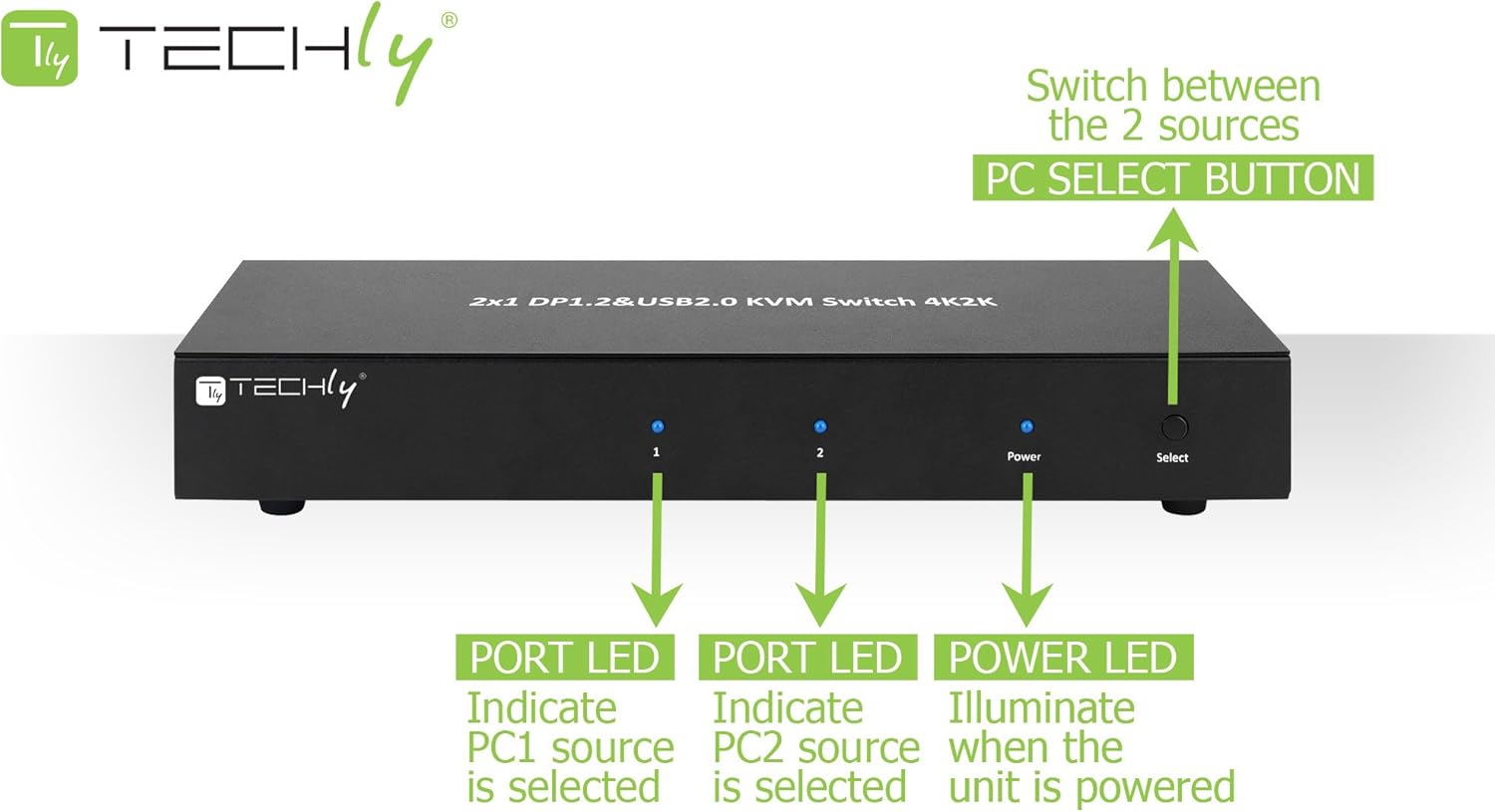
The front panel includes indicators for power and active PC selection, along with a button for manual switching.
- LED d'alimentació: S'il·lumina quan la unitat està engegada.
- Port LED (1, 2): Indicates which PC source (PC1 or PC2) is currently selected.
- Botó de selecció: Press to switch between connected computers (PC1 and PC2).
Panell posterior

The rear panel provides all necessary connection ports for computers, monitors, and peripherals.
- CC 5V: Power input jack for the included 5V DC adapter.
- Sortida d'àudio: 3.5mm jack for connecting speakers or headphones.
- Micròfon: Jack de 3.5 mm per connectar un micròfon.
- Console DisplayPort 1 & 2: Outputs for connecting to your DisplayPort monitors.
- Console USB Ports: USB 2.0 ports for connecting keyboard, mouse, and other USB peripherals.
- PC1/PC2 DisplayPort 1 & 2: Inputs for connecting DisplayPort cables from PC1 and PC2.
- PC1/PC2 USB (Type B): USB 2.0 Type B inputs for connecting USB cables from PC1 and PC2.
- PC1/PC2 Audio In/Out: 3.5mm jacks for audio and microphone connections from PC1 and PC2.
Instal·lació i connexió
Follow these steps to properly set up your Techly IDATA DP-KVM2 KVM switch:
- Ensure all devices (KVM switch, computers, monitors) are powered off before making any connections.
- Connect your DisplayPort monitors to the 'Console DisplayPort 1' and 'Console DisplayPort 2' outputs on the KVM switch.
- Connect your USB keyboard and mouse to the 'Console USB' ports on the KVM switch.
- If using external speakers/headphones and a microphone, connect them to the 'Audio Out' and 'Mic' jacks on the KVM switch.
- For PC1: Connect DisplayPort cables from PC1's graphics card to the 'PC1 DisplayPort 1' and 'PC1 DisplayPort 2' inputs on the KVM switch. Connect a USB Type B cable from PC1 to the 'PC1 USB' input on the KVM switch. Connect audio cables if desired.
- For PC2: Repeat the previous step, connecting PC2 to the 'PC2 DisplayPort 1', 'PC2 DisplayPort 2', and 'PC2 USB' inputs, along with audio cables if desired.
- Connect the provided 5V DC power adapter to the 'DC 5V' jack on the KVM switch and then to a power outlet.
- Power on the KVM switch, then power on your monitors and computers.

This diagram illustrates a typical connection setup for the KVM switch, showing how two computers share two monitors and various USB and audio peripherals.
Instruccions de funcionament
The Techly IDATA DP-KVM2 KVM switch offers two methods for switching between connected computers:
Front Panel Button Switching
- Press the 'Select' button on the front panel of the KVM switch to cycle between PC1 and PC2. The corresponding Port LED (1 or 2) will illuminate to indicate the active computer.
Canvi de tecles d'accés directe
- Switch to PC1: Press [Scroll Lock] + [Scroll Lock] + [1]
- Switch to PC2: Press [Scroll Lock] + [Scroll Lock] + [2]
- Nota: Hotkey functionality requires the keyboard to be connected to the dedicated USB keyboard port on the KVM switch.
Cura i Manteniment
- Keep the device in a cool, dry, and well-ventilated area.
- Eviteu exposar el dispositiu a temperatures extremes, humitat o llum solar directa.
- Netegeu el dispositiu amb un drap suau i sec. No utilitzeu netejadors líquids ni en aerosol.
- Assegureu-vos una ventilació adequada al voltant de la unitat per evitar el sobreescalfament.
Resolució de problemes
- No video output or flickering display.
- Ensure all DisplayPort cables are securely connected. Verify that the KVM switch is powered on and the correct PC is selected. Try restarting the connected computers and monitors.
- El teclat o el ratolí no responen.
- Ensure the USB cables from the computers to the KVM switch are connected correctly. Try reconnecting the keyboard and mouse to the console USB ports. Some specialized keyboards/mice may require direct connection to the computer or may not be fully supported by KVM hotkeys.
- Problemes d'àudio.
- Check all audio cable connections. Ensure the correct audio output is selected on your computer. Verify that the volume is not muted on the computer or the connected audio devices.
- KVM switch does not power on.
- Verify the power adapter is securely connected to the KVM switch and a working power outlet.
Especificacions tècniques
| Característica | Especificació |
|---|---|
| Número de model | IDATA DP-KVM2 |
| Versió DisplayPort | 1.2 |
| Resolució de vídeo | Up to 3840x2160@30Hz |
| Video Link Rate | Fins a 21.6 Gbps |
| Ports USB | USB 2.0 (Console: 4x Type A, PC: 2x Type B) |
| Suport d'àudio | Dolby True HD, DTS HD Master Audio |
| Mètodes de canvi | Front Push Button, Hotkey |
| Material de l'habitatge | Metall |
| Color | Negre |
| Compatibilitat de sistemes operatius | Windows, Mac OS, Linux |
| Pes de l'article | 6.7 unces |
| Voltage | 5 Volts |
| Fabricant | Tecnològicament |
Garantia i assistència al client
For warranty information or technical support, please refer to the official Techly website or contact your local distributor. Please have your product model number (IDATA DP-KVM2) and purchase details ready when seeking support.


