1. Producte acabatview
The XTRONS CM101HD is a 10.2-inch Digital TFT Screen Car Overhead Player designed to provide high-definition video entertainment for vehicle passengers. This unit features a compact and exquisite design, supporting 1080P video playback and offering various connectivity options.
Note: This product does not include a DVD drive.
2. Característiques clau
- 10.2-inch HD Digital TFT Monitor: Provides clear and vibrant visuals.
- 1080P Video Playback: Supports full high-definition video for an enhanced viewexperiència.
- Port HDMI integrat: Allows for mirroring content from smartphones or connecting other HDMI-enabled devices.
- Ranures per a targetes USB i SD: Expand media choices for endless entertainment.
- Disseny ultraprim: With a thickness of only 30mm when folded, it integrates seamlessly into your vehicle's interior.
- 180-Degree Rotating Screen: Ofereix flexibilitat viewing angles for passengers.
- Soft-touch Button Panel: Provides an elegant and user-friendly interface for operation.
- Blue Atmospheric LED Light Bar: Integrated LED light strips create a pleasant ambiance in the vehicle at night.
- Positive & Negative Door Control Support: Lights can automatically turn on/off based on door status.
- Variety of Sound Output Choices: Includes built-in IR transmitter for wireless headphones and FM transmitter for car speakers.

Imatge: Un cop mésview of the XTRONS CM101HD's key features, including screen size, HDMI, video resolution, screen rotation, and door control support.
3. Instal·lació
3.1 Desembalatge i inspecció
Carefully unpack the unit and check for all included accessories:
- 1 x Manual d'usuari
- 1 x comandament a distància
- 4 x Nuts (for mounting)
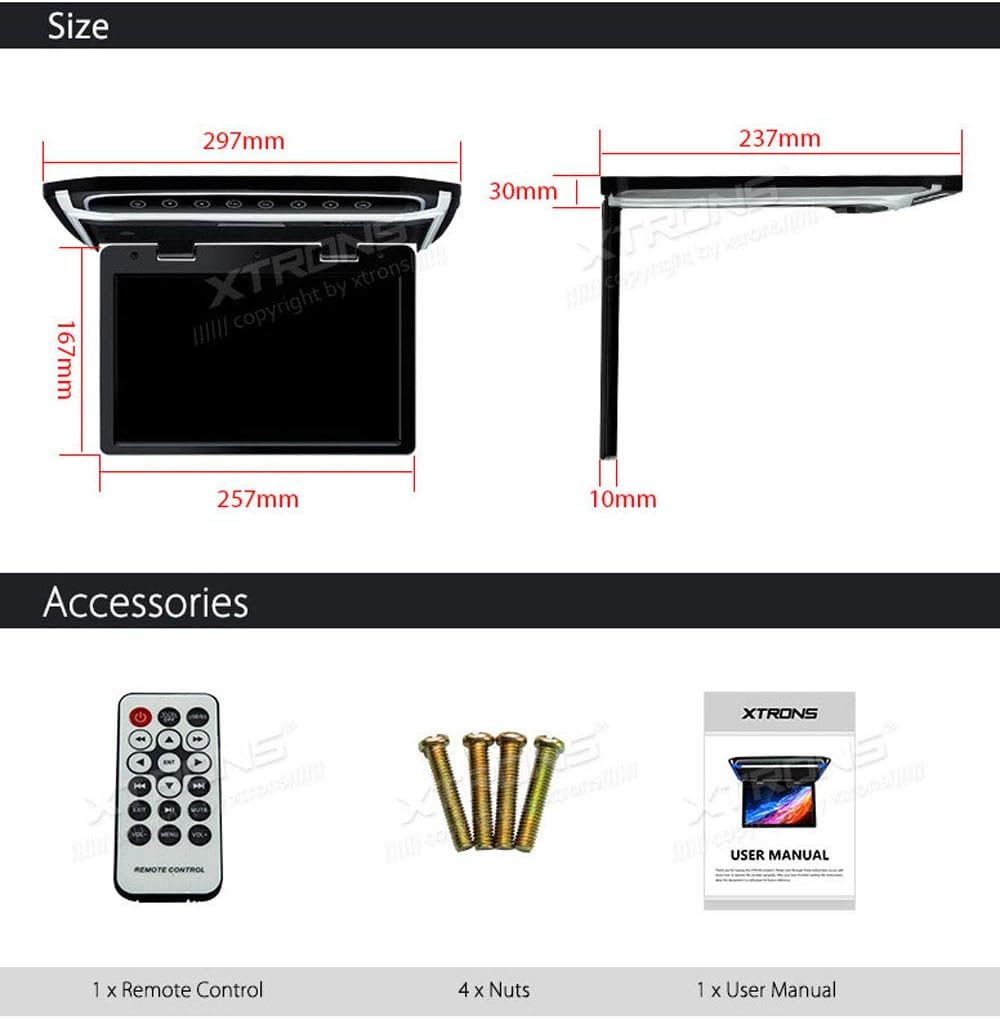
Image: Contents of the box including the remote control, mounting nuts, and user manual.
3.2 Muntatge de la unitat
The CM101HD is designed for roof mounting. Ensure you have adequate space and a stable mounting surface in your vehicle. Professional installation is recommended to ensure proper wiring and secure mounting.
- Identify a suitable location on the vehicle's roof, ensuring it does not obstruct the driver's view or passenger safety features.
- Use the provided nuts to securely fasten the unit to the vehicle's roof.
- Connect the power and signal cables according to the wiring diagram in the detailed user manual.

Image: The XTRONS CM101HD unit installed on a vehicle's roof, demonstrating its compact and sleek design when folded.

Image: The monitor screen shown rotating up to 180 degrees, illustrating its flexible viewcapacitats d'ingrés.
4. Funcionament
4.1 Engegada/apagada
To power on the unit, ensure it is correctly wired to your vehicle's power supply. The unit will typically power on with the vehicle's ignition or via a dedicated power button on the soft-touch panel.
4.2 Using the Soft-Touch Button Panel
The unit features an exclusive soft-touch button panel for intuitive control. Gently press the illuminated buttons to navigate menus, adjust settings, and control media playback.
4.3 Ajust de la pantalla
The screen can be rotated up to 180 degrees to achieve the optimal viewing angle for passengers. Carefully adjust the screen to your desired position.

Image: The monitor displaying a high-definition 1080p video, showcasing its superior visual quality compared to 720p.
5. Opcions de connectivitat
5.1 entrada HDMI
Connect your smartphone or other HDMI-enabled devices to the built-in HDMI port to mirror high-definition videos, games, and applications directly onto the 10.2-inch screen.
5.2 USB and SD Card Slots
Insert a USB drive or SD card into the respective slots to play various media files, including photos, music, and movies.

Image: Close-up of the XTRONS CM101HD unit highlighting the USB, HDMI, and SD card input ports for media expansion.
5.3 Audio Output Choices
- Built-in IR Transmitter: Enjoy audio files with wireless infrared headphones. Supports dual channel (A & B) wireless headphones. Compatible with XTRONS DWH002S, DWH003S, DWH004S, DWH005, DWH006, and DWH007.
- Transmissor FM integrat: Send the audio signal from the unit to your car's radio receiver (car stereo) to play sound through the vehicle's speakers. Available frequencies: 87.7, 88.1, 88.5, 88.9, 106.7, 107.1, 107.5, 107.9 OFF.
6. Manteniment
- Neteja: Feu servir un drap suau i sec per netejar la pantalla i l'exterior de la unitat. Eviteu productes de neteja o dissolvents abrasius.
- Comprovacions periòdiques: Comproveu periòdicament totes les connexions dels cables per assegurar-vos que estiguin ben fixades.
- Actualitzacions de programari: Refer to the XTRONS website or contact support for information on any available software updates.
7. Solució De Problemes
- Sense energia: Check all power connections and the vehicle's fuse box. Ensure the ignition is on if wired to accessory power.
- Sense senyal de vídeo: Verify that the input source (HDMI, USB, SD) is correctly connected and selected. Check the cables for damage.
- Sense àudio: Ensure the correct audio output method (IR headphones or FM transmitter) is selected and configured. Check headphone batteries or FM frequency.
- Parpelleig de la pantalla: This could indicate a faulty unit or wiring issue. Consult a professional installer or XTRONS support.
8. Especificacions
| Característica | Detall |
|---|---|
| Dimensions del producte | 15.28 x 11.69 x 1.18 polzades |
| Pes de l'article | 7.7 lliures |
| Número de model de l'article | CM101HD |
| Marca | XTRONS |
| Tipus de suport | SD |
| Mida de la pantalla | 10.2 polzades |
| Tipus de visualització | LED |
| Resolució | 1024*600 HD (for 10.2" screen) |
Note: The product description mentions 1080P video support and 1024*600 HD resolution. 1080P refers to the video content it can play, while 1024*600 is the native resolution of the 10.2-inch screen.
9. Garantia i assistència
9.1 Informació de la garantia
XTRONS provides a 1-year warranty for this overhead monitor. Please retain your proof of purchase for warranty claims.
9.2 Suport tècnic
For technical assistance, troubleshooting, or warranty inquiries, please contact XTRONS customer service. Refer to the official XTRONS website or the included user manual for contact details.


