Introducció
Thank you for choosing the AUNA AV2-CD509 HiFi CD Player. This high-performance audio device is designed to provide exceptional sound quality and versatile playback options for your home audio system. It supports various formats including CD, CD-R, CD-RW, and MP3, and features multiple connectivity options such as USB, optical, coaxial, and RCA outputs. This manual provides essential information for setting up, operating, and maintaining your new CD player. Please read it thoroughly before use to ensure proper functionality and longevity of the device.
Instruccions de seguretat
Per garantir un funcionament segur i evitar danys, observeu les següents precaucions de seguretat:
- No exposeu el dispositiu a la pluja o la humitat.
- No obriu la c.asing. No hi ha peces a l'interior que l'usuari pugui reparar. Demaneu totes les tasques de manteniment a personal de servei qualificat.
- Assegureu-vos una ventilació adequada al voltant de la unitat per evitar el sobreescalfament.
- Disconnect the power plug from the wall outlet if the unit will not be used for a long period.
- No col·loqueu objectes pesats a sobre de la unitat.
- Eviteu col·locar la unitat a prop de fonts de calor o sota la llum solar directa.
- Clean the unit only with a dry, soft cloth. Do not use liquid cleaners.
Producte acabatview
Panell frontal
The front panel of the AUNA AV2-CD509 features essential controls and indicators for easy operation.

Figura 1: Davant view of the AUNA AV2-CD509 HiFi CD Player. This image displays the sleek black brushed stainless steel finish, the central disc loading tray, the digital display, and the various control buttons for playback and source selection. A USB port is visible on the right side of the front panel.
- Botó d'espera: Encén o apaga la unitat.
- Safata de disc: Per inserir i treure CD.
- Visualització: Shows track information, playback status, and other operational details.
- Botons de control: Include Open/Close, Play/Pause, Stop, Next, Previous, and Source selection.
- Entrada USB: For connecting USB storage devices to play MP3 files.
Panell posterior
The rear panel provides all the necessary audio output connections for integrating the CD player into your existing audio system.
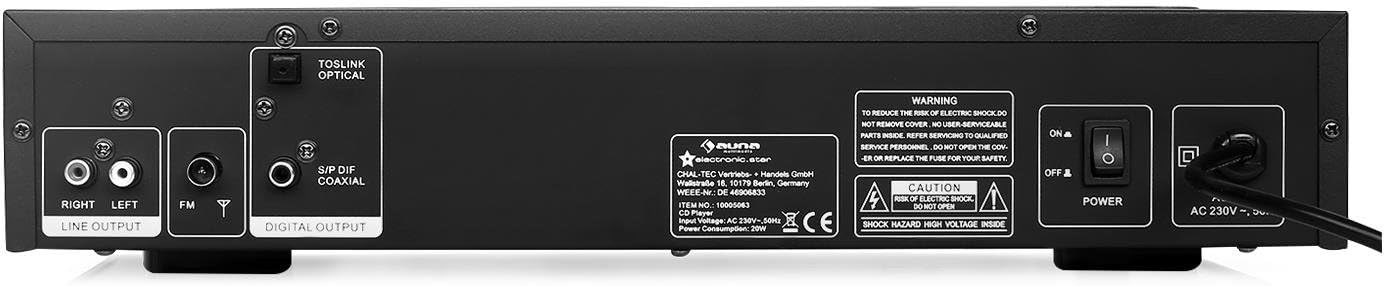
Figura 2: posterior view of the AUNA AV2-CD509 HiFi CD Player. This image highlights the connectivity options, including RCA stereo line outputs (Right/Left), an FM antenna input, a TOSLINK optical digital output, and a S/PDIF coaxial digital output. The main power switch and AC power input are also visible.
- RCA Line Output (L/R): Standard analog audio output for connecting to an amplificador o receptor.
- Optical Audio Output (TOSLINK): Digital audio output for high-quality connection to compatible audio equipment.
- Coaxial Audio Output (S/PDIF): Digital audio output, an alternative to optical for digital connections.
- Entrada d'antena FM: For connecting an FM antenna.
- Interruptor d'alimentació: Interruptor principal d'encesa/apagada.
- Entrada d'alimentació de CA: Per connectar el cable d'alimentació.
Control remot
The included remote control provides convenient access to all functions of the CD player from a distance.

Figura 3: Remote control for the AUNA AV2-CD509 HiFi CD Player. The remote features buttons for power (Standby), source selection, disc tray open/close, playback controls (Play/Pause, Stop, Next, Previous), repeat function, numeric keypad for track selection, USB mode, volume control, and mute.
- ESTÀNDUT: Encès / apagat.
- FONT: Selects input source (e.g., CD, USB).
- OBRIR TANCAR: Obre i tanca la safata del disc.
- REPRODUCCIÓ/PAUSA: Inicia o posa en pausa la reproducció.
- STOP: Atura la reproducció.
- ANTERIOR/SEGUENT: Salta a la pista anterior o següent.
- REPETIR: Repeteix la pista actual o totes les pistes.
- USB: Switches to USB playback mode.
- VOL + / VOL-: Adjusts volume of compatible connected AUNA amplificadors o receptors.
- MUT: Silencia la sortida d'àudio.
- Numeric Keypad (0-9, 10+): Selecció directa de pista.
- AB: Repeats a specific section of a track.
Configuració
Follow these steps to set up your AUNA AV2-CD509 CD Player:
- Col·locació: Place the CD player on a stable, flat surface away from direct sunlight, heat sources, and excessive dust or moisture. Ensure adequate ventilation around the unit.
- Connexió d'àudio:
- Connexió analògica (RCA): Connect the RCA Line Output (L/R) on the rear panel of the CD player to the corresponding analog audio input (e.g., "CD IN" or "AUX IN") on your ampamplificador o receptor mitjançant cables RCA.
- Digital Connection (Optical or Coaxial): For higher fidelity, connect either the Optical Audio Output or the Coaxial Audio Output from the CD player to a compatible digital audio input on your amplifier, AV receiver, or DAC. Use a high-quality optical (TOSLINK) or coaxial cable.
- Connexió d'alimentació: Ensure the main power switch on the rear panel is in the "OFF" position. Connect the supplied power cord to the AC Power Input on the rear panel and then plug the other end into a suitable wall outlet (230V, 50Hz).
- Encesa inicial: Flip the main power switch on the rear panel to the "ON" position. The unit will enter standby mode. Press the "STANDBY" button on the front panel or remote control to turn the unit on.
Instruccions de funcionament
Reproducció d'un CD
- Turn on the CD player and your amplificador/receptor.
- Press the "OPEN/CLOSE" button on the front panel or remote control to open the disc tray.
- Place a CD (CD, CD-R, or CD-RW) gently into the disc tray with the label side facing up.
- Press "OPEN/CLOSE" again to close the disc tray. The player will read the disc, and the display will show the total number of tracks and total playing time.
- Press the "PLAY/PAUSE" button to start playback.
- Use the "PREV" and "NEXT" buttons to skip between tracks.
- To pause playback, press "PLAY/PAUSE". Press again to resume.
- To stop playback, press the "STOP" button.
- To repeat a track or the entire disc, press the "REPEAT" button.
- For direct track selection, use the numeric keypad on the remote control.
Reproducció de MP3 Files mitjançant USB
- Insert a USB storage device (e.g., USB flash drive) containing MP3 files into the USB input port on the front panel.
- Press the "SOURCE" button on the front panel or the "USB" button on the remote control to switch to USB mode.
- The player will automatically scan and begin playing MP3 files.
- Use the "PREV" and "NEXT" buttons to navigate through the MP3 files.
- Playback controls (PLAY/PAUSE, STOP, REPEAT) function similarly to CD playback.
- Nota: The player supports MP3 files. Ensure your USB device is formatted to FAT32 for optimal compatibility.
Ús del comandament a distància
Point the remote control directly at the front panel of the CD player. Ensure there are no obstructions between the remote and the unit. Insert 2 x AAA batteries (not included) into the remote control, observing correct polarity.
Manteniment
Proper care and maintenance will ensure the longevity of your AUNA AV2-CD509 CD Player.
- Neteja de la unitat: Wipe the exterior of the unit with a soft, dry cloth. Do not use abrasive cleaners, waxes, or solvents as they may damage the finish.
- Cleaning the Disc Tray: Keep the disc tray clean and free of dust. Avoid touching the laser lens inside the disc tray.
- Manipulació del disc: Always handle CDs by their edges. Avoid touching the playing surface. Store discs in their cases when not in use to prevent scratches and dust accumulation.
- Ventilació: Ensure the ventilation openings on the unit are not blocked.
Resolució de problemes
If you encounter any issues with your CD player, refer to the following table for common problems and solutions.
| Problema | Causa possible | Solució |
|---|---|---|
| Sense poder | Power cord not connected; Main power switch off; Wall outlet not active. | Ensure power cord is securely connected. Turn main power switch ON. Check wall outlet with another device. |
| Sense so | Incorrect audio cable connection; Wrong input selected on ampmés viu; Amplifier volume too low or muted. | Check all audio cable connections. Select the correct input source on your amplifier/receiver. Increase volume or unmute ampmés viu. |
| El disc no es reprodueix / Error "NO DISC" | Disc inserit incorrectament; disc brut o ratllat; format de disc no compatible. | Insert disc with label side up. Clean disc with a soft, lint-free cloth. Try a different disc. Ensure disc is CD, CD-R, CD-RW, or MP3 CD. |
| La reproducció USB no funciona | USB device not inserted correctly; USB device not formatted to FAT32; Files not MP3; USB device corrupted. | Ensure USB device is fully inserted. Format USB device to FAT32. Check if files are MP3. Try a different USB device. |
| El comandament a distància no funciona | Batteries are dead or inserted incorrectly; Obstruction between remote and unit; Remote sensor blocked. | Replace batteries, ensuring correct polarity. Remove any obstructions. Clean the remote sensor on the unit. |
Especificacions
| Característica | Detall |
|---|---|
| Model | AV2-CD509 |
| Formats suportats | CD, CD-R, CD-RW, MP3 |
| Connectivitat | 1 x USB input, 1 x Optical audio output, 1 x Coaxial audio output, 1 x RCA audio line output (L/R) |
| Font d'alimentació | 230 V, 50 Hz |
| Consum d'energia | 80 watts |
| Dimensions (A x A x P) | 42.5 x 8.5 x 22.5 cm |
| Pes | 4.3 kg |
| Material | Acer inoxidable raspallat |
| Components inclosos | 1 x Device, 1 x Remote control with button batteries |
Garantia i Suport
For warranty information and technical support, please refer to the documentation provided with your purchase or visit the official AUNA weblloc web. Conserveu el comprovant de compra per a qualsevol reclamació de garantia.
You can also visit the AUNA brand store for more information: AUNA Brand Store.