1. Producte acabatview
The RapidX LunaX is a portable Bluetooth speaker designed for outdoor and indoor use, featuring an integrated LED light. It combines audio playback with illumination, making it suitable for various activities such as camping, hiking, picnics, and beach outings. The device is water-resistant (IPX5 rated) and designed for portability.
Contingut del paquet:
- LunaX Portable Speaker with LED Lamp
- Cable de càrrega micro USB
- Guia de l'usuari (aquest document)
2. Introducció (Configuració)
2.1 Càrrega de l'altaveu
Before initial use, fully charge the LunaX speaker. The charging port is located under the top cap of the device. Unscrew and remove the top cap to access the micro USB port.
- Unscrew and remove the top cap of the LunaX speaker.
- Connect the provided micro USB cable to the charging port on the speaker.
- Connect the other end of the USB cable to a standard USB power supply (e.g., wall adapter, computer USB port).
- The LED indicator light will blink red while charging and turn solid red once fully charged.
- Una càrrega completa normalment triga unes hores.

Image: Micro USB charging port located under the top cap.
2.2 Engegada/apagada
- Per engegar: premeu i manteniu premut el botó Potència/Pausa button until the LED indicator lights up blue.
- Per apagar: premeu i manteniu premut el botó Potència/Pausa button until the LED indicator turns off.
2.3 Vinculació Bluetooth
After powering on, the LunaX speaker will automatically enter Bluetooth pairing mode, indicated by a blinking blue LED. It is ready to connect to your device.
- Ensure the LunaX speaker is powered on and in pairing mode (blinking blue LED).
- Al teu telèfon intel·ligent o tauleta, navega fins a la configuració de Bluetooth.
- Cerca available devices and select "LunaX" from the list.
- Un cop connectat, l'indicador LED s'il·luminarà de color blau fix i sentireu una confirmació audible.
3. Operating the LunaX Speaker
3.1 botons de control
The LunaX speaker features four control buttons located on the side, near the top. These buttons are marked with raised icons.
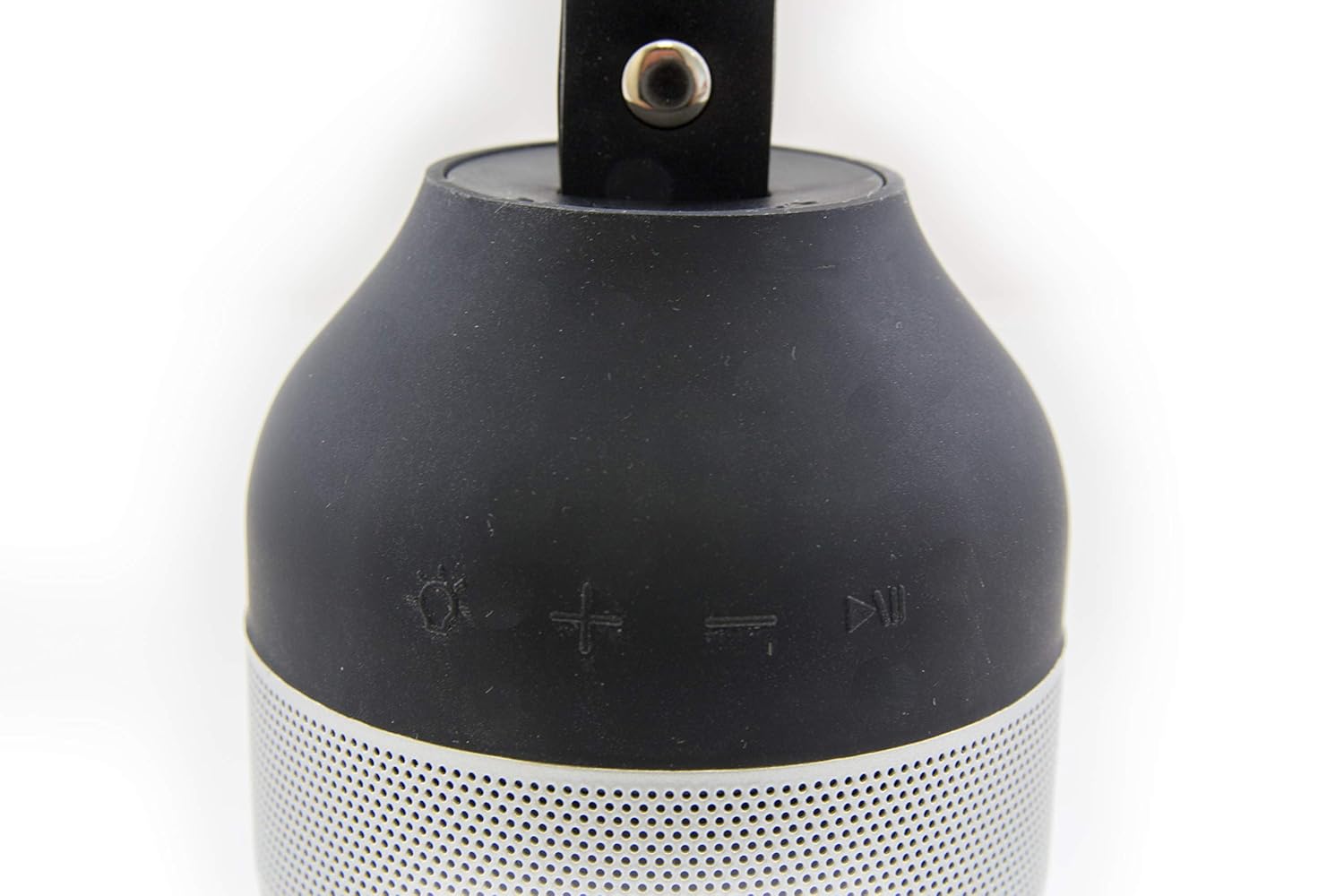
Image: Control buttons on the LunaX speaker.
- Light Button (Sun icon): Press to cycle through light brightness settings (Low, High, Off).
- Volume Up Button (+ icon): Premeu per augmentar el volum.
- Volume Down Button (- icon): Premeu per reduir el volum.
- Power/Pause Button (Play/Pause icon): Premeu i manteniu premut per encendre/apagar. Premeu breument per reproduir o pausar l'àudio.
Reproducció d'àudio 3.2
Once paired with your device, you can stream audio wirelessly to the LunaX speaker. The speaker can play music at maximum volume for approximately 7 hours on a full charge.
3.3 Funcionament de la llum LED
The integrated LED light provides white illumination with two brightness settings. The light can operate continuously for 12-24 hours, depending on the selected brightness level.
- Premeu el botó Llum button to turn the light on at the low brightness setting.
- Premeu el botó Llum button again to switch to the high brightness setting.
- Premeu el botó Llum button a third time to turn the light off.
3.4 Portability and Water Resistance
The LunaX speaker is designed to fit in most standard-sized car and boat cup holders. It features an IPX5 water resistance rating, meaning it can withstand splashes and light rain, making it suitable for outdoor use. It is not designed for submersion in water.

Image: RapidX LunaX speaker with handle for portability.
4. Manteniment
4.1 Neteja
Netegeu l'altaveu amb un suau, damp cloth. Do not use harsh chemicals or abrasive cleaners. Ensure the charging port is dry before connecting the charging cable.
4.2 Cura de la bateria
To prolong battery life, avoid fully discharging the battery frequently. Charge the speaker regularly, especially if it will not be used for an extended period.
5. Solució De Problemes
- L'altaveu no s'encén: Ensure the battery is charged. Connect the speaker to a power source using the micro USB cable and try again.
- No es pot emparellar amb un dispositiu Bluetooth:
- Ensure the speaker is in pairing mode (blinking blue LED).
- Assegureu-vos que el Bluetooth estigui habilitat al vostre dispositiu.
- Acosta l'altaveu al dispositiu.
- Turn off and on both the speaker and your device, then attempt pairing again.
- Audio quality is poor or distorted:
- Assegureu-vos que l'altaveu estigui dins de l'abast del Bluetooth del vostre dispositiu.
- Reduce the volume on both the speaker and your device to prevent distortion.
- Check for any obstructions between the speaker and your device.
- Speaker disconnects frequently:
- Ensure the speaker is fully charged. Low battery can affect connection stability.
- Keep the speaker and your device within close proximity.
- Avoid environments with strong wireless interference.
- Buttons are difficult to see/locate: The control buttons are designed with raised icons on a black surface. Familiarize yourself with their positions by touch.
- LED indicator light is dim: The LED indicator is small. Observe it in lower light conditions if necessary to confirm its status.
6. Especificacions
| Número de model | RX-LUNAXBLK |
| Marca | RapidX |
| Tecnologia de connectivitat | Bluetooth |
| Tecnologia de comunicació sense fils | Bluetooth |
| Font d'alimentació | Funciona amb bateria |
| Tipus de bateria | Lithium (Product Specific) |
| Durada mitjana de la bateria | 12 Hours (Speaker), 12-24 Hours (Light) |
| Nivell de resistència a l'aigua | IPX5 (resistent a l'aigua) |
| Mètode de control | Toqueu els botons |
| Potència de sortida màxima dels altaveus | 3 watts |
| Pes de l'article | 245 g |
| Dimensions del producte (LxWxH) | 7.62 x 7.62 x 14.92 cm |
| Material | Metall |
| UPC | 856690005807 |
7. Garantia i Suport
For warranty information or technical support, please refer to the RapidX official weblloc web o contacteu directament amb el seu servei d'atenció al client. Conserveu el rebut de compra com a comprovant de compra.
Manufacturer: Rapidx


