1. Acabatview
The Linksys RE6800 AC1750 Wi-Fi Range Extender is designed to expand the coverage of your existing Wi-Fi network, eliminating dead zones and providing stronger, more reliable wireless connectivity throughout your home or office. This dual-band extender supports speeds up to AC1750, ensuring high-speed performance for all your connected devices.
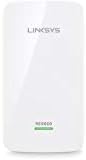
Imatge 1.1: Frontal view of the Linksys RE6800 AC1750 Wi-Fi Range Extender, showing its compact design and LED indicator.
Key features include Push Button Connect (WPS) for easy setup, and Spot Finder Technology to help you determine the optimal placement for maximum Wi-Fi extension.
2. Contingut del paquet
Comproveu que el vostre paquet contingui els elements següents:
- Linksys RE6800 AC1750 Wi-Fi Range Extender unit
- Guia d'inici ràpid
- Informació normativa
3. Característiques físiques
The Linksys RE6800 features a streamlined design with essential indicators and ports:
- Indicador LED: Located on the front, this light indicates the extender's status and connection quality.
- Port Ethernet: A Gigabit Ethernet port is located on the bottom, allowing you to connect a wired device or use the extender in Access Point mode.
- Botó WPS: For quick and easy setup with WPS-enabled routers.
- Botó de restabliment: A small recessed button to restore factory default settings.
4. Configuració
There are two primary methods to set up your Linksys RE6800 range extender:
4.1. Push Button Connect (WPS)
This is the simplest method for WPS-enabled routers.
- Plug the range extender into a power outlet midway between your router and the area without Wi-Fi.
- Wait for the LED on the extender to blink orange.
- Premeu el botó WPS del vostre encaminador.
- Within two minutes, press the WPS button on the Linksys RE6800 extender.
- The LED on the extender will turn solid green when the connection is successful.
4.2. Configuració manual (Web Navegador)
Use this method if your router does not have a WPS button or if WPS setup fails.
- Plug the range extender into a power outlet.
- On a computer or mobile device, connect to the Wi-Fi network named 'Linksys Extender Setup - XXX'.
- Obre a web navegador i navegueu a http://extender.linksys.com.
- Follow the on-screen instructions to select your existing Wi-Fi network(s) and enter the password(s).
- Create new network names (SSIDs) for your extended networks or use the same as your router.
- Completeu l'assistent de configuració.
4.3. Spot Finder Technology
After initial setup, use Spot Finder Technology to ensure optimal placement. Access the extender's web interfície (http://extender.linksys.com) and look for the Spot Finder tool. It will guide you to the best location for your extender, indicating if it's too close, too far, or just right from your router.
5. Funcionament de l'extensor d'abast
5.1. Dispositius de connexió
Once the extender is set up, devices can connect to the extended Wi-Fi networks. If you created new SSIDs, connect to those. If you chose to use the same SSIDs as your router, your devices should automatically roam to the strongest signal.
5.2. Accés a la configuració
To manage your extender's settings, open a web browser on a device connected to the extended network and go to http://extender.linksys.com. You may need to enter the administrator password you created during setup.
5.3. Dual-Band Operation
The RE6800 operates on both 2.4 GHz and 5 GHz bands. The 2.4 GHz band offers wider coverage, while the 5 GHz band provides faster speeds over shorter distances. The extender intelligently manages connections to optimize performance.
6. Manteniment
- Actualitzacions de firmware: Regularly check for and install firmware updates through the extender's web interfície per garantir un rendiment i una seguretat òptims.
- Neteja: Keep the extender clean and free from dust. Use a soft, dry cloth. Do not use liquid cleaners.
- Col·locació òptima: Periodically re-evaluate the extender's placement using Spot Finder Technology, especially if your network layout changes.
7. Solució De Problemes
- Sense conexió: Ensure the extender is powered on and the LED is solid green. Check the connection to your main router. Try restarting both the router and the extender.
- Velocitats lentes: Relocate the extender using Spot Finder Technology to ensure it's in an optimal position. Ensure your main router is providing adequate speed.
- Problemes de configuració: If WPS fails, try the manual web browser setup. Ensure you are connecting to the correct setup Wi-Fi network. If issues persist, perform a factory reset by pressing the recessed reset button for 5-10 seconds.
- Connexió intermitent: This could be due to interference or suboptimal placement. Try adjusting the extender's position or checking for other devices that might be causing interference.
8. Especificacions
| Dimensions del producte | 6 x 8 x 2 polzades |
| Pes de l'article | 15.3 unces |
| Número de model de l'article | AC1750 (RE6800) |
| Estàndard sense fils | 802.11ac |
| Velocitat de transferència de dades | Fins a 1750 Mbps |
| Classe de banda de freqüència | Doble banda (2.4 GHz i 5 GHz) |
| Dispositius compatibles | Devices supporting 802.11a/g/n/ac network standards |
| Fabricant | Linksys |
9. Garantia i Suport
Linksys products are backed by a limited warranty. For specific warranty terms and conditions, please refer to the documentation included with your product or visit the official Linksys weblloc.
For technical support, troubleshooting assistance, or to access additional resources, please visit the Linksys support portal:


