Manual d'usuari del controlador de jocs sense fil Tronsmart Mars G02
Model: G02
Introducció
Thank you for choosing the Tronsmart Mars G02 Wireless Game Controller. This manual provides detailed instructions for setting up, operating, and maintaining your controller to ensure optimal performance across various compatible devices, including smartphones, tablets, PCs, and smart TVs.
Contingut del paquet
Si us plau, verifiqueu que tots els elements siguin presents al vostre paquet:
- Tronsmart Mars G02 Wireless Game Controller
- Cable de càrrega USB
- Receptor USB de 2.4 GHz
- Manual d'usuari (aquest document)

Image: Contents of the Tronsmart Mars G02 Wireless Game Controller package, showing the controller, USB receiver, charging cable, and user manual.
Producte acabatview
Familiarize yourself with the various components and controls of your Tronsmart Mars G02 controller.

Imatge: Frontal view of the Tronsmart Mars G02 controller, highlighting the D-pad, left and right joysticks, A/B/X/Y buttons, Start, Select, Home, and Turbo buttons.

Image: The Tronsmart Mars G02 controller with its integrated smartphone holder extended, ready to secure a mobile device for gaming.
Característiques principals:
- Dual Connectivity: Supports both Bluetooth and 2.4GHz wireless connections.
- Integrated Phone Holder: Adjustable holder for smartphones (3.5 to 6 inches).
- Multi-Platform Compatibility: Works with Android devices, PCs, and smart TVs.
- Ergonomic Design: Comfortable grip for extended gaming sessions.
- Turbo Function: Programmable turbo button for rapid fire.
Configuració
1. Càrrega del controlador
Before initial use, fully charge the controller. Connect the supplied USB charging cable to the controller's charging port and the other end to a USB power source (e.g., computer USB port, USB wall adapter). The charging indicator light will show the charging status and turn off when fully charged.
2. Connexió a dispositius
The Tronsmart Mars G02 offers two primary connection methods:
2.1. Bluetooth Connection (for Android Smartphones/Tablets)
- Assegureu-vos que el controlador estigui apagat.
- Manteniu premut el botó Botó d'inici i Un botó simultaneously for 3 seconds until the indicator light flashes rapidly, indicating pairing mode.
- Al teu dispositiu Android, vés a Configuració > Bluetooth i activa el Bluetooth.
- Scan for available devices and select "Tronsmart Mars G02" from the list.
- Un cop connectat, l'indicador lluminós del controlador s'il·luminarà fixament.
2.2. 2.4GHz Wireless Connection (for PC/Smart TV/TV Box)
- Insert the 2.4GHz USB receiver into an available USB port on your PC, Smart TV, or TV Box.
- Assegureu-vos que el controlador estigui apagat.
- Manteniu premut el botó Botó d'inici i botó X simultaneously for 3 seconds until the indicator light flashes rapidly.
- The controller will automatically connect to the USB receiver. Once connected, the indicator light will become solid.
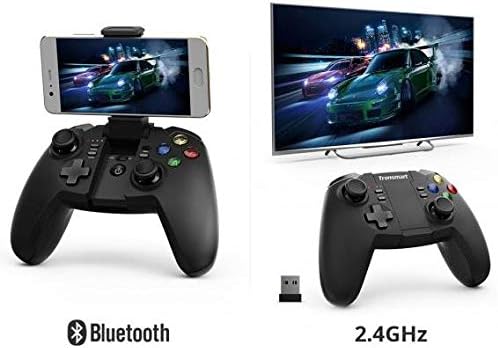
Image: Illustration showing the Tronsmart Mars G02 controller connecting to a smartphone via Bluetooth and to a television via its 2.4GHz USB receiver.
3. Attaching a Smartphone (Optional)
The integrated phone holder can accommodate smartphones between 3.5 and 6 inches.
- Gently pull up the phone holder from the center of the controller.
- Adjust the angle to your preference (up to 135 degrees).
- Carefully place your smartphone into the holder, ensuring it is securely gripped.

Imatge: Lateral view of the Tronsmart Mars G02 controller demonstrating the adjustable angles (90 and 135 degrees) of the integrated phone holder, designed for phones between 3.5 and 6 inches.
Instruccions de funcionament
Encès/Apagat
- Encès: Premeu el botó Botó d'inici once. The controller will attempt to reconnect to the last paired device.
- Apagar: Manteniu premut el botó Botó d'inici for 5 seconds until the indicator lights turn off. The controller will also automatically power off after 5 minutes of inactivity.
Funcions del botó
The Tronsmart Mars G02 features standard gaming controller buttons:
- Left/Right Analog Joysticks: For precise 360-degree movement.
- D-Pad (coixinet direccional): Per a entrada direccional.
- Botons A/B/X/Y: Action buttons, typically color-coded.
- L1/R1 (Bumpers): Botons a l'espatlla.
- L2/R2 (Disparadors): Analog triggers for variable input.
- Botó d'inici: Typically used to pause or confirm actions.
- Botó de selecció: Often used for menu navigation or secondary functions.
- Botó d'inici: Powers the controller on/off, and returns to the home screen on some devices.
- Botó Turbo: Activa el foc ràpid per als botons assignats.
Funció Turbo
To enable the Turbo function for a specific button:
- Manteniu premut el botó Botó Turbo.
- While holding Turbo, press the desired action button (e.g., A, B, X, Y, L1, R1, L2, R2) once. The Turbo function is now active for that button.
- To disable Turbo for that button, repeat the process: hold Turbo and press the action button again.

Image: The Tronsmart Mars G02 controller positioned in front of a range of compatible devices, including a smartphone, tablet, laptop, and television, illustrating its multi-platform support.
Manteniment
- Mantingueu el controlador sec. Eviteu l'exposició a la humitat o a líquids.
- Netegeu el controlador amb un drap suau i sec. No utilitzeu productes químics agressius ni netejadors abrasius.
- Guardeu el controlador en un lloc fresc i sec, allunyat de la llum solar directa i de temperatures extremes.
- Eviteu deixar caure el controlador ni sotmetre'l a impactes forts.
- When not in use for extended periods, charge the controller periodically to maintain battery health.
Resolució de problemes
| Problema | Solució |
|---|---|
| El controlador no s'encén. | Assegureu-vos que el controlador estigui carregat. Connecteu-lo a una font d'alimentació amb el cable USB. |
| No es pot connectar per Bluetooth. |
|
| Cannot connect via 2.4GHz receiver. |
|
| Els botons no responen o fan lentitud. |
|
Especificacions
- Dimensions del producte: 7.4 x 18 x 13.8 cm
- Pes: 400 g
- Connectivitat: Bluetooth, sense fil de 2.4 GHz
- Compatibilitat: Multi (Android, PC, Smart TV, TV Box)
- Referència del fabricant: 2724572970803
- ASIN: B0777SKFX6


