Introducció
Thank you for choosing the Capello Extra Large Display Digital Alarm Clock. This manual provides detailed instructions to help you set up, operate, and maintain your new alarm clock. Designed for clarity and ease of use, this clock features a large digital display and a stylish wood-grain finish, making it a perfect addition to any bedroom or living space.
Producte acabatview
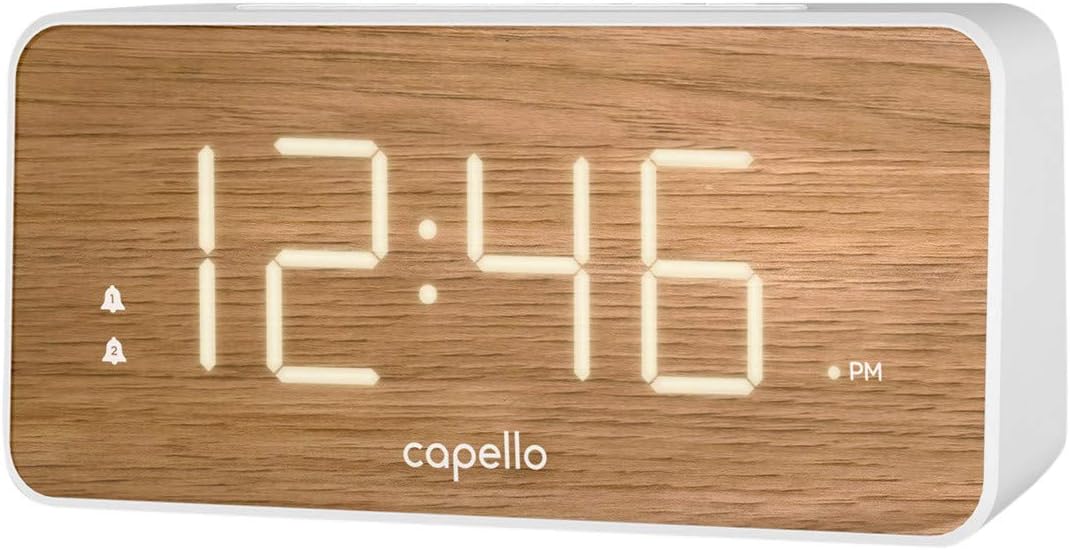
The Capello Digital Alarm Clock (Model: 43213-14795) features an extra-large digital display for easy readability from across the room. Its elegant white and pine D-frame design with a wood-grain finish complements various interior styles. The clock is equipped with intuitive controls for setting time and alarms, ensuring a user-friendly experience.
Configuració
Connexió d'alimentació
The alarm clock requires a continuous power supply via its included AC adapter for full functionality. Insert the adapter into a standard wall outlet and connect it to the clock's power input port. For backup during power outages, install 2 AAA batteries (not included) into the battery compartment located on the underside of the unit. These batteries will preserve time and alarm settings but will not power the display or alarm functions during an outage.
Establiment de l'hora
- Manteniu premut el botó HORA CONFIGURADA button (or similar button, refer to specific button labels on your unit) until the hour digits begin to flash.
- Utilitza el HORA per ajustar l'hora. Presteu atenció a l'indicador AM/PM.
- Premeu el botó HORA CONFIGURADA button again to move to the minute digits.
- Utilitza el MIN per ajustar els minuts.
- Premeu HORA CONFIGURADA una vegada més per confirmar i sortir del mode de configuració de l'hora.
Configuració de l'Alarma
This clock supports dual alarms.
- Manteniu premut el botó ALARMA 1 fins que els dígits de l'hora de l'alarma parpellegin.
- Utilitza el HORA i MIN botons per configurar l'hora d'alarma desitjada per a l'Alarma 1.
- Premeu ALARMA 1 again to confirm. The alarm indicator for Alarm 1 will illuminate.
- Repetiu els passos 1-3 per a ALARMA 2 if a second alarm is desired.
- To activate/deactivate an alarm, simply press the corresponding ALARMA 1 or ALARMA 2 button. The alarm indicator will show its status.
Instruccions de funcionament
Funció de posposar
Quan soni l'alarma, premeu el botó gran DORMITAR button located on the top of the clock. This will temporarily silence the alarm for approximately 9 minutes, allowing for extra rest. The alarm will sound again after the snooze period ends.
Aturar l'alarma
To turn off the alarm completely after it sounds, press the corresponding ALARMA 1 or ALARMA 2 button. The alarm indicator will turn off, signifying that the alarm is deactivated for the next day.
Brillantor de la pantalla
The display brightness can be adjusted to suit your preference. Locate the LLUM or DIMMER button (often represented by a sun icon) on the top panel. Press this button repeatedly to cycle through different brightness levels (e.g., High, Medium, Low, Off).
Manteniment
To ensure the longevity and optimal performance of your Capello Digital Alarm Clock, follow these simple maintenance guidelines:
- Neteja: Wipe the clock's surface with a soft, dry cloth. Do not use abrasive cleaners, waxes, or solvents as they may damage the finish.
- Col·locació: Col·loqueu el rellotge sobre una superfície estable i plana, allunyada de la llum solar directa, de fonts de calor i d'humitat excessiva.
- Substitució de la bateria: Substituïu les piles de reserva anualment o quan la pantalla mostri signes d'enfosquiment durant un tall de corrent.tage. Assegureu-vos de la polaritat correcta quan inseriu piles noves.
Resolució de problemes
If you encounter any issues with your alarm clock, please refer to the following common problems and solutions:
| Problema | Possible solució |
|---|---|
| La pantalla està en blanc o tènue. | Ensure the AC adapter is securely plugged into both the clock and a working wall outlet. Check the display brightness setting using the LIGHT/DIMMER button. |
| L'alarma no sona. | Verify that the alarm is activated (alarm indicator is lit). Ensure the alarm time is set correctly (AM/PM). Check if the volume is set to an audible level. |
| L'hora és incorrecta. | Reset the time following the 'Setting the Time' instructions. If using backup batteries, ensure they are fresh and correctly installed. |
| Els botons no responen. | Unplug the AC adapter, remove backup batteries, wait for 1 minute, then reconnect power. This performs a soft reset. |
Especificacions
- Marca: Capello
- Número de model: 43213-14795
- Color: Blanc
- Tipus de visualització: Digital
- Estil: Modern
- Característica especial: Large Display, Alarm
- Dimensions del producte: 8.74 cm d'amplada x 5.83 cm d'alçada
- Font d'alimentació: AC Powered (with battery backup for settings)
- Material: Plàstic
- Pes de l'article: 1.01 lliures
Vídeos oficials de productes
En aquest moment no hi ha vídeos oficials del venedor disponibles per a aquest article.
Garantia i Suport
For warranty information and customer support, please refer to the manufacturer's official documentation included with your product or visit the Capello weblloc. Conserveu el rebut de compra per a reclamacions de garantia.


