Introducció
Thank you for choosing the Rexing V1GW-4K Ultra HD Car Dash Cam. This manual provides detailed instructions for the proper installation, operation, and maintenance of your device. Please read this manual thoroughly before using the dash cam to ensure optimal performance and safety. The V1GW-4K features 4K Ultra HD video recording, a built-in GPS logger, Wi-Fi connectivity, a 170-degree wide-angle lens, and a supercapacitor for enhanced durability.
Informació de seguretat
- No feu servir la càmera del salpicader mentre conduïu. Ajusteu la configuració o reajusteu-la.view footagnomés quan el vehicle està aparcat de manera segura.
- Ensure the dash cam is securely mounted and does not obstruct the driver's view o interferir amb els controls del vehicle.
- Use only original Rexing accessories and power cables to prevent damage and ensure proper operation.
- Avoid exposing the dash cam to extreme temperatures outside its operating range (-20 to 176°F).
- Mantingueu la lent neta per garantir gravacions de vídeo nítides.
- No intenteu desmuntar o reparar el dispositiu vosaltres mateixos. Contacteu amb l'assistència al client per obtenir assistència.
Què hi ha a la caixa
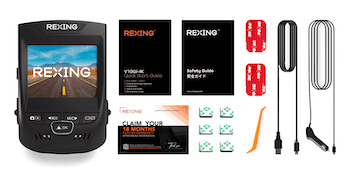
The Rexing V1GW-4K package includes the following components:
- Càmera de tauler Rexing V1GW-4K
- Cable d'alimentació del cotxe
- Muntatge adhesiu 3M
- Cable USB
- Clips de gestió de cables
- Manual d'usuari
- Guia d'inici ràpid

Producte acabatview
Familiarize yourself with the main components and controls of your Rexing V1GW-4K Dash Cam.

The dash cam features a compact design with a 2.4-inch LCD screen, intuitive buttons for navigation, and ports for power, GPS, and memory card. The main lens is located on the front, capturing a wide 170-degree view.
Configuració
1. Inserció de la targeta Micro SD
Before first use, insert a high-endurance Micro SD card (up to 256GB, Class 10 or higher recommended) into the designated slot on the side of the dash cam. Ensure the card is inserted correctly until it clicks into place.
2. Muntatge de la Dash Cam
Clean the windshield area where you intend to mount the dash cam. Attach the 3M adhesive mount to the dash cam, then firmly press the mount onto the windshield, ensuring it does not obstruct your view. The ideal placement is typically behind the rearview mirall.
3. Potència de connexió
Connect the car power cable to the dash cam's power input and plug the other end into your vehicle's 12V power outlet (cigarette lighter socket). The dash cam will automatically power on and begin recording when the vehicle starts.
4. Initial Power On and Formatting
Upon first power on, the dash cam may prompt you to format the Micro SD card. It is highly recommended to format the card directly on the device to ensure compatibility and optimal performance. Navigate through the menu using the buttons and confirm the format operation.
5. Built-in GPS Logger
The V1GW-4K features a built-in GPS logger. Once powered on, the GPS module will automatically attempt to acquire a satellite signal. This allows for recording of speed, location, and time data which can be viewed during video playback using the Rexing Connect App or the dedicated GPS Logger Software on your computer.

6. Wi-Fi Connection and Mobile App
To connect your dash cam to your smartphone via Wi-Fi:
- Download the 'Rexing Connect' app from your smartphone's app store.
- On the dash cam, enable Wi-Fi from the settings menu.
- On your smartphone, go to Wi-Fi settings and connect to the dash cam's Wi-Fi network (SSID and password displayed on the dash cam screen).
- Open the Rexing Connect app. You can now view viu footage, reproducció d'enregistraments, descàrrega files, and adjust settings wirelessly.
Instruccions de funcionament
1. Modes d'enregistrament
The V1GW-4K supports several recording modes:
- Enregistrament en bucle: The dash cam continuously records video in short segments (e.g., 1, 3, or 5 minutes). When the memory card is full, the oldest unlocked files are automatically overwritten. It is highly recommended to keep Loop Recording enabled.
- Sensor G (sensor de gravetat): In the event of a sudden impact or collision, the G-Sensor automatically detects the event and locks the current video segment, preventing it from being overwritten by loop recording. The sensitivity of the G-Sensor can be adjusted in the settings.

2. Monitor d'aparcament
The Parking Monitor feature allows the dash cam to record when the vehicle is parked. There are two main modes:
- Vibration Detection: The dash cam will automatically turn on and record a 20-second video if it detects vibration while parked.
- Vídeo de lapse de temps: For 24/7 surveillance, the dash cam can capture frames to create a time-lapse video. This mode requires a smart hardwire kit (sold separately) to provide continuous power.
3. Reproducció de vídeo
Videos can be played back directly on the dash cam's LCD screen, via the Rexing Connect app on your smartphone, or by removing the Micro SD card and playing files on a computer using compatible media players (e.g., VLC Media Player for HEVC codec files) or the Rexing GPS Logger Software.

4. Ajust de configuració
Access the settings menu on the dash cam to adjust various parameters such as video resolution (up to 2160p), loop recording duration, G-Sensor sensitivity, exposure, time zone, and Wi-Fi settings. These settings can also be managed through the Rexing Connect app.
5. Superior Night Vision & WDR
The V1GW-4K is equipped with an F/1.7 aperture lens and Wide Dynamic Range (WDR) technology. This combination enhances picture quality in low-light conditions and balances exposure to create clear, detailed images and footage, even at night or in challenging lighting environments.

Manteniment
1. Formatació de la targeta SD
It is recommended to format the Micro SD card regularly (e.g., once a month) to prevent file corruption and ensure smooth operation. This can be done directly through the dash cam's menu or via the Rexing Connect app.
2. Neteja de la lent
Use a soft, lint-free cloth to gently clean the dash cam lens. Avoid using abrasive cleaners or solvents that could damage the lens coating.
3. Actualitzacions de firmware
Periodically check the Rexing weblloc web per a les actualitzacions de firmware disponibles. Les actualitzacions de firmware poden millorar el rendiment, afegir noves funcions i resoldre possibles problemes. Seguiu atentament les instruccions que s'inclouen amb l'actualització del firmware.
Resolució de problemes
| Problema | Causa possible | Solució |
|---|---|---|
| La càmera del salpicader no s'encén. | No power from car charger; faulty cable; damaged dash cam. | Check car charger connection and vehicle's 12V outlet. Try a different power source or cable. Contact support if issue persists. |
| L'enregistrament s'atura inesperadament. | SD card full or corrupted; incompatible SD card; G-Sensor triggered too often. | Format SD card regularly. Ensure using a high-endurance Class 10 SD card. Adjust G-Sensor sensitivity. |
| Problemes de connexió Wi-Fi. | Incorrect password; app issues; distance from dash cam. | Verify Wi-Fi password. Restart dash cam and phone. Ensure phone is close to the dash cam. Reinstall app if necessary. |
| La qualitat del vídeo és deficient. | Dirty lens; low resolution setting; extreme lighting conditions. | Clean the lens. Set video resolution to 4K (2160p) in settings. WDR should help with lighting. |
| GPS not logging data. | Poor satellite signal; GPS module issue. | Assegureu-vos de clar view of the sky. Wait for GPS signal acquisition. If issue persists, contact support. |
Especificacions
| Característica | Descripció |
|---|---|
| Model | V1GW-4K |
| Resolució de vídeo | Up to 2160p (4K Ultra HD) |
| Angle de la lent | Gran angular de 170° |
| Mostra | Pantalla LCD de 2.4" |
| Emmagatzematge | Supports Micro SD cards up to 256GB (Class 10+ recommended) |
| GPS | Registrador GPS integrat |
| Connectivitat | Wi-Fi |
| Sensor | Sensor G (sensor de gravetat) |
| Font d'alimentació | Supercapacitor (Operating Temp: -20 to 176°F) |
| Característiques especials | Loop Recording, Parking Monitor (requires hardwire kit for 24/7), WDR |
| Dimensions del producte | 3.9 x 5.51 x 5.24 polzades |
| Pes de l'article | 4.8 unces |


Vídeo oficial del producte
Garantia i Suport
Rexing products come with a standard warranty. For detailed warranty information, please refer to the warranty card included in your product packaging or visit the official Rexing website. If you encounter any issues or have questions regarding your V1GW-4K Dash Cam, please contact Rexing customer support.
Rexing Customer Support:
- Visit the Rexing weblloc per a preguntes freqüents, guies de resolució de problemes i informació de contacte.
- Email support is available for technical assistance.
- Phone support may be available during business hours.