Introducció
This manual provides essential information for the proper setup, operation, maintenance, and troubleshooting of your Razer Phone (1st Generation). Please read this guide thoroughly to ensure optimal performance and longevity of your device.
Producte acabatview
The Razer Phone (1st Generation) is designed for high-performance mobile computing and entertainment. It features a 120Hz Ultra Motion Display, Dolby ATMOS audio, and is powered by the Qualcomm Snapdragon 835 processor.

Figura 1: Davant view of the Razer Phone, showcasing its display and front-facing speakers.
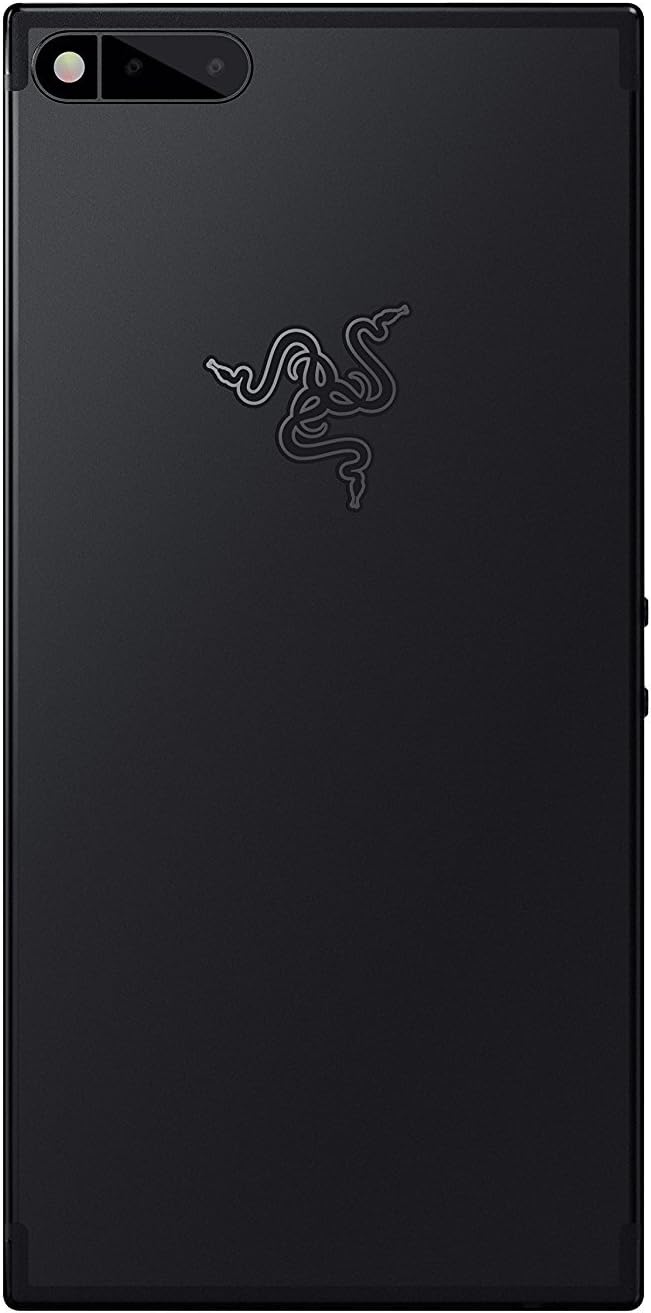
Figura 2: posterior view of the Razer Phone, highlighting the dual camera system and the Razer emblem.
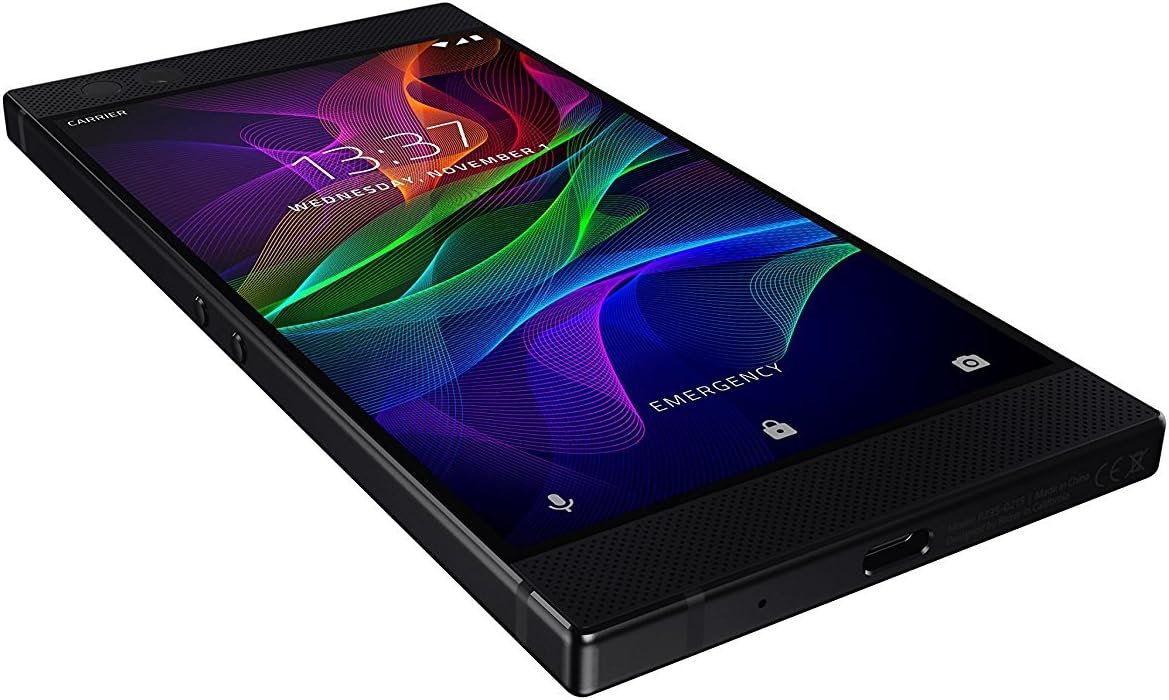
Figura 3: Lateral i inferior view of the Razer Phone, illustrating the physical buttons and connectivity port.
Configuració
1. Unboxing i Inspecció Inicial
En obrir el paquet, comproveu que tots els components siguin presents i no estiguin danyats. La caixa ha de contenir:
- Razer Phone (1st Generation) Smartphone
- Carregador
2. Instal·lació de la targeta SIM
- Localitza la safata de la targeta SIM al lateral del dispositiu.
- Insert the SIM ejector tool (not included, typically comes with SIM cards) into the small hole on the tray.
- Gently pull out the SIM card tray.
- Col·loca la targeta Nano-SIM a la safata amb els contactes daurats cap avall.
- Torneu a inserir la safata amb cura al telèfon fins que encaixi al seu lloc.
3. Càrrega inicial
Before first use, fully charge your Razer Phone. Connect the provided charger to the USB-C port at the bottom of the phone and plug it into a power outlet. The device supports fast charging.
4. Encès
Press and hold the power button, located on the side of the device, until the Razer logo appears on the screen. Follow the on-screen prompts to complete the initial setup, including language selection, Wi-Fi connection, and Google account setup.
En funcionament
Característiques de visualització
The Razer Phone features a 120Hz Ultra Motion Display with Corning Gorilla Glass 3, providing smooth visuals and responsive touch interaction. This high refresh rate minimizes lag and stuttering, enhancing the user experience for all content.
Sistema d'àudio
Experience cinematic sound with Dolby ATMOS powered and THX certified audio. The device incorporates dual front-firing speakers and dual amplifiers, delivering clear and immersive sound. An audio adapter with a THX certified DAC is included for wired audio connections, as the phone does not feature a standard 3.5mm headphone jack.
Ús de la càmera
The Razer Phone is equipped with a dual camera system. To access the camera, tap the camera icon on your home screen or lock screen. The camera interface allows for basic photo and video capture. For advanced features, third-party camera applications may be utilized.
Connectivitat
The device supports cellular (GSM-compatible), Wi-Fi, and Bluetooth connectivity. Ensure your SIM card is properly installed for cellular network access. Connect to Wi-Fi networks via the Settings menu for internet access. The phone operates on Android 8.1.
Manteniment
Neteja del teu dispositiu
To clean the screen, use a soft, lint-free cloth. For the body of the phone, a slightly damp cloth can be used. Avoid using harsh chemicals, abrasive materials, or aerosol sprays, as these can damage the device's finish and internal components.
Cura de la bateria
The Razer Phone contains a 4000 mAh Lithium Ion battery. To prolong battery life, avoid exposing the device to extreme temperatures. Use only the provided charger or certified compatible chargers. Regular software updates can also optimize battery performance.
Actualitzacions de programari
Periodically check for software updates in the device settings. Updates often include performance improvements, security enhancements, and new features. Ensure your device is sufficiently charged and connected to Wi-Fi before initiating an update.
Resolució de problemes
| Problema | Possible solució |
|---|---|
| El dispositiu no s'encén | Ensure the battery is charged. Connect the charger and wait a few minutes before attempting to power on again. If unresponsive, perform a force restart by holding the power button for an extended period (e.g., 10-15 seconds). |
| La pantalla no respon | Restart the device. If the issue persists, ensure the screen is clean and free of moisture. |
| Mala qualitat d'àudio | Check volume settings. Ensure speakers are not obstructed. If using headphones, verify the connection and try another pair. |
| No es pot connectar a la Wi-Fi | Restart the phone and the Wi-Fi router. Forget the network in settings and reconnect. Ensure you are within range of the Wi-Fi signal. |
| La bateria s'esgota ràpidament | Reduce screen brightness, close unused apps, disable unnecessary background processes, and check for software updates. |
Especificacions
| Característica | Detall |
|---|---|
| Número de model | RZ35-02150100-R3U1 |
| Sistema operatiu | Android 8.1 |
| Mostra | 5.72 Inches, 1440 x 2560 pixels, 120Hz Ultra Motion Display, Corning Gorilla Glass 3 |
| Processador | Qualcomm Snapdragon 835, 2.45 GHz |
| RAM | 8 GB |
| Emmagatzematge intern | 64 GB |
| Capacitat de la bateria | 4000 mAh d'ions de liti |
| Àudio | Dolby ATMOS, THX Certified, Dual Front-Facing Speakers, Dual Ampaixecadors |
| Càmera | Dual Rear Camera (13.0 MP), Front Camera |
| Connectivitat | Cellular (GSM-compatible), Wi-Fi |
| Dimensions | 6.26 x 3.05 x 0.31 polzades |
| Pes | 1.4 lliures |
Garantia i Suport
Per obtenir informació sobre la garantia i assistència tècnica, consulteu la pàgina oficial de Razer. website or contact Razer customer service. Specific warranty terms and conditions may vary by region and purchase location. Keep your proof of purchase for warranty claims.
Podeu trobar recursos en línia i preguntes freqüents a Botiga Razer.


