1. Introducció
Gràcies per la compraasing the GPX PDB1077B Portable DVD Player. This device offers versatile entertainment with its 10.1-inch display, DVD/CD playback capabilities, and built-in Bluetooth wireless transmitter for audio streaming to compatible headphones. This manual provides detailed instructions for setup, operation, and maintenance to ensure optimal performance and longevity of your device.
2. Informació important de seguretat
Please read all safety warnings and instructions carefully before using this product. Retain this manual for future reference.
- Font d'alimentació: Feu servir només l'adaptador de corrent especificat. Volum incorrectetagi pot danyar el dispositiu i anul·lar la garantia.
- Aigua i humitat: Do not expose the device to rain, moisture, or immerse it in water.
- Calor: Mantingueu el dispositiu allunyat de fonts de calor com ara radiadors, registres de calor, estufes o altres aparells (inclosos amplificadors) que produeixen calor.
- Ventilació: Assegureu-vos que hi hagi una ventilació adequada. No bloquegeu cap obertura de ventilació.
- Neteja: Netegeu només amb un drap sec. No utilitzeu netejadors líquids ni aerosols.
- Manteniment: No intenteu atendre aquest producte vosaltres mateixos. Consulteu tots els serveis a personal de servei qualificat.
- Seguretat de la bateria: The device contains a rechargeable battery. Do not expose to excessive heat or direct sunlight. Dispose of batteries properly according to local regulations.
- Protecció auditiva: Eviteu escoltar a nivells de volum elevats durant períodes prolongats per evitar danys auditius.
3. Contingut del paquet
Verifiqueu que tots els elements que s'enumeren a continuació s'inclouen al vostre paquet:
- GPX PDB1077B Portable DVD Player
- Auriculars Bluetooth sense fil
- Control remot
- Adaptador d'alimentació AC/DC
- Adaptador de corrent del cotxe
- Cable AV
- Manual d'usuari (aquest document)
4. Producte acabatview
Familiarize yourself with the components of your GPX PDB1077B Portable DVD Player.
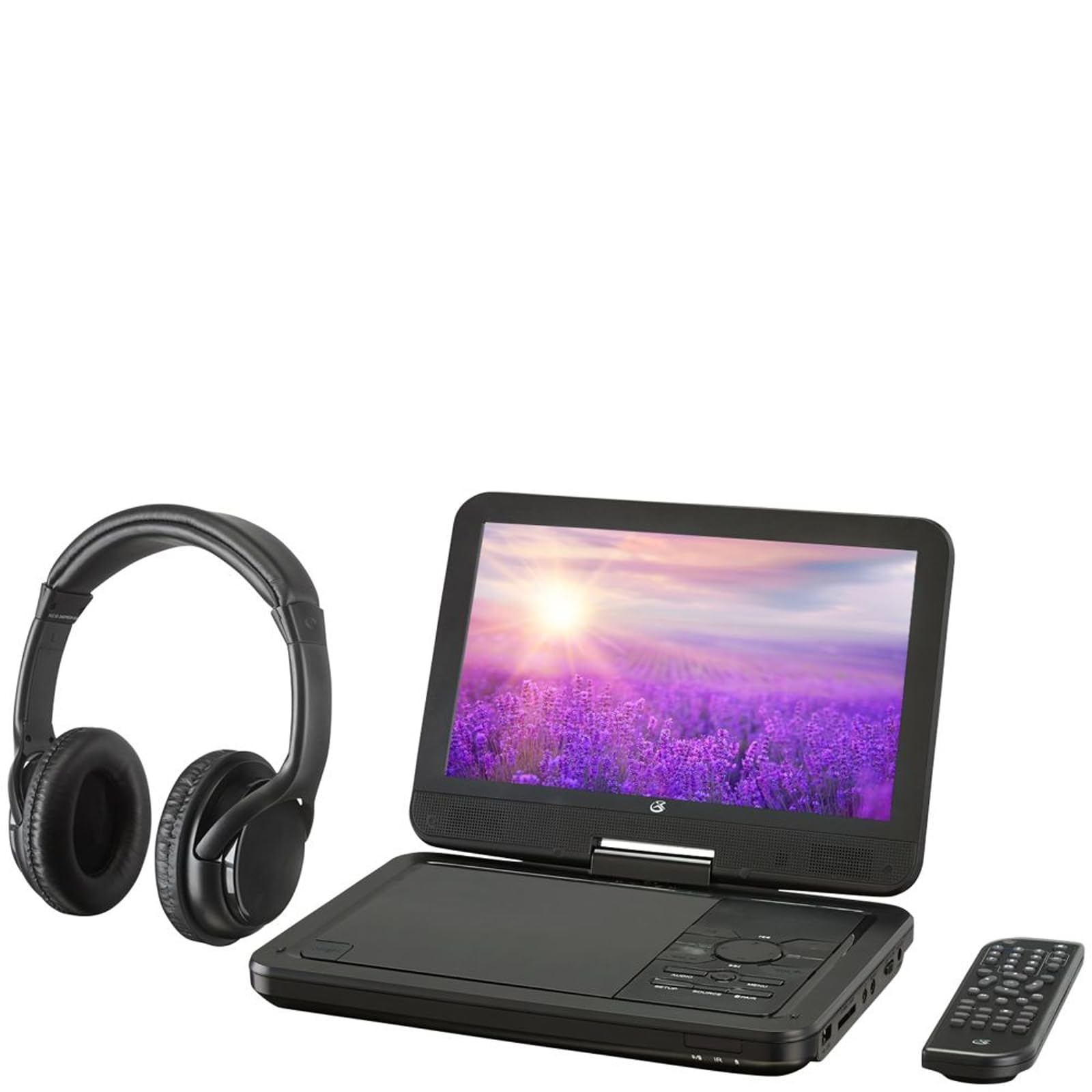
Figura 4.1: The GPX PDB1077B Portable DVD Player, showing the 10.1-inch screen, control panel, wireless Bluetooth headphones, and remote control.
4.1 Portable DVD Player Unit
The main unit features a swivel screen, disc tray, and control buttons. Key components include:
- Pantalla LCD de 10.1 polzades: Per viewing video content.
- Safata de disc: Per inserir DVD i CD.
- Tauler de control: Buttons for playback, menu navigation, volume, and source selection.
- Ports: USB, SD card slot, AV out, headphone jack, DC in.
- Ponents: Altaveus estèreo integrats.
4.2 Wireless Bluetooth Headphones
The included headphones connect wirelessly to the DVD player via Bluetooth for private listening.
Figura 4.2: Un primer pla view of the black wireless Bluetooth headphones, featuring padded earcups and an adjustable headband.
4.3 Control remot
El comandament a distància proporciona un accés còmode a totes les funcions des de la distància.
Figura 4.3: Un primer pla view of the compact black remote control with various buttons for playback, menu navigation, and volume adjustment.
5. Guia de configuració
5.1 Càrrega del dispositiu
- Connect the AC/DC power adapter to the DC IN port on the DVD player.
- Connecteu l'adaptador a una presa de corrent estàndard.
- L'indicador lluminós de càrrega s'il·luminarà. Espereu aproximadament de 3 a 4 hores per a una càrrega completa.
- For in-car use, connect the car power adapter to the DC IN port and your vehicle's 12V power outlet.
5.2 Engegada/apagada
- To power on, slide the POWER switch to the ON position. The screen will light up.
- Per apagar-lo, feu lliscar l'interruptor POWER a la posició OFF.
5.3 Connecting Bluetooth Headphones
- Ensure the DVD player is powered on.
- Turn on the Bluetooth headphones and put them into pairing mode (refer to headphone manual if needed).
- On the DVD player, navigate to the Bluetooth settings menu.
- Select "Scan for Devices" or similar option.
- Choose your headphones from the list of available devices to pair.
- Once paired, audio will automatically transmit to the headphones.
5.4 Connexió a una pantalla externa (opcional)
Use the included AV cable to connect the DVD player to a TV or monitor.
- Connect one end of the AV cable to the AV OUT port on the DVD player.
- Connect the other end to the AV IN ports (Yellow for Video, White for Left Audio, Red for Right Audio) on your external display.
- Select the correct AV input on your external display.
6. Instruccions de funcionament
6.1 Playing DVDs and CDs
- Open the disc tray by gently lifting the screen.
- Place a DVD or CD onto the spindle with the label side facing up.
- Gently close the disc tray.
- El reproductor detectarà automàticament el disc i començarà la reproducció o mostrarà el menú del disc.
- Use the navigation buttons (Up, Down, Left, Right, Enter) on the control panel or remote to navigate menus.
- Premeu el botó REPRODUCCIÓ/PAUSA botó per iniciar o aturar la reproducció.
- Premeu el botó STOP botó per aturar la reproducció.
6.2 Using USB and SD Card Media
- Inseriu una unitat flaix USB al port USB o una targeta SD a la ranura per a targetes SD.
- Premeu el botó FONT button on the control panel or remote to select "USB" or "SD".
- Navega pel teu files using the control buttons.
- Seleccioneu a file (e.g., MP3, JPEG) and press ENTRAR to play or view.
6.3 Ajustar la configuració
Access the system settings to customize your viewexperiència i escolta.
- Premeu el botó CONFIGURACIÓ button on the remote or control panel.
- Use the navigation buttons to select options such as:
- Configuració de la pantalla: Adjust brightness, contrast, color.
- Configuració d'àudio: Adjust volume, equalizer.
- Configuració d'idioma: Select OSD language, audio language, subtitle language.
- Control parental: Set rating levels for disc playback.
- Premeu ENTRAR to confirm selections and CONFIGURACIÓ de nou per sortir.
6.4 Ús del comandament a distància
The remote control provides full functionality. Ensure batteries are correctly inserted (2 x AAA, not included).
| Botó | Funció |
|---|---|
| PODER | Encén o apaga el reproductor. |
| CONFIGURACIÓ | Accedeix al menú de configuració del sistema. |
| FONT | Switches between DVD, USB, SD, and AV input modes. |
| REPRODUCCIÓ/PAUSA | Inicia o posa en pausa la reproducció. |
| STOP | Atura la reproducció. |
| VOL + / VOL- | Ajusta el nivell de volum. |
| NAVIGATE (Up/Down/Left/Right/ENTER) | Navega pels menús i confirma les seleccions. |
| MENÚ | Accedeix al menú del disc durant la reproducció de DVD. |
7. Manteniment
7.1 Neteja del dispositiu
- Assegureu-vos que el dispositiu estigui apagat i desconnectat abans de netejar-lo.
- Feu servir un drap suau, sec i sense borrissol per netejar les superfícies exteriors.
- For the screen, use a screen-specific cleaning solution and a microfiber cloth, applying gentle pressure.
- No utilitzeu netejadors abrasius, ceres ni dissolvents.
7.2 Cura del disc
- Manegeu els discs per les vores per evitar empremtes dactilars.
- Guardeu els discs a les seves fundes quan no els feu servir per evitar ratllades.
- Netegeu els discs bruts amb un drap suau i sense borrissol, netejant des del centre cap a fora.
7.3 Cura de la bateria
- To prolong battery life, fully charge the device before first use.
- If storing the device for an extended period, charge it to approximately 50% every few months.
- Eviteu exposar el dispositiu a temperatures extremes.
8. Solució De Problemes
If you encounter issues with your GPX PDB1077B, refer to the following common problems and solutions.
| Problema | Causa possible | Solució |
|---|---|---|
| Sense poder | Battery drained; Power adapter not connected properly; Power switch off. | Charge the device; Ensure power adapter is securely connected; Slide power switch to ON. |
| No Disc Playback | Disc inserit incorrectament; disc brut o ratllat; format de disc no compatible. | Reinsert disc label-side up; Clean or replace disc; Check supported media types in specifications. |
| Sense so | Volume too low; Mute function active; Headphones not connected/paired correctly. | Increase volume; Deactivate mute; Reconnect or re-pair headphones. |
| Bluetooth Headphones Not Pairing | Headphones not in pairing mode; Player not in Bluetooth scan mode; Interference. | Ensure headphones are in pairing mode; Activate Bluetooth scan on player; Move closer to player, away from other devices. |
| El control remot no funciona | Batteries are dead or inserted incorrectly; Obstruction between remote and player; Remote sensor blocked. | Replace batteries, check polarity; Remove obstructions; Ensure remote sensor on player is clear. |
9. Especificacions
Technical specifications for the GPX PDB1077B Portable DVD Player.
| Característica | Detall |
|---|---|
| Model | PDB1077B |
| Mida de la pantalla | 10.1 polzades |
| Tipus de visualització | LCD |
| Resolució nativa | 1024 x 600 |
| Mitjans suportats | DVD, DVD±R/RW, CD, CD-R/RW, MP3 CD, JPEG CD |
| Connectivitat | Bluetooth wireless transmitter, USB port, SD card slot, AV Out, Headphone Jack, DC In |
| Font d'alimentació | Built-in rechargeable battery, AC/DC adapter, Car adapter |
10. Garantia i atenció al client
GPX products are designed for reliability and performance. For specific warranty information, please refer to the warranty card included with your purchase or visit the official GPX website. If you require technical assistance or have questions regarding your device, please contact GPX customer support.
GPX Official Weblloc: www.gpx.com
Please note that warranty terms and customer support availability may vary by region.


