1. Introducció
Gràcies per la compraasing the Roadstar HRA-9D+BT/RDL Digital Stereo System. This versatile audio system combines classic and modern features, offering DAB, DAB+, FM radio, CD playback, Bluetooth connectivity, and USB/AUX input. This manual provides essential information for setting up, operating, and maintaining your device to ensure optimal performance and longevity. Please read this manual thoroughly before use and retain it for future reference.
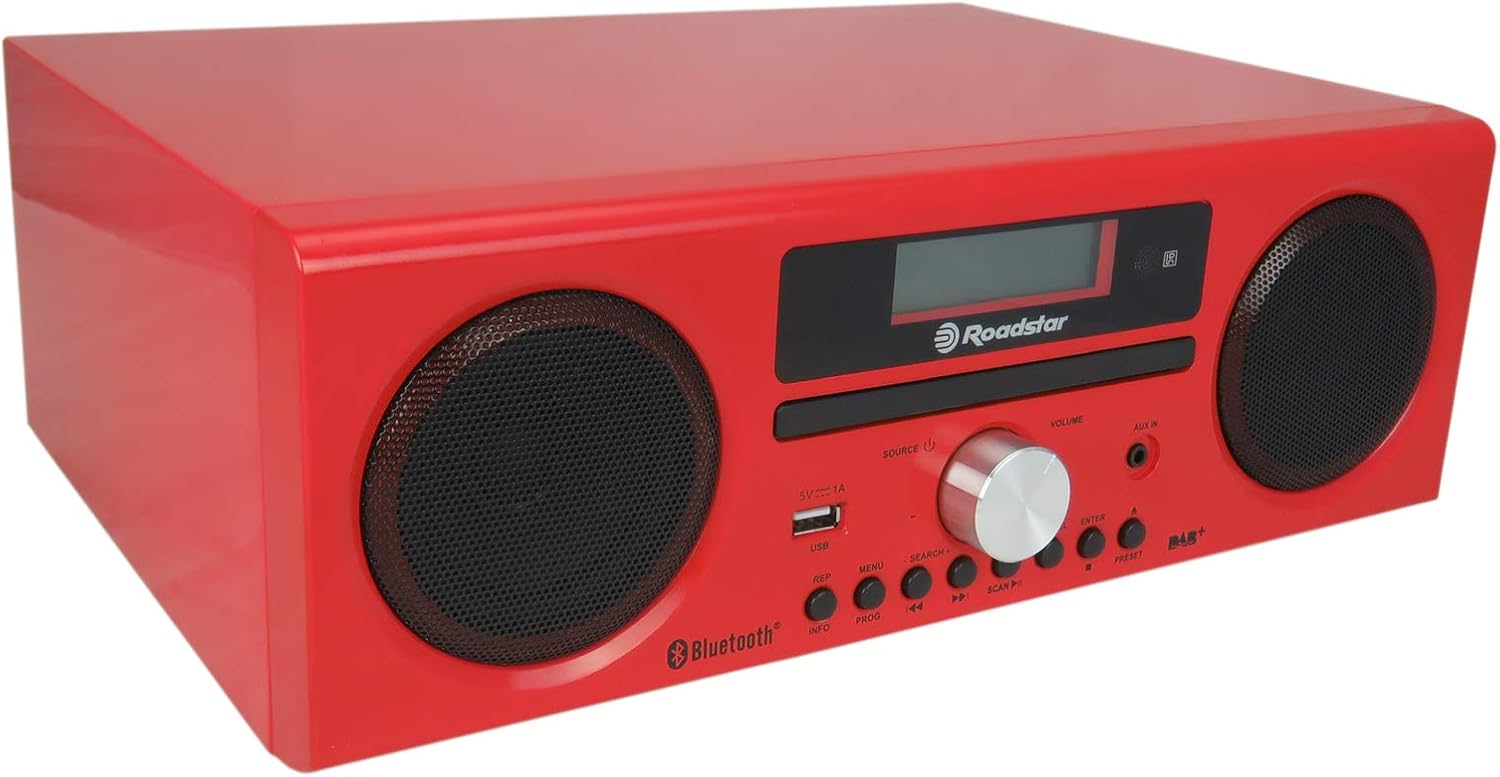
Figure 1.1: Roadstar HRA-9D+BT/RDL Digital Stereo System, angled front view. This image shows the compact red unit with its two front speakers, central display, and control panel.
2. Informació de seguretat
Per reduir el risc de descàrrega elèctrica, incendi o danys a la unitat, observeu les següents precaucions de seguretat:
- Font d'alimentació: Use only the specified power supply (AC 230V). Ensure the power cord is not damaged or pinched.
- Ventilació: No bloquegeu cap obertura de ventilació. Deixeu prou espai al voltant de la unitat per a un flux d'aire adequat.
- Aigua i humitat: No exposeu la unitat a la pluja, la humitat, les goteges o les esquitxades. No col·loqueu objectes plens de líquids, com ara gerros, a sobre de la unitat.
- Calor: Mantingueu la unitat allunyada de fonts de calor com ara radiadors, registres de calor, estufes o altres aparells (inclosos amplificadors) que produeixen calor.
- Neteja: Desendolleu la unitat de la presa de corrent abans de netejar-la. Feu servir un drap sec per netejar-la.
- Manteniment: No intenteu atendre aquest producte vosaltres mateixos. Consulteu tots els serveis a personal de servei qualificat.
- Col·locació: Place the unit on a stable, flat surface. Avoid placing it in direct sunlight or in areas with excessive dust, vibration, or mechanical shock.
3. Contingut del paquet
Please check that all items listed below are present in the package:
- Roadstar HRA-9D+BT/RDL Digital Stereo System Unit
- Control remot
- Cable d'alimentació CA
- FM Antenna (75 ohm coaxial type)
- Manual d'usuari (aquest document)

Figure 3.1: The Roadstar HRA-9D+BT/RDL unit shown with its included remote control. The remote is black with various function buttons.
4. Producte acabatview
4.1 Controls i funcions del panell frontal
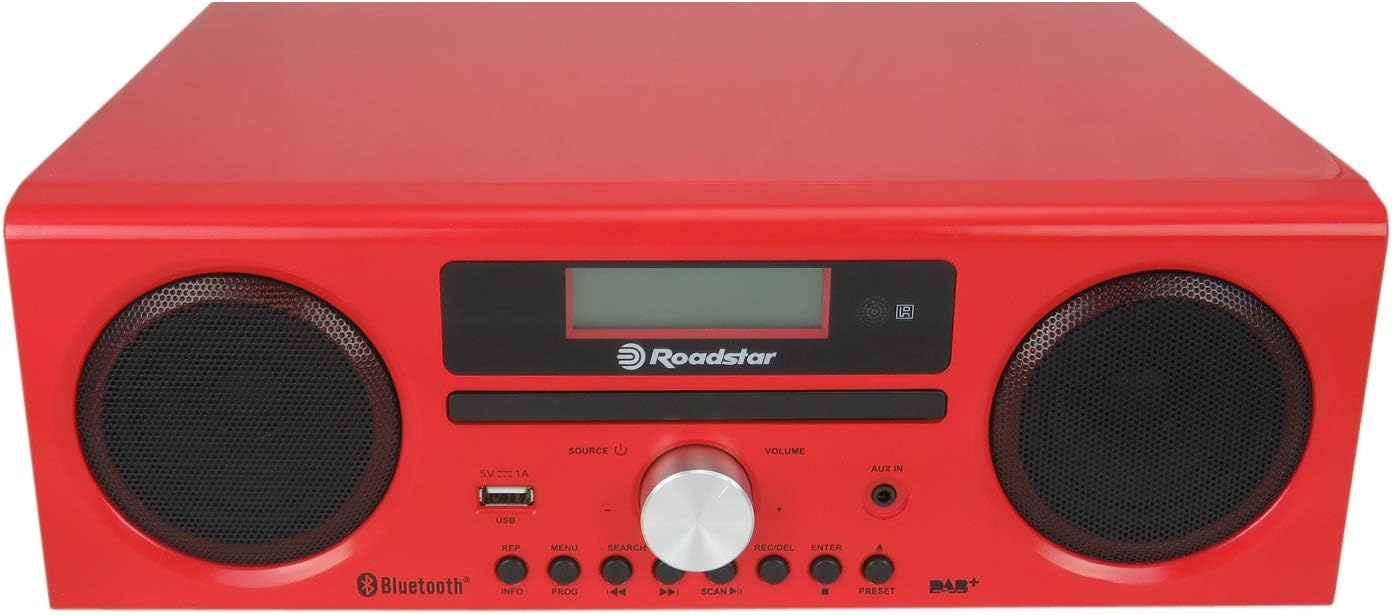
Figura 4.1: Frontal view of the Roadstar HRA-9D+BT/RDL, highlighting the display, CD tray, speakers, and control buttons.
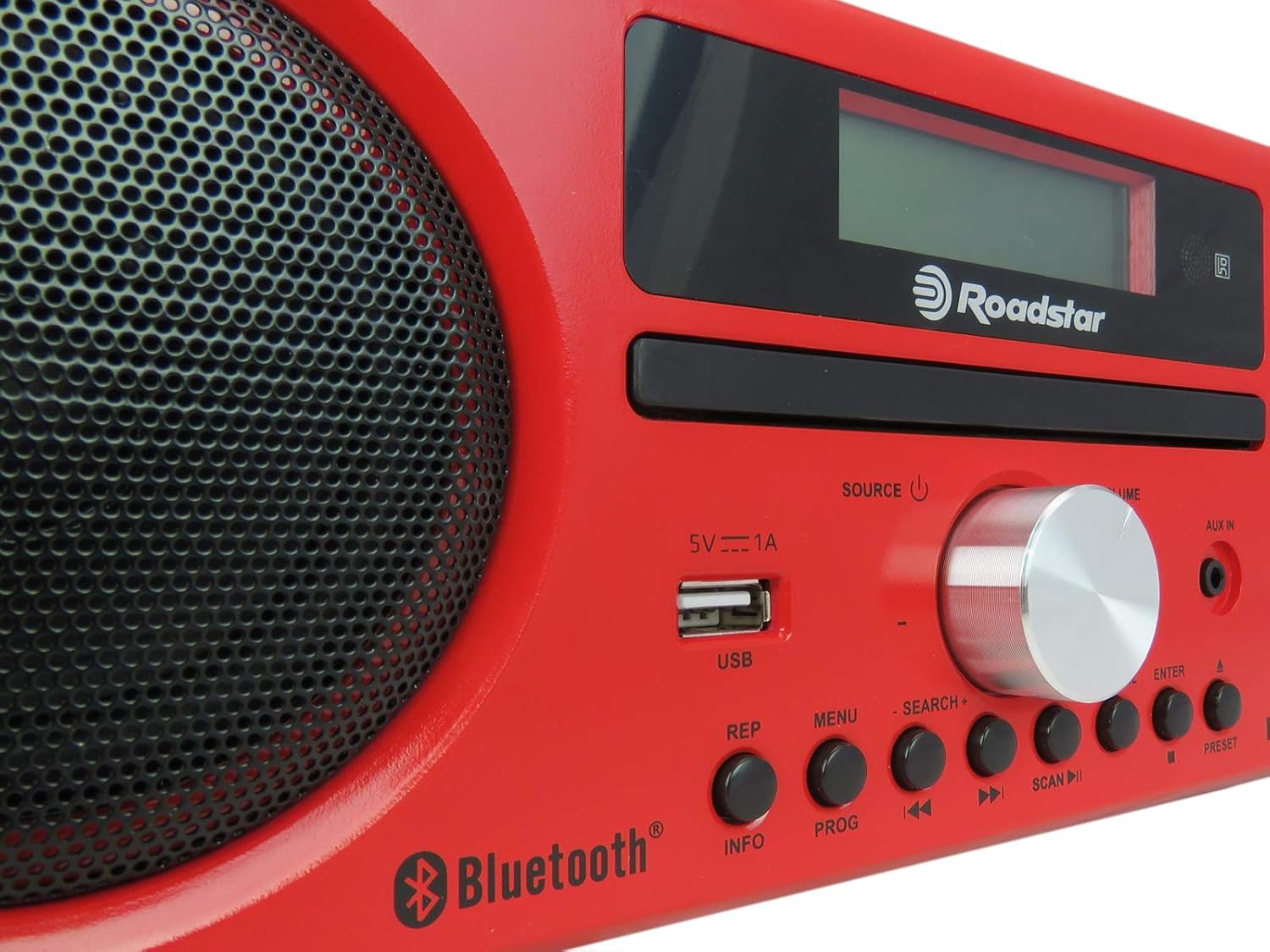
Figura 4.2: Primer pla view of the central control panel, showing the USB port, volume knob, and various function buttons clearly labeled.
- Ponents: Left and right audio output.
- Visualització: LED screen for showing mode, track information, station frequency, etc.
- Safata de CD: Per inserir CD d'àudio.
- SOURCE / Power Button: Press to switch between input sources (DAB, FM, CD, Bluetooth, USB, AUX). Press and hold to power the unit on/off.
- Botó de VOLUM: Gireu per ajustar el volum de l'àudio.
- Port USB (5V 1A): Per connectar dispositius d'emmagatzematge USB per a la reproducció d'MP3.
- Jack AUX IN: Entrada de 3.5 mm per connectar dispositius d'àudio externs.
- REP (Repeat) Button: Repeteix la pista actual o totes les pistes.
- Botó INFO: Displays additional information (e.g., DAB station details).
- Botó MENÚ: Accesses menu options for the current mode.
- PROG (Program) Button: Programs radio presets or CD track order.
- SEARCH +/- Buttons: Used for searching radio stations or navigating menus.
- Previous / Fast Rewind Button: Skips to the previous track/station or fast rewinds.
- Botó Reproduir/Pausa: Inicia o posa en pausa la reproducció.
- Next / Fast Forward Button: Skips to the next track/station or fast forwards.
- Botó SCAN: Initiates auto-scan for radio stations.
- Botó ENTER: Confirma les seleccions als menús.
- Botó PRESET: Accesses saved radio presets.
4.2 Característiques del panell posterior

Figura 4.3: posterior view of the Roadstar HRA-9D+BT/RDL, showing the FM antenna input, power input, and product label.
- FM ANT (75 ohm) Jack: Per connectar l'antena FM externa.
- Entrada d'alimentació de CA: Per connectar el cable d'alimentació de CA.
- Etiqueta del producte: Contains model number, serial number, and electrical specifications.
5. Configuració
5.1 Desembalatge
Traieu amb cura la unitat i tots els accessoris de l'embalatge. Conserveu els materials d'embalatge per a futurs transports o emmagatzematge.
5.2 Connexió d'alimentació
- Assegureu-vos que la unitat estigui col·locada sobre una superfície plana i estable.
- Connect the supplied AC power cord to the AC Power Input jack on the rear of the unit.
- Plug the other end of the AC power cord into a standard AC 230V wall outlet.
5.3 Connexió de l'antena FM
For optimal FM radio reception, connect the supplied FM antenna to the "FM ANT 75 ohm" jack on the rear panel. Extend the antenna fully and adjust its position for the best signal.
5.4 Encès inicial
After connecting power, press and hold the SOURCE / Power button on the front panel to turn on the unit. The display will light up.
6. Instruccions de funcionament
6.1 Canvi de modes
Premeu el botó FONT button repeatedly to cycle through the available modes: DAB, FM, CD, Bluetooth, USB, and AUX.
6.2 Funcionament de la ràdio (DAB/DAB+ i FM)
- Seleccioneu el mode: Premeu FONT to select DAB or FM mode.
- Escaneig automàtic: En mode DAB o FM, premeu el botó ESCANEAR button to automatically scan for available stations. The unit will store found stations.
- Manual Tuning (FM): En mode FM, premeu el botó Anterior / Següent buttons to manually tune the frequency.
- Selecció d'estacions: Utilitza el Anterior / Següent buttons to navigate through scanned DAB stations or FM frequencies.
- Desant els valors predefinits:
- Sintonitza l'emissora desitjada.
- Manteniu premut el botó PROG botó.
- Utilitza el Anterior / Següent buttons to select a preset number.
- Premeu ENTRAR per confirmar.
- Recordant presets: Premeu el botó PRESET botó i, a continuació, feu servir Anterior / Següent to select the desired preset, and press ENTRAR.
- Visualització d'informació: Premeu el botó INFO button to cycle through various information displays (e.g., program type, signal strength, time).
6.3 Funcionament del reproductor de CD
- Seleccioneu el mode: Premeu FONT to select CD mode.
- Insereix CD: Gently insert a CD (CD, CD-R, CD-RW) into the CD tray with the label side facing up. The unit will automatically start reading the disc.
- Reproduir/pausa: Premeu el botó Reproduir/Pausa botó per iniciar o aturar la reproducció.
- Omet les pistes: Premeu el botó Anterior / Següent buttons to skip to the beginning of the previous or next track.
- Avançar/rebobinar ràpid: Manteniu premut el botó Anterior / Següent buttons to fast rewind or fast forward through a track.
- Repetició de reproducció: Premeu el botó REP botó per anar canviant pels modes de repetició (per exemple, repetir una pista, repetir totes les pistes).
- Reproducció del programa: Premeu el botó PROG button to create a custom playback order for CD tracks.
6.4 Funcionament Bluetooth
- Seleccioneu el mode: Premeu FONT to select Bluetooth mode. The display will show "PAIRING" or "BLUETOOTH".
- Activa el Bluetooth: On your Bluetooth-enabled device (smartphone, tablet, etc.), turn on Bluetooth and search for available devices.
- Maridatge: Select "Roadstar HRA-9D+BT/RDL" (or similar name) from the list of found devices. Once paired, the unit will indicate a successful connection.
- Reproduir àudio: Start playing audio on your connected device. The sound will be streamed through the stereo system.
- Control de reproducció: Utilitza el Reproduir/Pausa i Anterior / Següent buttons on the unit or your connected device to control playback.
Reproducció USB 6.5
- Inseriu USB: Insert a USB storage device (flash drive) containing MP3 audio files al port USB del panell frontal.
- Seleccioneu el mode: Premeu FONT to select USB mode. The unit will automatically start reading the files.
- Control de reproducció: Utilitza el Reproduir/Pausa i Anterior / Següent botons per controlar la reproducció.
- Format compatible: Only MP3 audio files are supported for USB playback.
6.6 Entrada AUX
- Connectar el dispositiu: Connecteu un dispositiu d'àudio extern (per exemple, un telèfon intel·ligent o un reproductor MP3) al AUX IN jack on the front panel using a 3.5mm audio cable (not supplied).
- Seleccioneu el mode: Premeu FONT per seleccionar el mode AUX.
- Reproduir àudio: Start playing audio on your connected external device. The sound will be output through the stereo system.
- Control de volum: Ajusteu el volum amb el botó VOLUM knob on the unit and/or the volume control on your external device.
7. Manteniment
- Neteja de la unitat:
Wipe the exterior of the unit with a soft, dry cloth. Do not use abrasive cleaners, waxes, or solvents as they may damage the finish. For stubborn stains, a slightly damp es pot fer servir un drap, seguit d'un drap sec.
- Cura de CD:
Handle CDs by their edges. Keep them clean and free from scratches. Store CDs in their cases when not in use. Do not use abrasive cleaners or solvents on CDs.
- Emmagatzematge:
If the unit is not used for an extended period, unplug it from the power outlet and store it in a cool, dry place, away from direct sunlight and extreme temperatures.
8. Solució De Problemes
| Problema | Causa possible | Solució |
|---|---|---|
| Sense poder | Cable d'alimentació no connectat; Presa de corrent no activa. | Ensure power cord is securely plugged into the unit and a working wall outlet. Try a different outlet. |
| Sense so | Volume too low; Incorrect source selected; Mute activated. | Increase volume. Press SOURCE to select the correct input. Check if mute is active (if applicable, though not explicitly mentioned for this model). |
| Mala recepció de ràdio | Antena no connectada o mal posicionada; Senyal feble. | Ensure FM antenna is connected and fully extended. Adjust antenna position. Try moving the unit to a different location. |
| El CD salta o no es reprodueix | El CD està brut o ratllat; el CD s'ha inserit incorrectament. | Clean the CD with a soft, lint-free cloth. Ensure the CD is inserted correctly with the label side up. Try a different CD. |
| Bluetooth no connectat | La unitat no està en mode Bluetooth; El dispositiu no està en mode d'emparellament; El dispositiu està massa lluny. | Ensure the unit is in Bluetooth mode. Make sure Bluetooth is enabled on your device and it's in pairing mode. Move devices closer. |
| Problemes de reproducció per USB | Sense suport file format; USB drive corrupted; USB drive not inserted correctly. | Assegureu-vos files are MP3 format. Try reformatting the USB drive (backup data first). Reinsert the USB drive. |
9. Especificacions
| Marca | Roadstar |
| Número de model | HRA-9D+BT/RDL |
| Dimensions (A x A x P) | 31 x 17 x 22 cm |
| Pes | 3.25 kg |
| Potència RMS nominal | 30 W |
| Bandes de ràdio compatibles | DAB, DAB+, FM |
| Tipus de disc compatibles | CD, CD-R, CD-RW |
| Formats d'àudio compatibles (USB) | MP3 |
| Connectivitat | Bluetooth, USB (5V 1A), AUX In (3.5mm) |
| Tipus de visualització | LED |
| Font d'alimentació | 230 V CA |
10. Garantia i Suport
This product is covered by a warranty in accordance with local consumer protection laws. For specific details regarding warranty coverage, returns, and repairs, please refer to the purchase documentation or the retailer's policy where the product was acquired.
For technical assistance or further inquiries, please contact Roadstar customer support. Contact information can typically be found on the official Roadstar weblloc web o a l'embalatge del producte.
Note: If you wish to return a product within 30 days of receipt because you have changed your mind, consult the retailer's return policy page. If you have received a defective or damaged product, consult the retailer's help page on damaged goods. For specific information on purchases made on marketplaces, consult their respective help pages.


