Introducció
This manual provides instructions for the Smartby XRT135 Remote Control. This remote is designed as a replacement for various Vizio HDTV models, offering direct functionality without the need for programming.

Image: Smartby XRT135 Remote Control.
Compatible Vizio HDTV Models: P55-E1, P60-E1, P65-E1, M70-E3, P75-E1, M55E1, M55E0, M65E0, D32HN-E1.
Configuració
1. Instal·lació de la bateria
The Smartby XRT135 remote control requires two AAA batteries (not included). Follow these steps to install them:
- Localitzeu el compartiment de la bateria a la part posterior del comandament a distància.
- Feu lliscar la tapa del compartiment de la bateria cap avall per obrir-lo.
- Introduïu dues piles AAA, assegurant-vos que els terminals positiu (+) i negatiu (-) s'alineïn correctament amb les marques de l'interior del compartiment.
- Feu lliscar la tapa del compartiment de la bateria fins que faci clic de manera segura.
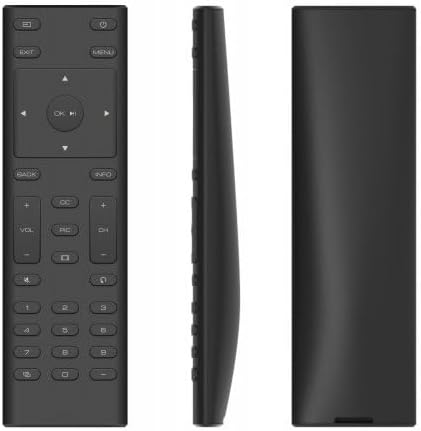
Imatge: Lateral view of the remote, indicating the battery compartment location.
2. Ús inicial
This remote control is designed to work immediately with compatible Vizio HDTV models without any programming. Once batteries are installed, point the remote at your Vizio TV and begin operation.
Instruccions de funcionament
The Smartby XRT135 remote control features a standard layout for Vizio HDTVs. Refer to the diagram below for button identification and their functions.

Image: Labeled diagram of the XRT135 remote control buttons.
- Botó d'encesa: Encén o apaga el televisor.
- Botó d'entrada: Passa ciclísticament per les fonts d'entrada disponibles (HDMI, AV, etc.).
- Botó de menú: Accedeix al menú principal del televisor.
- Botó de sortida: Surt del menú actual o de la visualització en pantalla.
- Botons de fletxa (amunt, avall, esquerra, dreta): Navegueu pels menús i opcions.
- OK / Play/Pause Button: Confirms selections or controls media playback.
- Botó enrere: Torna a la pantalla o menú anterior.
- Botó d'informació: Mostra informació sobre el programa o l'entrada actual.
- Pujar/Baixar el volum (VOL +/-): Ajusta el volum d'àudio.
- Canal amunt/avall (CH +/-): Canvia els canals de televisió.
- Botó de silenci: Toggles audio mute on or off.
- CC (Closed Captions) Button: Activates or deactivates closed captions.
- PIC (Picture Modes) Button: Cycles through various picture modes.
- Botó de relació d'aspecte: Ajusta la relació d'aspecte de la pantalla.
- Last Button: Torna a l'anterior viewcanal ed.
- Teclat numèric (0-9): Introdueix directament els números de canal.
- Dash (-) Button: S'utilitza per entrar a subcanals (per exemple, 7-1).
- Pairing Link Button: (If applicable for specific Vizio models) Initiates pairing.
Manteniment
Canvi de bateria
Replace batteries when the remote's response becomes inconsistent or stops working. Always replace both batteries at the same time with new AAA batteries. Do not mix old and new batteries, or different types of batteries.
Neteja
To clean the remote control, gently wipe it with a soft, dry cloth. Do not use liquid cleaners, sprays, or abrasive materials, as these can damage the remote's surface or internal components.
Resolució de problemes
- El comandament a distància no respon:
- Assegureu-vos que les bateries estiguin instal·lades correctament amb la polaritat adequada.
- Substitueix les piles velles per piles AAA noves.
- Comproveu si hi ha alguna obstrucció entre el comandament a distància i el sensor d'infrarojos del televisor.
- Assegureu-vos que esteu dins de l'abast efectiu del sensor del televisor.
- Els botons no funcionen:
- If only specific buttons are not working, try cleaning the remote as described in the Maintenance section.
- If multiple buttons are unresponsive, replace the batteries.
- Remote works intermittently:
- Això sovint indica que la bateria està baixa. Canvieu les piles.
- Assegureu-vos que hi hagi una línia de visió clara amb el televisor.
Especificacions
| Característica | Detall |
|---|---|
| Número de model | XRT135 |
| Marca | Smartby |
| Dispositius compatibles | Vizio HDTVs (P55-E1, P60-E1, P65-E1, M70-E3, P75-E1, M55E1, M55E0, M65E0, D32HN-E1) |
| Font d'alimentació | 2 piles AAA (no incloses) |
| Pes de l'article | 2.04 unces |
| Dimensions del paquet | 6.18 x 2.2 x 0.75 polzades |
| Color | Negre |
| Característica especial | Disseny ergonòmic |
Informació de la garantia
Specific warranty details for the Smartby XRT135 Remote Control are not provided within this manual. For information regarding warranty coverage, please refer to the product packaging or contact Smartby customer support directly.
Suport
For further assistance or inquiries about your Smartby XRT135 Remote Control, please contact Smartby customer support. You may also visit the official Smartby store on Amazon for additional product information: