1. Introducció
This manual provides instructions for the Smartby Universal XRT136 Remote Control. This remote is designed to operate various Vizio Smart TV models without requiring any programming or setup. Simply insert batteries, and it is ready for use.
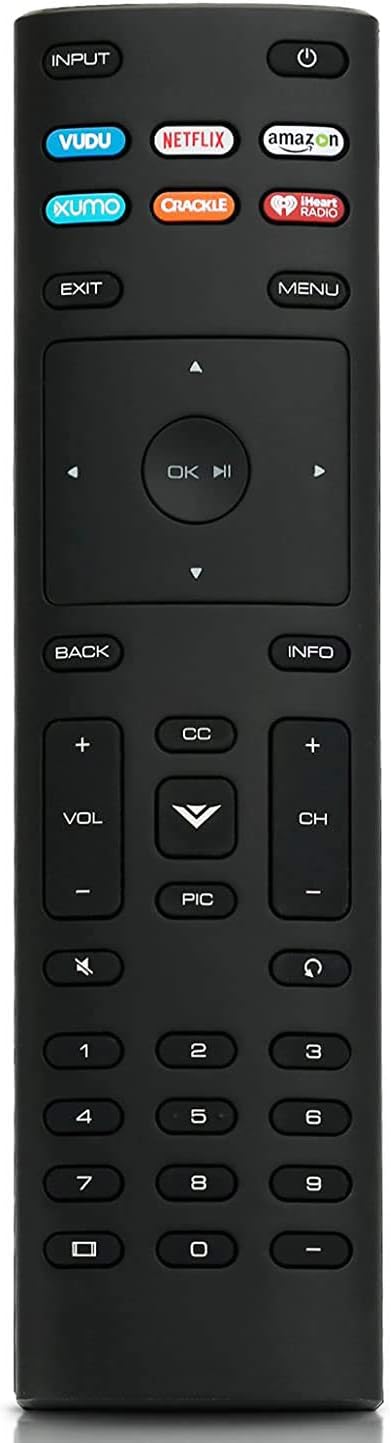
Imatge: Frontal view of the Smartby Universal XRT136 Remote Control, showcasing all buttons.
2. Configuració: Instal·lació de la bateria
El comandament a distància requereix dues piles AAA (no incloses). Segueix aquests passos per instal·lar-les:
- Locate the notch on the back of the remote control.
- Insert a coin into the notch and gently pry open the back cover.
- Insert two AAA batteries, ensuring the positive (+) and negative (-) terminals align correctly with the markings inside the battery compartment.
- Torneu a col·locar la tapa de la bateria, prement fermament fins que encaixi al seu lloc.

Image: Diagram illustrating the process of opening the battery compartment and inserting AAA batteries into the remote control.
3. Operating Instructions: Button Functions
The Smartby Universal XRT136 Remote Control features dedicated buttons for various functions. Below is a guide to each button's purpose:

Imatge: Detallada view of the XRT136 remote control with labels pointing to each button and its corresponding function.
- ENTRADA: Changes the currently displayed input source on the television.
- POTÈNCIA: Encén o apaga el televisor.
- App Launcher Buttons (VUDU, NETFLIX, Amazon, XUMO, CRACKLE, iHeartRadio): Quickly launches the corresponding application.
- SORTIDA: Closes on-screen menus or returns to the previous screen.
- MENÚ: Displays the television's settings menu.
- Botons de fletxa (amunt, avall, esquerra, dreta): Navega pels menús i les opcions en pantalla.
- OK/Play/Pause: Selects the highlighted menu option, plays content, or pauses content.
- ESQUENA: Torna al menú o pantalla anterior.
- INFORMACIÓ: Mostra informació sobre el programa o contingut actual.
- VOL +/-: Augmenta o disminueix el volum de l'àudio.
- CC (Subtítols): Opens or closes the closed captioning feature.
- Botó V: Launches SmartCast TV or returns to the SmartCast TV Home Screen.
- FOTO: Cycles through different picture setting modes.
- CH +/-: Canvia el canal de televisió.
- MUT: Turns the audio on or off.
- ÚLTIM: Torna a l'últim viewcanal ed.
- Teclat numèric (0-9): Manually enters a channel number.
- DASH (-): Used with the number pad to manually enter a digital sub-channel (e.g., 18-4 or 18-5).
4. Compatibilitat
This universal remote control is compatible with a wide range of Vizio Smart TV models. It replaces various Vizio remote control models including XRT112, XRT122, XRT302, XRT135, XRT510, XRT500, XRT100, XRT140, VR1, VR2, VR7, VR10, VR15, and XRT260.
Compatible Vizio TV series include:
- D-Series: D24f-F1, D32f-F1, D43f-F1, D50f-F1
- Sèrie E: E43-E2, E50-E1, E50x-E1, E55-E1, E55-E2, E60-E3, E65-E0, E65-E1, E65-E3, E70-E3, E75-E1, E75-E3, E80-E3, E55D0, E55U-D0, E55U-D2, E60U-D3, E65D0, E65D1, E65U-D1, E65U-D3, E70D3, E70U-D3, E75E16, E80U-D3
- Sèrie M: M50-E1, M55-E0, M65-E0, M70-E3, M75-E1, M50D1, M55D0, M60D1, M65D0, M70D3, M80D3
- Sèrie P: P55-E1, P65-E1, P75-E1, P50C1, P55C1, P65-C1, P75C1
- And other VIZIO V/M/D/P/PX/E/OLED/LED/LCD/HD/4K/HDR/UHD Smart TV models.

Image: The XRT136 remote control alongside a list of compatible Vizio TV models and other remote models it replaces.
5. Especificacions
| Característica | Detall |
|---|---|
| Marca | Smartby |
| Número de model | XRT136 |
| Característica especial | Universal, no cal programació |
| Color | Negre |
| Nombre màxim de dispositius compatibles | 1 (Televisió) |
| Dispositius compatibles | Vizio Smart Televisions |
| Pes de l'article | 2.08 unces |
| Dimensions del paquet | 6.69 x 1.77 x 0.75 polzades |

Imatge: frontal, lateral i posterior views of the XRT136 remote control, illustrating its physical dimensions and design.
6. Solució De Problemes
If the remote control is not functioning as expected, consider the following:
- Comproveu les bateries: Ensure that the batteries are inserted correctly with the correct polarity (+/-) and are not depleted. Replace with fresh AAA batteries if necessary.
- Línia de visió: Ensure there is a clear line of sight between the remote control and the television's infrared receiver. Obstructions can block the signal.
- Restabliment remot: Remove the batteries, press all buttons on the remote a few times to discharge any residual power, then reinsert the batteries.
- Compatibilitat amb TV: Verify that your Vizio TV model is listed in the compatibility section of this manual.
7. Garantia i Suport
For warranty information or further assistance, please refer to the contact information provided by your retailer or the Smartby manufacturer's official support channels. Keep your purchase receipt for warranty claims.
