1. Introducció
This manual provides essential information for the setup, operation, maintenance, and troubleshooting of your BenQ HT2550 4K UHD HDR Home Theater Projector. Please read this manual thoroughly before using the projector to ensure optimal performance and safety.
Característiques principals:
- True 4K UHD Resolution: 8.3 million distinct pixels for stunning clarity.
- Projector-optimized HDR: HDR10 support with BenQ exclusive Auto HDR color rendition.
- Cinematic Color Technology: Reproduces >96% of Rec.709 color gamut.
- Disseny compacte: Light and sleek with Auto vertical Keystone and 1.2x zoom for easy installation.
2. Contingut del paquet
Verifiqueu que tots els elements que s'enumeren a continuació s'inclouen al vostre paquet:
- BenQ HT2550 Projector
- Remote Control with Battery (RCV015)
- Cable d'alimentació (3 m)
- User Manual CD (27L)
- Quick Start Guide (21L)
- Targeta de garantia
- Tapa de la lent
3. Configuració
3.1 Col·locació física
The BenQ HT2550 features a compact design with 1.2x zoom and Auto vertical Keystone, allowing for flexible placement. Consider the throw ratio (1.47 - 1.76) to determine the optimal distance from the screen for your desired image size (60" to 200" clear image size).
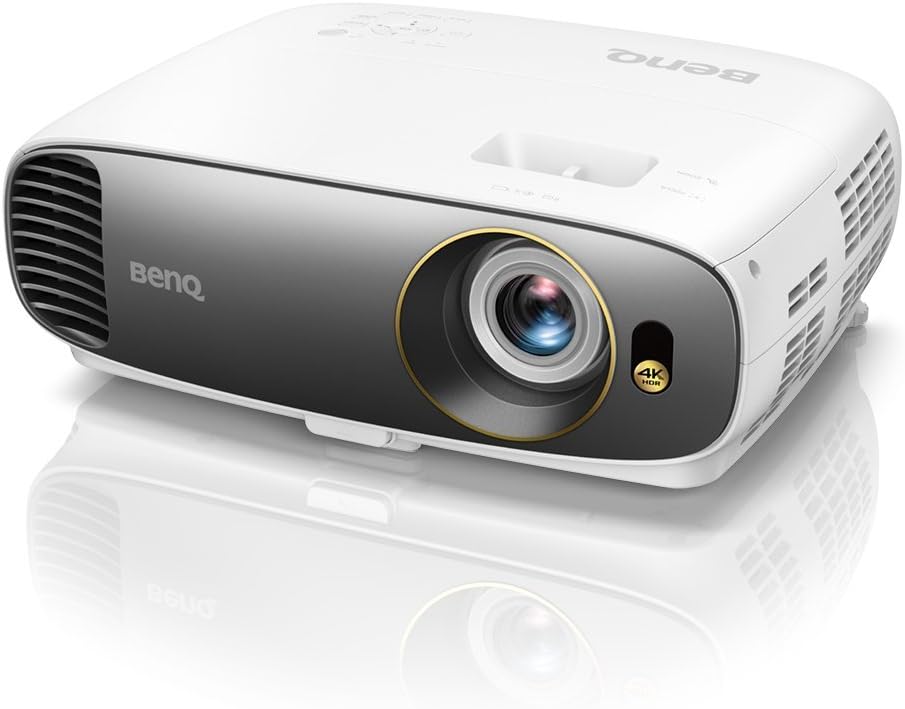
Figura 1: Frontal view of the BenQ HT2550 projector, showcasing el seu disseny compacte i la seva lent.
3.2 Connexió de dispositius
El projector ofereix diverses opcions de connectivitat:
- HDMI: 2 ports (HDMI 1: 2.0 / HDCP 2.2; HDMI 2: 1.4a / HDCP 1.4) for connecting Blu-ray players, gaming consoles, or streaming devices.
- USB tipus A: 1 port (2.0/Power Supply) for media playback or powering accessories.
- USB (Type mini B): 1 port.
- PC (D-Sub): 1 port for computer connection.
- Audio In/Out (3.5mm Mini Jack): 1 each for external audio devices.
- RS232 (DB-9pin): 1 port for control systems.
- DC 12V Trigger (3.5mm Jack): 1 port for synchronized screen control.

Figura 2: posterior view of the BenQ HT2550 projector, highlighting the various input and output ports for connectivity.
3.3 Engegada inicial i ajust
- Connecteu el cable d'alimentació al projector i a una presa de corrent.
- Premeu el botó d’engegada del projector o del comandament a distància.
- Adjust the focus and zoom using the rings on the lens.
- Utilize the vertical keystone adjustment (±40 degrees) to correct image distortion if the projector is not perfectly perpendicular to the screen.
4. Funcionament del projector
4.1 Modes d'imatge
The BenQ HT2550 offers several picture modes to optimize viewing for different content:
- ISF Disabled: Bright / Vivid / Cinema / Sport / User 1 / User 2
- ISF Enabled: Bright / Vivid / Cinema / Sport / User 1 / User 2 / ISF Night / ISF Day
Select the appropriate mode via the projector's menu or remote control for the best visual experience.
4.2 HDR and 3D Content
The projector supports HDR (High Dynamic Range) for enhanced contrast and color. It also features 3D compatibility with various formats:
- Frame Sequential: Up to 1280x720 120Hz
- Frame Packing: Fins a 1080p 24Hz
- Top Bottom: Fins a 720p 60Hz
Ensure your content source and 3D glasses (if applicable) are compatible with these formats.
4.3 Sortida d'àudio
The projector includes a built-in 5W speaker. For a more immersive audio experience, connect external speakers via the 3.5mm Audio out jack or through your HDMI receiver.
5. Manteniment
5.1 Lamp La vida
El projector lamp has an estimated lifespan depending on the usage mode:
- Mode normal: 4000 hores
- Modalitat econòmica: 10000 hores
- SmartEco Mode: 8000 hores
- LampMode d'estalvi: 15000 hores
Regular cleaning of the lens and ensuring proper ventilation will help prolong the lamp's life and maintain image quality.
5.2 actualitzacions de microprogramari
BenQ periodically releases firmware updates to improve performance and address issues. As of March 16, 2018, units include Firmware Update 1.0.3. For information on checking your current firmware version or obtaining updates, please refer to the official BenQ support resources.
6. Solució De Problemes
Problemes comuns i solucions:
- Sense imatge/senyal: Ensure all cables (HDMI, PC) are securely connected and the correct input source is selected on the projector. Verify the source device is powered on and outputting a signal.
- Distorsió de la imatge: Use the keystone adjustment to correct trapezoidal images. Ensure the projector is placed on a stable, level surface.
- Fuzzy/Unclear Image: Adjust the focus ring on the lens until the image is sharp. Ensure the lens is clean.
- Projector Noise: A faint fan noise is normal. Check if the projector is in "Silence" mode (if available) which might limit resolution. Ensure adequate ventilation to prevent overheating, which can increase fan speed.
- Light Border Around Image: This can occur with some projectors. Ensure your screen has a black velvet border or consider LED backlighting around the screen to minimize its visibility.
7. Especificacions
| Característica | Detall |
|---|---|
| Sistema de projecció | DLP |
| Resolució nativa | 3840x2160 (XPR pixel shifting technology) |
| Suport a la resolució | VGA (640 x 480) a 4K UHD (3840 x 2160) |
| Brillantor (lúmens ANSI) | 2200 lúmens ANSI |
| Relació de contrast (FOFO) | 10,000:1 |
| Color de la pantalla | 30 bits (1.07 mil milions de colors) |
| Relació d'aspecte nativa | 16:9 natiu (6 relacions d'aspecte seleccionables) |
| Font de llum | Lamp (240W) |
| Light Source Life (Normal/Economic/SmartEco/LampSave) | 4000 / 10000 / 8000 / 15000 hores |
| Relació de llançament | 1.47 - 1.76 (100" @ 3.25 m) |
| Relació del zoom | 1.2X |
| Ajust Keystone | 1D, vertical ± 40 graus |
| Clear Image Size (Diagonal) | 60" ~ 200" |
| Altaveu | 5W x 1 |
| Ports HDMI | 2 (HDMI 1: 2.0 / HDCP 2.2; HDMI 2: 1.4a / HDCP 1.4) |
| USB tipus A | 1 (2.0/Power Supply) |
| Dimensions (A x A x P) | 13.9 x 5.3 x 10.7 polzades |
| Pes net | 9.2 lliures |
8. Garantia i Suport
Your BenQ HT2550 projector comes with a warranty. Please refer to the included Warranty Card for detailed terms and conditions specific to your region. For technical assistance, product registration, or further inquiries, please visit the official BenQ support weblloc o poseu-vos en contacte amb el seu servei d'atenció al client.
BenQ is committed to providing excellent customer support. For any firmware-related concerns or assistance, contacting BenQ directly is recommended.
9. Vídeos de productes
Producte oficial acabatview
Video: BenQ TK800 4K UHD HDR Home Theater Projector OverviewAquest vídeo ofereix una visió generalview of BenQ's 4K HDR projector features, similar to the HT2550 model.
User Experience Highlights
Video: BenQ HT2550 4k HDR Projector Review. This video offers insights into the user experience and performance of the BenQ HT2550 projector.
Video: Great Budget 4k Projector with some minor quirks. This video provides a user's perspective on the BenQ HT2550, including its strengths and minor considerations.


