Producte acabatview
The Redmi Y2 is a feature-rich smartphone designed for everyday use. It combines a sleek design with robust performance, making it suitable for communication, entertainment, and productivity. This manual provides essential information for setting up, operating, maintaining, and troubleshooting your device.

Figura 1: posterior view of the Redmi Y2 smartphone, highlighting the dual camera module and fingerprint sensor.
1. Configuració
Follow these steps to set up your new Redmi Y2 smartphone.
1.1 Desembalatge i inspecció inicial
Traieu amb cura tots els components de l'embalatge. Assegureu-vos que hi hagi els elements següents:
- Redmi Y2 Smartphone
- Carregador
- SIM ejector Pin
- Guia d'usuari
- Clear soft case
- Targeta de garantia
Vídeo 1: Un overview of the Redmi Y2 smartphone, including its design, display, camera, and accessories found in the box.
1.2 Inserció de targetes SIM i targetes MicroSD
The Redmi Y2 supports dual Nano-SIM cards and a dedicated MicroSD card for expandable storage. Locate the SIM tray on the left side of the device.
- Insert the SIM ejector pin into the small hole on the SIM tray to open it.
- Traieu amb cura la safata de la targeta SIM.
- Place your Nano-SIM cards into the designated slots.
- If desired, insert a MicroSD card into its dedicated slot.
- Empènyer suaument la safata cap al dispositiu fins que encaixi al seu lloc.

Figure 2: Left side of the Redmi Y2, illustrating the SIM card tray location.
1.3 Engegada i configuració inicial
To power on your device, press and hold the power button located on the right side until the Redmi logo appears. Follow the on-screen instructions to complete the initial setup, including language selection, Wi-Fi connection, and Google account setup.

Figure 3: Right side of the Redmi Y2, showing the power and volume buttons.
1.4 Device Ports and Buttons
Familiarize yourself with the physical layout of your Redmi Y2:
- A dalt: 3.5mm headphone jack, secondary microphone, and IR blaster.
- A baix: Micro-USB charging port, primary microphone, and speaker grilles.

Figura 4: superior view of the Redmi Y2, highlighting the headphone jack and IR blaster.

Figura 5: A baix view of the Redmi Y2, showing the Micro-USB port and speaker grilles.
2. Operating Your Redmi Y2
2.1 Pantalla i interfície d'usuari
The Redmi Y2 features a 5.99-inch HD+ display with an 18:9 aspect ratio, providing an immersive viewing experience for media and gaming. The device runs on Android 8.1 Oreo with MIUI 9.5 (or later) overlay, offering a customized and user-friendly interface.
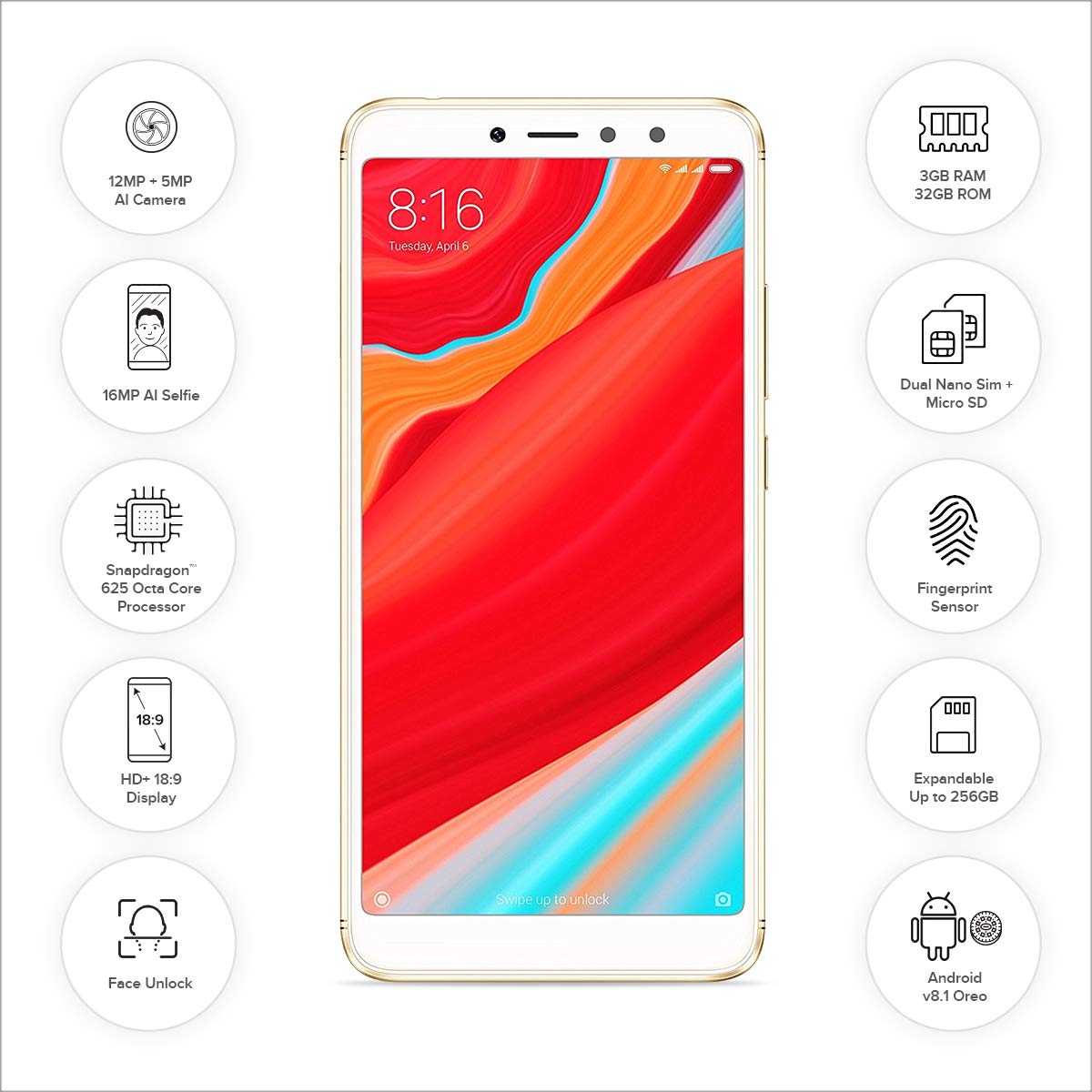
Figura 6: Frontal view of the Redmi Y2, showcasing its 5.99-inch display and key features.
2.2 Característiques de la càmera
The Redmi Y2 is equipped with a dual rear camera setup (12MP + 5MP) for capturing photos with depth-of-field effects. The front-facing camera is a 16MP sensor, ideal for high-quality selfies, even in low-light conditions thanks to its soft-tone selfie light.
2.3 Funcions de seguretat
For enhanced security, the Redmi Y2 includes a rear-mounted fingerprint sensor and face unlock functionality. These features allow for quick and secure access to your device.
2.4 Navigation Gestures
The device offers optional gesture navigation, allowing you to replace traditional navigation buttons with intuitive swipes. Swipe up from the bottom to go home, swipe up and pause for recent apps, and swipe from the left or right edge to go back.
3. Manteniment
3.1 Cura de la bateria
The Redmi Y2 is powered by a 3080 mAh Lithium Polymer battery. To maximize battery life and ensure longevity:
- Eviteu temperatures extremes.
- Feu servir el carregador proporcionat per a una càrrega òptima.
- Eviteu esgotar completament la bateria amb freqüència.
- Manage background app usage to conserve power.
3.2 Gestió d'emmagatzematge
The device comes with 32GB or 64GB of internal storage, expandable up to 256GB via a MicroSD card. Regularly manage your storage by:
- Eliminació innecessària files i aplicacions.
- Moving large media files to the MicroSD card.
- Clearing cached data from apps.
4. Solució De Problemes
If you encounter issues with your Redmi Y2, refer to the following common solutions:
4.1 El dispositiu no respon
- Reinicia: Press and hold the power button for about 10-15 seconds until the device restarts.
- Càrrec: Connect the device to its charger and wait a few minutes before attempting to power it on again.
4.2 La bateria s'esgota ràpidament
- Check Apps: Identify and close power-intensive applications running in the background.
- Brillantor de la pantalla: Redueix la brillantor de la pantalla o activa la brillantor adaptativa.
- Ús de la xarxa: Turn off Wi-Fi, Bluetooth, or GPS when not in use.
- Actualització de programari: Ensure your device's software is up to date, as updates often include battery optimizations.
4.3 Camera Issues
- Esborra la memòria cau: Go to Settings > Apps > Camera > Storage and clear cache/data.
- Reinicia: Reinicieu el dispositiu.
- Check Permissions: Ensure the camera app has all necessary permissions.
5. Especificacions
Below are the detailed specifications for the Redmi Y2 smartphone:
| Sistema operatiu | Android 8.1 (Oreo) |
| RAM | 3 GB |
| Emmagatzematge intern | 32 GB (ampliable fins a 256 GB amb MicroSD) |
| Processador | Qualcomm Snapdragon 625 Octa-Core, 1.3 GHz |
| Mostra | 5.99-inch IPS LCD, 1440 x 720 resolution (HD+) |
| Càmera posterior | 12 MP + 5 MP Dual AI Camera |
| Càmera frontal | 16 MP with Selfie Light |
| Bateria | Polímer de liti de 3080 mAh |
| Dimensions | 16.1 x 0.8 x 7.7 cm |
| Pes | 168 g |
| Connectivitat | Bluetooth, Wi-Fi, GLONASS GPS, Dual SIM (4G VoLTE) |
| Característiques especials | Dual SIM, Fingerprint Sensor, Face Unlock, IR Blaster |
6. Garantia i Suport
Your Redmi Y2 smartphone comes with a 1-year manufacturer's warranty from the date of purchase. This warranty covers manufacturing defects and issues arising from normal use.
For technical support, service requests, or further assistance, please visit the official Redmi support website or contact their customer service. Refer to the warranty card included in your product packaging for specific terms and conditions.
Fabricant: Xiaomi