
Introducció
This manual provides comprehensive instructions for the setup, operation, and maintenance of your MASTER & DYNAMIC MH40 Over-Ear Headphones. Please read this guide thoroughly to ensure optimal performance and longevity of your device.
Contingut del paquet
Verifiqueu que tots els elements siguin presents al vostre paquet:
- MASTER & DYNAMIC MH40 Over-Ear Headphones
- Audio Cable with In-line Microphone
- USB-C Charging Cable (for Bluetooth functionality)
- Canvas Carrying Case
- Manual d'usuari (aquest document)
Producte acabatview
The MH40 headphones are designed with premium materials for durability and comfort. Key components include:
- Forged Aluminum Body: Provides a robust and lightweight structure.
- Lambskin Ear Pads: Offer comfort for extended listening sessions.
- Custom Neodymium Drivers: Engineered for superior sound reproduction.
- Diadema ajustable: Assegura un ajust segur i còmode.
- Cables desmuntables: For both audio and charging.

Figure 1: MASTER & DYNAMIC MH40 Over-Ear Headphones, showcasing black metal and camo leather design.
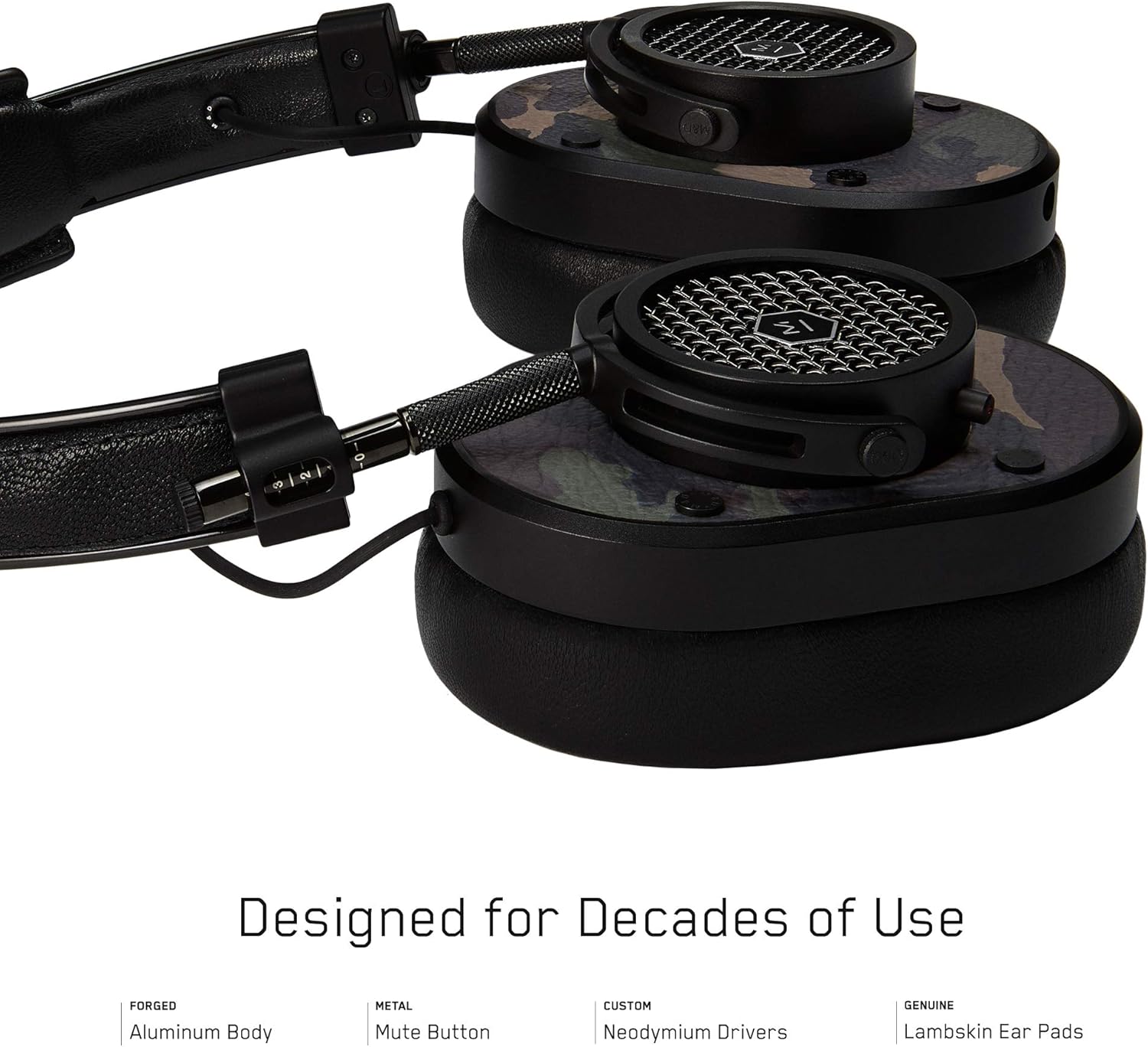
Figura 2: Detallada view of the MH40 headphone earcups, highlighting the lambskin ear pads, metal grille, and adjustable hinge.
Configuració
1. Ajust de l'ajust
- Gently extend or retract the metal arms on each side of the headband to adjust the height.
- Position the earcups so they fully cover your ears, ensuring a comfortable and secure fit.
- The lambskin ear pads are designed to conform to your head shape for optimal sound isolation and comfort.
2. Connexió per cable
- Locate the audio input port on the left earcup.
- Insert one end of the provided audio cable into the headphone's audio input.
- Connect the other end of the audio cable to your audio device's 3.5mm jack.
3. Bluetooth Pairing (Wireless Connection)
The MH40 headphones support Bluetooth connectivity for wireless audio. Ensure the headphones are charged before pairing.
- Encès: Press and hold the power button (usually located on one of the earcups) until the indicator light flashes.
- Mode de sincronització: Continue holding the power button or press a dedicated Bluetooth pairing button (if available) until the indicator light flashes rapidly, indicating pairing mode.
- Connexió del dispositiu: On your audio device (smartphone, tablet, computer), navigate to Bluetooth settings and select "MH40" from the list of available devices.
- Confirmació: The indicator light on the headphones will turn solid blue or green once successfully paired.
Note: The Bluetooth range is approximately 10 meters (33 feet).
Instruccions de funcionament
Reproducció d'àudio
- Reproduir/pausa: Press the multi-function button (often on the in-line microphone or earcup) once.
- Pista següent: Press the multi-function button twice rapidly.
- Pista anterior: Press the multi-function button three times rapidly.
- Control de volum: Use the volume up/down buttons on the in-line microphone or dedicated earcup controls.
Gestió de trucades
- Respondre/Finalitzar la trucada: Premeu el botó multifunció una vegada.
- Rebutja la trucada: Premeu i manteniu premut el botó multifunció durant aproximadament 2 segons.
- Silenciar el micròfon: The MH40 features a dedicated mute button, typically located on the earcup or in-line control. Press to mute/unmute during a call.
Manteniment
- Neteja: Use a soft, dry cloth to wipe the headphones. For leather parts, use a specialized leather cleaner if necessary. Avoid harsh chemicals or abrasive materials.
- Emmagatzematge: When not in use, store the headphones in the provided canvas carrying case to protect them from dust and scratches.
- Cura del cable: Handle cables gently. Avoid sharp bends or excessive pulling to prevent damage. The retractable cable feature helps manage cable length.
- Coixinets per a les orelles: The magnetic ear pads are removable for cleaning or replacement. Gently pull them off and reattach by aligning the magnets.
Resolució de problemes
Sense so
- Amb cable: Ensure the audio cable is securely connected to both the headphones and the audio source. Check the volume level on both the headphones and the source device.
- Bluetooth: Verify that the headphones are powered on and successfully paired with your device. Check the volume levels. Try re-pairing the headphones.
No es pot emparellar per Bluetooth
- Ensure the headphones are in pairing mode (rapidly flashing indicator light).
- Assegureu-vos que el Bluetooth estigui activat al dispositiu font.
- Acosta els auriculars al dispositiu (a menys de 10 metres).
- Turn off and on both the headphones and your device, then attempt pairing again.
- If previously paired, try "forgetting" the device on your source and re-pairing.
El micròfon no funciona
- Check if the microphone mute button is engaged.
- Ensure the audio cable with the in-line microphone is fully inserted.
- Verifiqueu la configuració d'entrada de micròfon al dispositiu connectat.
Especificacions
| Nom del model | MH40 |
| Tecnologia de connectivitat | Cablejat, Bluetooth |
| Tecnologia de comunicació sense fils | Bluetooth |
| Material | Copper (components), Lambskin (ear pads), Canvas (carrying case) |
| Tipus de control | Control de trucades, tàctil |
| Característica del cable | Retractable |
| Pes de l'article | 0.36 quilograms (12.7 unces) |
| Tipus de controlador d'àudio | Conductor dinàmic |
| Interval Bluetooth | 10 metres |
| Forma de l'auricular | Sobre l'orella |
| Característiques especials | Carrying case included, Lightweight, Microphone Included, Noise Isolation, Wireless |
| Dimensions del producte | 7.48 x 6.3 x 2.76 polzades |
| Fabricant | MASTER & DYNAMIC |
| Color | Black Metal / Camo Leather |
| Col·locació de l'orella | Sobre l'orella |
| Control de soroll | Aïllament acústic |
| UPC | 858901007099 |
Garantia i Suport
For detailed warranty information and customer support, please refer to the official MASTER & DYNAMIC weblloc web o contacteu directament amb el servei d'atenció al client. Conserveu el comprovant de compra per a reclamacions de garantia.
Assistència en línia: www.masterdynamic.com/support (Exampl'enllaç, l'enllaç real pot variar)


