1. Introducció
This manual provides comprehensive instructions for the assembly, operation, and maintenance of your Zinus Tresa Metal Desk with Storage and Monitor Stand, Large. Designed for home office or den use, this desk features a durable metal frame, an espresso wood-like finish tabletop, a movable monitor stand, a hanging hook, a side storage tray, and a built-in cable organizer. Please read all instructions carefully before assembly and use to ensure proper function and safety.

Figure 1: Zinus Tresa Metal Desk, Large. This image shows the assembled desk with a monitor, lamp, and small plant, highlighting its functional design.
2. Informació de seguretat
Si us plau, observeu les següents pautes de seguretat per evitar lesions o danys al producte:
- Always assemble the desk according to the provided instructions.
- Do not exceed the weight limit of 100 lliures (45 kg).
- Ensure the desk is stable and secure before use.
- Keep the work area clear of obstacles to prevent accidents.
- No us poseu drets ni asseguts a l'escriptori.
- Mantingueu les peces petites allunyades dels nens durant el muntatge.
3. Contingut del paquet
Verifiqueu que tots els components siguin presents abans de començar el muntatge. Si falta alguna peça o hi ha alguna peça danyada, poseu-vos en contacte amb el servei d'atenció al client.

Figure 2: Product Packaging. The desk components are efficiently packed in one compact box for shipping.
Components inclosos:
- Desk Tabletop (Espresso Finish)
- Desk Legs and Frame (Steel)
- Suport de monitor
- Side Storage Tray
- Ganxo per penjar
- Cable Management Organizer
- Maquinari de muntatge (cargols, perns, etc.)
- Assembly Tools (ratchet tool)
- Manual d'instruccions
4. Instruccions de muntatge
Assembly is designed to be straightforward and typically takes under 30 minutes with one person. All necessary tools are included.
- Desempaquetar components: Traieu amb cura totes les peces de l'embalatge i col·loqueu-les sobre una superfície neta i suau per evitar ratllades. Verifiqueu que totes les peces estiguin presents amb la llista de contingut del paquet.
- Fixar les potes al marc: Securely attach the desk legs to the main frame using the provided hardware. Ensure all connections are tight but do not overtighten.
- Muntar sobretaula: Carefully place the tabletop onto the assembled frame. Align the pre-drilled holes and secure the tabletop using the designated screws.
- Instal·lació d'accessoris: Attach the monitor stand, side storage tray, hanging hook, and cable organizer to their respective positions as indicated in the detailed assembly diagram (refer to the included printed manual for specific diagrams).
- Comprovació final: Once assembled, gently lift and move the desk to its desired location. Ensure all connections are secure and the desk is stable before placing any items on it.
5. Ús
Suport de monitor
The movable monitor stand helps elevate your screen to an ergonomic height, reducing neck and back strain. It can be positioned anywhere on the desk surface to suit your setup.
Side Storage Tray
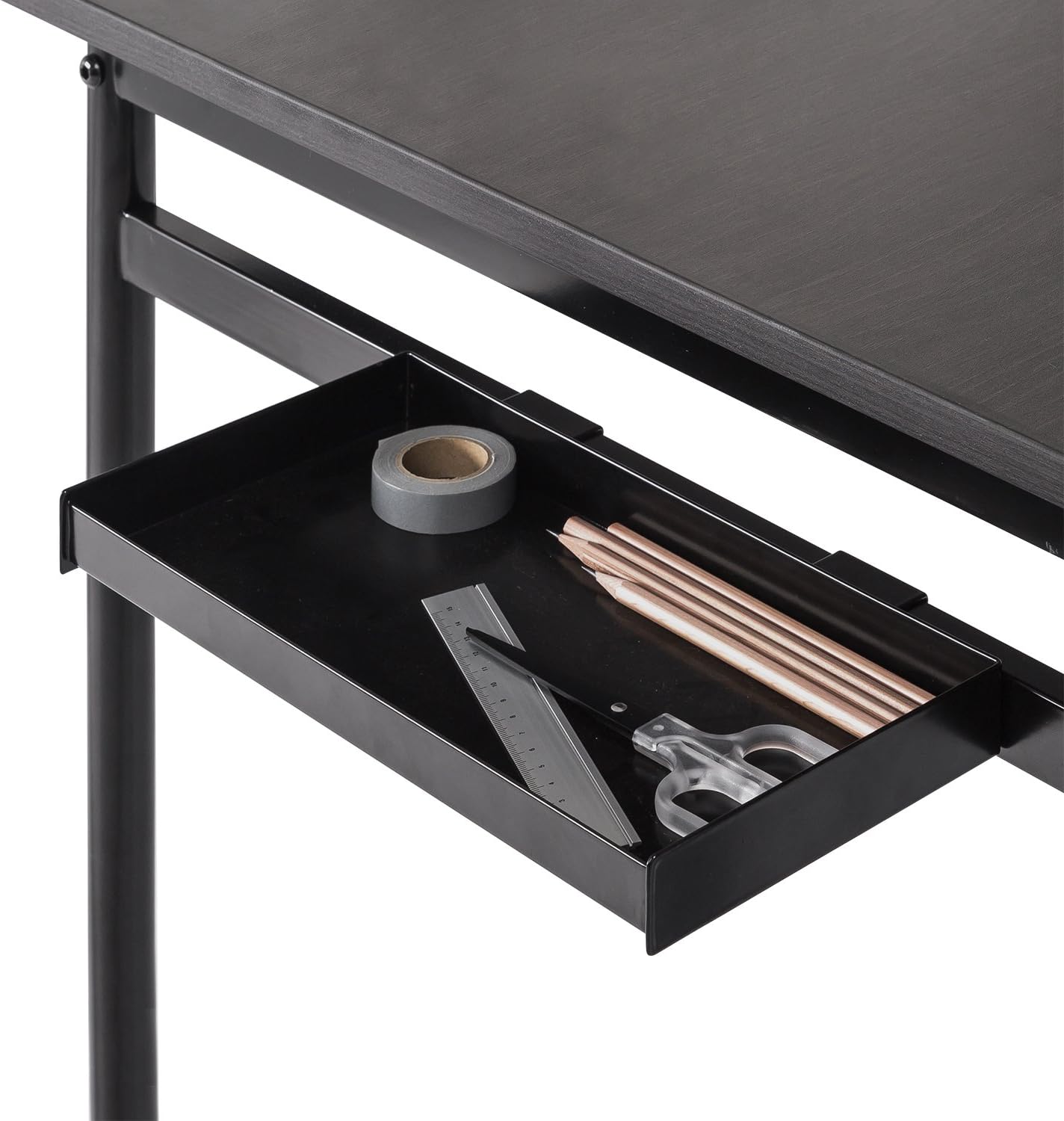
Figure 3: Side Storage Tray. This tray provides convenient access for small office supplies like pens, pencils, and rulers.
The integrated side storage tray is ideal for keeping small office essentials, such as pens, pencils, and other accessories, within easy reach.
Ganxo per penjar

Figure 4: Hanging Hook. A bag is shown hanging from the hook, demonstrating its use for personal items.
Utilize the hanging hook to keep bags, headphones, or other items off the floor and within easy access, helping to maintain a tidy workspace.
Cable Management Organizer

Figure 5: Cable Management Organizer. This image illustrates how cables can be routed through the organizer to keep them neat and prevent tangling.
The built-in cable organizer helps manage and route power cords and other cables, preventing clutter and ensuring a clean, organized desk surface.
6. Manteniment
To maintain the appearance and longevity of your Zinus Tresa Metal Desk, follow these simple care instructions:
- Neteja: Netegeu les superfícies de l'escriptori amb anuncisamp drap. Eviteu utilitzar productes químics agressius o netejadors abrasius, que poden danyar l'acabat.
- Inspecció: Reviseu periòdicament tots els cargols i connexions per assegurar-vos que romanen ajustats. Torneu a apretar-los si cal.
- Eviteu l'excés d'humitat: No exposeu l'escriptori a una humitat excessiva ni a la llum solar directa durant períodes prolongats.
7. Solució De Problemes
Si teniu algun problema amb el vostre escriptori, consulteu les solucions habituals següents:
- L'escriptori és tambaleant: Ensure all bolts and screws are securely tightened. Check that the desk is on a level surface. If the floor is uneven, consider using furniture pads to stabilize.
- Peces que falten: If any parts were missing upon unboxing, please contact Zinus customer support immediately for assistance.
- Danys durant el muntatge: If a part was damaged during assembly, cease assembly and contact customer support.
8. Especificacions

Figure 6: Desk Dimensions. This image provides a visual representation of the desk's key measurements in centimeters.
| Característica | Detall |
|---|---|
| Marca | Zinus |
| Nom del model | Tresa |
| Número de model | OLB-DS-PL55 |
| Dimensions del producte (L x A x A) | 55"D x 22.53"W x 32.52"H (approx. 139.7 cm x 57.2 cm x 82.6 cm) |
| Pes de l'article | 53.73 lliures (aprox. 24.37 kg) |
| Recomanació de pes màxim | 100 lliures (aprox. 45 kg) |
| Tipus de material | Fusta dissenyada, Acer |
| Tipus d'acabat | Steel frame, Espresso wood-like tabletop |
| Característiques especials | Adjustable Monitor Stand, Side Storage Tray, Hanging Hook, Cable Organizer |
| Muntatge obligatori | Yes (Tools included, 1 person recommended) |
| Tipus d'habitació | Dormitory, Office, Study Room |
9. Garantia i assistència
Informació de la garantia
The Zinus Tresa Metal Desk is covered by a 1 anys de garantia sense preocupacions des de la data de compra. Aquesta garantia cobreix els defectes de fabricació en materials i mà d'obra. Si us plau, conserveu el comprovant de compra per a reclamacions de garantia.
Atenció al client
For any questions, missing parts, or warranty claims, please contact Zinus customer support. Refer to the contact information provided in your product packaging or visit the official Zinus weblloc d'assistència.


