1. Introducció
Thank you for choosing the NPET K80 TKL Tenkeyless Gaming Keyboard. This manual provides detailed instructions for setting up, operating, and maintaining your new mechanical keyboard. Designed for optimal gaming and typing performance, the K80 features a compact layout, responsive red mechanical switches, and customizable RGB backlighting.
2. Contingut del paquet
Si us plau, verifiqueu que tots els elements siguin presents al vostre paquet:
- NPET K80 TKL Tenkeyless Gaming Keyboard
- Manual d'usuari (aquest document)
- Extractor de tecles
3. Producte acabatview
The NPET K80 is an 89-key tenkeyless mechanical keyboard engineered for durability and performance. Its compact design saves desk space while providing a full range of essential keys.

Figura 3.1: Acabatview of the NPET K80 TKL Gaming Keyboard, showcasinla seva disposició compacta de 89 tecles i la retroiluminació RGB.
3.1 Característiques clau
- 89-Key TKL Design: Ultra-portable compact layout, freeing up desk space for mouse movement.
- Linear & Quiet Red Mechanical Switches: Guaranteed for 50 million key presses, offering smooth, linear travel without a tactile bump for fast actuation and quiet operation.
- Anti-ghosting i rollover de N-Key: All 89 mechanical keys are conflict-free, ensuring every keystroke is registered accurately during intense gaming sessions.
- 21 RGB Backlight Modes: Customizable lighting with 5 brightness levels and adjustable breathing speed. Includes 3 customizable Chroma RGB modes, 2 gaming modes (RTS/FPS), and 1 office mode.
- Construcció duradora: Built with metal alloy and ABS material, featuring plate-mounted mechanical keys and switches for enhanced longevity.
- Disseny ergonòmic: Features anti-slip feet, foldable stands, and a stepped keycap layout for comfortable use during extended periods.

Figura 3.2: The compact 89-key layout, including integrated number keys, designed to optimize desk space.
The 89-key layout provides essential functionality in a smaller footprint, making it ideal for gaming setups where desk space is at a premium.

Figura 3.3: Primer pla view of the high-precision red mechanical key switches, known for their linear and quiet operation.
The red mechanical switches provide a smooth, consistent keystroke without a tactile bump, making them ideal for rapid key presses in gaming and comfortable typing in office environments.

Figura 3.4: Illustration of the ergonomic design, including stepped keycap layout, foldable stand, and anti-slip feet for improved comfort.
The keyboard's ergonomic design, including adjustable feet and a stepped keycap profile, is intended to reduce hand fatigue during prolonged use.

Figura 3.5: View highlighting the robust metal and ABS construction of the keyboard, ensuring durability.
Constructed from a combination of metal alloy and high-quality ABS plastic, the K80 keyboard is built to withstand demanding usage.
4. Configuració
The NPET K80 keyboard is designed for simple plug-and-play operation.
- Desembaleu el teclat del seu embalatge.
- Connecteu el cable USB del teclat a un port USB disponible de l'ordinador.
- Your operating system (Windows, Mac OS, etc.) will automatically detect and install the necessary drivers. No additional software or drivers are required.
- El teclat ja està llest per utilitzar-lo.
5. Instruccions de funcionament
This section details the various functions and customization options available on your NPET K80 keyboard.
5.1 Control de retroiluminació RGB
The K80 features 21 distinct RGB lighting modes, adjustable brightness, and breathing speed. All lighting controls are managed directly from the keyboard using the Fn clau en combinació amb altres tecles.
- Fn + Scroll Lock (Scrlk): Cycle through 21 different RGB backlight modes.
- Fn + Up Arrow (PgUp): Increase backlight brightness (5 levels).
- Fn + Down Arrow (PgDn): Decrease backlight brightness (5 levels).
- Fn + Left Arrow (Home): Decrease breathing/animation speed.
- Fn + Right Arrow (End): Increase breathing/animation speed.
- Fn + Impr Pant: Turn full keyboard light on/off.

Figura 5.1: Visual guide to RGB backlight controls, showing key combinations for modes, brightness, and speed adjustments.
The image above illustrates the key combinations for adjusting the RGB lighting effects, including cycling through modes and controlling brightness and speed.
5.2 Dreceres multimèdia
Access common multimedia functions using the Fn key in combination with the F-keys.
| Combinació de tecles | Funció |
|---|---|
| Fn + F1 | El meu ordinador |
| Fn + F2 | Cerca |
| Fn + F3 | Calculadora |
| Fn + F4 | Reproductor multimèdia |
| Fn + F5 | Pista anterior |
| Fn + F6 | Pista següent |
| Fn + F7 | Reproduir/Pausa |
| Fn + F8 | Atureu-vos |
| Fn + F9 | Silenciar |
| Fn + F10 | Baixa el volum |
| Fn + F11 | Puja el volum |
| Fn + F12 | Correu electrònic |
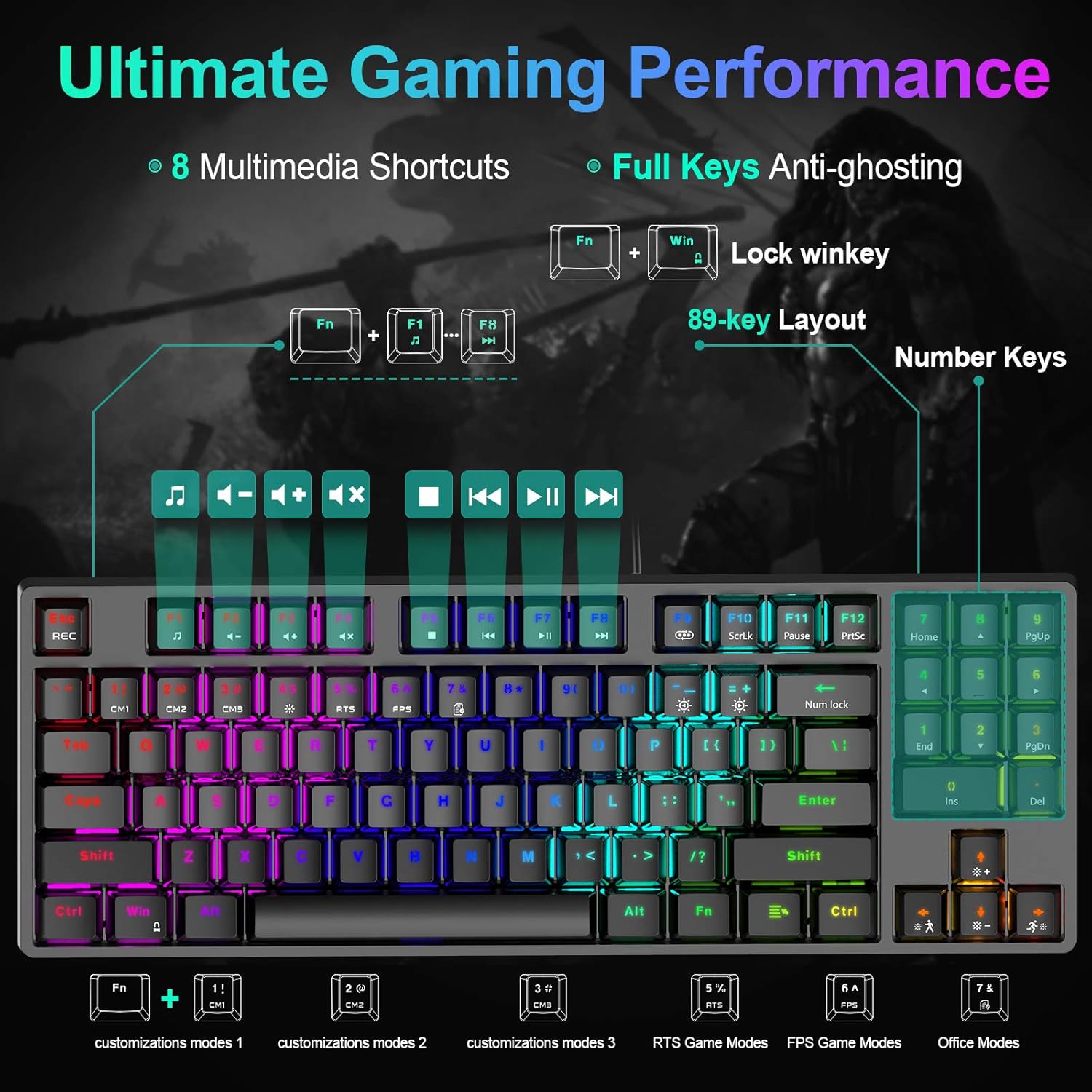
Figura 5.2: Diagram illustrating the multimedia shortcuts and dedicated gaming/office modes accessible via Fn key combinations.
This image provides a visual reference for the multimedia functions and the various customizable modes available on the keyboard.
5.3 Gaming and Office Modes
The keyboard offers specialized modes for gaming and office use, along with customizable lighting profiles.
- Fn + 1! (Customization Mode 1): Activates a customizable RGB lighting profile.
- Fn + 2@ (Customization Mode 2): Activates a second customizable RGB lighting profile.
- Fn + 3# (Customization Mode 3): Activates a third customizable RGB lighting profile.
- Fn + 4$ (RTS Game Mode): Optimizes lighting for Real-Time Strategy games.
- Fn + 5% (FPS Game Mode): Optimizes lighting for First-Person Shooter games.
- Fn + 6^ (Office Mode): Provides a suitable lighting profile for office work.
- Fn + Win Key: Locks/unlocks the Windows key to prevent accidental presses during gaming.
6. Manteniment
Un manteniment adequat garanteix la longevitat i el rendiment del teclat.
- Neteja: Use a soft, dry cloth to wipe the surface of the keyboard. For deeper cleaning, you may use a keycap puller (included) to remove keycaps and clean dust or debris with compressed air or a small brush. Ensure the keyboard is disconnected from your computer before cleaning.
- Eviteu líquids: No exposeu el teclat a líquids. En cas de vessaments accidentals, desconnecteu immediatament el teclat i deixeu-lo assecar completament abans de tornar-lo a connectar.
- Emmagatzematge: Guardeu el teclat en un lloc fresc i sec, allunyat de la llum solar directa i de temperatures extremes.

Figura 6.1: Illustration of the precision-engineered keycaps, designed for clear backlighting and durability against wear.
The keycaps are designed for durability, but regular cleaning helps maintain their appearance and functionality.
7. Solució De Problemes
If you encounter issues with your NPET K80 keyboard, please refer to the following solutions:
| Problema | Possible solució |
|---|---|
| El teclat no respon. |
|
| La retroiluminació no funciona o és tènue. |
|
| Algunes tecles no responen. |
|
| La tecla Windows està desactivada. |
|
8. Especificacions
| Característica | Detall |
|---|---|
| Número de model | K80 |
| Tipus de teclat | 80% TKL Mechanical Gaming Keyboard |
| Tipus de canvi | Linear & Quiet Red Mechanical Switches |
| Recompte de claus | 89 claus |
| Llum de fons | RGB (21 modes, 5 brightness levels, adjustable speed) |
| Connectivitat | Cable USB |
| Material | Metal Alloy, ABS |
| Dimensions (L x A x A) | 14.09 x 5.11 x 1.57 polzades (35.8 x 13 x 4 cm) |
| Pes de l'article | 1.32 lliures (0.6 kg) |
| Durada de la pulsació de tecles | 50 milions |
| Sistema operatiu compatible | Windows 10, 8, 7, XP, VISTA, Mac OS |

Figura 8.1: Physical dimensions of the NPET K80 keyboard, showing its compact size.
The compact dimensions of the K80 make it suitable for various desk setups and portability.
9. Garantia i Suport
NPET products are designed for reliability and performance. For warranty information and technical support, please refer to the official NPET weblloc web o contacteu directament amb el servei d'atenció al client. Conserveu el rebut de compra com a comprovant de compra per a reclamacions de garantia.
Per obtenir més ajuda, visiteu: NPET Official Store on Amazon


