Introducció
This manual provides essential instructions for the safe and effective use of your YISSVIC Baby Monitor Additional Camera Unit. Please read this manual thoroughly before operation and retain it for future reference.
Producte acabatview
The YISSVIC Baby Monitor system allows for remote monitoring of your child with features such as two-way audio communication and night vision. This document specifically covers the additional camera unit (Model B078JMPM4F) which can be paired with a compatible YISSVIC monitor.
Components
- YISSVIC Baby Monitor Camera Unit (Model B078JMPM4F)
- Adaptador d'alimentació
- (Note: Monitor unit sold separately or as part of a complete set)
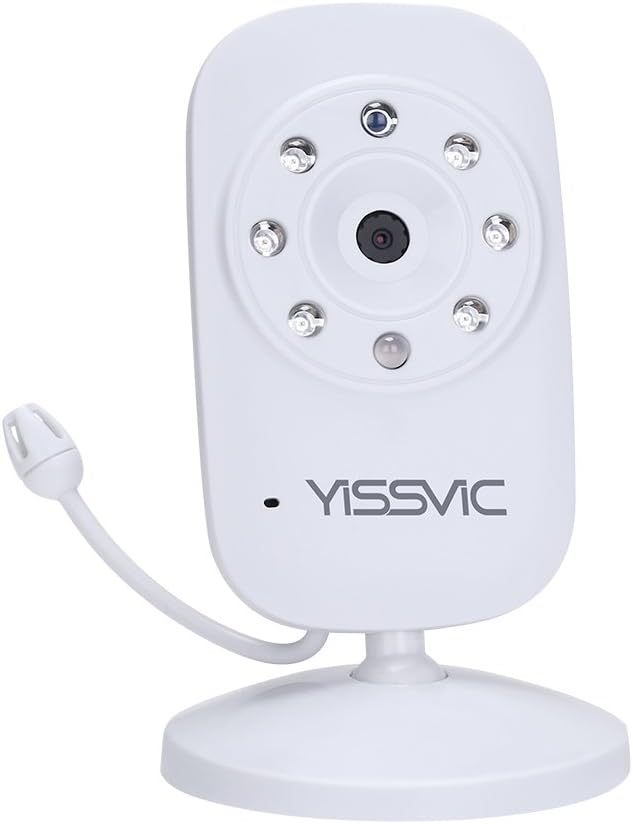
Imatge 1: YISSVIC Baby Monitor Camera Unit. This image displays the standalone camera unit, highlighting its compact design and the lens with surrounding infrared LEDs for night vision. A flexible antenna is visible on the side.

Imatge 2: YISSVIC Baby Monitor Camera and Monitor Set. This image shows both the camera unit and the handheld monitor, illustrating how they work together. The monitor displays a live feed of a sleeping baby.
Instruccions de configuració
This section outlines the steps to pair your additional camera unit with your existing YISSVIC monitor. Ensure both the monitor and camera are powered on before proceeding.
- Encès: Connect the monitor and the camera unit(s) to their respective power adapters and turn them on.
- Initiate Pairing on Monitor: Press the left menu button on the monitor. Navigate to the pairing option (typically the second to last option in the menu). Press the OK button to start the pairing process.
- Activate Pairing on Camera: While the monitor is searching, press and hold the pair button located on the back of the camera unit for a few seconds. Release the button once the camera successfully pairs with the monitor.
- Maridatge complet: Press the left menu button on the monitor again to exit the pairing menu and finalize the process.
- Switch Cameras (if multiple): If you have multiple cameras paired, press the OK button on the monitor to switch between the camera feeds.
Vídeo 1: YISSVIC Baby Monitor Features Overview. This video demonstrates various functionalities of the YISSVIC baby monitor system, including ECO sound recognition, 2x zoom, temperature display, two-way audio communication, built-in lullabies, and night vision. It shows a parent monitoring a baby in a crib from different rooms and activities.
Instruccions de funcionament
Característiques principals:
- Àudio bidireccional: Use the microphone button on the monitor to speak to your baby through the camera unit.
- Visió nocturna: The camera automatically activates infrared night vision in low-light conditions, providing a clear black and white image.
- ECO Mode (Sound Recognition): The monitor can be set to ECO mode, where the screen and audio remain off until sound is detected from the baby's room, conserving battery.
- Visualització de la temperatura: The monitor displays the room temperature detected by the camera unit.
- Funció de zoom: Magnify the image on the monitor for a closer view del teu nadó.
- Cançons de bressol: Play built-in lullabies from the monitor to soothe your baby.
- Multiple Camera Support: Connect and switch between up to four camera units (additional cameras sold separately).

Imatge 3: YISSVIC Baby Monitor with Multiple Camera Views. This image illustrates the monitor displaying feeds from multiple cameras simultaneously, showing different rooms in a household. This feature allows monitoring of various areas.

Imatge 4: YISSVIC Baby Monitor Use Cases. This image shows various scenarios where the baby monitor can be used, including monitoring a sleeping baby, a child playing alone, elderly care, and even pet monitoring, highlighting its versatility.
Manteniment
- Neteja: Feu servir un drap suau i sec per netejar la lent de la càmera i la pantalla del monitor. No utilitzeu productes de neteja abrasius ni dissolvents.
- Emmagatzematge: If storing the unit for an extended period, ensure it is clean, dry, and stored in a cool, dark place.
- Cura de la bateria: For the monitor unit (if applicable), follow battery care guidelines to maximize lifespan. Avoid extreme temperatures.
Resolució de problemes
| Problema | Causa possible | Solució |
|---|---|---|
| Sense imatge/senyal al monitor |
|
|
| Mala qualitat d'imatge |
|
|
| Sense so ni amb una mala qualitat de so |
|
|
Especificacions
- Marca: YISSVIC
- Model: B078JMPM4F (Additional Camera Unit)
- Tecnologia de connectivitat: Sense fil
- Característica especial: Visió nocturna
- Protocol de connexió: ONVIF (Note: This protocol is typically associated with IP cameras; for a closed baby monitor system, it may refer to an internal or proprietary protocol.)
- Pes de l'article: 210 g
- Dimensions del paquet: 18.2 x 8.8 x 7.1 cm
- Ús recomanat: Baby Monitor, Night Vision
Garantia i Suport
Informació de la garantia
This YISSVIC product is typically covered by a 24-month warranty from the date of purchase. Please refer to your purchase documentation or contact YISSVIC customer support for specific warranty terms and conditions.
Atenció al client
For technical assistance, troubleshooting, or warranty claims, please contact YISSVIC customer support. Contact details can usually be found on the product packaging or the official YISSVIC weblloc.


