1. Introducció
This manual provides detailed instructions for the installation, operation, and maintenance of the Aiphone IX-MV IP Direct Video Master Station. Please read this manual thoroughly before using the product to ensure correct operation and to prevent damage.
2. Informació de seguretat
Observe the following safety precautions to ensure safe and reliable operation:
- No exposeu la unitat a l'aigua ni a una humitat excessiva.
- No intenteu obrir ni reparar la unitat vosaltres mateixos. Encarregueu tot el manteniment a personal qualificat.
- Ensure the power source (Ethernet-based PoE) meets the specified requirements.
- Mantingueu la unitat allunyada de la llum solar directa i de les fonts de calor.
3. Producte acabatview
The Aiphone IX-MV is an IP Direct Video Master Station designed for advanced communication and security applications. It features a video display, a numeric keypad, and dedicated function buttons for various operations.
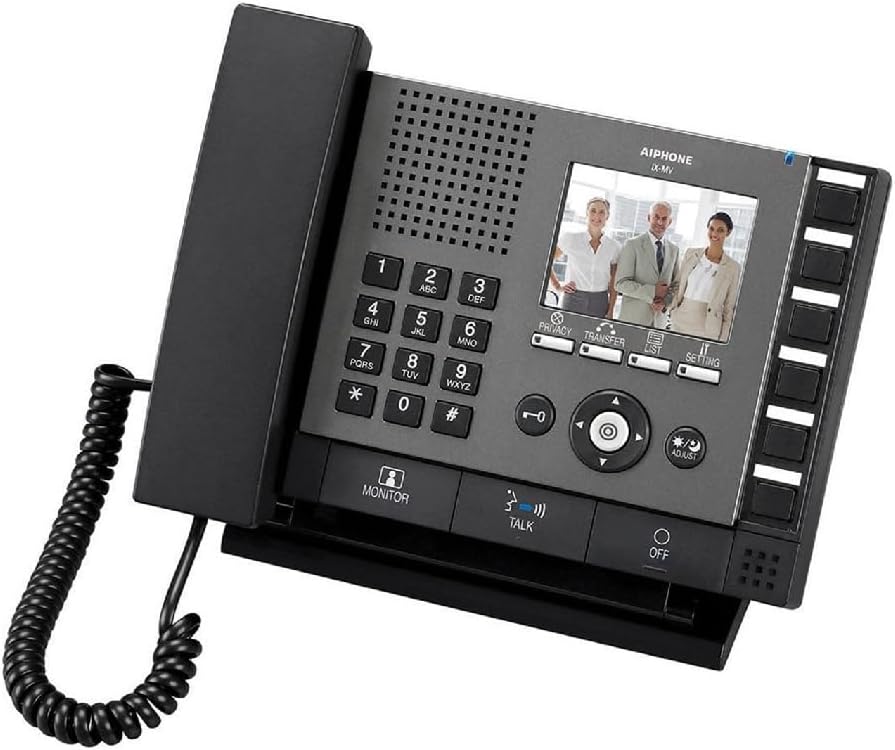
Figure 3.1: Aiphone IX-MV IP Direct Video Master Station
This image displays the Aiphone IX-MV unit, a black IP video master station. It features a traditional telephone handset on the left, connected by a coiled cord. The main console includes a numeric keypad (0-9, *, #), a speaker grille, and a color LCD screen showing three people. Below the screen are control buttons for 'PRIVACY', 'TRANSFER', 'LIST', and 'SETTING'. A central navigation cluster with directional arrows and an 'OK' button is present, along with 'ADJUST' and 'MONITOR' buttons. At the bottom, there are 'TALK' and 'OFF' buttons. On the right side, there is a column of unlabeled programmable buttons.
3.1 Components clau
- Auricular: For private audio communication.
- Teclat numèric: Used for dialing and data entry.
- Pantalla LCD: Displays video feeds, menus, and status information.
- Botons de funció: Dedicated buttons for Privacy, Transfer, List, Setting, Monitor, Talk, and Off.
- Botons de navegació: Per a la navegació i selecció de menús.
- Botons programables: Located on the right side, these can be configured for quick access to specific functions or contacts.
4. Configuració
4.1 Contingut del paquet
- Aiphone IX-MV IP Direct Video Master Station
- Auricular amb cable en espiral
- Mounting bracket (if applicable, not explicitly stated but common)
- Guia d'inici ràpid (no inclosa en aquest manual)
4.2 Instal·lació
- Muntatge: Securely mount the master station in a suitable location, typically on a desk or wall using the provided bracket.
- Connexió de xarxa: Connect an Ethernet cable from your network switch (with PoE support) to the LAN port on the back of the IX-MV unit. The unit is Ethernet-based for power.
- Connexió del telèfon: Plug the coiled cord of the handset into the designated port on the side of the unit.
- Encès: Once connected to a PoE-enabled network, the unit will power on automatically.
- Configuració inicial: Refer to the network administrator guide for initial IP address configuration and system integration.
5. Instruccions de funcionament
5.1 Fer una trucada
- Aixequeu el telèfon o premeu PARLAR botó.
- Dial the desired extension or station number using the numeric keypad.
- Premeu el botó PARLAR button again to initiate the call, or wait for automatic connection if configured.
- Per finalitzar la trucada, pengeu l'auricular o premeu la tecla OFF botó.
5.2 Recepció d'una trucada
- When the unit rings, lift the handset or press the PARLAR botó per respondre.
- Per finalitzar la trucada, pengeu l'auricular o premeu la tecla OFF botó.
5.3 Monitorització de vídeo
- Premeu el botó MONITOR botó per view video from a designated camera or door station.
- Use the navigation buttons to switch between different camera feeds if multiple are configured.
- Premeu MONITOR again to exit monitoring mode.
5.4 Ajustar la configuració
- Premeu el botó CONFIGURACIÓ button to access the system menu.
- Use the navigation buttons to scroll through options and the central OK botó per seleccionar.
- El AJUSTAR button may be used for quick adjustments like volume or brightness, depending on context.
- Refer to the system administration guide for advanced configuration options.
6. Manteniment
- Neteja: Netegeu la unitat amb un drap suau i sec. Per a la brutícia resistent, utilitzeu un drap lleugerament sec.amp drap amb sabó suau i després eixugueu-lo. No utilitzeu productes de neteja abrasius ni dissolvents.
- Cable del telèfon: Periodically check the coiled cord for any signs of wear or damage.
- Actualitzacions de programari: Ensure the unit's firmware is kept up-to-date as recommended by Aiphone. This typically requires network administrator intervention.
7. Solució De Problemes
| Problema | Causa possible | Solució |
|---|---|---|
| Sense energia a la unitat. | Ethernet cable disconnected or no PoE from network switch. | Check Ethernet cable connection. Verify network switch provides PoE. |
| No es poden fer ni rebre trucades. | Incorrect network configuration or system error. | Verify network settings. Contact your system administrator. |
| No video displayed. | Camera not connected, configured incorrectly, or network issue. | Check camera connections and configuration. Ensure network connectivity. |
| La qualitat de l'àudio és deficient. | Loose handset connection, network interference, or volume setting. | Ensure handset cord is securely plugged in. Check network for interference. Adjust volume using the AJUSTAR button or settings menu. |
8. Especificacions
- Marca: Aiphone
- Model: IX-MV
- Color: Negre
- Tipus de telèfon: Cordat
- Font d'alimentació: Ethernet-based (PoE - Power over Ethernet)
- Tipus de marcador: Marcació per tons
- Tipus de contestador: Digital
- Pes de l'article: 3.3 lliures (aproximadament 1.5 kg)
- Dimensions del paquet: 10.16 x 9.21 x 3.54 polzades (25.8 x 23.4 x 9 cm)
- Dispositius compatibles: Networks, computer systems, and other communication devices supporting Web, SNMP, Telnet protocols and 802.3af PoE power standard.
- Operació multilínia: Operació d'una sola línia
- Identificació de la persona que truca: Sí
- Primera data disponible: 17 d'abril de 2016
9. Garantia i Suport
For warranty information and technical support, please refer to the official Aiphone website or contact your authorized Aiphone dealer. Keep your purchase receipt as proof of purchase for warranty claims.
Aiphone Official Weblloc: www.aiphone.com


