1. Producte acabatview
The Zoom H1n Handy Recorder (2018 Model) is a compact and versatile audio recording device designed for musicians, podcasters, filmmakers, and content creators. It features a streamlined body with a matte finish and a newly designed protective mic enclosure, making it ideal for on-the-go recording. With its intuitive controls and high-quality built-in microphones, the H1n provides excellent audio capture for various applications.

Figura 1: Frontal view of the Zoom H1n Handy Recorder, showcasing its compact design and built-in X/Y stereo microphones.
2. Què hi ha a la caixa
Upon unboxing your Zoom H1n Handy Recorder, please ensure all the following items are present:
- Zoom H1n Handy Recorder Unit
- 2 x AAA Batteries (for immediate use)
- Manual d'usuari (PDF disponible en línia)
Note: A microSD card is required for recording and is not included with the unit. Please purchase one separately (up to 32GB capacity recommended).
3. Configuració inicial
3.1. Instal·lació de bateries
- Locate the battery compartment on the back of the H1n unit.
- Obriu la tapa del compartiment de la bateria.
- Insert the two AAA batteries, ensuring correct polarity (+/-) as indicated inside the compartment.
- Tanqueu bé la tapa del compartiment de la bateria.

Figura 2: posterior view of the Zoom H1n, showing the battery compartment and overall compact size.
3.2. Inserció d'una targeta microSD
- Locate the microSD card slot on the side of the H1n.
- Gently insert a formatted microSD card (up to 32GB) into the slot until it clicks into place.
- Per treure-la, empenyeu lleugerament la targeta fins que surti.
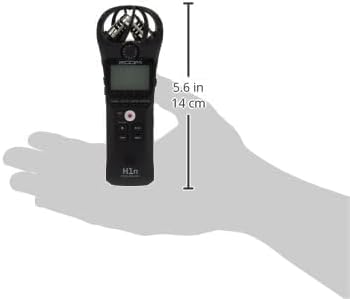
Figura 3: lateral view of the Zoom H1n, highlighting the microSD card slot and other side controls.
3.3. Encès / apagat
To power on the device, slide the power switch to the ON position. To power off, slide the switch to the OFF position and hold until the display turns off.
4. Funcionament bàsic
4.1. Gravació d'àudio
- Ensure batteries and a microSD card are installed.
- Power on the H1n.
- Adjust the input level using the VOLUM dial on the side to prevent clipping (distortion). The display will show input levels.
- Premeu el gran REC button (red circle) to start recording. The REC indicator will light up.
- Premeu el botó REC button again to pause recording.
- Premeu el botó STOP button (square) to stop recording and save the file.

Figure 4: Close-up of the Zoom H1n's display and main control buttons, including REC, STOP, and playback controls.
4.2. Reproducció
- Premeu el botó REPRODUCCIÓ/PAUSA button (triangle/two vertical bars) to begin playback of the last recorded file.
- Utilitza el REBOBINAR i AVANT RÀPID botons per navegar entre files.
- Adjust playback volume using the VOLUM marcar.
- Connecteu els auriculars al LÍNIA OUT jack for private monitoring.
4.3. Connexió a un ordinador
The H1n can be connected to a computer via its USB port to transfer recorded files. It functions as a USB microphone or a card reader. Use a standard USB cable (not included) to connect the device to your computer.
5. Característiques clau
- Streamlined Body: Features a matte finish and a newly designed protective mic enclosure for durability and portability.
- Built-in Stereo Condenser Microphones: Utilizes 90-degree X/Y format for clear, wide-range stereo recording.
- One-touch Button Controls: Simplifies operation for quick recording and playback.
- Localized and Intuitive Menus: Easy navigation through settings for efficient use.
- Control de velocitat de reproducció: Allows adjustment of playback speed without changing pitch.
- Voice Emphasize Filter: Enhances vocal clarity for interviews o conferències.
- Stereo Overdubbing Functions: Enables layering of audio tracks for creative projects.
- Llarga vida útil de la bateria: Approximately 10 hours of continuous recording time using built-in mic (44.1 kHz/16-bit) with alkaline batteries.
6. Especificacions tècniques
| Atribut | Valor |
|---|---|
| Pes de l'article | 2.4 unces |
| Dimensions del producte | 5.4 x 1.9 x 1.2 polzades (1.5" de profunditat x 5.5" d'amplada x 1" d'alçada) |
| Número de model de l'article | H1n |
| Piles necessàries | 1 piles AA (es recomanen alcalines) |
| Nom del color | Negre |
| Dispositius compatibles | Portàtil |
| Tipus de connector | USB |
| Interfície del maquinari | USB |
| Format dels mitjans | WAV |
| Font d'alimentació | Funciona amb bateria |
| Mida de la pantalla de peu | 1.25 polzades |
| Factor de forma del micròfon | Integrat |
| Conector d'auriculars | 2.5 mil·límetres |
| Capacitat d'emmagatzematge de memòria | 32 GB (max SDHC) |
| Impedància d'entrada | 2 kΩ |
7. Solució De Problemes
7.1. Excessive Handling Noise
The H1n's lightweight plastic body can sometimes transmit handling noise to the sensitive built-in microphones. To minimize this:
- Hold the device as still as possible during recording.
- Consider using a shock mount if recording while moving or attaching to a camera.
- For outdoor use, a foam windscreen (not included) is highly recommended to reduce wind noise.
7.2. No Recording or File Not Saved
- Ensure a formatted microSD card is properly inserted.
- Check battery levels. Replace or recharge batteries if low.
- Verify that the device is not in USB mode (if connected to a computer).
7.3. Mala qualitat d'àudio
- Check the input level. If it's too high, audio may be distorted (clipping). Adjust the VOLUM dial down.
- If the level is too low, audio may be noisy. Increase the VOLUM marcar.
- Assegureu-vos que els micròfons no estiguin obstruïts.
- Consider the recording environment; excessive background noise will be captured.
8. Cura i Manteniment
- Neteja: Feu servir un drap suau i sec per netejar l'exterior de la unitat. No utilitzeu netejadors líquids ni dissolvents.
- Emmagatzematge: Store the H1n in a cool, dry place away from direct sunlight and extreme temperatures.
- Bateries: Traieu les piles si no heu d'utilitzar la unitat durant un període prolongat per evitar fuites.
- Micròfons: Avoid applying direct pressure or impact to the microphone capsules.
9. Garantia i Suport
For detailed warranty information, technical support, or further assistance, please refer to the official user manual provided with your product or visit the Zoom Official Store on Amazon.
An extended user manual in PDF format is available for download: Descarrega el manual d'usuari (PDF).


