Producte acabatview
The MOXA TCF-142-M-SC-T is a robust industrial-grade media converter designed to extend RS-232/422/485 serial communication over multi-mode optical fiber. This device is engineered to provide reliable data transmission in harsh environments, offering protection against electrical interference and chemical corrosion. It supports both "Ring" and "Point-to-Point" transmission modes, making it versatile for various industrial applications.
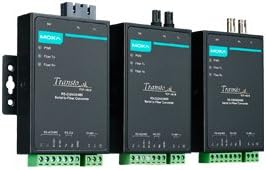
Image: Three MOXA TCF-142-M-SC-T media converters, showcasing their compact design and various port configurations. These devices facilitate the conversion of serial signals to optical fiber for extended range and noise immunity.
Característiques clau
- Versatile Transmission Modes: Supports both "Ring" and "Point-to-Point" transmission configurations for flexible network design.
- Rang de transmissió ampliat: Extends RS-232/422/485 transmission distances up to 5 km using multi-mode optical fiber.
- Integritat del senyal millorada: Significantly decreases signal interference, ensuring reliable data communication.
- High Baud Rate Support: Capable of supporting baud rates up to 921.6 kbps for high-speed data transfer.
- Protecció del medi ambient: Provides robust protection against electrical interference and chemical corrosion, suitable for industrial environments.
- Amplia temperatura de funcionament: Available in models designed for a wide operating temperature range of -40 to 75°C, ensuring performance in extreme conditions.
Especificacions tècniques
| Especificació | Detall |
|---|---|
| Marca | Moxa |
| Model | TCF-142-M-SC-T |
| Tipus de muntatge | Muntatge en rack |
| Nombre de pins | 29 |
| Tipus d'interfície | Òptic |
| Nombre de canals | 2 |
| UPC | 613739924259 |
| Fabricant | Moxa Inc. |
| Primera data disponible | 4 de gener de 2018 |
Configuració i instal·lació
Proper installation of the TCF-142-M-SC-T converter is crucial for optimal performance and longevity. Follow these guidelines for setup:
- Muntatge: The device is designed for rack mounting. Securely attach the converter to a standard equipment rack using appropriate mounting hardware. Ensure adequate ventilation around the unit.
- Connexió d'alimentació: Connect the power supply to the converter's power input. Verify that the power source matches the device's voltage requirements. The power indicator LED should illuminate upon successful connection.
- Connexió del port sèrie: Connect your RS-232, RS-422, or RS-485 serial device to the corresponding serial port on the converter. Ensure correct pin assignments for your specific serial standard. Refer to the device's pinout diagram for detailed connection information.
- Connexió de fibra òptica: Connect the multi-mode optical fiber cables to the SC connectors on the converter. Ensure that the transmit (Tx) port on one device is connected to the receive (Rx) port on the other, and vice-versa. Clean fiber optic connectors before insertion to prevent signal degradation.
- Configuration (if applicable): Depending on your application, you may need to configure DIP switches or software settings for specific serial modes (RS-232/422/485) or transmission modes (Point-to-Point/Ring). Consult the detailed product manual for configuration instructions.
Funcionament
Once installed and powered, the TCF-142-M-SC-T operates as a transparent media converter, extending your serial communication over fiber optic cables. Its primary function is to convert electrical serial signals into optical signals and vice versa.
Modes de transmissió:
- Mode punt a punt: In this mode, two TCF-142-M-SC-T converters are used to establish a direct fiber optic link between two serial devices. This is the most common setup for extending serial communication over long distances or in environments with high electromagnetic interference.
- Fiber Ring Mode: The TCF-142-M-SC-T supports fiber ring topologies, which provide redundancy and fault tolerance. In a ring setup, data can travel in both directions, ensuring communication continuity even if a single fiber link breaks. This mode requires specific configuration and is typically used in critical industrial control systems.
The converter automatically handles the baud rate conversion up to 921.6 kbps, ensuring seamless data flow between the serial and fiber interfaces. Monitor the status LEDs on the device to confirm power, serial data activity, and fiber link status.
Manteniment
The MOXA TCF-142-M-SC-T is designed for industrial environments and requires minimal maintenance. However, periodic checks can ensure its long-term reliability:
- Neteja: Keep the device free from dust and debris. Use a soft, dry cloth for external cleaning. For fiber optic connectors, use specialized fiber optic cleaning tools and procedures to prevent signal loss.
- Condicions ambientals: Ensure the operating environment remains within the specified temperature range (-40 to 75°C) and humidity levels. Avoid exposing the device to excessive moisture or corrosive substances.
- Integritat del cable: Periodically inspect all connected cables (power, serial, fiber) for any signs of damage, kinks, or loose connections. Replace damaged cables immediately.
- Actualitzacions de firmware: Check the Moxa official website periodically for any available firmware updates. Follow the manufacturer's instructions carefully when performing firmware upgrades.
Resolució de problemes
If you encounter issues with your TCF-142-M-SC-T converter, consider the following common troubleshooting steps:
- Sense energia:
- Verifiqueu que la font d'alimentació estigui connectada correctament i que proporcioni el volum correctetage.
- Check the power outlet and power cable for faults.
- Ensure the power indicator LED on the converter is illuminated.
- Sense comunicació en sèrie:
- Confirm that the serial cables are securely connected and correctly wired (Tx to Rx, Rx to Tx).
- Verify the serial port settings (baud rate, data bits, parity, stop bits) on your connected devices match.
- Check the serial data activity LEDs on the converter to see if data is being transmitted or received.
- No Fiber Link:
- Ensure fiber optic cables are properly connected to the SC ports and are not damaged.
- Verify that the fiber link LEDs on both converters are illuminated, indicating a successful optical connection.
- Clean the fiber optic connectors using appropriate cleaning tools.
- Confirm that the correct type of fiber (multi-mode) is being used and that the distance does not exceed 5 km.
- Comunicació intermitent:
- Check for sources of electromagnetic interference (EMI) near the serial cables or converter.
- Inspect fiber optic cables for bends, kinks, or damage that could cause signal attenuation.
- Ensure the operating temperature is within the specified range.
If issues persist after following these steps, refer to the comprehensive product manual available on the Moxa website or contact Moxa technical support.
Garantia i Suport
Moxa products are designed for high reliability and come with manufacturer support. For detailed warranty information, including terms and conditions, please refer to the official Moxa weblloc web o la targeta de garantia inclosa amb el producte.
For technical assistance, product documentation, drivers, and software, visit the official Moxa support portal. When contacting support, please have your product model (TCF-142-M-SC-T) and serial number ready to expedite assistance.
Official Moxa Weblloc: www.moxa.com


