1. Introducció
Gràcies per la compraasing the Lenco DIR-150 Internet Radio. This manual provides essential information for setting up, operating, and maintaining your device. Please read it thoroughly before use and retain it for future reference.
2. Informació de seguretat
- No exposeu el dispositiu a la pluja ni a la humitat per evitar incendis o descàrregues elèctriques.
- No obriu la c.asing. Demaneu totes les tasques de manteniment a personal qualificat.
- Assegureu-vos que hi hagi una ventilació adequada al voltant de la unitat. No bloquegeu les obertures de ventilació.
- Utilitzeu només l'adaptador d'alimentació subministrat amb el dispositiu.
- Mantingueu el dispositiu allunyat de la llum solar directa, de fonts de calor i de camps magnètics forts.
- Netegeu el dispositiu només amb un drap suau i sec.
3. Contingut del paquet
Verifiqueu que tots els elements siguin presents al paquet:
- Lenco DIR-150 Internet Radio
- Control remot
- Adaptador d'alimentació
- Manual d'usuari (aquest document)
4. Producte acabatview
4.1 Tauler frontal
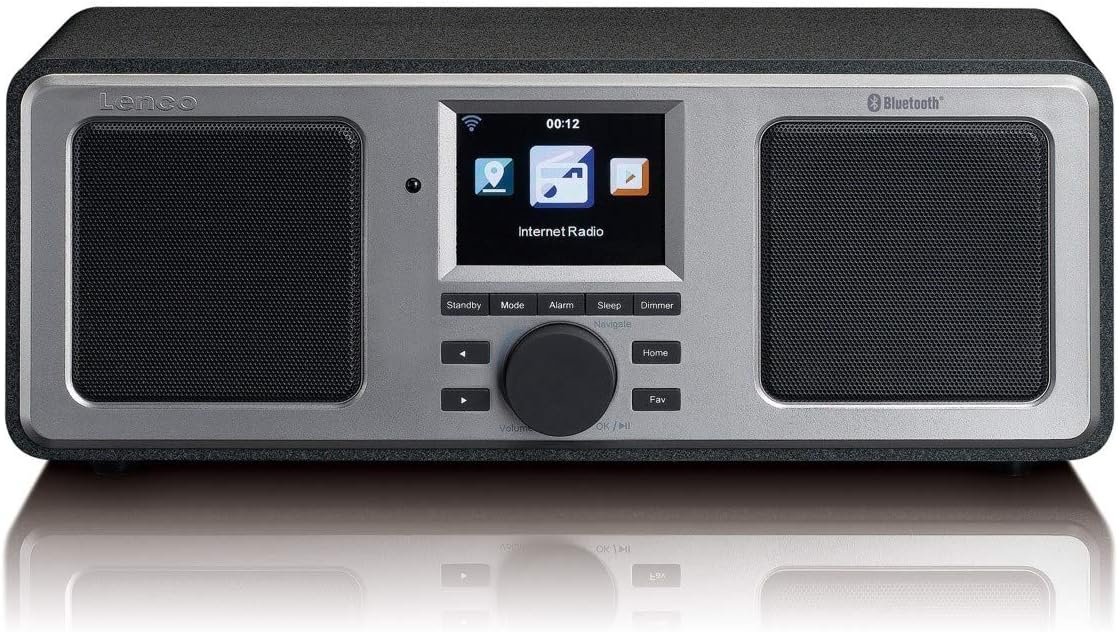
The front panel features a central color display, two integrated speakers, and control buttons. The display shows current mode, station information, time, and menu options. Control buttons include Standby, Mode, Alarm, Sleep, Dimmer, navigation arrows, a rotary knob for volume and selection, Home, and Fav (Favorites).
4.2 Panell posterior

The rear panel includes the power switch, DC IN port, Line Out, AUX In, and a USB port. An extendable telescopic antenna for FM reception is also located on the rear.
5. Configuració
5.1 Connexió de potència
- Connect the supplied power adapter to the DC IN port on the rear of the DIR-150.
- Connecteu l'adaptador de corrent a una presa de corrent.
- Flip the power switch on the rear panel to the 'ON' position.
5.2 Col·locació de l'antena
For optimal FM radio reception, fully extend the telescopic antenna located on the rear of the unit. Adjust its position for the best signal quality.
5.3 Initial Network Configuration (Wi-Fi)
Upon first power-on, the device will guide you through the initial setup wizard:
- Seleccioneu l'idioma que preferiu amb el botó giratori i premeu per confirmar.
- La ràdio cercarà les xarxes Wi-Fi disponibles.
- Seleccioneu la vostra xarxa Wi-Fi domèstica a la llista.
- Enter your Wi-Fi password using the rotary knob to select characters and navigation buttons to move. Press the knob to confirm each character and then the final password.
- Un cop connectada, la ràdio mostrarà un missatge de confirmació.
6. Instruccions de funcionament
6.1 Funcionament bàsic
- Encès/apagat: Premeu el botó En espera button to switch the unit between standby and operational mode.
- Control de volum: Gireu el botó central per ajustar el nivell de volum.
- Navegació: Use the navigation arrows and the rotary knob to browse menus and select options. Press the rotary knob to confirm a selection.
- Mode: Premeu el botó Mode button to cycle through available modes (Internet Radio, FM, Bluetooth, USB, AUX).
- Inici: Premeu el botó Casa botó per tornar al menú principal.
- Fav (Favorites): Premeu el botó Fav button to access your saved favorite stations.
6.2 Ràdio per Internet
Accedeix a milers d'emissores de ràdio per Internet a tot el món.
- Select 'Internet Radio' from the main menu.
- Browse stations by location, genre, or search by name.
- Select a station using the rotary knob and press to start playback.
- To save a station as a favorite, navigate to the station and press the Fav botó.
6.3 Ràdio FM
Listen to local FM broadcasts.
- Premeu el botó Mode button until 'FM Radio' is selected.
- The radio will automatically scan for available FM stations.
- Use the navigation arrows to manually tune or select a scanned station.
- The display will show RDS information (station name, program type) if available.
6.4 Reproducció Bluetooth
Reprodueix àudio en streaming sense fil des del teu dispositiu amb Bluetooth.
- Premeu el botó Mode button until 'Bluetooth' is selected. The radio will enter pairing mode.
- On your mobile device, enable Bluetooth and search for 'Lenco DIR-150'.
- Select 'Lenco DIR-150' to pair. Once connected, you can play audio from your device through the radio.
Reproducció USB 6.5
Reprodueix àudio files directament des d'una unitat flash USB.
- Insert a USB flash drive into the USB port on the rear panel.
- Premeu el botó Mode button until 'USB' is selected.
- Browse your audio files (MP3, WAV, AAC formats supported) and select one to play.
6.6 Entrada AUX
Connecteu dispositius d'àudio externs amb un cable d'àudio de 3.5 mm.
- Connect one end of a 3.5mm audio cable to the AUX IN port on the rear of the DIR-150.
- Connecteu l'altre extrem a la presa d'auriculars o a la sortida d'àudio del dispositiu extern.
- Premeu el botó Mode button until 'AUX' is selected.
- Controla la reproducció i el volum des del teu dispositiu extern.
6.7 Media Streaming (UPnP)
Stream music from a PC or NAS (Network Attached Storage) device on your home network.
- Ensure your PC or NAS is configured as a UPnP media server and is on the same Wi-Fi network as the DIR-150.
- Navigate to the 'Media Player' or 'UPnP' option in the radio's menu.
- Select your media server from the list and browse your music library.
7. Característiques addicionals
7.1 Rellotge despertador
Configura fins a dues alarmes independents.
- Premeu el botó Alarma botó.
- Select 'Alarm 1' or 'Alarm 2' and configure the time, alarm source (buzzer or radio), and frequency (daily, once, weekends, weekdays).
- Press the rotary knob to confirm settings.
- Per posposar una alarma activa, premeu la tecla Posposa button (usually the rotary knob).
7.2 Temporitzador de repòs
Configura la ràdio perquè s'apagui automàticament després d'un període especificat.
- Premeu el botó Dormir botó.
- Seleccioneu la durada de son desitjada (per exemple, 15, 30, 60 minuts).
- The radio will count down and enter standby mode when the timer expires.
7.3 Previsió meteorològica
View local weather forecasts for the next 5 days.
- Navigate to the 'Weather' option in the main menu.
- Select your location to view la previsió.
8. Manteniment
- Neteja: Disconnect the power before cleaning. Use a soft, dry, lint-free cloth to wipe the exterior. Do not use abrasive cleaners or solvents.
- Emmagatzematge: If not used for an extended period, unplug the device and store it in a cool, dry place.
9. Solució De Problemes
| Problema | Causa possible | Solució |
|---|---|---|
| Sense poder | Power adapter not connected; Power switch off | Ensure adapter is securely connected and power switch is ON. |
| Sense connexió a Internet | Incorrect Wi-Fi password; Router issue; Out of range | Re-enter Wi-Fi password; Restart router; Move radio closer to router. |
| Mala recepció FM | Antenna not extended or positioned correctly | Esteneu i ajusteu completament l'antena telescòpica. |
| L'aparellament de Bluetooth falla | Device not in pairing mode; Other device already connected | Ensure radio is in Bluetooth mode; Disconnect from other devices; Restart both devices. |
| La reproducció USB no funciona | Sense suport file format; USB drive not recognized | Assegureu-vos files are MP3, WAV, or AAC; Try a different USB drive. |
10. Especificacions
- Model: DIR-150
- Potència de sortida: 16 W (RMS)
- Visualització: Pantalla a color de 2.8 polzades
- Connectivitat: Wi-Fi, Bluetooth, USB, AUX (3.5mm), Line-Out
- Bandes de ràdio: Internet Radio, FM (PLL Tuner)
- Formats d'àudio compatibles: MP3, WAV, AAC (for USB/Streaming)
- Font d'alimentació: Adaptador de CA (inclòs)
- Dimensions (L x P x A): 310 x 126 x 116 mm
- Pes: 1.52 kg
- Característiques: Alarm Clock (2 alarms), Snooze, Sleep Timer, Weather Forecast, UPnP Streaming
11. Garantia i Suport
Lenco products are manufactured to high quality standards. In the unlikely event of a defect, Lenco provides a warranty in accordance with the laws of the country of purchase. For specific warranty terms and conditions, please refer to the warranty card included with your product or visit the official Lenco website. For technical support or service inquiries, please contact your retailer or the Lenco customer service department.


