Introducció
The AbergBest 21 Mega Pixels HD Digital Camera is designed to capture every significant moment with ease. Featuring 21 megapixels and HD 720P resolution, it's ideal for recording memories. The camera includes face detection, smile capture, anti-shake technology, continuous shooting, a self-timer, and 8X digital zoom. Its compact and portable design makes it a great choice for teens, kids, and students looking to explore photography.

Davant view of the AbergBest 21 Mega Pixels Digital Camera.
Configuració
Què hi ha a la caixa
- Cos de la càmera
- Accessories (including charger and USB cable)
- Two rechargeable Lithium-Ion batteries
- Maleta de transport
- Manual d'usuari (aquest document)
- Digital Camera Driver Disk
Instal·lació de la bateria
The camera comes with two rechargeable Lithium-Ion batteries. To install a battery, locate the battery compartment on the side of the camera. Slide the compartment cover open. Insert one of the provided batteries, ensuring the correct orientation as indicated inside the compartment. Close the cover securely.
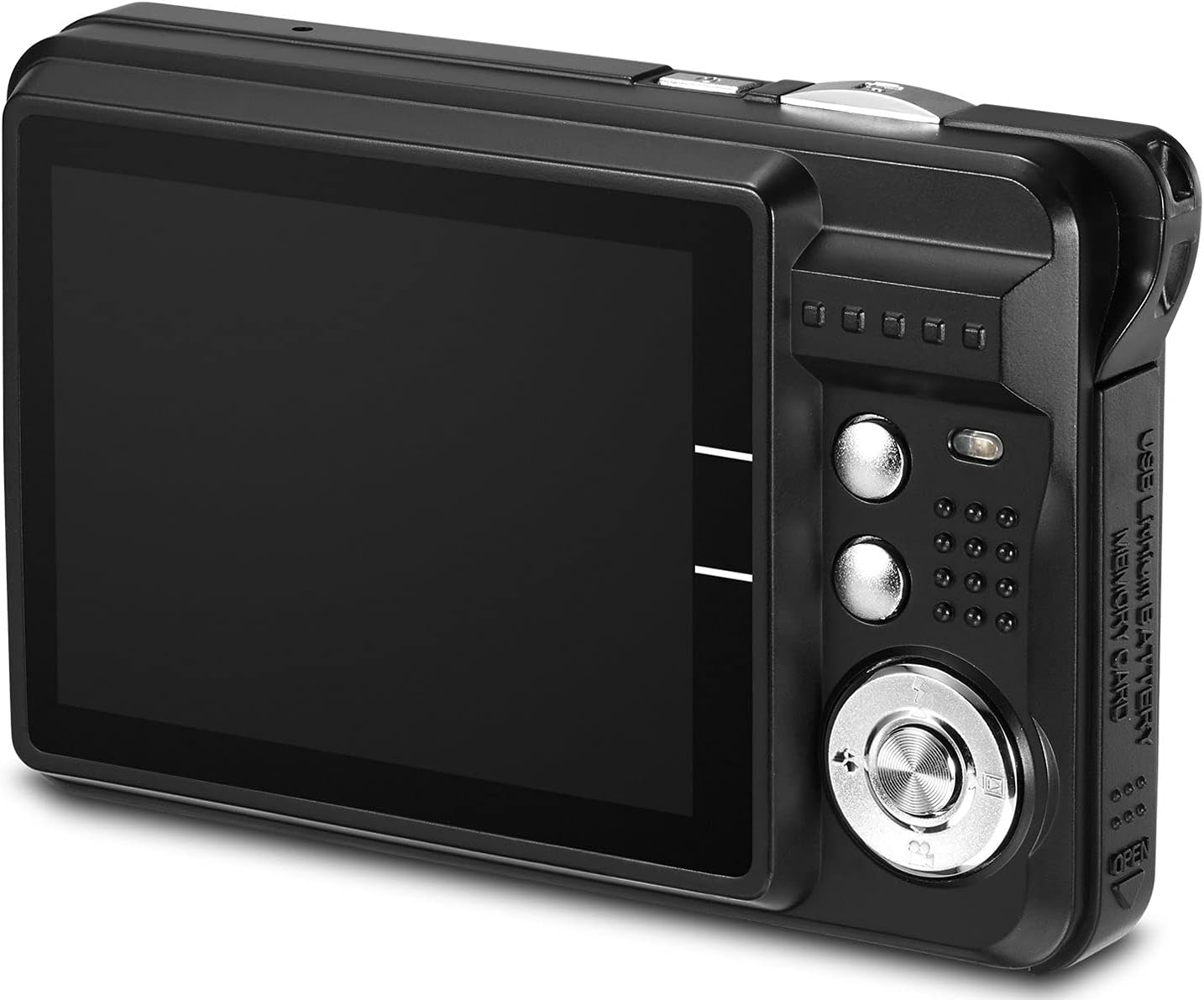
Enrere view de la càmera, mostrant la pantalla LCD i els botons de control.
Instal·lació de la targeta SD
An SD memory card (up to 64GB) is required for storing photos and videos and is not included with the camera. Locate the SD card slot, usually near the battery compartment. Insert the SD card with the metal contacts facing down until it clicks into place. To remove, gently press the card until it pops out.
Carregant la bateria
Use the provided USB cable and charger to charge the camera's battery. Connect the small end of the USB cable to the camera's USB port and the larger end to the charger. Plug the charger into a power outlet. The battery indicator on the camera's screen will show charging status. A fully charged battery can support over 60 minutes of use.
Funcionament de la càmera
Encès/Apagat
To turn the camera on, press and hold the power button located on the top or side of the camera until the screen illuminates. To turn it off, press and hold the same button until the screen shuts down.
Modes de navegació
The camera offers various shooting modes to adapt to different environments. Press the 'Mode' dial or button (often labeled with 'M' or a scene icon) to cycle through options such as:
- Automàtic: Standard mode for general use.
- Retrat nocturn: Optimized for portraits in low light.
- Night Scenery: Optimized for landscapes in low light.
- Esport: For capturing fast-moving subjects.
- Scenery: Enhances outdoor landscape shots.
- Retrat: Ideal for close-up shots of people.
- Festa: Adjusts settings for indoor party lighting.
- Platja: Optimizes for bright, reflective environments.
- Alta sensibilitat: For very low light conditions.

The camera's LCD screen showing available scene modes for different shooting conditions.
Funció de zoom
The camera features an 8X digital zoom. To zoom in, press the 'T' (Telephoto) button, usually located near the shutter button or on the directional pad. To zoom out, press the 'W' (Wide) button. Digital zoom magnifies the image electronically, which may affect image quality at higher magnifications.
Taking Photos & Recording Videos
To take a photo, frame your subject on the LCD screen and press the shutter button halfway down to focus, then press it fully to capture the image. To record a video, switch to video mode (if available, or press the dedicated video record button) and press the shutter/record button to start and stop recording.

The camera's digital lens and flash, capable of capturing detailed images.
Viewing Files
A view your captured photos and videos, switch the camera to playback mode (often indicated by a play icon). Use the directional buttons to navigate through your files. Press the 'OK' or 'Enter' button to view a file a pantalla completa.
Manteniment
Neteja
Use a soft, lint-free cloth to clean the camera body and LCD screen. For the lens, use a specialized lens cleaning cloth and solution. Avoid using abrasive materials or harsh chemicals, as they can damage the camera's surfaces.
Emmagatzematge
When not in use, store the camera in its provided carrying case in a cool, dry place away from direct sunlight and extreme temperatures. Remove the battery if the camera will not be used for an extended period to prevent leakage.
Resolució de problemes
| Problema | Causa possible | Solució |
|---|---|---|
| La càmera no s'encén | Low or uncharged battery; incorrectly inserted battery. | Carregueu la bateria completament. Assegureu-vos que la bateria estigui inserida correctament. |
| "No File Exist" or "Memory Full" message | No SD card inserted; SD card is full or corrupted. | Insert a compatible SD card. Transfer files to a computer and format the SD card, or use a new SD card. |
| Mala qualitat d'imatge | Incorrect scene mode; low light; excessive digital zoom. | Select an appropriate scene mode. Ensure sufficient lighting. Avoid using maximum digital zoom if possible. |
| Camera freezes or is unresponsive | Error de programari; bateria baixa. | Remove and reinsert the battery to reset the camera. Ensure battery is charged. |
Especificacions
| Característica | Detall |
|---|---|
| Marca | AbergBest |
| Nom del model | AbergBest 21 Mega Pixels 2.7" LCD Rechargeable HD Digital Camera Video Camera |
| Número de model | 20180112-BC |
| Resolució del sensor fotogràfic | 21 MP |
| Resolució de vídeo | HD 720p |
| Zoom digital | 8 x |
| Mida de la pantalla | 2.7 polzades |
| Tipus de visualització | LCD |
| Tipus de memòria flash | SD (supports up to 64 GB) |
| Tipus de bateria | Ió de liti |
| Tecnologia de connectivitat | USB |
| Característica especial | Detecció de cares |
| Color | Negre |
| Pes de l'article | 309 grams |
Garantia i Suport
Informació de la garantia
This product comes with no stated warranty. Please refer to your purchase documentation for any specific return or exchange policies from your retailer.
Suport addicional
For further assistance or detailed instructions, you may refer to the official User Guide PDF available online: AbergBest Digital Camera User Guide.
For product support, please contact the manufacturer, AbergBest, through their official channels or the retailer from whom the product was purchased.


