1. Introducció
The MOXA NPort 5450 is a 4-port serial device server designed to connect serial devices to an Ethernet network. It supports RS-232, RS-422, and RS-485 serial interfaces, allowing for versatile integration of various industrial and commercial serial equipment into an IP-based network. This manual provides comprehensive instructions for the installation, configuration, operation, and maintenance of your NPort 5450 device server.
Key features include 10/100M auto-sensing Ethernet, built-in 15 KV ESD surge protection for all serial signals, and versatile socket operation modes such as TCP Server, TCP Client, UDP, and Real COM. Configuration can be performed via Web console, Telnet console, or a Windows utility.
2. Característiques del producte
- 10/100M auto-sensing Ethernet connectivity.
- Four serial ports, supporting RS-232, RS-422, and RS-485 standards.
- Integrated 15 KV ESD surge protection for all serial signals, enhancing reliability.
- Multiple socket operation modes: TCP Server, TCP Client, UDP, and Real COM.
- SNMP MIB-II support for network management.
- Flexible configuration options: Web console, Telnet console, and Windows utility.
3. Descripció del maquinari
The NPort 5450 features a robust design with clearly labeled ports and indicators for easy setup and monitoring.

Figura 3.1: Angle frontal view of the MOXA NPort 5450, showing the display, control buttons, and serial ports.

Figura 3.2: superior view of the MOXA NPort 5450, highlighting the Ready, Ethernet, and Port (P1-P4) LED indicators, along with the MENU, arrow, and SEL buttons.
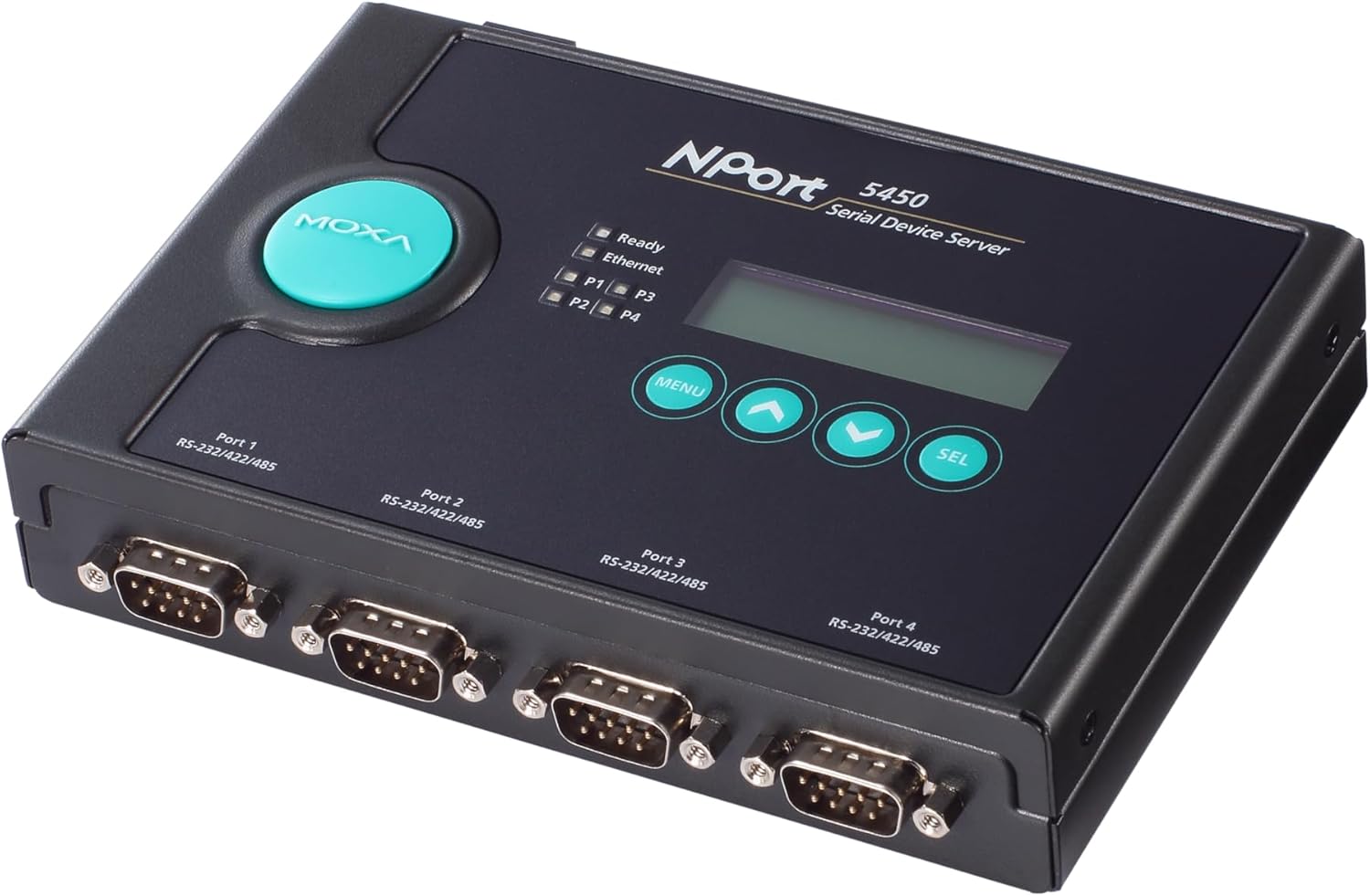
Figura 3.3: Angle posterior view of the MOXA NPort 5450, clearly showing the four DB-9 serial ports (Port 1 to Port 4) and their RS-232/422/485 compatibility.
3.1. Tauler frontal
- Indicadors LED:
- A punt: Indicates device operational status.
- Ethernet: Indicates Ethernet link and activity.
- P1-P4: Indicate activity for each serial port.
- Pantalla LCD: Shows device status and configuration menus.
- Control Buttons (MENU, Arrows, SEL): Used for navigating and selecting options on the LCD display.
3.2. Panell posterior
- Serial Ports (DB-9): Four ports (Port 1 to Port 4) supporting RS-232, RS-422, and RS-485.
- Port Ethernet (RJ45): 10/100BaseT(X) auto-sensing Ethernet connection.
- Entrada d'alimentació: DC power jack for connecting the included 110V adapter.
4. Configuració i instal·lació
Follow these steps to set up your NPort 5450 device server.
4.1. Contingut del paquet
Comproveu que el vostre paquet contingui els elements següents:
- MOXA NPort 5450 4-Port Device Server
- Adaptador de corrent de 110V
- Quick Installation Guide (refer to manufacturer's website for full manual)
- Targeta de garantia
Si falta algun article o està malmès, poseu-vos en contacte amb el vostre proveïdor immediatament.
4.2. Instal·lació de maquinari
- Muntatge: Place the NPort 5450 on a stable, flat surface or mount it using appropriate mounting kits (sold separately) if required for your application. Ensure adequate ventilation around the device.
- Connecteu el cable Ethernet: Connect a standard RJ45 Ethernet cable from your network switch or router to the Ethernet port on the rear panel of the NPort 5450.
- Connect Serial Devices: Connect your serial devices (e.g., PLCs, sensors, barcode scanners) to the DB-9 serial ports (Port 1-4) on the NPort 5450. Ensure correct pin assignments for RS-232, RS-422, or RS-485 as per your device's requirements.
- Connectar l'alimentació: Plug the 110V power adapter into the power input jack on the NPort 5450, then plug the adapter into a suitable power outlet. The device will power on automatically.
Nota: Always ensure power is disconnected before connecting or disconnecting serial cables to prevent potential damage from electrical surges.
5. Instruccions de funcionament
The NPort 5450 offers several methods for configuration and operation.
5.1. Configuració Inicial
For initial setup, it is recommended to use the Windows utility or the Web consola.
- Windows Utility: Download the latest NPort Windows utility from the Moxa official website. This utility can automatically discover NPort devices on your local network and allow for easy configuration of IP settings, serial port parameters, and operation modes.
- Web Consola: If the NPort 5450 has a default or known IP address, you can access its web-based configuration interface by entering the IP address into a web browser. The default IP address is typically 192.168.127.254.
- Telnet Console: For command-line based configuration, you can Telnet to the NPort's IP address. This method is generally used by advanced users.
5.2. Modes de funcionament bàsics
The NPort 5450 supports various operation modes to suit different application needs:
- Mode COM real: This mode allows Windows/Linux hosts to access serial devices connected to the NPort as if they were local COM ports. This requires installing Moxa's Real COM driver on the host PC.
- Mode de servidor TCP: The NPort listens for incoming TCP connections from host applications. When a connection is established, data is transparently exchanged between the serial device and the TCP client.
- Mode client TCP: The NPort actively initiates a TCP connection to a specified host IP address and port. This is useful for connecting to centralized servers.
- Mode UDP: Data is transmitted using UDP packets, which is connectionless and suitable for applications where speed is critical and some data loss is acceptable.
Refer to the detailed NPort 5450 user manual (available on Moxa's website) for in-depth configuration of each operation mode and advanced settings.
6. Manteniment
Regular maintenance ensures the longevity and optimal performance of your NPort 5450.
- Actualitzacions de firmware: Periodically check the Moxa website for firmware updates. Firmware updates can provide new features, performance improvements, and bug fixes. Follow the instructions provided by Moxa for safe firmware upgrades.
- Neteja: Mantingueu el dispositiu net i lliure de pols. Feu servir un drap suau i sec per netejar l'exterior. No utilitzeu netejadors líquids ni aerosols.
- Condicions ambientals: Ensure the device operates within its specified temperature and humidity ranges to prevent damage. Avoid exposing the device to direct sunlight or extreme temperatures.
7. Solució De Problemes
This section provides solutions to common issues you might encounter with your NPort 5450.
7.1. Indicador LED d'estat
| Indicador | Estat | Descripció / Acció |
|---|---|---|
| A punt | Apagat | Device is not powered on or is faulty. Check power connection. |
| A punt | Verd sòlid | El dispositiu està encès i funciona normalment. |
| Ethernet | Apagat | No Ethernet link. Check Ethernet cable connection and network device. |
| Ethernet | Verd sòlid | Enllaç Ethernet establert. |
| Ethernet | Verd parpellejant | Ethernet data activity. |
| P1-P4 | Apagat | No serial data activity on the port. |
| P1-P4 | Verd parpellejant | Serial data activity on the port. |
7.2. Problemes comuns
- Cannot connect to NPort via network:
- Verify Ethernet cable connection.
- Check network settings (IP address, subnet mask, gateway) of the NPort and your PC. Ensure they are on the same subnet or properly routed.
- Temporarily disable firewall on your PC to rule out blocking issues.
- Use the NPort Windows utility to discover the device's IP address.
- Serial device not communicating:
- Verify serial cable connection and pinout (RS-232, RS-422, RS-485).
- Check serial port settings on the NPort (baud rate, data bits, parity, stop bits, flow control) match the connected serial device.
- Ensure the NPort's operation mode (e.g., Real COM, TCP Server) is correctly configured for your application.
- Check the Px LED for activity. If no blinking, there's no data flow.
For more detailed troubleshooting, refer to the full NPort 5450 user manual on the Moxa support website or contact Moxa technical support.
8. Especificacions
| Característica | Especificació |
|---|---|
| Número de model | NPort 5450 |
| Ethernet | 10/100BaseT(X) auto-sensing |
| Ports sèrie | 4 (DB-9 male) |
| Normes de sèrie | RS-232, RS-422, RS-485 |
| Protecció ESD | 15 KV for all serial signals |
| Mètodes de configuració | Web console, Telnet console, Windows utility |
| Entrada de potència | 110V AC (via included adapter) |
| Dimensions del paquet | 15 x 6.73 x 3.58 polzades |
| Pes de l'article | 2.27 lliures |
| Fabricant | Moxa Inc. |
| Data de primera disponibilitat | 12 de gener de 2018 |
9. Informació sobre assistència i garantia
For technical support, detailed documentation, drivers, and firmware updates, please visit the official Moxa website. You can find comprehensive user manuals, FAQs, and contact information for customer service.
Weblloc: www.moxa.com
Information regarding the product warranty is typically provided with the purchase documentation or can be found on the Moxa weblloc web. Si us plau, conserveu el comprovant de compra per a reclamacions de garantia.


