1. Introducció
Gràcies per la compraasing the Capello Play it All Bluetooth Wireless Home Stereo Speaker CI302. This device offers versatile audio playback options including Bluetooth wireless streaming, CD player functionality, and FM digital radio. This manual provides detailed instructions for setup, operation, maintenance, and troubleshooting to ensure optimal performance and longevity of your speaker system.
2. Informació important de seguretat
- Llegiu totes les instruccions abans d'utilitzar el dispositiu.
- Conserveu aquest manual com a referència futura.
- No exposeu la unitat a la pluja o la humitat per evitar incendis o xocs.
- Assegureu-vos que la ventilació sigui adequada; no obstruïu cap obertura de ventilació.
- Col·loqueu la unitat sobre una superfície plana i estable.
- Utilitzeu només accessoris/accessoris especificats pel fabricant.
- Desendolleu la unitat durant les tempestes llamps o quan no l'utilitzeu durant llargs períodes.
- Demaneu tot el servei a personal de servei qualificat.
3. Contingut del paquet
Si us plau, comproveu que hi hagi tots els elements:
- Capello Play it All Bluetooth Wireless Home Stereo Speaker CI302
- Control remot
- Adaptador de corrent alterna
- Manual d'usuari (aquest document)
4. Producte acabatview
Familiarize yourself with the main components and controls of your Capello Play it All speaker.
Davant View

Figura 4.1: Davant view of the Capello Play it All speaker, showing the speaker grille, digital clock display, and subtle branding.
Controls del tauler superior

Figura 4.2: Top panel of the Capello Play it All speaker, illustrating the CD compartment, 'capello' logo, and various control buttons including PRESET, MODE, PAIRING, PROGRAM/CLOCK SET, SKIP, PLAY/PAUSE, STOP, REPEAT, and VOLUME.
- PRESET +/-: Navigate through saved FM radio stations.
- Mode: Switch between Bluetooth, CD, FM Radio, and Line-In modes.
- MARIDATGE: Inicia el mode d'emparellament Bluetooth.
- PROGRAM/CLOCK SET: Program CD tracks or set the clock.
- SKIP ◀◀ / ▶▶: Skip tracks on CD or adjust FM frequency.
- PLAY/PAUSE ▶▶: Reprodueix o posa en pausa la reproducció del CD.
- STOP ■: Stop CD playback.
- REPETIR: Repeat current track or all tracks on CD.
- VOL +/-: Ajusteu el nivell de volum.
- OBRIR TANCAR: Open or close the CD compartment.
- ESTÀNDUT: Power on/off the unit.
Rear Panel (Typical)
The rear panel typically includes the AC power input, FM antenna connection, and Line-In jack.
5. Configuració
5.1 Connexió d'alimentació
- Connect the AC power adapter to the DC IN jack on the rear of the speaker.
- Connecteu l'altre extrem de l'adaptador a una presa de corrent estàndard.
- The unit will enter standby mode, and the digital clock display will illuminate.
5.2 FM Antenna Setup
For optimal FM radio reception, extend the FM wire antenna fully and position it for the best signal. Avoid placing it near other electronic devices that may cause interference.
5.3 Configuració del rellotge
- En mode d'espera, manteniu premut el botó PROGRAM/CLOCK SET botó.
- The hour digits will begin to flash. Use the SKIP ◀◀ / ▶▶ botons per ajustar l'hora.
- Premeu PROGRAM/CLOCK SET de nou per confirmar l'hora.
- Els dígits dels minuts parpellejaran. Feu servir la tecla SKIP ◀◀ / ▶▶ botons per ajustar els minuts.
- Premeu PROGRAM/CLOCK SET one last time to save the setting.
6. Instruccions de funcionament
6.1 Engegada/Apagada i Selecció de Mode
- Premeu el botó ESPERA button on the unit or the remote control to turn the speaker on or off.
- Premeu el botó MODE button repeatedly to cycle through available modes: Bluetooth, CD, FM Radio, and Line-In.
Transmissió sense fil Bluetooth 6.2
- Turn on the speaker and select Bluetooth mode using the MODE button. The display will show 'BT' and flash, indicating it's in pairing mode.
- Al dispositiu amb Bluetooth (telèfon intel·ligent, tauleta, ordinador), activeu el Bluetooth i cerqueu els dispositius disponibles.
- Select 'Capello CI302' (or similar) from the list of devices.
- Once paired, the speaker will emit a confirmation tone, and 'BT' on the display will stop flashing.
- You can now play audio from your device through the speaker. Use your device or the speaker's controls for volume and track navigation.
6.3 Reproducció de CD
- Premeu el botó OBRIR/TANCAR botó per obrir el compartiment del CD.
- Carefully place an audio CD (CD, CD-R/-RW) with the label side facing up into the compartment.
- Tanqueu el compartiment del CD. La unitat llegirà el disc.
- If not already in CD mode, press the MODE botó per seleccionar el mode CD.
- Premeu el botó REPRODUCCIÓ/PAUSA per iniciar la reproducció.
- Ús SKIP ◀◀ / ▶▶ to skip tracks, STOP ■ to stop, and REPETIR to cycle through repeat options.
Ràdio digital 6.4 FM
- Premeu el botó MODE button to select FM radio mode. The current frequency will be displayed.
- Escaneig automàtic: Manteniu premut el botó REPRODUCCIÓ/PAUSA button to automatically scan and save available FM stations as presets.
- Sintonització manual: Premeu SKIP ◀◀ / ▶▶ briefly to fine-tune the frequency. Press and hold to scan for the next strong station.
- Accés a les configuracions predefinides: Utilitza el PRECONFIGURACIÓ +/- botons per anar passant per les estacions desades.
6.5 Line-In Operation
- Connect an audio cable (not included) from the headphone jack or line-out of an external audio device to the INICI DE LÍNIA jack on the speaker.
- Premeu el botó MODE button to select Line-In mode.
- Play audio from your connected device. Volume can be controlled via the speaker or the external device.
6.6 Càrrega USB
The speaker features a USB port for charging compatible devices (e.g., smartphones, tablets). Connect your device's USB charging cable (not included) to the USB port on the speaker. The speaker does not need to be in a specific mode for USB charging to function.
6.7 Ús del control remot
The included remote control provides convenient access to all functions. Ensure the remote has working batteries and is pointed towards the front of the speaker.
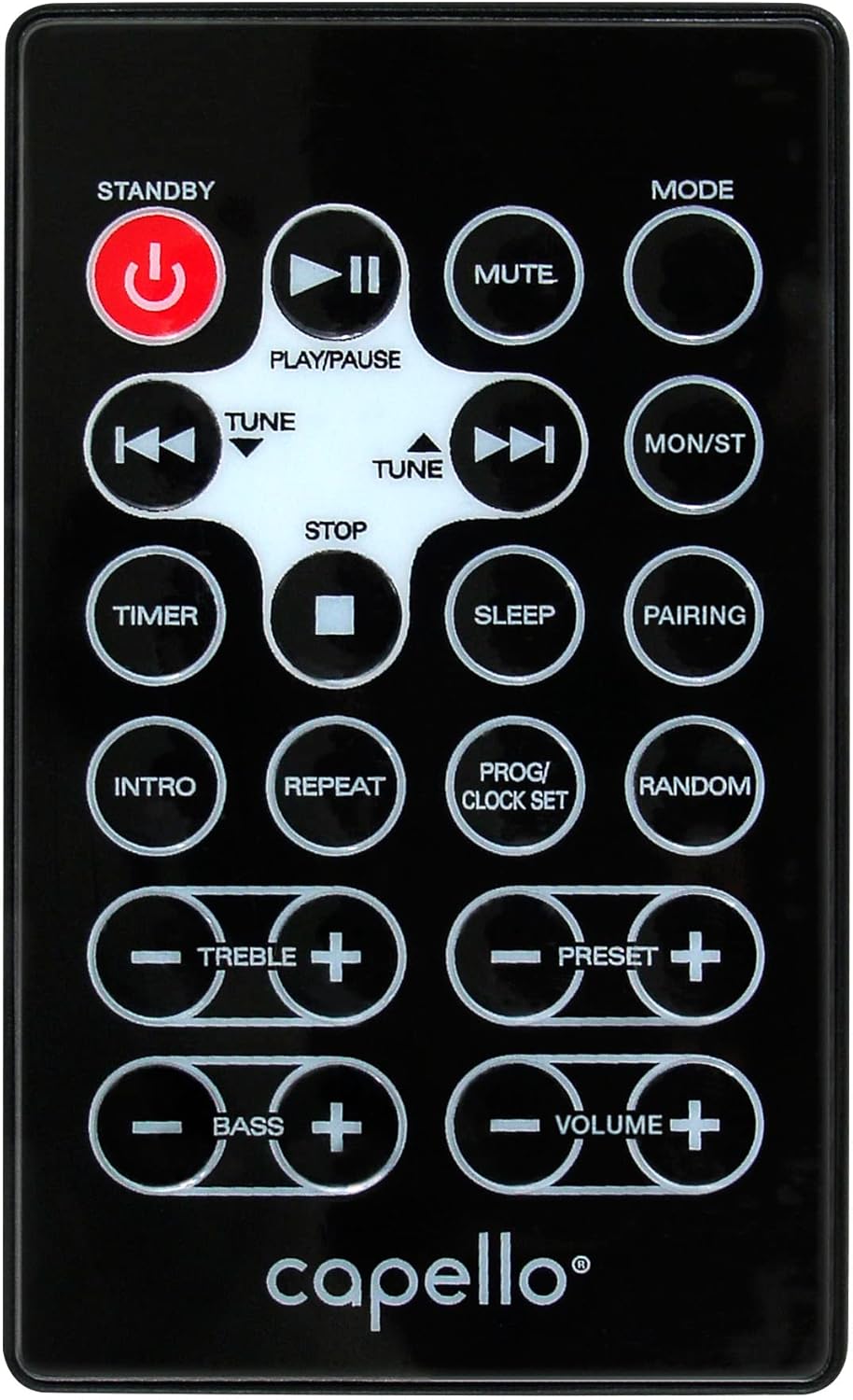
Figura 6.1: Layout of the remote control for the Capello Play it All speaker, showing buttons for Standby, Play/Pause, Mute, Mode, Skip/Tune, Stop, Timer, Sleep, Pairing, Intro, Repeat, Program/Clock Set, Random, Treble, Bass, and Volume controls.
- ESTÀNDUT: Encès / apagat.
- REPRODUCCIÓ/PAUSA: Reprodueix o posa en pausa l'àudio.
- MUT: Silencia o activa l'àudio.
- Mode: Cycle through input modes.
- SKIP/TUNE ◀◀ / ▶▶: Skip tracks or tune radio frequency.
- STOP: Atura la reproducció.
- TEMPORIZADOR: Estableix el temporitzador de son.
- DORMIR: Activate sleep function.
- MARIDATGE: Initiate Bluetooth pairing.
- INTRODUCCIÓ: Play the first few seconds of each CD track.
- REPETIR: Repeat current track or all tracks.
- PROG/CLOCK SET: Program CD tracks or set clock.
- ALeatori: Reprodueix les pistes del CD en ordre aleatori.
- AGUTS +/-: Adjust treble levels.
- BAIX +/-: Adjust bass levels.
- VOLUM +/-: Ajusteu el volum general.
7. Manteniment
7.1 Neteja
- Desconnecteu sempre la unitat de la presa de corrent abans de netejar-la.
- Feu servir un drap suau i sec per netejar les superfícies exteriors.
- No utilitzeu netejadors abrasius, ceres o dissolvents, ja que poden danyar l'acabat.
- Per a la lent del CD, feu servir un disc netejador de lents de CD especialitzat.
7.2 Emmagatzematge
If storing the unit for an extended period, unplug it from the power source and store it in a cool, dry place away from direct sunlight and extreme temperatures.
8. Solució De Problemes
| Problema | Causa possible | Solució |
|---|---|---|
| Sense poder | Cable d'alimentació no connectat; presa de corrent no activa. | Ensure power cord is securely plugged in; try a different outlet. |
| Sense so | Volume too low; incorrect mode selected; external device muted. | Increase volume; select correct input mode; check external device volume/mute. |
| El CD salta o no es reprodueix | Dirty or scratched CD; CD inserted incorrectly; dirty CD lens. | Clean or replace CD; insert CD label-side up; use a CD lens cleaner. |
| L'aparellament de Bluetooth falla | Device too far; Bluetooth not enabled on device; speaker not in pairing mode. | Move device closer; enable Bluetooth; ensure speaker is in BT pairing mode. |
| Mala recepció FM | Antena no estesa; interferències. | Fully extend and reposition FM antenna; move away from other electronics. |
| El comandament a distància no funciona | Batteries depleted; obstruction; not pointed at sensor. | Replace batteries; remove obstructions; point remote directly at the unit. |
9. Especificacions
| Característica | Especificació |
|---|---|
| Marca | Capello |
| Número de model | CI302 |
| Tecnologia de connectivitat | Bluetooth |
| Tipus d'altaveu | estèreo |
| Mode de sortida d'àudio | estèreo |
| Formats d'àudio compatibles | CD, MP3 |
| Speakers Nominal Output Power | 10 watts |
| Potència de sortida màxima dels altaveus | 10 watts |
| Configuració del canal de so envoltant de l'altaveu | 2.0 |
| Tipus de font d'alimentació | Elèctric amb cable |
| Dispositius compatibles | Ordinador portàtil, telèfon intel·ligent, tauleta |
| Característiques especials | Digital Display, Portable, USB Port |
| Tipus de material | Plàstic |
| Tipus de muntatge | Taula de taula |
| Pes de l'article | 2.57 quilos |
| Dimensions del paquet | 38.3 x 24.2 x 18.5 cm |
| Piles incloses | No |
| Piles necessàries | No |
10. Garantia i Suport
This product is covered by a limited warranty. Please refer to the warranty card included in your package for specific terms and conditions. For technical support or customer service inquiries, please contact Capello customer support through their official weblloc web o la informació de contacte proporcionada amb la documentació de compra.


