1. Introducció
This manual provides essential information for the safe and efficient use of your ASUS C302CA-DH75-G Chromebook. This device is a versatile 12.5-inch Full HD touchscreen laptop with a flip design, powered by an Intel Core m7 processor and running Google Chrome OS. Please read this manual thoroughly before operating your device.
2. Informació de seguretat
- Use only the original power adapter and battery provided with your Chromebook.
- No exposeu el dispositiu a temperatures extremes, humitat o llum solar directa.
- Avoid placing heavy objects on the Chromebook.
- Keep the device away from liquids and sources of strong magnetic fields.
- No intenteu desmuntar ni reparar el dispositiu vosaltres mateixos. Poseu-vos en contacte amb el personal de servei autoritzat per obtenir ajuda.
- Assegureu-vos que la ventilació sigui adequada quan utilitzeu el dispositiu per evitar el sobreescalfament.
3. Contingut del paquet
Verifiqueu que tots els elements siguin presents al vostre paquet:
- ASUS C302CA-DH75-G Chromebook
- Adaptador d'alimentació
4. Disseny del dispositiu
Familiarize yourself with the key components and ports of your Chromebook.

Figura 4.1: Davant view of the ASUS C302CA-DH75-G Chromebook in traditional laptop configuration.

Figura 4.2: The Chromebook demonstrating its 360-degree hinge, allowing for various modes such as tent or stand mode.
4.1 Ports del costat esquerre
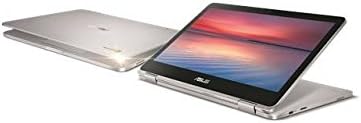
Figura 4.3: Left side of the Chromebook, showing the USB-C port and other features.
- USB-C Gen1 Port: Supports high-resolution display output and power delivery.
- Lector de targetes MicroSD: Per ampliar l'emmagatzematge o transferir files.
4.2 Ports del costat dret

Figura 4.4: Right side of the Chromebook, featuring another USB-C port and the headphone jack.
- USB-C Gen1 Port: Another port supporting high-resolution display output and power delivery.
- Presa combinada per a auriculars/micròfon: Per a l'entrada i sortida d'àudio.
4.3 Teclat i touchpad
- Teclat: Features a backlight for use in low-light conditions.
- Touchpad: Supports multi-touch gestures for navigation.
5. Configuració
5.1 Charging the Chromebook
- Connect the power adapter to one of the USB-C ports on your Chromebook.
- Connecteu l'adaptador de corrent a una presa de corrent.
- Allow the device to charge until the battery indicator shows a full charge, especially before first use.
5.2 Engegada i configuració inicial
- Press the power button located on the side of the device.
- Follow the on-screen instructions to select your language and connect to a Wi-Fi network.
- Sign in with your Google account. If you do not have one, you will be prompted to create one.
- Complete the initial setup steps as guided by Chrome OS.
6. Com utilitzar el Chromebook
6.1 Chrome OS Basics
- prestatge: The taskbar at the bottom of the screen for quick access to apps.
- Llançador: Click the circle icon in the bottom-left corner to open the app launcher and search bar.
- Àrea d'estat: Located in the bottom-right corner, it displays Wi-Fi, battery, time, and settings.
6.2 Using the Touchscreen and Convertible Modes
Your Chromebook features a 10-point multi-touch display and a 360-degree hinge, allowing it to be used in multiple configurations:
- Mode portàtil: Traditional laptop use with keyboard and touchpad.
- Mode tauleta: Plegueu la pantalla completament cap enrere per utilitzar-la com a tauleta. El teclat i el touchpad es desactivaran automàticament.
- Mode tenda: Stand the device in an inverted 'V' shape for media consumption or presentations.
- Mode de peu: Position the keyboard face down to use the screen as a display.
6.3 Keyboard Backlight
To adjust the keyboard backlight brightness, use the dedicated function keys on the top row of the keyboard.
7. Manteniment
7.1 Neteja del dispositiu
- Utilitzeu un drap suau i sense pelusa lleugerament dampNetegeu la pantalla amb aigua o un netejador de pantalles.
- Per al xassís i el teclat, feu servir un drap suau i sec. Eviteu productes químics agressius o materials abrasius.
- Assegureu-vos que el dispositiu estigui apagat i desconnectat abans de netejar-lo.
7.2 Cura de la bateria
- Eviteu descarregar completament la bateria amb freqüència.
- Store the device in a cool, dry place if not used for extended periods.
- No exposeu la bateria a altes temperatures.
7.3 Actualitzacions de programari
Chrome OS automatically updates in the background. Ensure your device is connected to the internet regularly to receive the latest security patches and features.
8. Solució De Problemes
- El dispositiu no s'encén: Ensure the device is charged. Connect the power adapter and try again. If unresponsive, perform a hard reset by holding the power button for 10 seconds.
- Problemes de connexió Wi-Fi: Check if Wi-Fi is enabled in the status area. Restart your router and the Chromebook.
- Rendiment lent: Close unnecessary tabs or applications. Restart the Chromebook. Ensure Chrome OS is up to date.
- Screen not responding to touch: Restart the device. Ensure the screen is clean and free of debris.
- La retroiluminació del teclat no funciona: Check the function keys for backlight control. Ensure the device is not in tablet mode.
9. Especificacions
| Característica | Detall |
|---|---|
| Nom del model | ASUS Chromebook C302CA-DH75-G |
| Sistema operatiu | Chrome OS |
| Processador | Intel Core m7 (6th Gen) 6Y75, 1.2 GHz (up to 3.1 GHz Turbo) |
| RAM | 16 GB LPDDR3 SDRAM (soldered) |
| Emmagatzematge | 64 GB SSD (eMMC) |
| Mostra | 12.5-inch Full HD (1920 x 1080) LED-backlit LCD, 10-point multi-touch, glossy |
| Gràfics | Intel HD Graphics 515 (integrat) |
| Connectivitat sense fil | Bluetooth 4.0, 802.11ac Wi-Fi |
| Ports | 2 x USB-C Gen1 (supports display output & power delivery), Headphone/microphone combo jack, MicroSD card reader |
| Bateria | 2-cell Lithium Ion, 39 Wh (Up to 10 hours run time) |
| Dimensions (LxWxH) | 17.1 x 2.4 x 10.1 polzades |
| Pes | 4.25 lliures |
| Color | Plata |
10. Informació de la garantia
Your ASUS C302CA-DH75-G Chromebook is covered by a limited manufacturer's warranty. Please refer to the warranty card included with your product or visit the official ASUS website for detailed terms and conditions, including warranty period and service procedures.
11. Suport
For further assistance, technical support, or to download updated drivers and manuals, please visit the official ASUS support weblloc:
També podeu contactar directament amb el servei d'atenció al client d'ASUS per obtenir assistència personalitzada.