Producte acabatview
The Sharkoon V1000 is a versatile Micro ATX PC case designed for various computing needs, from demanding office setups to compact multimedia stations or gaming PCs. Despite its compact dimensions of 17.7 x 7.6 x 15.8 inches, it offers ample space for components typically found in larger ATX cases. Key features include a dedicated power supply tunnel for discreet installation and improved airflow, a wireless front panel design, and removable dust filters for easy maintenance.
Característiques principals:
- Power supply tunnel for clean cable management and improved thermal performance.
- Wireless front panel design for easy access and maintenance.
- Removable dust filter for convenient cleaning and system longevity.
- Decoupled power supply pad to reduce vibrations and noise.
- Variable fan configuration options for optimized cooling.
- Support for a radiator in the front panel for advanced cooling solutions.

Figura 1: Front inclinat view of the Sharkoon V1000 PC Case, showcasing its sleek black design and mesh front panel.
Configuració i instal·lació
This section provides general guidelines for setting up your Sharkoon V1000 PC case and installing essential components. Always refer to your component manuals for specific installation instructions.
1. Preparació del cas
- Desembalatge: Traieu amb cura la caixa del seu embalatge. Inspeccioneu-la per si hi ha hagut danys durant l'enviament.
- Accés a l'interior: Remove the side panels. Typically, this involves unscrewing thumbscrews at the rear of the case and sliding the panels backward.

Figura 2: Interior view of the Sharkoon V1000, showing the motherboard tray, drive bays, and power supply tunnel.
2. Instal·lació de la font d'alimentació
The V1000 features a dedicated power supply tunnel at the bottom for a clean build.
- Position the power supply unit (PSU) into the tunnel from the rear of the case.
- Fixeu la font d'alimentació amb els cargols de la part posterior de la carcassa.
- Route necessary cables through the cutouts in the tunnel for connection to components.
3. Instal·lació de la placa base
The V1000 supports mATX motherboards.
- Instal·leu la protecció d'E/S a l'obertura posterior de la carcassa.
- Align the motherboard with the pre-installed standoffs. Ensure all screw holes align.
- Fixeu la placa base amb els cargols proporcionats.

Figura 3: posterior view of the Sharkoon V1000, showing the I/O shield cutout, expansion slots, and power supply mounting area.
4. Instal·lació de la unitat
Install your storage drives (HDDs/SSDs) into the designated bays. Refer to the case's internal structure for specific bay locations and mounting mechanisms.
5. Connexions del panell frontal
Connect the front panel cables (USB, audio, power/reset switches, LEDs) to the appropriate headers on your motherboard. Consult your motherboard manual for header locations.

Figura 4: Angle superior frontal view of the Sharkoon V1000, highlighting the front I/O panel with USB ports and audio jacks.
Operating Your PC Case
Once all components are installed and connected, you can begin using your PC. The Sharkoon V1000 is designed for optimal airflow and user convenience.
Encès
Press the power button located on the top front panel of the case to turn on your system. The power LED will illuminate.

Figura 5: Frontal view of the Sharkoon V1000, showing the mesh front panel and the top-mounted power button and I/O ports.
Configuració del ventilador
The V1000 offers variable fan configuration. Ensure fans are installed to create positive or negative pressure as desired for optimal cooling. The case supports 120mm fans.
Manteniment
Un manteniment regular ajuda a garantir la longevitat i el rendiment òptim dels components del teu PC.
Neteja del filtre de pols
The Sharkoon V1000 features removable dust filters. It is recommended to clean these filters every 1-3 months, depending on your environment, to maintain good airflow and prevent dust buildup inside the case.
- Locate and carefully remove the dust filters (e.g., front, top, bottom).
- Clean the filters using compressed air, a soft brush, or by rinsing with water (ensure they are completely dry before reinstallation).
- Reinstall the clean dust filters.
Neteja general
Netegeu l'exterior de la carcassa amb un drap suau iamp drap. Eviteu productes de neteja o dissolvents abrasius.
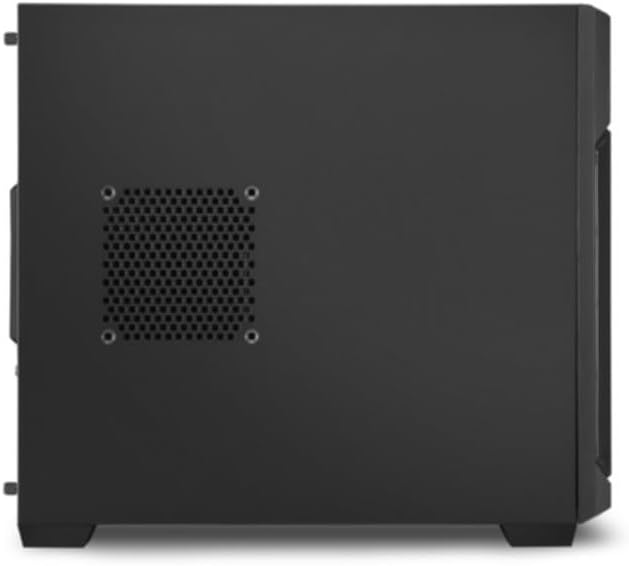
Figura 6: lateral view of the Sharkoon V1000, showing the ventilation cutouts which may have associated dust filters.
Resolució de problemes
Aquesta secció tracta problemes comuns que podeu trobar amb la carcassa del vostre PC.
Sense alimentació / El sistema no s'inicia
- Ensure the power supply unit (PSU) is properly connected to the wall outlet and the power switch on the PSU is in the 'ON' position.
- Verify that the front panel power button cable is correctly connected to the motherboard's power header.
- Comproveu que totes les connexions d'alimentació internes (ATX de 24 pins, alimentació de la CPU, alimentació de la GPU) estiguin ben connectades.
Soroll excessiu
- Inspect all fans (CPU, GPU, case fans) for obstructions or loose mounting.
- Ensure cables are not interfering with fan blades.
- Check if the power supply is securely mounted and its pad is properly decoupled.
Sobreescalfament
- Netegeu tots els filtres de pols i els components interns per millorar el flux d'aire.
- Verify that case fans are installed in the correct orientation (intake/exhaust) to create proper airflow.
- Ensure CPU cooler and GPU cooler are properly seated and functioning.
Especificacions
Detailed specifications for the Sharkoon V1000 PC Case.
| Característica | Detall |
|---|---|
| Marca | Sharkoon |
| Fabricant | Sharkoon Technologies GmbH |
| Sèrie | V1000 |
| Color | Negre |
| Factor de forma | mATX |
| Alçada de l'element | 40.2 centímetres |
| Amplada de l'element | 19.5 centímetres |
| Dimensions del producte | 45 x 19.5 x 40.2 cm; 4 kg |
| Nombre de ports USB 2.0 | 2 |
| Nombre de ports USB 3.0 | 1 |
| Compatibilitat amb la placa base | mATX |
| Tipus de cas | Torre del Midi |
| Tipus de muntatge de la font d'alimentació | Muntatge posterior |
| Mètode de refrigeració | Aire |
| Fan Size Supported | 120 Mil·límetres |
Garantia i Suport
For warranty information and technical support regarding your Sharkoon V1000 PC Case, please refer to the official Sharkoon website or contact Sharkoon Technologies GmbH directly.
Fabricant: Sharkoon Technologies GmbH
Conserveu el vostre comprovant de compra per a reclamacions de garantia.


