Introducció
The Rabbit Air MinusA2 is an advanced HEPA air purifier designed to significantly improve indoor air quality. It features a sophisticated six-stage filtration and deodorization system, effectively capturing allergens, dust, mold, smoke, VOCs, and odors. This unit is suitable for large rooms and can be used as a standalone device or mounted on a wall, offering versatile placement options for homes and businesses.
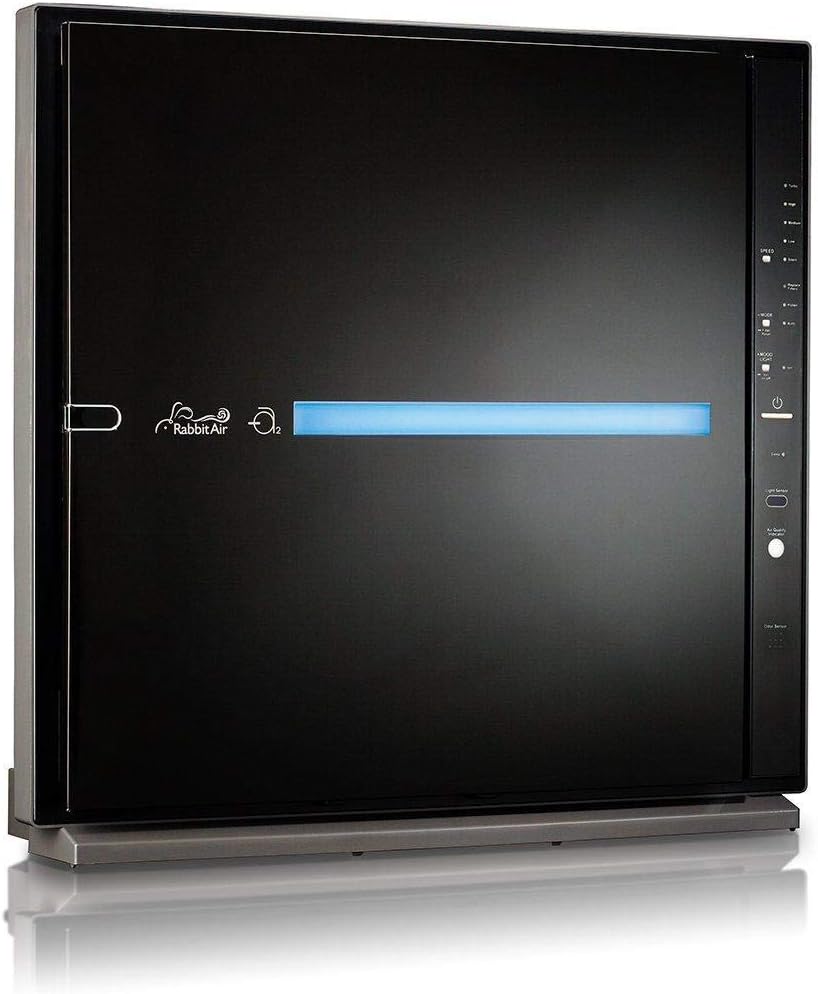
Figure 1: The Rabbit Air MinusA2 Air Purifier, showcasing its sleek black design and illuminated air quality indicator bar.
Configuració i instal·lació
Follow these steps for initial setup and filter installation to ensure optimal performance of your MinusA2 air purifier.
Unboxing and Initial Preparation
- Traieu amb cura el purificador d'aire del seu embalatge.
- Place the unit on a flat, stable surface or prepare for wall mounting.
- Locate the Quick Start Guide and read the initial filter installation instructions.
Instal·lació de filtres
The MinusA2 utilizes a multi-stage filtration system. Ensure all filters are unwrapped and correctly installed before operating the unit.
- Remove the front panel by gently pulling it from the bottom and lifting it up.
- Remove the filter case by grasping the handles on either side and pulling it forward. Lay the filter case on a flat surface.
- Estireu les pestanyes de la part davantera del prefiltre per treure'l.
- Remove the white Medium Filter from its black frame. Discard the plastic wrapping and return the filter to its frame.
- Remove the BioGS HEPA Filter and discard plastic wrapping.
- Remove the Activated Carbon Filter and discard plastic wrapping.
- Remove the empty Customized Filter frame from the case. Locate the Customized Filter set aside from the case. Insert the filter into its frame. Make sure the front of the filter is facing up. Refer to your Customized Filter chart to identify the front of your filter.
- Reinstall all filters in the correct order: Pre-Filter, Medium Filter, BioGS HEPA Filter, Activated Carbon Filter, and Customized Filter.
- Close the filter case and reattach the front panel.

Figure 2: The multi-stage filter set for the MinusA2 air purifier, including the Odor Remover customized filter.

Figure 3: Control panel diagram illustrating the various buttons and indicators for operation.
Instruccions de funcionament
Your MinusA2 air purifier offers various modes and settings for optimal air purification.
Tauler de control acabatview
The control panel, located on the side of the unit, allows you to manage all functions. Refer to Figure 3 for a visual guide.
- Botó d'encesa: Encén o apaga la unitat.
- Velocitat del ventilador: Adjusts the fan speed (Silent, Low, Medium, High, Turbo).
- Botó de mode: Toggles between Auto Mode and Pollen Mode.
- Llum d'humor: Controls the ambient light bar.
- Indicador de qualitat de l'aire: Changes color to reflect current air quality.
- Indicador de substitució del filtre: Illuminates when filters need replacement.
- Botó de restabliment del filtre: Resets the filter timer after replacement.
Modes de funcionament
- Mode automàtic: The unit automatically adjusts fan speed based on detected air quality. This is the recommended setting for continuous operation.
- Mode de pol·len: Optimized for detecting and removing pollen, adjusting fan speed accordingly.
- Mode de repòs: Reduces fan speed to the lowest setting and dims lights for quiet operation during sleep.
Smart App Control (WIFI Models)
For models with WIFI capability, you can control your air purifier remotely using the Rabbit Air App.
- Download the "Rabbit Air" app from the App Store or Google Play.
- Follow the in-app instructions to connect your MinusA2 to your home WIFI network.
- Once connected, you can monitor air quality, adjust settings, and schedule operations from your smartphone or tablet.

Figure 4: The Rabbit Air MinusA2 unit alongside mobile devices demonstrating the smart app control feature.

Figure 5: Remote control of the air purifier via the Rabbit Air mobile application.
Manteniment
Regular maintenance ensures the longevity and efficiency of your Rabbit Air MinusA2 air purifier.
Neteja i substitució del filtre
- Pre-filtre: Clean the Pre-Filter monthly by vacuuming or rinsing with water. Ensure it is completely dry before reinstallation.
- Medium Filter, BioGS HEPA Filter, Activated Carbon Filter, Customized Filter: These filters are not washable and should be replaced approximately every 12 months, depending on usage and air quality. The Filter Replacement Indicator on the control panel will illuminate when replacement is due.
- After replacing filters, press and hold the Filter Reset Button on the control panel until the indicator light turns off.
Neteja general
- Netegeu l'exterior de la unitat amb un drap suau i sec. No utilitzeu productes de neteja abrasius ni dissolvents.
- Ensure the air intake and outlet vents are free from dust and obstructions.
Resolució de problemes
If you encounter issues with your MinusA2 air purifier, refer to the common problems and solutions below.
| Problema | Causa possible | Solució |
|---|---|---|
| La unitat no s'encén. | El cable d'alimentació no està connectat correctament; no hi ha corrent a la presa de corrent. | Ensure power cord is securely plugged into the unit and a working electrical outlet. Check circuit breaker. |
| El flux d'aire és feble o no surt aire. | Filters are clogged; plastic wrapping not removed from new filters; air intake/outlet blocked. | Clean or replace filters as needed. Ensure all plastic wrapping is removed from new filters. Check for obstructions around air vents. |
| Soroll inusual de la unitat. | Foreign object inside; fan obstruction; unit not on a stable surface. | Turn off and unplug the unit. Carefully inspect for any foreign objects. Ensure unit is on a stable, level surface. |
| L'indicador de qualitat de l'aire sempre és vermell/deficient. | Sensor is dirty; high levels of pollutants in the environment. | Gently clean the air quality sensor with a dry cotton swab. Ensure proper ventilation in the room. |
| Cannot connect to Wi-Fi (WIFI models). | Incorrect Wi-Fi password; unit too far from router; router issues. | Verify Wi-Fi password. Move unit closer to router. Restart your Wi-Fi router. Refer to the app's connection guide. |
If the problem persists after attempting these solutions, please contact Rabbit Air customer support.
Especificacions
| Característica | Detall |
|---|---|
| Número de model | SPA-780N |
| Dimensions del producte | 7 "P x 21.4" W x 20.25" H |
| Pes | 19.4 lliures |
| Color | Black (Odor Remover variant) |
| Cobertura de la superfície del sòl | Fins a 815 peus quadrats (basat en 2 canvis d'aire per hora) |
| Estàndard de filtració | HEPA filtration standard |
| Vida del filtre | Approximately 12 months (main filters) |
| Font d'alimentació | Alimentat per corrent altern |
| Piles necessàries | 1 Lithium Metal battery (included, likely for remote control) |
| Connectivitat | Wi-Fi enabled (for app control) |
| Opcions de muntatge | Independent o muntable a la paret |

Figura 6: Dimensionalment sobrepassatview of the MinusA2 air purifier.

Figure 7: Included remote control and wall mount bracket for flexible placement.

Figure 8: The MinusA2 air purifier seamlessly blending into a living space.

Figure 9: The MinusA2 air purifier wall-mounted, demonstrating its space-saving design.
Garantia i Suport
Rabbit Air stands behind the quality of its products. Your MinusA2 air purifier comes with a comprehensive warranty.
- Període de garantia: The standard warranty period is typically 5 years upon registration.
- Inscripció: To activate your 5-year warranty, please register your product online at www.rabbitair.com/warranty.
- Avís legal: Les declaracions sobre els suplements dietètics no han estat avaluades per la FDA i no tenen com a objectiu diagnosticar, tractar, curar o prevenir cap malaltia o afecció mèdica.Note: This disclaimer was found in the product data under "important_information" and is included as per instructions, though its relevance to an air purifier manual is unusual.)
Atenció al client
For technical assistance, warranty claims, or general inquiries, please contact Rabbit Air customer support through their official website or contact information provided in your product packaging.


