Introducció
Welcome to the user manual for your Mustool G600 Digital Portable Microscope. This guide provides detailed instructions to help you set up, operate, and maintain your device, ensuring optimal performance and longevity. Please read this manual thoroughly before using the microscope.
Producte acabatview
The Mustool G600 is a versatile digital portable microscope designed for detailed observation of tiny objects. It features a high-definition display and adjustable magnification, making it suitable for various applications.
Característiques clau
- 4.3-inch HD LCD display for clear viewing.
- HD 3.6MP CCD sensor for high-resolution imaging.
- Adjustable magnification from 1x to 600x.
- Eight high-brightness LEDs for optimal illumination.
- Support for Micro SD card up to 64GB (not included) for storage.
- Built-in Li-ion battery providing approximately 6 hours of continuous working time.
- Auto turn-off function for power saving.
- Object distance: 15mm to infinity.
- Suport multi-idioma.
Components

Figure 1: Mustool G600 Digital Portable Microscope in operation, showing a circuit board under its lens and the magnified image on the display.
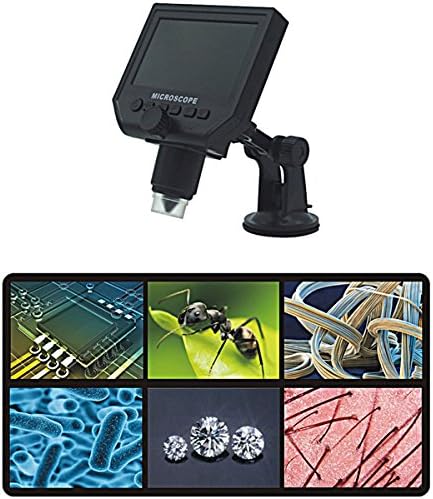
Figure 2: The Mustool G600 Digital Portable Microscope detached from its stand, showcasing the device's compact design and the adjustable stand.

Figure 3: The Mustool G600 Digital Portable Microscope display, illustrating various magnified views such as circuit components, an ant, textile fibers, bacteria, diamonds, and hair strands.

Figura 4: Frontal view of the Mustool G600 Digital Portable Microscope mounted on its suction cup stand, highlighting the 4.3-inch LCD screen and control buttons.

Figura 5: lateral view of the Mustool G600 Digital Portable Microscope, illustrating the adjustable arm of the stand and the microscope's lens assembly.

Figura 6: posterior view of the Mustool G600 Digital Portable Microscope, showing the various ports for power, data, and Micro SD card insertion.
Contingut del paquet
Si us plau, verifiqueu que tots els articles que s'enumeren a continuació s'inclouen al vostre paquet. Si falta algun article o hi ha algun malmès, poseu-vos en contacte amb el servei d'atenció al client.
- 1 x Mustool G600 LCD Digital Microscope
- 1 x EU Plug Power supply (Note: Adapter may vary by region)
- 1 x Data line (USB cable)
- 1 x Multi-functional support (Stand)
- 1 x User’s manual (This document)
Configuració
Carregant la bateria
Before first use, fully charge the microscope's built-in Li-ion battery.
- Connect the provided power supply to the microscope's charging port.
- Connecteu la font d'alimentació a una presa de corrent estàndard.
- El llum indicador de càrrega s'il·luminarà. Un cop completament carregat, el llum pot canviar de color o apagar-se.
- A full charge provides approximately 6 hours of continuous operation.
Muntatge de l’estand
The multi-functional support allows for stable positioning of the microscope.
- Attach the microscope unit to the adjustable arm of the stand. Ensure it is securely fastened.
- Place the suction cup base on a clean, flat, non-porous surface. Press down firmly on the suction cup lever to secure the stand.
- Adjust the arm and microscope angle as needed for your viewing subjecte.
Inserció d'una targeta Micro SD (opcional)
To save images and videos, insert a Micro SD card (up to 64GB, not included).
- Locate the Micro SD card slot on the side or back of the microscope unit.
- Gently insert the Micro SD card with the gold contacts facing down (or as indicated by the slot diagram) until it clicks into place.
- Per treure-la, torneu a prémer suaument la targeta fins que surti.
Instruccions de funcionament
Encès/Apagat
Manteniu premut el botó Poder button (usually marked with a power symbol) for a few seconds to turn the microscope on or off. The LCD screen will illuminate.
Ajust d'ampliació i enfocament
The microscope offers 1x to 600x continuous magnification.
- Place the object you wish to observe directly under the microscope lens.
- Gira el gran Pom de focus (typically located on the side of the microscope body) to bring the image into sharp focus on the LCD screen.
- Adjust the distance between the lens and the object (object distance: 15mm to infinity) using the stand's adjustment mechanisms to achieve the desired magnification and clarity.
Ajust de la brillantor del LED
The microscope is equipped with 8 adjustable high-brightness LEDs.
Localitza el Control de brillantor LED (often a small knob or button) on the microscope body. Rotate or press it to increase or decrease the illumination on your subject.
Captura d'imatges i vídeos
To capture still images or record videos, ensure a Micro SD card is inserted.
- Mentre viewing your subject, press the Mode button to switch between photo mode, video mode, and playback mode.
- En el mode de foto, premeu la tecla D'acord/Captura botó per fer una foto.
- In video mode, press the D'acord/Captura button to start recording. Press it again to stop recording.
- Capturat files es guarden a la targeta Micro SD.
Navegació pel menú
Utilitza el Menú button to access settings and options.
Utilitza el Amunt/Avall or Esquerra/Dreta botons de fletxa per navegar per les opcions del menú.
Premeu el botó OK botó per confirmar les seleccions.
Common settings include resolution (1080P, 720P, VGA), language, date/time, and auto-off timer.
Manteniment
Neteja
Per assegurar-se clar viewing and extend the life of your microscope:
- Gently wipe the LCD screen with a soft, lint-free cloth. For stubborn smudges, slightly dampNetegeu el drap amb aigua o un netejador de pantalles.
- Use a soft brush or air blower to remove dust from the lens. For smudges on the lens, use a specialized lens cleaning solution and cloth.
- Clean the microscope body with a dry or slightly damp tela. No utilitzeu netejadors abrasius ni dissolvents.
Emmagatzematge
When not in use, store the microscope in a cool, dry place, away from direct sunlight and extreme temperatures.
Keep the lens covered to prevent dust accumulation.
Cura de la bateria
Per allargar la durada de la bateria:
- Eviteu descarregar completament la bateria amb freqüència.
- Si l'emmagatzemeu durant un període prolongat, carregueu la bateria fins a un 50% de la seva capacitat aproximadament.
- Torneu a carregar la bateria cada pocs mesos si no l'utilitzeu per evitar una descàrrega profunda.
Resolució de problemes
| Problema | Causa possible | Solució |
|---|---|---|
| El microscopi no s'encén. | La bateria està esgotada. | Carregueu la bateria amb la font d'alimentació proporcionada. |
| La imatge és borrosa. | Incorrect focus or object distance. | Adjust the focus knob and/or the distance between the lens and the object. |
| Screen is too dark/bright. | Brillantor del LED no ajustada. | Adjust the LED brightness control. |
| No es poden desar imatges/vídeos. | No hi ha cap targeta Micro SD inserida o la targeta està plena/corrompuda. | Insert a Micro SD card, ensure it has sufficient space, or try formatting the card (this will erase all data). |
| Microscope turns off automatically. | Auto turn-off function is enabled or battery is low. | Charge the battery. Check menu settings to adjust or disable the auto turn-off timer. |
Si el problema persisteix després de provar aquestes solucions, poseu-vos en contacte amb l'atenció al client.
Especificacions
| Característica | Detall |
|---|---|
| Model | Mustool G600 |
| Mostra | Pantalla LCD HD de 4.3 polzades |
| Píxel | HD 3.6MP CCD |
| Resolució | 1080P, 720P, VGA |
| Ampliació | 1-600x (Continuous) |
| Distància d'objectes | 15mm - infinity |
| Font de llum | 8 Adjustable High Brightness LEDs |
| Suport d'emmagatzematge | Micro SD card up to 64GB (Not included) |
| Font d'alimentació | Bateria Li-ion incorporada |
| Durada de la bateria | Approx. 6 hours continuous working |
| Apagat automàtic | Sí |
| Suport lingüístic | English, Spanish, Russian, Korean, Japanese, Thai, Hebrew, Portuguese, German, French, Italian, Turkish, Czech, Chinese |
| Material | Glass/Glass-like (Lens), Other components as per design |
| Color | Negre |
| UPC | 783050248461 |
Garantia i Suport
The Mustool G600 Digital Portable Microscope comes with a standard manufacturer's warranty. Please refer to the warranty card included in your package for specific terms and conditions.
For technical support, troubleshooting assistance beyond this manual, or warranty claims, please contact Mustool customer service through the retailer where you purchased the product or visit the official Mustool weblloc.
Please have your product model (G600) and purchase information ready when contacting support.


