Introducció
This manual provides essential information for the safe and efficient operation of your Samsung 7 Series NU7100 43" 4K UHD Smart LED TV. Please read it thoroughly before using the product and keep it for future reference.
The Samsung NU7100 series offers a clear upgrade from Full HD, providing 4x the resolution of Full HD. Non-4K content is upscaled to 4K via a powerful UHD engine, ensuring a vibrant and clear picture quality.
Què hi ha a la caixa
Your purchase includes the following items:
- One Samsung 7 Series NU7100 43" - Flat 4K UHD Smart LED TV (2018)
- One remote TM1240A with batteries
- Un cable d'alimentació
- Un manual d'usuari (aquest document)
Configuració
1. Desembalatge i col·locació
Carefully remove the TV from its packaging. It is recommended to have two people for larger screen sizes. Place the TV on a stable, flat surface or mount it to a wall using a VESA-compatible bracket (sold separately).

Figura 1: Frontal view of the Samsung 7 Series NU7100 43-inch TV.
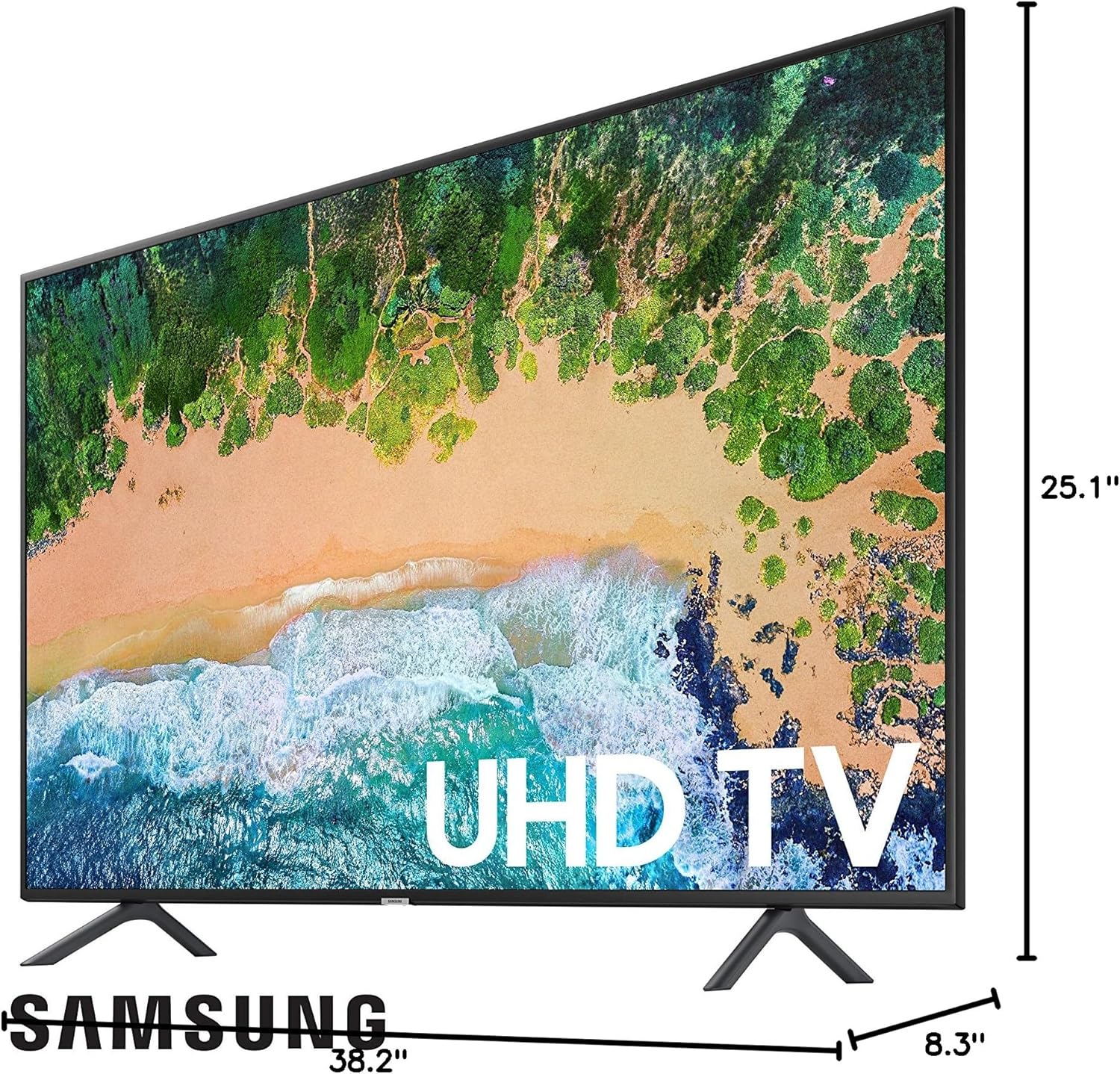
Figura 2: lateral view with dimensions of the Samsung 7 Series NU7100 43-inch TV. TV Size without Stand: 38.2"W x 22.2"H x 2.3"D. TV Size with Stand: 38.2"W x 25.1"H x 8.3"D. TV Weight: 21.2 lb.
2. Connexió de l'alimentació i dels dispositius
Connect the power cable to the TV and a wall outlet. Connect your external devices (e.g., cable box, Blu-ray player, gaming console) to the available HDMI ports. This model includes multiple HDMI inputs and a USB port for connectivity.
For internet connectivity, you can use Wi-Fi or an Ethernet cable via the Cat5/Cat6 jack on the back of the TV.
3. Assistent de configuració inicial
Upon first power-on, the TV will guide you through an initial setup process. This includes selecting your language, connecting to your Wi-Fi network, and agreeing to terms and conditions. You may also be prompted to create or log in to a Samsung account to access all smart features and applications.
Vídeo 1: Producte acabatview of the Samsung UN43NU7100FXZA 43-inch TV, demonstrating its features and connectivity. This video is provided by the merchant.
Instruccions de funcionament
1. Ús del comandament a distància
The included remote control (TM1240A) allows you to navigate the TV's menus, change channels, adjust volume, and access smart features. Familiarize yourself with the button layout for optimal use.
Video 2: Demonstration of the Samsung 40NU7100 TV's smart features and remote control functionality. This video is provided by the merchant.
2. Navegació Smart Hub
The Smart Hub provides access to a variety of streaming apps, live TV, and connected devices. Use the directional pad on your remote to navigate through the Smart Hub interface. You can customize the order of apps and access recommended content.
3. Configuració d'imatge i so
Access the TV's settings menu to adjust picture modes (e.g., Dynamic, Standard, Movie), brightness, contrast, and color. Sound settings allow you to select sound modes (e.g., Standard, Optimized, Amplify) and adjust equalizer settings. The TV features a 120 Motion Rate for smooth action on fast-moving content.
Manteniment
1. Neteja del televisor
To clean the screen, gently wipe it with a soft, lint-free cloth. For stubborn smudges, lightly dampen the cloth with water or a screen cleaner specifically designed for electronics. Avoid using harsh chemicals or abrasive materials. Clean the TV frame and stand with a soft, dry cloth.
2. Actualitzacions de programari
Ensure your TV's software is up to date for optimal performance and security. You can usually check for and install updates through the TV's settings menu under "Support" or "Software Update."
Resolució de problemes
Sense poder
- Comproveu si el cable d'alimentació està connectat correctament al televisor i a la presa de corrent.
- Assegureu-vos que la presa de corrent funcioni connectant-hi un altre dispositiu.
- Premeu el botó d'engegada del comandament a distància o del televisor mateix.
Sense imatge/Mala qualitat d'imatge
- Verifiqueu que s'ha seleccionat la font d'entrada correcta (per exemple, HDMI 1, HDMI 2).
- Comproveu totes les connexions de cable entre el televisor i els dispositius externs.
- Ajusteu la configuració de la imatge (brillantor, contrast, nitidesa) al menú del televisor.
- If using an antenna, ensure it is properly connected and positioned.
Sense so/Mala qualitat de so
- Comproveu el nivell de volum tant del televisor com de qualsevol dispositiu d'àudio connectat.
- Assegureu-vos que el televisor no estigui silenciat.
- Verifiqueu les connexions del cable d'àudio.
- Adjust sound mode settings in the TV menu.
Smart Hub/Internet Connectivity Issues
- Check your Wi-Fi connection in the TV's network settings.
- Reinicieu el router i el mòdem.
- Si feu servir un cable Ethernet, assegureu-vos que estigui connectat correctament.
- Perform a Smart Hub reset in the TV's settings (this may require re-entering account information for apps).
Especificacions
| Característica | Detall |
|---|---|
| Marca | Samsung |
| Número de model | UN43NU7100FXZA |
| Mida de la pantalla | 43 Inches (42.5" Measured Diagonally) |
| Tecnologia de visualització | LED |
| Resolució | 4K UHD (3,840 x 2,160) |
| Freqüència d'actualització | 120 Hz Motion Rate (Native 60Hz) |
| Característica especial | Pantalla plana, funcionalitat Smart TV |
| Tecnologia de connectivitat | HDMI, Wi-Fi, Ethernet |
| Product Dimensions (with Stand) | 38.2" d'amplada x 25.1" d'alçada x 8.3" de profunditat |
| Product Dimensions (without Stand) | 38.2" d'amplada x 22.2" d'alçada x 2.3" de profunditat |
| Pes de l'article | 21.2 lbs (without stand) / 21.6 lbs (with stand) |
| Nom del color | Negre carbó |
| Consum d'energia | 50 watts |
| Control remot | TM1240A (2 AAA batteries required) |
| Suport Bluetooth | No |
Garantia i suport
Per obtenir informació sobre la garantia i assistència tècnica, consulteu el lloc web oficial de Samsung. website or contact Samsung customer service directly. Keep your purchase receipt and product serial number handy for any inquiries.
Online resources and FAQs are available on the Samsung support portal.


