1. Producte acabatview
The MOXA EDS-405A is a robust 5-port entry-level managed Ethernet switch designed for industrial applications. It features five 10/100 BaseTx ports and supports advanced network management functions such as Port Base VLAN and Quality of Service (QoS). This switch is engineered to operate reliably in environments with temperatures ranging from 0°C to 60°C, providing stable and efficient network connectivity for critical systems.
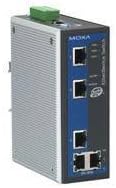
Figure 1: MOXA EDS-405A Managed Ethernet Switch. This image displays the compact, rugged metal housing of the switch, highlighting its five Ethernet ports and status indicator LEDs on the front panel. A green terminal block for power input is visible at the top.
2. Característiques clau
- Network Redundancy: Supports Turbo Ring and Turbo Chain (recovery time < 20 ms @ 250 switches), and RSTP/STP for enhanced network reliability.
- Gestió del trànsit: Features IGMP Snooping, QoS (Quality of Service), IEEE 802.1Q VLAN, and port-based VLAN for efficient network traffic control.
- Gestió fàcil: Offers versatile network management options via web browser, Command Line Interface (CLI), Telnet/serial console, Windows utility, and ABC-01.
- Industrial Protocol Support: PROFINET or EtherNet/IP enabled by default (PN or EIP models) for seamless integration into industrial automation systems.
- Visualized Management: Compatible with MXstudio for easy, visualized industrial network management, simplifying configuration and monitoring.
3. Configuració i instal·lació
Follow these steps to properly install and set up your MOXA EDS-405A switch:
- Muntatge: Securely mount the switch in a suitable industrial enclosure or on a DIN-rail. Ensure adequate ventilation around the device.
- Connexió d'alimentació: Connect the appropriate DC power supply to the terminal block located on the top of the switch. Verify that the power source matches the switch's voltage requisits.
- Connexions de xarxa: Connect your network devices (e.g., PLCs, HMIs, industrial PCs) to the RJ45 Ethernet ports on the front panel using standard Ethernet cables.
- Configuració inicial: For initial setup, connect a PC directly to one of the switch's Ethernet ports. Access the switch's web-based management interface by entering its default IP address into a web browser. Refer to the product's quick installation guide for the default IP address and login credentials.
- Verificar el funcionament: Check the LED indicators on the front panel. Power LEDs should be on, and port LEDs should indicate active links and data activity.
4. Instruccions de funcionament
The EDS-405A is a managed switch, offering various configuration options to optimize your network. Most configurations are performed via the web-based management interface or CLI.
- Accés a la interfície de gestió: Obre a web browser and enter the switch's IP address. Log in using your credentials.
- Configuració de VLAN: Navigate to the VLAN settings to segment your network into virtual local area networks. This enhances security and improves network performance by reducing broadcast domains.
- QoS Setup: Configure Quality of Service (QoS) to prioritize critical network traffic, such as real-time control data, ensuring consistent performance even under heavy load.
- Redundancy Protocols: Implement Turbo Ring or RSTP/STP to create redundant network paths, ensuring network availability in case of a link failure.
- Seguiment: Use the interface to monitor port status, traffic statistics, and system logs to keep track of network health and performance.
5. Manteniment
Regular maintenance ensures the longevity and optimal performance of your EDS-405A switch:
- Control ambiental: Ensure the operating environment remains within the specified temperature (0°C to 60°C) and humidity ranges. Avoid excessive dust or moisture.
- Neteja: Periodically clean the exterior of the switch with a soft, dry cloth. Do not use liquid cleaners or solvents. Ensure ventilation openings are clear of obstructions.
- Actualitzacions de firmware: Comproveu la Moxa website regularly for firmware updates. Applying the latest firmware can improve performance, add new features, and address security vulnerabilities.
- Còpia de seguretat de la configuració: Regularly back up your switch's configuration settings. This allows for quick restoration in case of accidental changes or device replacement.
- Inspecció del cable: Periodically inspect all connected network and power cables for damage or loose connections.
6. Solució De Problemes
If you encounter issues with your EDS-405A switch, consider the following troubleshooting steps:
- Sense energia:
- Verifiqueu que la font d'alimentació estigui connectada correctament i que proporcioni el volum correctetage.
- Comproveu la funcionalitat de la font d'alimentació (endoll, regleta).
- Ensure the power terminal block is securely fastened.
- Sense connectivitat de xarxa:
- Check if the link/activity LEDs for the connected ports are lit. If not, try a different port or cable.
- Assegureu-vos que el dispositiu connectat estigui encès i funcioni correctament.
- Verify network cable integrity and proper connection.
- Check the switch's configuration (VLANs, port settings) to ensure it matches your network requirements.
- No es pot accedir Web Interfície:
- Confirm your PC's IP address is in the same subnet as the switch's IP address.
- Assegureu-vos que no hi hagi conflictes d'adreces IP a la xarxa.
- Try resetting the switch to factory defaults (refer to the product manual for the reset procedure) if you have forgotten the login credentials or configuration.
If issues persist, consult the comprehensive user manual available on the Moxa website or contact Moxa technical support.
7. Especificacions tècniques
| Atribut | Valor |
|---|---|
| Model | EDS-405A |
| Marca | Moxa |
| Fabricant | Moxa Inc. |
| Nombre de Ports | 5 (10/100 BaseTx) |
| Tipus d'interfície | RJ45 |
| Temperatura de funcionament | 0 °C a 60 °C |
| Material de la caixa | Metall |
| Pes de l'article | 1 lliures (aprox. 0.45 kg) |
| Dimensions del paquet | 9 x 6.6 x 3.7 polzades (aprox. 22.86 x 16.76 x 9.4 cm) |
| Platform for Management | Web Navegador |
| Color | Plata |
| Dispositius compatibles | Desktop (general network devices) |
| Tipus de canvi | Commutador Ethernet gestionat |
| UPC | 613739925133 |
| Primera data disponible | 23 de gener de 2018 |
8. Garantia i Suport
Moxa products typically come with a standard manufacturer's warranty. For specific warranty terms and conditions, please refer to the warranty card included with your product or visit the official Moxa website. Warranty details can vary by region and product.
For technical assistance, product inquiries, or support, please contact Moxa's customer service or visit their official support portal. Ensure you have your product model (EDS-405A) and serial number ready when seeking support.
Moxa Official Weblloc: www.moxa.com