Introducció
The Venstar T1000FS is a 1-day programmable digital thermostat designed for efficient temperature control in your home or office. It features a clear digital display that simultaneously shows heating and cooling set points along with the current room temperature. This thermostat is hardwired and operates on 24 volts, making it a reliable choice for various HVAC systems. Its user-friendly design includes push-button controls and the capability for remote operation, offering convenience and flexibility.
Configuració i instal·lació
The Venstar T1000FS thermostat is designed for straightforward wall-mount installation. It comes with a mounting bracket to facilitate easy attachment to drywall or other surfaces. Ensure power is off at the circuit breaker before beginning installation.
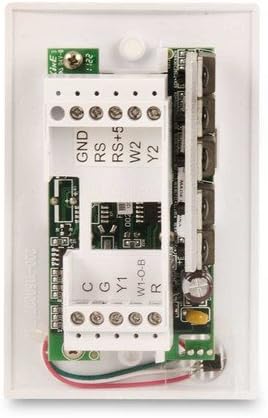
Figura 1: posterior view of the Venstar T1000FS thermostat, illustrating the wiring terminals for connection to your HVAC system. Proper wiring is crucial for correct operation.

Figura 2: Davant view of the Venstar T1000FS thermostat with the outer cover removed, revealing the internal circuitry and display area. This view is relevant during the initial mounting and wiring process.
Instruccions de cablejat:
This thermostat requires a 24-volt hardwired connection. Refer to your HVAC system's wiring diagram and the labels on the thermostat's terminal block for correct connections. Common terminals include R (power), C (common), Y (cooling), W (heating), and G (fan). Always ensure wires are securely fastened to prevent loose connections.
Muntatge:
Attach the mounting bracket to the wall using appropriate screws. Once wiring is complete and secured, carefully align the thermostat with the bracket and snap it into place. Ensure it is firmly seated.
Instruccions de funcionament
The Venstar T1000FS thermostat features a digital display and push-button controls for easy operation. It supports single-day programming and auto changeover between heating and cooling modes.
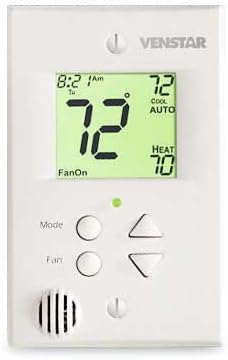
Figura 3: Davant view of the Venstar T1000FS thermostat, showcasing its digital display with backlight and the primary control buttons (Mode, Fan, Up/Down arrows).
Mostra informació:
- The digital display shows the current room temperature prominently.
- Heating and cooling set points are displayed simultaneously, allowing for quick reference.
- A backlight ensures visibility in various lighting conditions.
Funcions del botó:
- Botó de mode: Cycles through system modes such as Heat, Cool, Auto, and Off.
- Botó del ventilador: Controla el funcionament del ventilador (per exemple, Automàtic, Encès).
- Fletxes amunt/avall: Adjust the temperature set points.
Programació:
As a single-day programmable thermostat, the T1000FS allows you to set a consistent schedule for heating and cooling for a 24-hour period. Consult the detailed programming guide that came with your thermostat for step-by-step instructions on setting your desired temperature schedule.
Manteniment
The Venstar T1000FS thermostat requires minimal maintenance. Since it is hardwired, no batteries are required for operation.
Neteja:
Per netejar el termòstat, netegeu suaument l'exterior amb un drap suau i sec.amp cloth. Do not use abrasive cleaners, solvents, or spray cleaners directly onto the unit, as this may damage the display or internal components.
Comprovacions periòdiques:
Periodically ensure that the thermostat is securely mounted to the wall and that there are no obstructions around it that could affect accurate temperature readings.
Resolució de problemes
If you encounter issues with your Venstar T1000FS thermostat, consider the following common troubleshooting steps:
- Sense pantalla/alimentació: Ensure the circuit breaker supplying power to your HVAC system and thermostat is on. Verify all wiring connections are secure at the thermostat and the HVAC unit.
- Lectures de temperatura incorrectes: Assegureu-vos que el termòstat no estigui exposat a la llum solar directa, corrents d'aire ni fonts de calor (per exemple,amps, electrodomèstics) que podrien afectar el seu sensor de temperatura.
- El sistema no respon: Check that the system mode (Heat, Cool, Auto) is correctly selected. Verify that the temperature set point is above (for heating) or below (for cooling) the current room temperature to trigger the system.
- Problemes amb els fans: If the fan is not operating as expected, check the fan mode setting (Auto/On).
For persistent issues or complex problems, it is recommended to contact a qualified HVAC technician or Venstar customer support.
Especificacions
| Característica | Detall |
|---|---|
| Marca | Venstar |
| Número de model | Cab-T1000FS |
| Dimensions del producte | 4.25 x 2.75 x 1.25 polzades |
| Pes de l'article | 0.01 unces |
| Font d'alimentació | Cablejat |
| Voltage | 24 Volts |
| Necessites piles? | No |
| Tipus de controlador | Botó, comandament a distància |
| Característiques especials | Canvi automàtic, programable |
| Tipus de control de temperatura | Programable |
| Tecnologia de connectivitat | Wi-Fi |
| Protocol de connectivitat | Wi-Fi |
| Tipus de muntatge | Muntatge de paret |
| Tipus de visualització | Digital |
| Llum de fons | Sí |
| Components inclosos | Suport de muntatge |
Garantia i Suport
For information regarding the warranty of your Venstar T1000FS thermostat, please refer to the warranty card included with your product packaging or visit the official Venstar website. For technical support, troubleshooting assistance beyond this manual, or to inquire about replacement parts, please contact Venstar customer service directly. Contact details can typically be found on the manufacturer's weblloc o a la documentació del producte.


