1. Introducció
This manual provides essential information for the safe and efficient operation of your APC Smart-UPS 600 VA Battery Backup System. This Uninterruptible Power Supply (UPS) is designed to provide temporary battery power during power outages and protect your electronic equipment from power surges and fluctuations. Please read this manual thoroughly before installation and use.
2. Informació important de seguretat
Observe the following safety precautions during installation, operation, and maintenance of the UPS unit.
- No obriu la carcassa del SAI. No hi ha peces a l'interior que l'usuari pugui reparar.
- Do not dispose of the battery in a fire as it may explode.
- Do not connect non-computer related items, such as medical equipment, life support equipment, microwave ovens, or vacuum cleaners, to the UPS.
- Assegureu-vos que el SAI estigui connectat a una presa de corrent de CA amb connexió a terra.
- Operate the UPS in a well-ventilated area, free from excessive dust, corrosive fumes, and conductive contaminants.
3. Contingut del paquet
Verifiqueu que hi hagi tots els elements en desempaquetar:
- APC Smart-UPS 600 VA Battery Backup System
- Manual d'usuari (aquest document)
- USB Communication Cable (if applicable)

Figura 3.1: Frontal view of the APC Smart-UPS 600 VA Battery Backup System, showing the power button and outlets.
4. Producte acabatview
4.1. Components i controls
Familiarize yourself with the key components of your UPS unit.
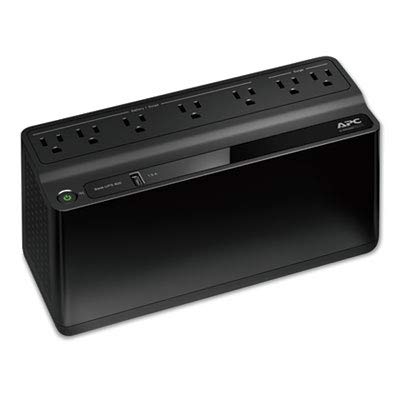
Figura 4.1: De dalt a baix view of the UPS, highlighting the seven power outlets. Four outlets are for battery backup and surge protection, and three are for surge protection only.
- Botó d'encesa: Turns the UPS on or off.
- Bateria de reserva i preses de corrent protegides contra sobretensions (4): Proporciona energia de bateria durant la teva ústages i protegir contra sobretensions.
- Surge Protected Only Outlets (3): Provide surge protection but no battery backup.
- Port de càrrega USB (1.5A): Per carregar dispositius mòbils.
- AC Input Cord: Connects the UPS to wall power.
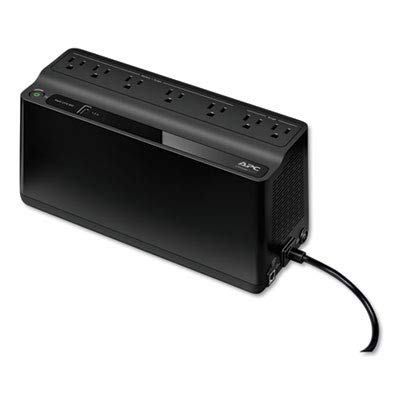
Figura 4.2: posterior view of the UPS, showing the integrated power cord and ventilation grilles.
5. Configuració
5.1. Col·locació
Place the UPS on a flat, stable surface away from direct sunlight, heat sources, and excessive moisture. Ensure adequate airflow around the unit.
5.2. Initial Battery Connection
The UPS battery is disconnected for safety during shipping. Before initial use, connect the battery as follows:
- Lay the UPS on its side.
- Localitzeu la tapa del compartiment de la bateria.
- Remove the cover and connect the battery terminal.
- Substituïu la coberta.
5.3. Connexió d'equips
Connect your computer, monitor, and other critical equipment to the Còpia de seguretat de la bateria i punts de venda protegits contra sobretensions. Connect less critical peripherals, such as printers or scanners, to the Endolls només protegits contra sobretensions.
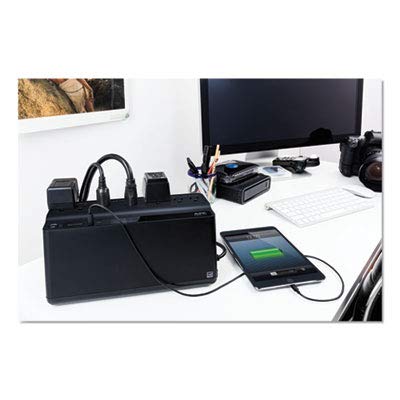
Figure 5.1: The UPS connected to a typical desktop computer setup, providing power and protection to the computer, monitor, and other accessories.
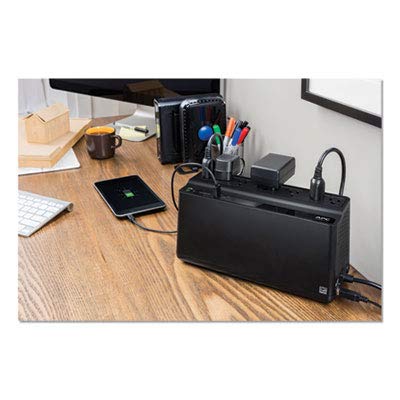
Figure 5.2: The UPS providing power and surge protection to multiple office devices, including a smartphone charging via the USB port.
5.4. Connecting to AC Power
Plug the UPS power cord directly into a grounded 2-pole, 3-wire wall receptacle. Avoid using extension cords or surge strips with the UPS.
6. Funcionament del SAI
6.1. Encendre/apagar
- Encendre: Press the power button once. The UPS will emit a short beep, and the power indicator will illuminate.
- Apagar: Press and hold the power button until the UPS beeps and the power indicator turns off.
6.2. Càrrega de la bateria
The UPS battery charges automatically when connected to AC power. Allow the battery to charge for at least 8 hours before initial use to ensure full runtime capacity.
6.3. Potència Outage Funcionament
Durant una potènciatage, the UPS will automatically switch to battery power. It will emit a series of beeps to indicate it is operating on battery. The duration of battery power depends on the load connected. Save your work and shut down your equipment gracefully when the battery is low.
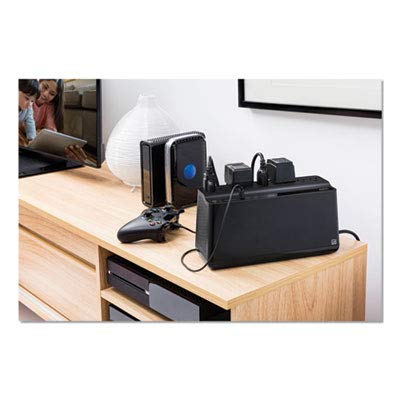
Figure 6.1: The UPS integrated with a home entertainment system, providing backup power for devices like a gaming console and media server.
7. Manteniment
7.1. Substitució de la bateria
The battery in your UPS is designed for a service life of 3-5 years under normal operating conditions. Battery replacement should only be performed by qualified service personnel. Contact APC support for battery replacement options.
7.2. Neteja
Clean the exterior of the UPS with a soft, dry cloth. Do not use liquid or aerosol cleaners. Ensure ventilation openings are free from dust and debris.
8. Solució De Problemes
Consulteu la taula següent per veure els problemes habituals i les seves solucions.
| Problema | Causa possible | Solució |
|---|---|---|
| El SAI no s'encén. | Battery not connected or low. | Assegureu-vos que la bateria estigui connectada. Carregueu el SAI durant 8 hores. |
| El SAI emet un so continu. | Funcionant amb bateria. | Save work and shut down equipment. Restore AC power. |
| No hi ha alimentació als dispositius connectats. | Overload or tripped circuit breaker. | Reduce load. Check and reset circuit breaker on UPS (if present). |
9. Especificacions
| Característica | Detall |
|---|---|
| Número de model | 600M1 |
| Capacitat | 600 VA / 490 J |
| Entrada Voltage | 120 Volts |
| Ampedat | 1.6 Amps |
| Punts de venda | 7 (4 Battery Backup & Surge, 3 Surge Only) |
| Tipus de bateria | Ió de liti |
| Color | Negre |
| Dimensions (L x A x A) | 10.7 x 5.47 x 4.13 polzades |
| Fabricant | AMERICAN POWER CONVERSION |
| Data de primera disponibilitat | 16 de març de 2017 |
10. Garantia i Suport
For warranty information and technical support, please visit the official APC weblloc web o poseu-vos en contacte amb el seu servei d'atenció al client. Conserveu el rebut de compra com a comprovant de compra.
Fabricant: AMERICAN POWER CONVERSION (APC)
Weblloc: www.apc.com


