1. Introducció
This manual provides essential information and instructions for the safe and efficient use of your Nokia 8 Sirocco TA-1005 smartphone. Please read this guide thoroughly before operating your device to ensure optimal performance and longevity. This device is designed for use with GSM, 3G, and 4G LTE networks. Compatibility with CDMA networks, including Verizon, Sprint, and US Cellular, is not supported. Verify network compatibility with your service provider prior to use.
2. Què hi ha a la caixa
Upon unboxing your Nokia 8 Sirocco TA-1005, verify that all components are present:
- Nokia 8 Sirocco TA-1005 Device
- Cable USB-Type C
- Adaptador d'alimentació
- Auriculars
- Eina expulsora de SIM
- Guia d'inici ràpid
- Informació de seguretat i garantia
3. Disseny del dispositiu
Familiarize yourself with the physical components of your Nokia 8 Sirocco TA-1005.
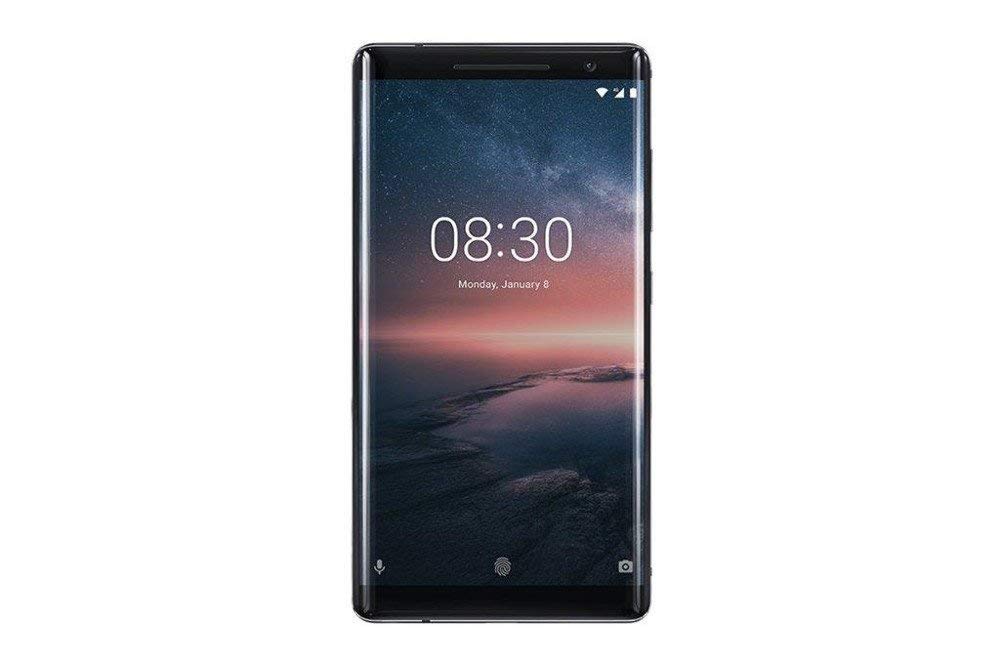
Figura 3.1: posterior view of the Nokia 8 Sirocco TA-1005. This image displays the dual camera setup with ZEISS optics, the circular fingerprint sensor below the camera, and the Nokia logo centrally placed. The 'androidone' branding is visible towards the bottom.
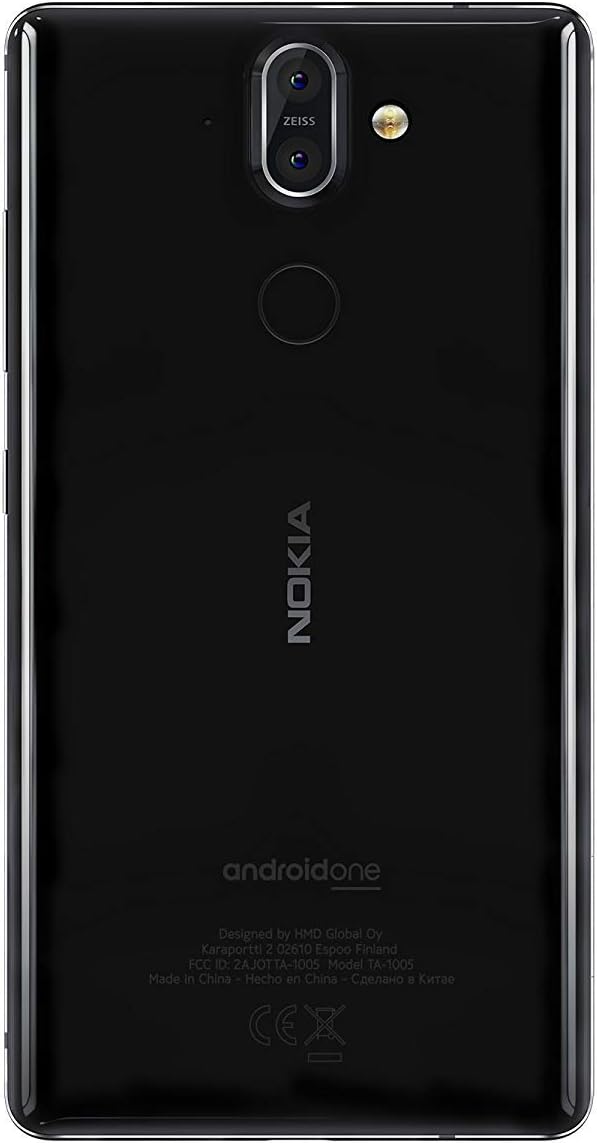
Figura 3.2: Davant view of the Nokia 8 Sirocco TA-1005. The image highlights the 5.5-inch P-OLED curved display, the front-facing camera at the top, and the on-screen navigation buttons. The device features minimal bezels.

Figura 3.3: lateral view of the Nokia 8 Sirocco TA-1005. This image illustrates the slim profile of the device, with the power button and volume rocker located on the right side for easy access.
Components clau:
- Càmera frontal: Situat a la part superior de la pantalla.
- Auricular: For calls, located above the display.
- Visualització: 5.5-inch P-OLED capacitive touchscreen.
- Botons de volum: On the right side, to adjust audio levels.
- Botó d'encesa/bloqueig: On the right side, to power on/off or lock/unlock the screen.
- Port USB tipus C: A la part inferior, per a la càrrega i la transferència de dades.
- Micròfon: Located at the bottom and top.
- Ponent: Situat a la part inferior.
- SIM/Memory Card Tray: On the side, for inserting SIM cards.
- Càmeres posteriors: Dual cameras with ZEISS optics on the back.
- Flash: Dual-tone flash next to the rear cameras.
- Sensor d’empremta digital: On the back, below the rear cameras.
4. Configuració
4.1. Inserció de la targeta SIM
- Localitza la safata de la targeta SIM al lateral del dispositiu.
- Introduïu l'eina d'expulsió de la SIM al forat petit de la safata per obrir-la.
- Place your Nano-SIM card(s) into the designated slot(s) on the tray, ensuring the gold contacts face downwards.
- Empenyeu amb cura la safata cap al dispositiu fins que encaixi al seu lloc.
Nota: This device does not support external memory cards.
4.2. Encès i apagat
- Per encendre: Press and hold the Power/Lock button until the Nokia logo appears.
- Per apagar: Press and hold the Power/Lock button until the power options menu appears, then select "Power off".
4.3. Configuració inicial
Upon first power-on, the device will guide you through the initial setup process. This includes selecting your language, connecting to a Wi-Fi network, setting up your Google account, and configuring security features like fingerprint unlock or a PIN/pattern.
5. Instruccions de funcionament
5.1. Realització de trucades
- Open the "Phone" application.
- Introduïu el número de telèfon amb el teclat numèric o seleccioneu un contacte de la llibreta d'adreces.
- Toqueu la icona de trucada per iniciar la trucada.
5.2. Enviament de missatges
- Open the "Messages" application.
- Toca la icona "Inicia el xat" o "Nou missatge".
- Introduïu el número del destinatari o seleccioneu-lo dels contactes.
- Escriviu el vostre missatge al camp de text.
- Toca la icona d'enviament.
5.3. Ús de la càmera
- Obriu l'aplicació "Càmera".
- Emmarqueu el tema a la pantalla.
- Toqueu el botó de l'obturador per fer una foto.
- Switch between photo and video modes, or access advanced settings like portrait mode or panorama, as desired.
5.4. Connectivitat a Internet
- Wi-Fi: Vés a Configuració > Xarxa i Internet > Wi-Fi. Turn Wi-Fi on and select an available network. Enter the password if required.
- Dades mòbils: Vés a Configuració > Xarxa i Internet > Xarxa mòbil. Ensure "Mobile data" is enabled.
5.5. Característiques de seguretat
Your Nokia 8 Sirocco TA-1005 offers various security options:
- Desbloqueig de les empremtes digitals: Registra les teves empremtes dactilars a través de Settings > Security & Location > Fingerprint.
- Bloqueig de pantalla: Set a PIN, pattern, or password via Settings > Security & Location > Screen lock.
6. Manteniment
6.1. Neteja del dispositiu
Use a soft, lint-free cloth to clean your device. Avoid using harsh chemicals or abrasive materials, which can damage the screen or finish.
6.2. Cura de la bateria
- Charge your device using only Nokia-approved chargers and cables.
- Eviteu exposar el dispositiu a temperatures extremes.
- No permeteu que la bateria es descarregui completament amb freqüència.
6.3. Actualitzacions de programari
Comproveu i instal·leu regularment si hi ha actualitzacions de programari per assegurar-vos que el dispositiu tingui les darreres funcions, pegats de seguretat i millores de rendiment. Aneu a Configuració > Sistema > Actualització del sistema.
7. Solució De Problemes
Si teniu problemes amb el dispositiu, consulteu les solucions habituals següents:
| Problema | Solució |
|---|---|
| El dispositiu no s'encén | Assegureu-vos que la bateria estigui carregada. Connecteu-la a un carregador durant almenys 30 minuts. Si no respon, feu un reinici forçat mantenint premut el botó d'engegada durant 10-15 segons. |
| Senyal de xarxa pobre | Check SIM card insertion. Move to an area with better network coverage. Restart the device. Verify network settings in Configuració > Xarxa i Internet > Xarxa mòbil. |
| Applications are crashing | Esborra la memòria cau de l'aplicació (Settings > Apps & notifications > [App Name] > Storage & cache > Clear cacheActualitza l'aplicació des de Google Play Store. Si el problema persisteix, desinstal·la i torna a instal·lar l'aplicació. |
| La bateria s'esgota ràpidament | Redueix la brillantor de la pantalla. Tanca les aplicacions en segon pla que no utilitzis. Desactiva el Wi-Fi, el Bluetooth i el GPS quan no estiguin en ús. Comprova l'ús de la bateria a Configuració > Bateria per identificar les aplicacions que consumeixen energia. |
| El dispositiu no respon | Perform a force restart by holding the Power button for 10-15 seconds. If the issue continues, consider a factory reset (Configuració > Sistema > Opcions de restabliment > Esborra totes les dades (restabliment de fàbrica)). Avís: Un restabliment de fàbrica esborrarà totes les dades del dispositiu. Fes una còpia de seguretat de les dades importants abans de continuar. |
8. Especificacions
Detailed technical specifications for the Nokia 8 Sirocco TA-1005:
| Característica | Detall |
|---|---|
| Nom del model | 8 Sirocco |
| Número de model | TA-1005 |
| Sistema operatiu | Android 8.0 (Oreo) |
| Processador | Qualcomm MSM8998 Snapdragon 835, Octa-core (4x2.5 GHz Kryo & 4x1.8 GHz Kryo) |
| GPU | Adreno 540 |
| RAM | 6 GB |
| Emmagatzematge intern | 128 GB |
| Mostra | 5.5 inches, P-OLED capacitive touchscreen, 1440 x 2560 pixels, Corning Gorilla Glass 5 |
| Càmera posterior | 12MP Wide (f/1.7) + 13 MP Tele (f/2.6), dual-tone flash |
| Càmera frontal | 5MP |
| Capacitat de la bateria | 3250 mAh |
| Carregant | Suport de càrrega ràpida |
| Connectivitat | Wi-Fi 802.11a/b/g/n, Bluetooth, USB Type-C |
| Dimensions | 43.36 x 43.17 x 0.75 cm |
| Pes | 181 g |
| Tipus de SIM | Nano-SIM |
| Suport a la xarxa | 2G GSM, 3G, 4G LTE (Note: Not compatible with CDMA networks) |
9. Safety and Warranty Information
9.1. Pautes de seguretat
- Do not use the device in prohibited areas, such as aircraft or hospitals.
- Eviteu exposar el dispositiu a l'aigua o a una humitat excessiva.
- Utilitzeu només accessoris originals o homologats.
- No intenteu desmuntar o reparar el dispositiu vosaltres mateixos.
- Desfeu-vos del dispositiu i de la bateria de manera responsable d'acord amb la normativa local.
9.2. Informació de la garantia
Your Nokia 8 Sirocco TA-1005 is covered by a limited manufacturer's warranty. Please refer to the separate warranty document included in your product packaging or visit the official Nokia support weblloc web per conèixer els termes i condicions detallats. Conserveu el comprovant de compra per a reclamacions de garantia.


