Introducció
The OREI HDA-912 is a compact HDMI 2.0 audio extractor designed to separate audio signals from an HDMI source. It allows users to output audio through optical (SPDIF) or 3.5mm stereo ports while passing the video signal to a display. This device supports 4K@60Hz video, HDCP 2.2, HDR, Dolby Vision, and various audio formats, making it suitable for integrating modern AV equipment with diverse audio systems.
Contingut del paquet
Verifiqueu que tots els elements siguin presents al paquet:
- 1 x OREI HDA-912 HDMI Audio Extractor
- 1 x adaptador de corrent continu de 5 V
- 1 x Manual d'usuari
Producte acabatview
The HDA-912 features a durable metal enclosure designed to minimize interference and ensure signal integrity. Below are the key components and their functions:
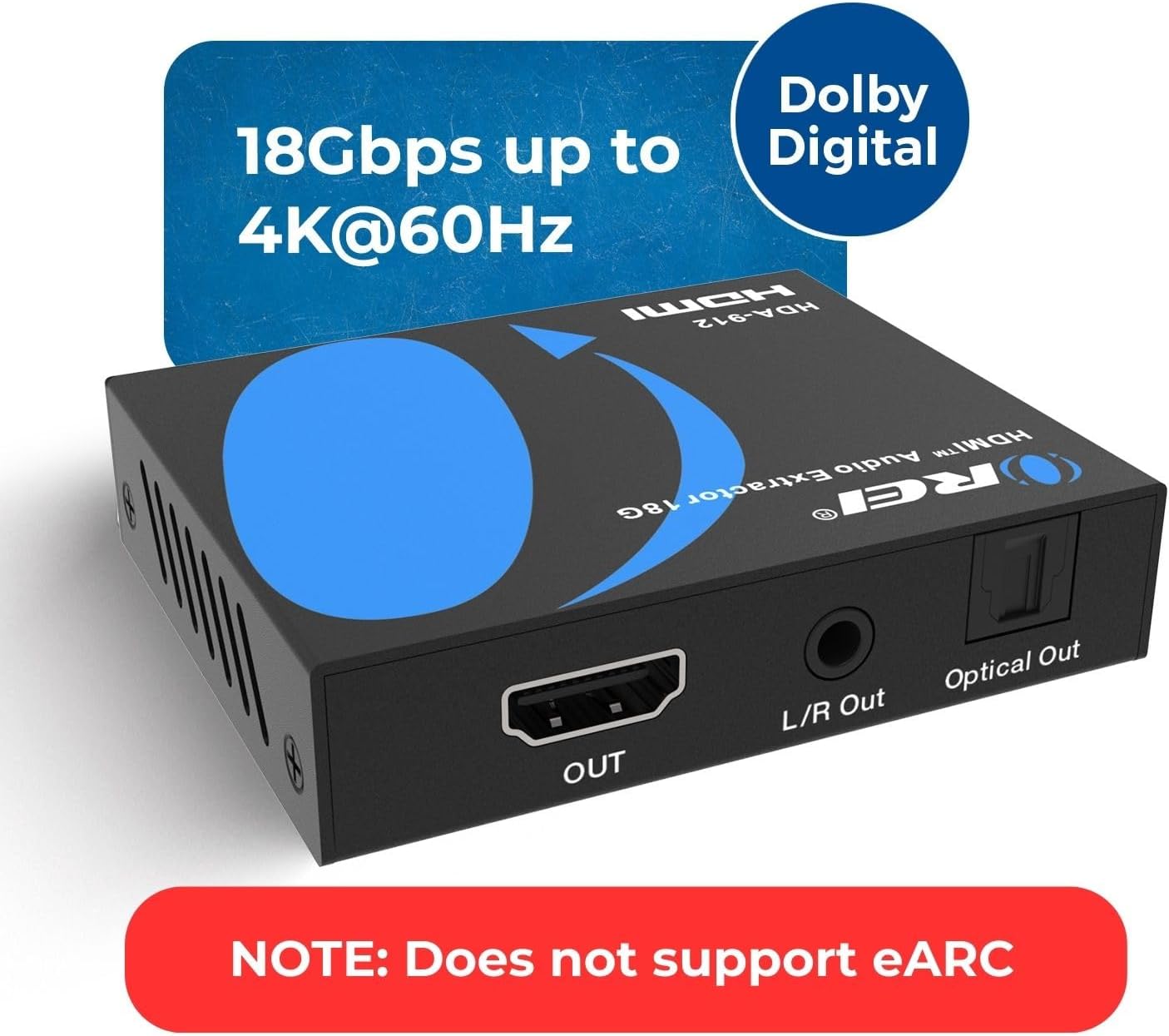
Figura 1: Davant i darrere view of the OREI HDA-912 HDMI Audio Extractor, showing the HDMI input, power port, audio selection switch, HDMI output, L/R audio output, and optical audio output.
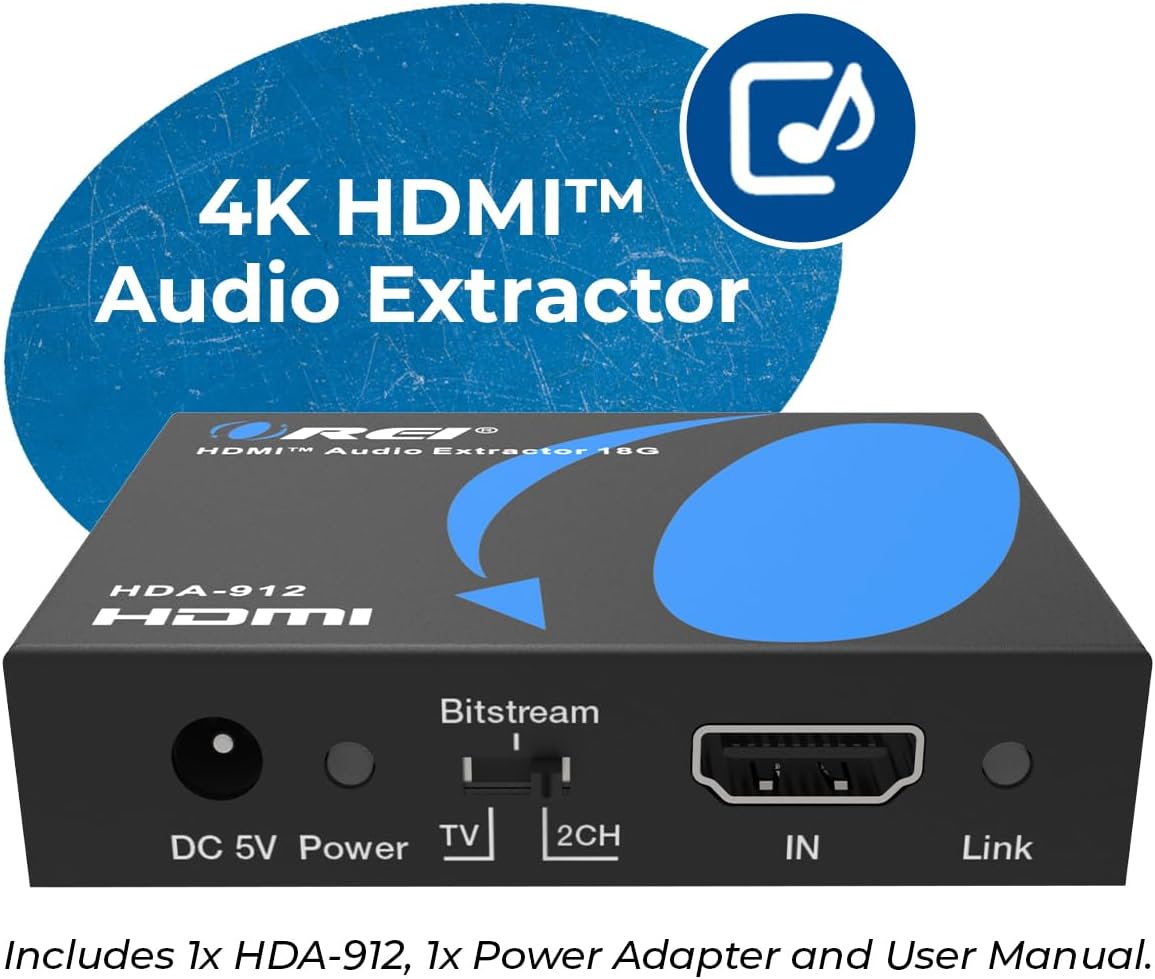
Figure 2: Close-up of the front panel of the OREI HDA-912, highlighting the DC 5V Power input, Bitstream/TV/2CH audio selection switch, HDMI In port, and Link LED indicator.
Panell frontal
- DC 5V Power: Connect the included 5V DC power adapter here.
- LED d'alimentació: S'il·lumina quan el dispositiu està encès.
- Audio Selection Switch (Bitstream/TV/2CH): Selects the desired audio output mode.
- Bitstream: For multi-channel audio formats (Dolby Digital, DTS, etc.) to a compatible receiver.
- TV: Passes audio directly from the HDMI source to the HDMI output.
- 2 canals: Outputs 2-channel stereo audio (LPCM 2CH) via optical and L/R outputs.
- Entrada HDMI: Connect your HDMI source device (e.g., Blu-ray player, game console, streaming device) here.
- LED d'enllaç: Illuminates when a valid HDMI input signal is detected.
Panell posterior
- Sortida HDMI: Connect this port to your display device (e.g., TV, monitor, projector). This port passes through the video signal from the HDMI In.
- Sortida L/R: 3.5mm stereo audio output for connecting to analog audio systems or headphones.
- Sortida òptica: SPDIF optical audio output for connecting to digital audio receivers or soundbars.
Vídeo 1: Un overview of the OREI HDA-912 4K Audio Extractor, detailing its features and ports. This video provides a visual guide to the device's physical aspects and basic functionality.
Instruccions de configuració
Follow these steps to set up your OREI HDA-912 HDMI Audio Extractor:
- Connecteu la font HDMI: Connecteu un cable HDMI des del dispositiu font (per exemple, reproductor de Blu-ray, consola de jocs, PC) al Entrada HDMI port on the HDA-912.
- Connecta la pantalla: Connect another HDMI cable from the Sortida HDMI port on the HDA-912 to the HDMI input of your display (TV, monitor, projector).
- Connecta la sortida d'àudio: Choose your preferred audio output:
- Per a l'àudio digital, connecteu un cable òptic des del Sortida òptica port on the HDA-912 to your audio receiver or soundbar.
- For analog stereo audio, connect a 3.5mm audio cable from the L/R Fora port on the HDA-912 to your analog audio system or headphones.
- Connectar l'alimentació: Connecteu l'adaptador de corrent continu de 5 V inclòs a la Alimentació DC 5V port on the HDA-912, then plug the adapter into a power outlet. The Power LED will illuminate.
- Seleccioneu el mode d'àudio: Utilitza el Interruptor de selecció d'àudio on the front panel to choose the appropriate audio mode (Bitstream, TV, or 2CH) based on your audio system's capabilities and desired output.

Figure 3: A diagram illustrating the typical connection setup for the OREI HDA-912, showing an HDMI input source connected to the extractor, which then connects to an HDMI display and separate audio outputs (RCA Out and Optical Out).
Video 2: A demonstration on how to connect and use the OREI HDA-912 4K HDMI Audio Extractor with various devices. This video guides users through the physical setup process.
Instruccions de funcionament
Once all connections are made and the device is powered on, ensure your HDMI source is active. The LED d'enllaç on the HDA-912 will illuminate, indicating a successful HDMI signal detection. Select the appropriate input on your display and audio system.
Selecció del mode d'àudio
El Interruptor de selecció d'àudio allows you to control how audio is processed:
- Bitstream: Use this mode when your audio receiver or soundbar supports multi-channel audio formats like Dolby Digital, DTS, Dolby Digital+, Dolby TrueHD, DTS-HD Master Audio, Dolby Atmos, or DTS:X. The HDA-912 will pass these formats directly to the optical output.
- TV: In this mode, the audio signal is passed through the HDMI output to your TV. The optical and L/R outputs will typically mirror the audio capabilities of the connected TV.
- 2 canals: Select this mode to output 2-channel stereo audio (LPCM 2CH) via both the optical and L/R outputs. This is ideal for stereo sound systems or headphones.
Note: Optical output is limited to 5.1CH and analog (L/R) output is limited to 2CH. The source device must output audio in compatible formats for optical or analog outputs. This extractor does not downmix 5.1CH to 2CH.
Especificacions

Figure 4: The OREI HDA-912 HDMI Audio Extractor with its compact dimensions (2.5" x 3" x 0.8") and weight (7.3 oz) highlighted.
| Característica | Descripció |
|---|---|
| Model | HDA-912 |
| Versió HDMI | HDMI 2.0b |
| Compliment HDCP | HDCP 2.2 |
| Ample de banda de vídeo | 18 Gbps |
| Resolucions suportades | Up to 4K@60Hz (YUV4:4:4) |
| Suport HDR | 10-bit HDR pass-through (HDR10, Dolby Vision) |
| Suport CEC | CEC Bypass |
| Formats d'àudio HDMI (de pas) | LPCM 2/5.1/7.1CH, Dolby Digital, DTS 5.1, Dolby Digital+, Dolby TrueHD, DTS-HD Master Audio, Dolby Atmos, DTS:X |
| Formats d'àudio òptic | LPCM 2CH, LPCM 5.1, Dolby Digital 2/5.1 CH, DTS 2/5.1 CH |
| Formats d'àudio L/R | 2 canals estèreo analògic |
| Àudio SampTarifa ling | Fins a 192 kHz |
| Material | Metall |
| Dimensions del producte | 2.9 cm de llargada x 2.4 cm d'amplada x 0.8 cm d'alçada (aprox.) |
| Pes de l'article | 8 unces |
| Font d'alimentació | DC 5V |
Resolució de problemes
If you encounter issues with your HDA-912, please refer to the following common solutions:
- Sense sortida de vídeo:
- Assegureu-vos que tots els cables HDMI estiguin connectats correctament.
- Verifiqueu que l'adaptador de corrent estigui connectat i que el LED d'alimentació estigui encès.
- Check if the Link LED is illuminated, indicating a valid HDMI input signal.
- Try using different HDMI cables.
- Assegureu-vos que la pantalla estigui configurada a l'entrada HDMI correcta.
- Sense sortida d'àudio:
- Verify all audio cables (optical or 3.5mm) are securely connected.
- Comproveu el Interruptor de selecció d'àudio setting. Ensure it matches your audio system's capabilities (e.g., Bitstream for multi-channel, 2CH for stereo).
- Confirm your audio receiver/soundbar is powered on and set to the correct input.
- Ensure the source device is outputting audio in a format compatible with the selected audio mode.
- Adjust the volume on your audio system.
- Intermittent Video/Audio:
- Comproveu si hi ha connexions de cable soltes.
- Assegureu-vos que la font d'alimentació sigui estable.
- Try reducing the cable lengths if they are very long.
- Power cycle all connected devices (source, HDA-912, display, audio system).
Manteniment
To ensure the longevity and optimal performance of your OREI HDA-912, follow these maintenance guidelines:
- Mantingueu el dispositiu en un lloc fresc i sec, allunyat de la llum solar directa, de fonts de calor i de la humitat.
- Netegeu el dispositiu amb un drap suau i sec. No utilitzeu netejadors líquids ni en aerosol.
- Eviteu col·locar objectes pesats a sobre del dispositiu.
- Do not attempt to open or service the device yourself. Refer to qualified personnel for repairs.
Garantia i Suport
The OREI HDA-912 comes with a 12-month manufacturer's warranty. OREI also provides lifetime technical support for its products.
For technical assistance or warranty claims, please contact OREI support through their official weblloc web o la informació de contacte que es proporciona a l'embalatge del producte. També podeu visitar el OREI Store on Amazon per obtenir més informació i recursos de suport.


