1. Introducció
Thank you for choosing the Renkforce RF-IR-MONO1 Internet Radio. This compact internet radio offers a wide selection of thousands of free radio stations from around the world, ranging from traditional pop to niche music, talk shows, and podcasts. It features a sleep and wake-up function, clear sound reception, Bluetooth streaming, and AUX output for external speakers. This manual provides detailed instructions for setting up, operating, and maintaining your device to ensure optimal performance.
2. Instruccions de seguretat
- Llegiu atentament totes les instruccions abans d'utilitzar el dispositiu.
- Conserveu aquest manual com a referència futura.
- No exposeu el dispositiu a la pluja, la humitat ni a temperatures extremes.
- Assegureu-vos que hi hagi una ventilació adequada al voltant de la unitat. No bloquegeu cap obertura de ventilació.
- Utilitzeu només l'adaptador d'alimentació subministrat amb el dispositiu.
- No intenteu obrir ni reparar el dispositiu vosaltres mateixos. Encarregueu totes les tasques de manteniment a personal qualificat.
- Eviteu col·locar el dispositiu a prop de fonts de calor com ara radiadors, registres de calor, estufes o altres aparells (inclosos amplificadors) que produeixen calor.
- Netegeu només amb un drap sec.
3. Contingut del paquet
Si us plau, comproveu que tots els elements siguin presents i en bon estat:
- Renkforce RF-IR-MONO1 Internet Radio
- Control remot
- Adaptador d'alimentació
- Manual d'usuari (aquest document)

Image 1: Renkforce RF-IR-MONO1 Internet Radio and its remote control.
4. Producte acabatview
The Renkforce RF-IR-MONO1 is a versatile digital internet radio designed for ease of use and high-quality audio. It features a clear display, intuitive controls, and multiple connectivity options.
4.1 Controls i pantalla del tauler frontal

Imatge 2: Frontal view of the Renkforce RF-IR-MONO1 Internet Radio.
- Pantalla de visualització: Mostra informació de l'estació, l'hora i les opcions del menú.
- Botó ON/OFF: Encén o apaga la unitat.
- LOCAL Button: Accesses local radio stations.
- Botó PRESET: Saves and recalls favorite stations.
- DIAL / SELECT Knob: Rotates to navigate menus and adjusts volume; press to select.
- LEFT / RIGHT Buttons: Navigates through menu options or tracks.
- Botó MENÚ: Accedeix al menú principal.
4.2 Connexions del panell posterior

Imatge 3: posterior view of the Renkforce RF-IR-MONO1 Internet Radio.
- Sortida de línia: Connects to external audio systems (e.g., Hi-Fi system, powered speakers).
- Auriculars Jack: For private listening with headphones.
- DC IN 5V: Power input for the supplied power adapter.
5. Configuració
5.1 Connexió d'alimentació
- Connecteu l'adaptador de corrent subministrat a CC EN 5V port a la part posterior de la ràdio.
- Connecteu l'adaptador de corrent a una presa de corrent adequada.
- Premeu el botó ON/OFF button on the front panel or remote control to power on the radio.
5.2 Connexió de xarxa Wi-Fi
To access internet radio stations, the device must be connected to a Wi-Fi network.
- Upon first power-on, the radio will guide you through the initial setup, including Wi-Fi configuration.
- If not prompted, press the MENÚ button, navigate to "Settings" or "Network", and select "Wi-Fi Setup".
- La ràdio buscarà les xarxes Wi-Fi disponibles. Seleccioneu la vostra xarxa de la llista.
- Enter your Wi-Fi password using the DIAL / SELECT knob and LEFT/RIGHT buttons to navigate characters, then press DIAL / SELECT to confirm each character.
- Un cop connectada, la ràdio mostrarà un missatge de confirmació.
Note: If the radio is unplugged, you may need to re-enter the Wi-Fi password.
5.3 Initial Setup (Time and Date)
After connecting to Wi-Fi, the radio should automatically synchronize the time and date. If not, you can manually set it via the "Settings" menu.
6. Instruccions de funcionament
6.1 Internet Radio Mode
- Premeu el botó MODE button on the remote or navigate through the main menu to select "Internet Radio".
- Podeu navegar per les emissores per ubicació, gènere o cercar emissores específiques.
- Utilitza el DIAL / SELECT knob to navigate and select stations.
- Ajusteu el volum amb el botó DIAL / SELECT knob (rotate) or the volume buttons on the remote control.
6.1.1 Desar i recuperar preajustos
- Guardar: Mentre escolteu una emissora, manteniu premut el botó PRESET button until the display shows "Save to Preset". Use the DIAL / SELECT knob to choose a preset number (1-10) and press to confirm.
- Recordar: Premeu breument PRESET button. Use the DIAL / SELECT knob to select your desired preset station and press to confirm.
6.2 Mode Bluetooth
Stream music wirelessly from your Bluetooth-enabled smartphone, tablet, or other device.
- Premeu el botó MODE button on the remote or navigate through the main menu to select "Bluetooth".
- La ràdio entrarà en mode d'emparellament, tal com s'indica a la pantalla.
- On your Bluetooth device, enable Bluetooth and search for "RF-IR-MONO1" (or similar).
- Select the radio from your device's list to pair. Once paired, you can stream audio.
- Control playback (play/pause, skip tracks) from your connected device or using the remote control.
6.3 Entrada AUX
Connect external audio sources like MP3 players or other devices using a 3.5mm audio cable (not included).
- Connect one end of a 3.5mm audio cable to the headphone jack or line out of your external device.
- Connecteu l'altre extrem a la Sortida de línia port on the rear of the RF-IR-MONO1.
- Premeu el botó MODE button on the remote or navigate through the main menu to select "AUX In" (or similar).
- Control playback from your external device. The radio's volume control will still function.
6.4 Sortida d'auriculars
For private listening, connect standard 3.5mm headphones to the headphone jack on the rear panel. The internal speaker will be muted automatically.
6.5 Alarm and Sleep Function
The radio includes an alarm clock and sleep timer function.
- Alarma: Access the "Alarm" settings via the main menu. Set the alarm time, source (e.g., buzzer, internet radio station), and volume.
- Temporitzador de son: Access the "Sleep Timer" settings via the main menu. Set a duration (e.g., 15, 30, 60 minutes) after which the radio will automatically turn off.
6.6 Funcionament del control remot
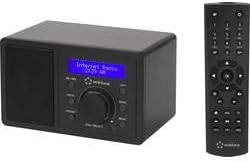
Image 4: Renkforce RF-IR-MONO1 Internet Radio with its remote control.
The included remote control allows convenient operation from a distance. It duplicates most functions available on the front panel and adds direct access buttons for certain features.
- Botó d'encesa: Encén/apaga la ràdio.
- Botons numèrics (0-9): For direct input or selecting presets.
- Botons de navegació (amunt/avall/esquerra/dreta/d'acord): Per a la navegació i selecció de menús.
- Pujar/baixar el volum: Ajusta el volum.
- Botó MODE: Switches between operating modes (Internet Radio, Bluetooth, AUX).
- Botó EQ: Accedeix a la configuració de l'equalitzador.
- LOCAL Button: Direct access to local stations.
- Botó INFO: Mostra informació addicional sobre l'emissora o la pista actuals.
- Botó DIMMER: Ajusta la brillantor de la pantalla.
7. Manteniment
- Neteja: Netegeu la unitat amb un drap suau i sec. No utilitzeu productes de neteja abrasius, ceres ni dissolvents.
- Emmagatzematge: If storing the radio for an extended period, disconnect it from the power supply and store it in a cool, dry place.
- Actualitzacions de programari: Periodically check the radio's settings menu for available software updates to ensure optimal performance and access to new features.
8. Solució De Problemes
| Problema | Causa possible | Solució |
|---|---|---|
| Sense poder | L'adaptador de corrent no està connectat o la presa de corrent està defectuosa. | Assegureu-vos que l'adaptador de corrent estigui ben connectat i que la presa de corrent funcioni. Proveu una altra presa de corrent. |
| No es pot connectar a la Wi-Fi | Contrasenya incorrecta, senyal feble o problema amb el router. | Verify Wi-Fi password. Move the radio closer to the router. Restart your router. |
| No sound from internet radio | Volume too low, station offline, or network issue. | Increase volume. Try a different station. Check Wi-Fi connection. |
| L'aparellament de Bluetooth falla | Device not in pairing mode, or too far away. | Ensure the radio is in Bluetooth pairing mode. Move devices closer. Disable and re-enable Bluetooth on your device. |
| Radio loses settings after unplugging | This model may require re-entering Wi-Fi credentials after a complete power loss. | This is expected behavior for some models. Re-enter Wi-Fi password and presets as needed. |
9. Especificacions
| Marca | Renkforce |
| Número de model | RF-IR-MONO1 (RF-4830285) |
| Color | Negre |
| Tecnologia de connectivitat | Wi-Fi, Bluetooth, Auxiliary |
| Tecnologia d'afinació | Digital |
| Característiques especials | Wireless, Sleep/Wake Function |
| Dispositius compatibles | Smartphone, Tablet, Bluetooth devices, devices with auxiliary jack |
| Font d'alimentació | DC 5V (via power adapter) |
| Potència de sortida d'àudio | 3 watts (RMS) |
| Interval Bluetooth | Fins a 10 metres (33 peus) |
10. Garantia i Suport
Information regarding spare parts availability and software updates is not explicitly provided in the product details. For warranty claims or technical support, please refer to the retailer or manufacturer's official website for the most up-to-date contact information and policies.


