1. Introducció
The SUUNTO Zoop Novo is a versatile and user-friendly wrist-mounted scuba diving computer designed for both new and experienced divers. It provides essential dive data at a glance, ensuring a safer and more enjoyable underwater experience. This manual provides detailed instructions for its operation, care, and maintenance.
2. Característiques clau
- Five operating modes: Air, Nitrox, Gauge, Free, and Off.
- Full continuous decompression algorithm (Suunto RGBM).
- Large, clear display with backlight for enhanced readability.
- Intuitive 4-button menu-based user interface.
- Innovative apnea timer for free diving.
- Built-in dive planner.
- Detailed graphical logs and dive data with Suunto DM5 software (PC/Mac compatible).
- Updateable firmware.
3. Producte acabatview
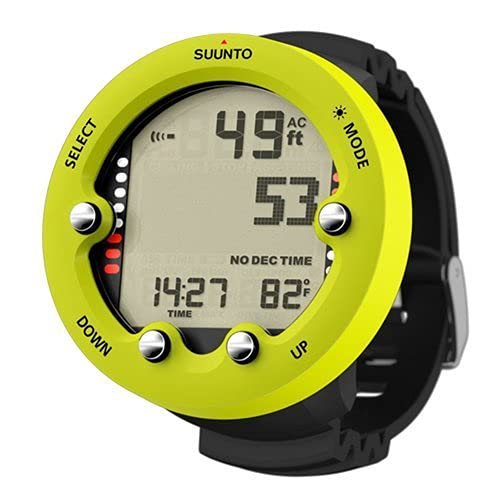
Figure 1: The SUUNTO Zoop Novo dive computer on a diver's wrist.

Figura 2: Detallada view of the SUUNTO Zoop Novo display and control buttons.

Figure 3: The SUUNTO Zoop Novo in use during an underwater dive.
4. Modes de funcionament
The SUUNTO Zoop Novo offers five distinct operating modes to suit various diving activities:
- Mode d'aire: For diving with standard air (21% oxygen).
- Nitrox Mode: For diving with enriched air nitrox, allowing adjustment of oxygen percentage.
- Gauge Mode: Operates as a bottom timer, providing depth and time without decompression calculations.
- Mode lliure: Specifically designed for freediving, tracking dive time, depth, and surface intervals.
- Mode desactivat: Disables dive functions, conserving battery life when not in use.
4.1. Dive Planning Mode
The dive planning mode allows you to simulate dives and understand no-decompression limits (NDL) based on your current saturation status and planned depth. This is crucial for safe dive planning, especially for repetitive dives.
- Entering Plan Mode: Des de la pantalla de l'hora, premeu la tecla MODE button repeatedly until 'PLAN' is displayed. The display will briefly show 'Desat.' (desaturation time), indicating the time required for your body to return to baseline nitrogen levels.
- Confirm Gas Mix: Ensure the oxygen percentage (O2%) displayed is correct for your dive. For standard air, this should be 21%. If you are certified for Nitrox, adjust accordingly.
- Adjusting Depth and Observing NDL: Utilitza el ABAIX i UP buttons to scroll through different planned depths. As you increase the planned depth, observe how the 'NO DEC TIME' (No-Decompression Limit) decreases. For example, at 9 meters, the NDL is almost indefinite, while at 39 meters (the recreational diving limit), it reduces to approximately 8 minutes.
- Repetitive Dive Planning: The dive computer accounts for residual nitrogen from previous dives. The 'DIVE' indicator in the bottom right corner shows the current dive number. The longer your surface interval between dives, the longer your NDL will be for subsequent dives, as your body off-gasses nitrogen.
Video 1: Demonstration of the SUUNTO Zoop Novo Dive Planning Mode. This video illustrates how to navigate through the dive planning features, adjust depth, and understand the no-decompression limits for various dive scenarios.
5. Cura i Manteniment
Proper care ensures the longevity and reliability of your SUUNTO Zoop Novo dive computer:
- Esbandida després de l'ús: Always rinse the dive computer thoroughly with fresh water after each dive to remove salt, sand, and chlorine.
- Assecar correctament: Allow the device to air dry completely in a shaded area. Avoid direct sunlight or excessive heat.
- Emmagatzematge: Store the dive computer in a cool, dry place away from direct sunlight and extreme temperatures.
- Substitució de la bateria: The battery housing reliability has been improved. Refer to the full SUUNTO manual for detailed instructions on battery replacement or seek professional service to maintain water resistance.
- Inspeccionar regularment: Periodically check the strap, buttons, and display for any signs of wear or damage.
6. Solució De Problemes
If you encounter any issues with your SUUNTO Zoop Novo, consider the following:
- Problemes de visualització: If the display is dim or unresponsive, check the battery level.
- Lectures inexactes: Ensure the device is properly calibrated and that you have selected the correct gas mix for your dive.
- Missatges d'error: Consult the comprehensive SUUNTO Zoop Novo manual (available online) for specific error code explanations and solutions.
- Problemes persistents: If issues persist, contact SUUNTO customer support or an authorized service center for assistance.
7. Especificacions
| Característica | Detall |
|---|---|
| Marca | Suunto |
| Model | Zoop Novo |
| Material | Compost |
| Dimensions del producte (L x A x A) | 5 x 5 x 4 polzades |
| Pes de l'article | 4.2 unces (120 grams) |
| UPC | 089902612597 |
| Fabricant | Suunto |
| Primera data disponible | 21 de març de 2018 |
8. Garantia i Suport
For detailed warranty information, product registration, and technical support, please visit the official SUUNTO weblloc web o poseu-vos en contacte amb el servei d'atenció al client. Conserveu el comprovant de compra per a qualsevol reclamació de garantia.
Online resources, including the full user manual and FAQs, are available on the SUUNTO support pages.


