1. Introducció
This manual provides essential information for the safe and efficient installation, operation, and maintenance of your Cloudray MYJG-150W 220V CO2 Laser Power Supply. Please read this manual thoroughly before use and retain it for future reference. This power supply is designed for use with 130-150W CO2 laser tubes in laser engraving and cutting machines.
Advertències de seguretat
- Vol. Alttage: Aquest dispositiu funciona amb un alt volumtage. Installation and maintenance should only be performed by qualified personnel.
- Radiació làser: CO2 lasers produce invisible radiation. Always wear appropriate laser safety eyewear and ensure all safety interlocks are functional.
- Posada a terra: Ensure the power supply is properly grounded to prevent electrical shock.
- Refrigeració per aigua: Proper water cooling for the laser tube is critical. Ensure the water protection circuit is correctly connected and functioning before operating the laser.
2. Producte acabatview
The Cloudray MYJG-150W CO2 Laser Power Supply is engineered for stable and reliable performance, offering precise control and protection features for your laser system.
Característiques clau
- Compatibilitat versàtil: Compatible with 130-150W laser tubes from various manufacturers.
- Resposta ràpida: Features fast response speed for efficient laser operation.
- Control sense esforç: TTL level start and stop functionality for easy laser control.
- Proteccions de seguretat: Includes output open circuit protection, TTL signal indication, water through signal indication, and laser output indication.
- Manual Output Check: Convenient button for manually checking laser output.
- Monitorització en temps real: External ammeter with LCD screen for real-time current and status monitoring, with a trimmer potentiometer for precise adjustments.
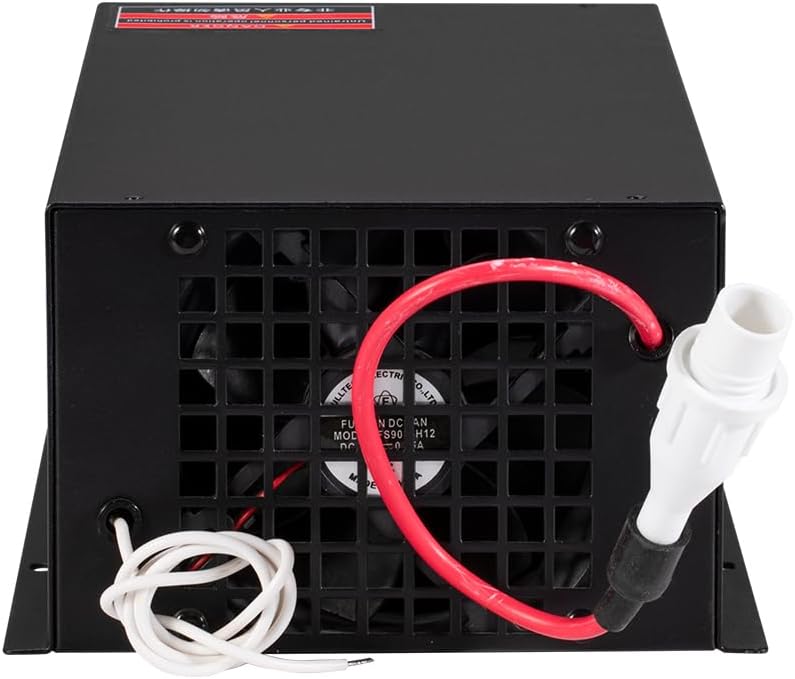
Components del producte



3. Especificacions
The following table outlines the technical specifications for the Cloudray MYJG-150W CO2 Laser Power Supply:

| Categoria | Paràmetre | Valor |
|---|---|---|
| Entrada | Entrada Voltage | AC230V / AC115V (This model is 220V) |
| Freqüència CA | 47 ~ 440Hz | |
| Sortida | Vol. De sortida màxtage | 34KV |
| Corrent de sortida màx | 38 mA | |
| General | Mida (L x A x A) | 305 x 161 x 91 mm (14.96 x 7.87 x 5.91 polzades) |
| Pes | 3.6 kg (9.13 lliures) | |
| Eficiència | 91% | |
| Rendiment | MTBF | ≥ 30000 hores |
| Velocitat de resposta | ≤ 1 ms | |
| Voltage Rang | Alt nivell | ≥ 3 V. |
| Baix Nivell | ≤ 0.7 V | |
| Medi ambient | Temperatura de funcionament | -30° ~ +65°C |
| Mètode de refrigeració | Forced air cooling (fan cooling) |
4. Configuració i instal·lació
Proper installation is crucial for the safe and optimal performance of your laser power supply. Always ensure the main power is disconnected before making any connections.
Connexions de cablejat
Refer to the wiring diagram below for correct connections. Ensure all connections are secure and insulated.

- Entrada de CA: Connect the 220V AC power supply to the 'AC' terminals. Ensure proper grounding to the 'FG' terminal.
- Vol. Alttage Sortida: Connect the 'LASER' terminal to the high voltage input of your CO2 laser tube. This connection carries extremely high voltage and must be handled with extreme caution and proper insulation.
- Control Signals: Connect the control signals (H, L, P, G, IN 5V, P) to your laser controller board.
- Protecció de l'aigua: Connect the water protection sensor to the designated terminals to ensure the laser tube is adequately cooled during operation.
- Laser Signal Input: Connect the laser signal input as per your system requirements.
Instal·lació física
Mount the power supply in a well-ventilated area, ensuring adequate clearance around the cooling fan. The dimensions are 305 x 161 x 91 mm. Secure the unit using appropriate fasteners.

5. Instruccions de funcionament
Follow these steps for safe operation of your Cloudray MYJG-150W power supply:
- Comprovació prèvia al funcionament: Before powering on, verify all wiring connections are correct and secure. Ensure the laser tube is properly installed and the water cooling system is operational and circulating water.
- Encès: Connect the main power. The external ammeter (if connected) should display the current status.
- Water Protection Check: Confirm the water protection signal is active (e.g., 'Water protection: ON' on the ammeter display). The laser will not fire if water protection is not engaged.
- Laser Output Test: Use the 'TEST' button on the power supply to briefly fire the laser and confirm output. Observe the ammeter for current readings.
- Funcionament normal: Control the laser output via your laser controller board using TTL signals. Monitor the current output on the external ammeter during operation.
Ammeter Display and Adjustment
The external ammeter provides real-time feedback on the laser's operating current and status indicators. Use the trimmer potentiometer on the ammeter to fine-tune the current output as needed for your application.

Vídeo del producteview
Vídeo 5.1: Un overview of the Cloudray CO2 Laser Power Supply MYJG-150W 220V, demonstrating its features and appearance.
6. Manteniment
Regular maintenance ensures the longevity and consistent performance of your power supply.
- Neteja: Periodically clean the exterior of the power supply, especially the cooling fan and ventilation grilles, to prevent dust buildup and ensure proper airflow. Disconnect power before cleaning.
- Connexions: Inspeccioneu regularment totes les connexions del cablejat per comprovar si estan ben ajustades i si hi ha signes de desgast o corrosió.
- Medi ambient: Ensure the operating environment is within the specified temperature and humidity ranges to prevent damage.
7. Solució De Problemes
Si teniu problemes amb la font d'alimentació, consulteu els passos habituals següents per a la resolució de problemes:
- Sense energia: Check the main power connection, circuit breaker, and ensure the power supply's indicator light is on.
- Sense sortida làser:
- Verify the water cooling system is running and the water protection signal is active.
- Check the laser tube connections and ensure the tube is not damaged.
- Confirm control signals from the laser controller are correctly sent to the power supply.
- Use the 'TEST' button on the power supply to isolate if the issue is with the power supply or the controller/laser tube.
- Unstable Output Current: Check for loose connections, ensure stable input voltage, and verify the laser tube is not nearing its end of life.
- Sobreescalfament: Ensure the cooling fan is operating correctly and ventilation is unobstructed. Reduce ambient temperature if necessary.
For persistent issues, contact Cloudray customer support for assistance.
8. Garantia i Suport
Cloudray products are designed for quality and reliability. For warranty information, technical support, or service inquiries, please refer to the official Cloudray website or contact their customer service department. Ensure you have your product model and purchase details available when contacting support.


