1. Producte acabatview
The Lorex DV900 Series DV9163 is a 16-channel 4K MPX Digital Video Recorder (DVR) equipped with a 3TB hard drive and 16 BNC ports. This DVR is designed for comprehensive security surveillance, supporting 4K Ultra HD recording on compatible cameras. It offers remote viewing capabilities through the FLIR Cloud app, allowing users to monitor their property from smartphones or tablets without complex network configurations.
Característiques principals:
- True 4K Ultra HD recording on all compatible cameras.
- Lorex Cloud app with 3-step setup for remote access from iOS or Android devices.
- Backward compatible with standard analog cameras.
- 16 BNC ports for extensive camera connectivity.
- 3TB pre-installed hard drive for ampl'emmagatzematge.

Figure 1: Lorex DV9163 DVR unit with power adapter, HDMI cable, Ethernet cable, USB mouse, and quick start guide.
2. Instruccions de configuració
Follow these steps to set up your Lorex DV9163 DVR system.
2.1 Desembalatge i inspecció inicial
Carefully unpack all components and ensure all items are present. The package should include the DVR unit, power adapter, HDMI cable, Ethernet cable, USB mouse, and a quick start guide.

Figure 2: Front panel of the Lorex DV9163 DVR, showing control buttons and USB port.
2.2 Connecting the DVR
- Connectar càmeres: Connect your security cameras to the BNC video input ports on the back of the DVR using standard Siamese BNC cabling. This cabling provides both video and power transmission.
- Connecta a la pantalla: Connect the DVR to a monitor or TV using the provided HDMI cable or a VGA cable (not included).
- Connecteu-vos a la xarxa: Connecteu el DVR al vostre encaminador mitjançant el cable Ethernet per a l'accés a la xarxa i el control remot. viewcapacitats d'ingrés.
- Connecteu el ratolí USB: Plug the USB mouse into one of the USB ports on the DVR for navigation.
- Encès: Connect the power adapter to the DVR and then to a power outlet. Ensure all connections are secure before powering on.
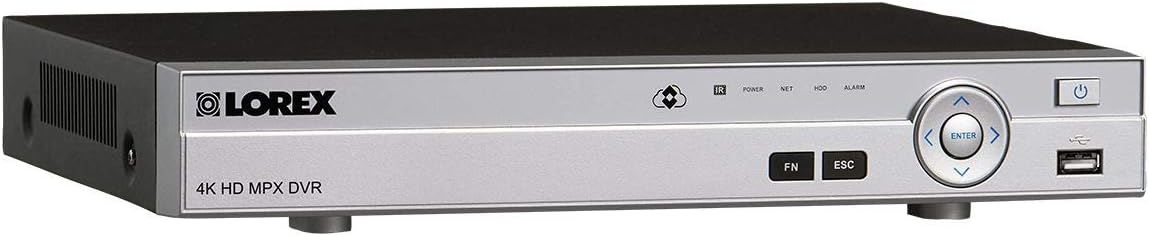
Figure 3: Rear panel of the Lorex DV9163 DVR, showing BNC ports, HDMI, VGA, Ethernet, and USB connections.
3. Instruccions de funcionament
Once your DVR is set up, you can begin monitoring and managing your security system.
3.1 Monitorització local
View live feeds from all connected cameras directly on your connected monitor or TV. Use the USB mouse to navigate the on-screen menu, switch between camera views, and access recording playback.
3.2 Remot Viewing with FLIR Cloud App
- Descarregar l'aplicació: Download the free FLIR Cloud app from your smartphone or tablet's app store (iOS or Android).
- Configuració del compte: Creeu un compte i inicieu sessió.
- Afegeix un dispositiu: Scan the QR code located on your DVR unit using the app. This will quickly add your security system to your mobile device.
- Viu View i reproducció: Un cop afegit, podeu view live camera feeds, play back recorded footage, and receive motion-activated push notifications and email alerts with screenshot attachments directly on your phone.
The FLIR Cloud app simplifies remote access by eliminating the need for complex port forwarding or network configurations.
4. Manteniment
Regular maintenance ensures optimal performance and longevity of your Lorex DVR system.
- Mantenir net: Periodically clean the DVR unit and cameras to prevent dust buildup, which can affect performance and cooling. Use a soft, dry cloth.
- Comproveu les connexions: Regularly inspect all cable connections (BNC, HDMI, Ethernet, power) to ensure they are secure and free from damage.
- Actualitzacions de programari: Consulta el Lorex website or FLIR Cloud app for available firmware updates for your DVR to ensure you have the latest features and security patches.
- Estat del disc dur: The 3TB hard drive is crucial for recording. Monitor its health through the DVR's system settings. Back up important footage periòdicament.
5. Solució De Problemes
If you encounter issues with your Lorex DV9163 DVR, refer to the following common solutions.
- Sense senyal de vídeo:
- Ensure all camera BNC cables are securely connected to both the cameras and the DVR.
- Verify the display monitor/TV is set to the correct input source (HDMI/VGA).
- Check if cameras are receiving power.
- Sense accés remot:
- Confirm the DVR is connected to the internet via the Ethernet cable.
- Ensure your mobile device has an active internet connection.
- Verify the DVR is properly added to your FLIR Cloud app account.
- Excessive Noise from DVR:
- Some fan noise is normal, especially under heavy load. Ensure the DVR is placed in a well-ventilated area.
- If the noise is unusually loud or new, contact Lorex support.
- Interference with TV Remote Control:
- This can occur due to infrared signal overlap. Try repositioning the DVR or the TV, or using an IR extender for your TV remote if available.
- Protecció contra sobretensions:
To protect your DVR from power surges, it is highly recommended to connect it to a surge protector. This can prevent damage to the unit and ensure continuous operation.
6. Especificacions
| Característica | Detall |
|---|---|
| Número de model | DV9163 |
| Canals | Canal 16 |
| Resolució de gravació | 4K MPX (Ultra HD) |
| Capacitat del disc dur | 3 TB (3000 GB) |
| Tecnologia de connectivitat | Wired (BNC, Ethernet) |
| Dispositius compatibles | Cameras, Smartphone, Tablet |
| Pes de l'article | 6 lliures |
| Dimensions del paquet | 18 x 13.6 x 5.6 polzades |
| Fabricant | LOREX |
7. Garantia i Suport
For warranty information, technical support, or further assistance, please contact Lorex customer service. They can provide guidance on installation, troubleshooting, and product compatibility.
Refer to the official Lorex website or the documentation included with your product for the most up-to-date contact information and warranty details.


