1. Introducció
Gràcies per la compraasing the Ematic EMHD130LED HD 16GB Music Player. This compact and portable device allows you to enjoy your favorite music on the go. Featuring a 1.3-inch OLED display and a MicroSD slot for expanded storage, it is designed for ease of use and portability. This manual provides detailed instructions for setting up, operating, and maintaining your music player.
2. Informació important de seguretat
- No exposeu el dispositiu a temperatures extremes, llum solar directa ni humitat elevada.
- Eviteu deixar caure o sotmetre el dispositiu a forts impactes.
- No intenteu desmuntar ni reparar el dispositiu vosaltres mateixos. Encarregueu tot el manteniment a personal qualificat.
- Mantingueu el dispositiu allunyat de l'aigua i altres líquids.
- Utilitzeu només accessoris aprovats pel fabricant.
- Desfeu-vos del dispositiu i de la bateria de manera responsable d'acord amb la normativa local.
3. Contingut del paquet
Si us plau, comproveu el paquet per veure si hi ha els elements següents:
- Ematic EMHD130LED HD 16GB Music Player
- Manual d'usuari (aquest document)
- Note: A USB charging/data transfer cable is typically required and may be sold separately.
4. Producte acabatview
Familiarize yourself with the components and controls of your Ematic music player.
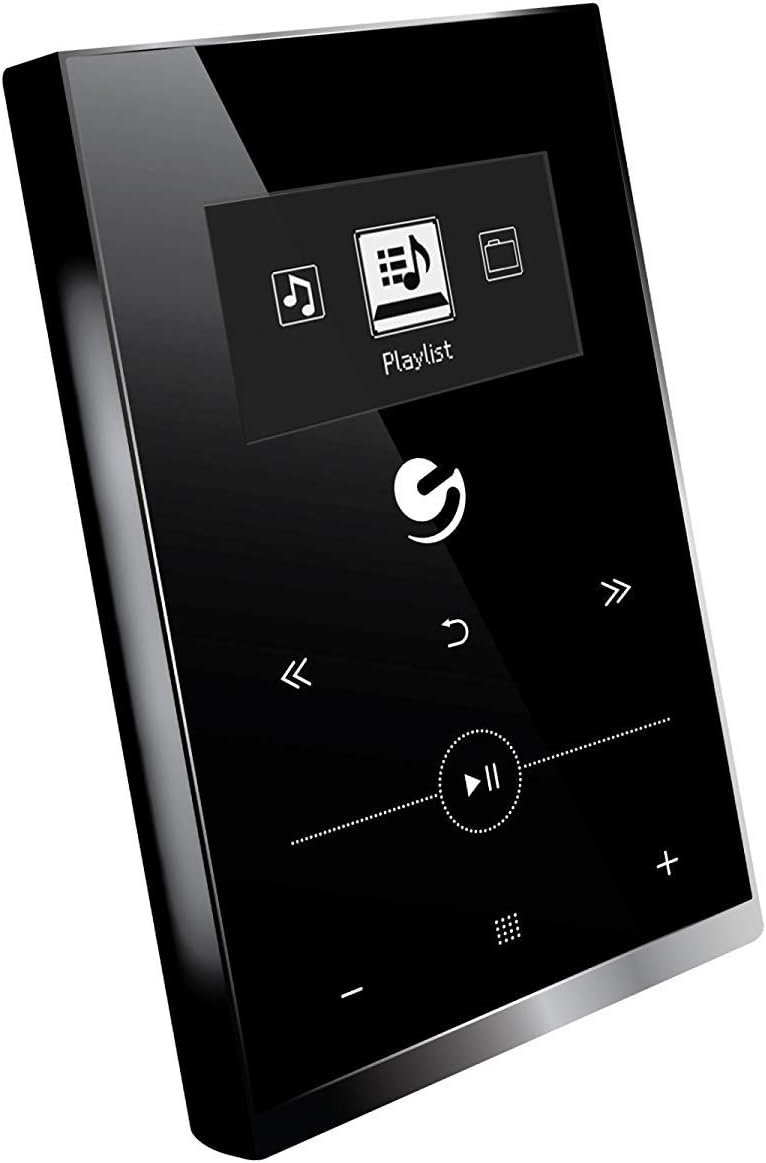
Figura 4.1: Davant view of the Ematic EMHD130LED Music Player, highlighting its 1.3-inch OLED display and touch-sensitive controls for navigation and playback.

Figura 4.2: The Ematic EMHD130LED Music Player shown in a typical usage scenario, demonstrating its small form factor suitable for connection to a computer for media transfer.
Controls i ports:
- Pantalla OLED: 1.3-inch screen for track information and menu navigation.
- Botons de navegació: (Implied from image) Up, Down, Left, Right, Select/Play/Pause.
- Controls de volum: (Implied from image) Plus (+) and Minus (-) buttons for adjusting audio output.
- Ranura MicroSD: For expanding storage capacity beyond the internal 16GB.
- Port USB: For connecting to a computer for charging and data transfer.
5. Configuració
5.1 Càrrega del dispositiu
Before first use, fully charge your music player. Connect the device to a computer's USB port or a compatible USB wall adapter using a USB cable. The OLED display will indicate charging status. A full charge typically takes a few hours.
5.2 Loading Music
The Ematic EMHD130LED has 16GB of internal storage. You can add more music using a MicroSD card (sold separately).
- Per ordinador: Plug your media player directly into your computer using a USB cable. The device will appear as a removable drive. Drag and drop your MP3 audio files into the player's music folder.
- Via MicroSD Card: Insert a MicroSD card into the designated slot on the player. You can transfer music files directly to the MicroSD card via a card reader on your computer, or transfer them to the card once it's in the player and connected to the computer.
6. Instruccions de funcionament
6.1 Encès/Apagat
Press and hold the Power button (location not specified, typically a side button or integrated with Play/Pause) for a few seconds to turn the device on or off.
6.2 Navegació bàsica
Use the navigation buttons (Up, Down, Left, Right) to browse through menus and select options on the 1.3-inch OLED display. Press the central Select button to confirm a selection or play a track.
6.3 Reproducció de música
- From the main menu, navigate to 'Music' or 'Playlist'.
- Browse through your stored music by artist, album, genre, or all songs.
- Select a track and press the Play/Pause button to begin playback.
- Use the Skip Forward/Backward buttons to change tracks.
- Adjust the volume using the Volume Up (+) and Volume Down (-) buttons.
6.4 Using the MicroSD Card
Once a MicroSD card is inserted and contains music, the player will automatically detect it. You can typically switch between internal storage and MicroSD card content through the music menu settings.
7. Manteniment
- Neteja: Use a soft, dry, lint-free cloth to clean the device. Do not use abrasive cleaners or solvents.
- Emmagatzematge: Quan no l'utilitzeu durant períodes prolongats, guardeu el dispositiu en un lloc fresc i sec, allunyat de la llum solar directa.
- Cura de la bateria: Per allargar la durada de la bateria, eviteu descarregar-la completament amb freqüència. Carregueu el dispositiu regularment, fins i tot si no l'esteu fent servir.
8. Solució De Problemes
| Problema | Causa possible | Solució |
|---|---|---|
| El dispositiu no s’encén. | La bateria està esgotada. | Carregueu el dispositiu durant almenys 30 minuts. |
| Sense so. | Volume is too low or muted; Headphones not connected properly. | Increase volume; Ensure headphones are fully plugged in. |
| No es pot transferir files. | Incorrect USB connection; Driver issue; Corrupted files. | Ensure USB cable is securely connected; Try a different USB port or cable; Restart computer and player; Check file format (only MP3 supported). |
| La pantalla està en blanc o congelada. | Error de programari. | Premeu i manteniu premut el botó d'engegada durant 10-15 segons per forçar un reinici. |
9. Especificacions
| Característica | Detall |
|---|---|
| Marca | Emàtica |
| Model | EMHD130LED |
| Nom del model | 16GB High Definition Music Player with 1.3-inch OLED Display |
| Capacitat d'emmagatzematge de memòria | 16 GB (intern) |
| Capacitat d'emmagatzematge digital | 16 GB |
| Dispositius compatibles | Ordinador portàtil, ordinador personal |
| Tipus de visualització | OLED |
| Mida de la pantalla | 1.3 polzades |
| Tipus de connector | USB |
| Tipus de suport compatible | MP3 |
| Tipus de suport | Micro SD |
| Dimensions del producte | 11.99 x 8.48 x 2.84 cm; 312.98 g |
| Composició de les cèl·lules de la bateria | Ió de liti |
| Bateria recarregable | Sí |
| Fabricant | Shaghai LTD |
| Primera data disponible | 26 de març de 2018 |
10. Garantia i Suport
For warranty information and customer support, please refer to the warranty card included with your product or visit the official Ematic website. You may also contact Ematic customer service directly for assistance with product issues or inquiries.
Ematic Official Weblloc: www.ematic.us (Note: This is a general placeholder link for Ematic's website. Please verify the correct support URL per a la teva regió.)


