1. Introducció
The Logitech Wireless Mini Mouse M187 is designed for portability and ease of use, making it an ideal companion for your laptop or PC. Its extra-small design allows you to take it anywhere, providing more precision and control than a traditional touchpad. The simple plug-and-play setup ensures you can start working quickly and efficiently.

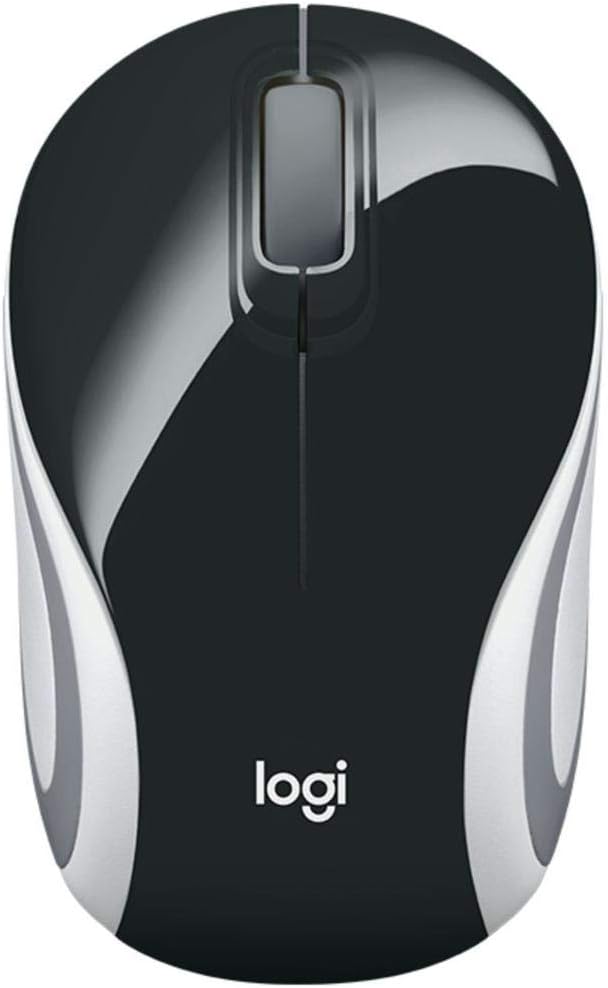
Image: Logitech Wireless Mini Mouse M187 in Palace Blue, top view.
Característiques principals:
- Disseny ultraportàtil: Pocket-ready and extra-small for easy transport.
- Configuració senzilla: Plug-and-play functionality with a nano receiver.
- Reliable Wireless Connection: Enjoy wireless freedom with the reliability of a wired mouse.
- Convenient Receiver Storage: The nano receiver stores inside the mouse to prevent loss.
- Seguiment òptic: 1000 DPI optical tracking for precise and smooth cursor control.
Vídeo: Producte oficial acabatview demonstrating the Logitech M170 Wireless Mouse features and setup.
2. Contingut del paquet
Assegureu-vos que tots els elements estiguin presents al vostre paquet:
- Ratolí M187
- Receptor USB
- 1 bateria AAA (preinstal·lada)
- Documentació d'usuari
3. Instruccions de configuració
Setting up your Logitech Wireless Mini Mouse M187 is quick and easy:
- Insereix la bateria: The mouse comes with one AAA battery pre-installed. If you need to replace it, gently slide off the top cover of the mouse to access the battery compartment. Ensure the battery is inserted with the correct polarity.
- Localitza el receptor USB: The nano USB receiver is stored inside the mouse, usually near the battery compartment. Carefully remove it.
- Connecta el receptor: Plug the nano USB receiver into an available USB port on your computer (PC, Mac, or Laptop).
- Power On Mouse: Locate the On/Off switch on the bottom of the mouse and slide it to the 'On' position. A small indicator light may illuminate briefly.
- Connexió automàtica: Your computer should automatically detect and connect to the mouse within a few seconds. No additional software installation is typically required.

Imatge: Part inferior view of the Logitech Wireless Mini Mouse M187, illustrating the USB receiver storage slot.
Imatge: Part inferior view of the Logitech Wireless Mini Mouse M187 with the battery compartment open, showing the AAA battery slot.
4. Instruccions de funcionament
Once connected, your Logitech Wireless Mini Mouse M187 is ready for use:
- Moviment: Move the mouse across a flat surface to control the cursor on your screen. The 1000 DPI optical tracking provides smooth and precise navigation.
- Clic esquerre: Press the left button to select items, open applications, or activate functions.
- Clic amb el botó dret: Premeu el botó dret per obrir menús contextuals o accedir a opcions addicionals.
- Roda de desplaçament: Gireu la roda de desplaçament amunt o avall per navegar pels documents i web pages. The scroll wheel can also be pressed for a middle-click function, depending on your operating system settings.
- Gestió d'energia: To conserve battery life, slide the On/Off switch on the bottom of the mouse to the 'Off' position when not in use or when transporting the mouse.
5. Manteniment
Substitució de la bateria:
The Logitech M187 mouse uses one AAA battery with an average life of 6 months. To replace the battery:
- Turn the mouse off using the switch on the bottom.
- Gently slide the top cover of the mouse backward and lift it off.
- Traieu la pila AAA antiga.
- Inseriu una pila AAA nova, assegurant-vos de la polaritat correcta (+/-).
- Torneu a col·locar la coberta superior alineant-la i lliscant-la cap endavant fins que encaixi al seu lloc.
- Torneu a engegar el ratolí.
Neteja:
Per mantenir un rendiment òptim, netegeu el ratolí periòdicament:
- Utilitzeu un drap suau i sense pelusa lleugerament dampamb aigua o una solució de neteja suau.
- Eviteu productes químics o materials abrasius.
- Do not immerse the mouse in water.
- Clean the optical sensor on the bottom of the mouse with a dry cotton swab to ensure accurate tracking.
6. Solució De Problemes
El ratolí no respon:
- Comproveu la bateria: Ensure the AAA battery is correctly inserted and has sufficient charge. Replace if necessary.
- Interruptor d'alimentació: Verify the On/Off switch on the bottom of the mouse is in the 'On' position.
- Receptor USB: Ensure the nano USB receiver is securely plugged into a working USB port on your computer. Try a different USB port.
- Reinicieu l'ordinador: Sometimes restarting your computer can resolve connectivity issues.
Moviment erràtic del cursor:
- Neteja el sensor: Clean the optical sensor on the bottom of the mouse with a dry cotton swab.
- Superfície: Assegureu-vos que feu servir el ratolí sobre una superfície neta, no reflectant i uniforme. Eviteu el vidre o les superfícies molt reflectants.
- Interferència: Acosteu el ratolí al receptor USB o allunyeu-lo d'altres dispositius sense fil que puguin causar interferències.
7. Especificacions tècniques
| Característica | Especificació |
|---|---|
| Número de model | 910-005360 |
| Tipus sense fil | Radiofreqüència de 2.4 GHz |
| Tecnologia de detecció de moviment | Òptic |
| DPI | 1000 DPI |
| Nombre de botons | 3 (esquerra, dreta, roda de desplaçament) |
| Font d'alimentació | Funciona amb bateria |
| Tipus de bateria | 1 bateria AAA (inclosa) |
| Durada mitjana de la bateria | 6 mesos |
| Pes de l'article | 1.83 unces |
| Dimensions del producte (LxWxH) | 1.25 x 1.94 x 3.22 polzades |
| Plataforma de maquinari | Portàtil, PC |
| Compatibilitat de sistemes operatius | Windows 10 or later, Windows 8, Windows 7, Mac OS X 10.10 or later, Chrome OS, Linux Kernel 2.6+ |
| Color | Palau Blau |
8. Garantia i Suport
Per obtenir informació sobre la garantia i assistència tècnica, consulteu la pàgina oficial de Logitech. website or the user documentation included in your product package. Logitech provides comprehensive support resources to ensure your satisfaction with their products.
You can visit the Logitech support page for your product model for FAQs, troubleshooting guides, and contact information.


