1. Introducció
This instruction manual provides detailed guidance for the proper use and care of your Olympus DS-9500 Digital Voice Recorder. The DS-9500 is designed for professional dictation, offering enhanced clarity and flexible workflow management through features such as WiFi connectivity, advanced noise cancellation, and robust construction. Please read this manual thoroughly to ensure optimal performance and longevity of your device.
2. Producte acabatview
The Olympus DS-9500 is a sophisticated digital voice recorder equipped with various controls and ports for efficient operation. Familiarize yourself with the device's components as illustrated below.
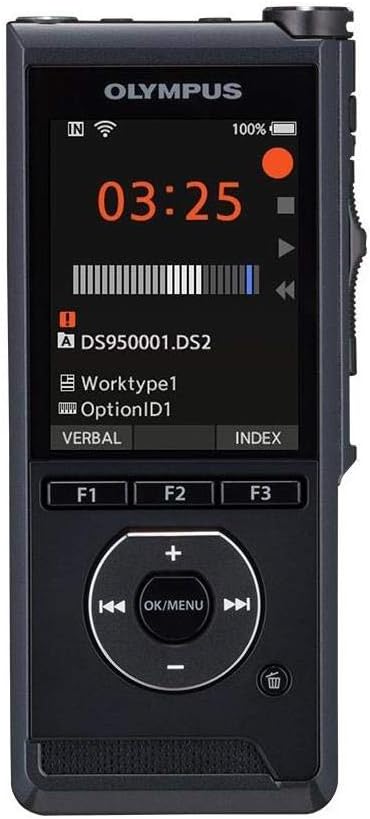
Figura 2.1: Frontal View. This image displays the front of the Olympus DS-9500, highlighting its color display, recording status indicators, and the central navigation pad with OK/MENU button, along with three programmable function buttons (F1, F2, F3).
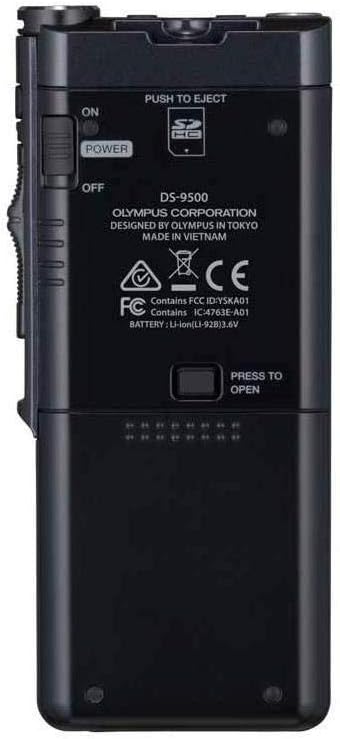
Figura 2.2: Esquena View. The rear of the DS-9500 features the power switch (ON/OFF), a 'PUSH TO EJECT' mechanism for the SD card slot, and the battery compartment release. Model information and regulatory markings are also visible.

Figura 2.3: Costat esquerre View. This image shows the left side of the device, which typically houses volume controls or other secondary buttons, contributing to its ergonomic design.

Figura 2.4: Costat dret View. The right side of the DS-9500 features the optical slide switch, a key control for recording, stopping, and playback functions, designed for tactile and reliable operation.

Figura 2.5: A baix View. The bottom of the device includes the USB ports for charging and data transfer, facilitating connectivity with a computer or docking station.
3. Configuració
3.1. Instal·lació de la bateria
- Assegureu-vos que el dispositiu estigui apagat.
- Localitzeu el compartiment de la bateria a la part posterior del dispositiu (vegeu la Figura 2.2).
- Slide the battery cover release and open the compartment.
- Insert the supplied Li-ion battery, ensuring correct polarity.
- Tanqueu la tapa del compartiment de la bateria fins que encaixi correctament al seu lloc.
3.2. Engegada inicial i configuració bàsica
- Slide the power switch (located on the back, Figure 2.2) to the 'ON' position.
- Upon first use, the device may prompt you to set the date and time. Follow the on-screen instructions using the navigation pad.
- Charge the device fully before first use using the supplied USB cable.
4. Instruccions de funcionament
4.1. Gravació
The DS-9500 features intelligent dual microphones and a studio-quality pop filter for clear audio capture.
- Comença a gravar: Slide the optical slide switch (Figure 2.4) to the 'REC' position. The recording indicator will illuminate.
- Pausa de gravació: Slide the optical slide switch to the 'STOP' position to pause. Slide back to 'REC' to resume.
- Atura la gravació: Slide the optical slide switch to the 'STOP' position and hold briefly, or press the 'STOP' button on the navigation pad.
- Direcció del micròfon: Access the menu to select between 'Narrow' directionality for single-speaker dictation in noisy environments (e.g., airports) or 'Wide' directionality for conference settings with multiple speakers.
4.2. Reproducció
- Seleccioneu File: Use the navigation pad to browse and select the desired audio file from the list on the display.
- Inicia la reproducció: Press the 'PLAY' button on the navigation pad or slide the optical slide switch to the 'PLAY' position.
- Ajustar el volum: Use the volume buttons (typically on the side or navigation pad) to increase or decrease playback volume.
- Avançar/rebobinar ràpid: Use the fast forward and rewind buttons on the navigation pad to navigate within the audio file.
- Atura la reproducció: Press the 'STOP' button on the navigation pad or slide the optical slide switch to the 'STOP' position.
4.3. WiFi Functionality
The DS-9500's WiFi capability allows for wireless transfer of dictation files.
- Connecteu-vos a WiFi: Navigate to the WiFi settings in the device menu. Select your desired network (e.g., personal hotspot or office network) and enter the password if required.
- File Transferència: Un cop connectat, files can be sent to a designated transcriptionist or server. Refer to the accompanying software manual for detailed instructions on configuring wireless transfer destinations.
- Comprova l'estat: The device allows you to check the status of transcription files directly on its display.
4.4. Característiques de seguretat
The DS-9500 incorporates security measures to protect sensitive information.
- Xifratge AES: The device supports 256-bit AES encryption for recorded files. Enable this feature through the device settings to secure your dictations.
- Device PIN Lock: Set a PIN lock to prevent unauthorized access to the device and its contents.
5. Manteniment
- Neteja: Feu servir un drap suau i sec per netejar l'exterior del dispositiu. No utilitzeu netejadors líquids ni dissolvents.
- Emmagatzematge: Guardeu el dispositiu en un lloc fresc i sec, allunyat de la llum solar directa i de temperatures extremes.
- Cura de la bateria: For optimal battery life, avoid fully discharging the battery frequently. If storing for an extended period, charge the battery to approximately 50%.
- Actualitzacions de firmware: Periodically check the Olympus support weblloc web per obtenir actualitzacions de firmware per assegurar-vos que el dispositiu tingui les darreres funcions i millores de rendiment.
6. Solució De Problemes
Si teniu problemes amb el vostre DS-9500, consulteu les solucions habituals següents:
- El dispositiu no s'encén: Ensure the battery is correctly installed and charged. Connect the device to a power source using the USB cable.
- Problemes de gravació: Check microphone settings (directionality). Ensure the pop filter is clean. Verify sufficient storage space on the SD card.
- Problemes de connexió WiFi: Confirm correct network password. Ensure the device is within range of the WiFi signal. Restart the device and attempt reconnection.
- Bloqueig/No respon del dispositiu: If the device becomes unresponsive, try performing a soft reset by holding down the power button for several seconds. If this does not work, temporarily remove and reinsert the battery.
- Slow Startup/Battery Drain: Ensure all unnecessary background processes or WiFi connections are disabled when not in use. Consider performing a factory reset if issues persist after backing up data.
- Compatibilitat del programari: Ensure you are using the latest version of the Olympus dictation management software compatible with your operating system.
For persistent issues, contact Olympus customer support.
7. Especificacions
| Característica | Especificació |
|---|---|
| Marca | Olimp |
| Número de model | DS-9500 |
| Pes de l'article | 1.82 lliures |
| Dimensions del producte | 7.4 x 6.5 x 4.2 polzades |
| Capacitat d'emmagatzematge de memòria | 16 GB |
| Mida de la pantalla | 2.4 polzades |
| Temps d'enregistrament digital | 1275 hores |
| Mode de funcionament del micròfon | estèreo |
| Interfície del maquinari | Secure Digital Card, USB |
| Conector d'auriculars | 3.5 mil·límetres |
| Dispositius compatibles | Ordinador personal |
| Número de peça del fabricant | V741010BU000 |
8. Garantia i Suport
For information regarding the product warranty, please refer to the warranty card included with your purchase or visit the official Olympus support website. For technical assistance, software downloads, or further inquiries, please contact Olympus customer support directly. Contact details can typically be found on the Olympus weblloc o a l'embalatge del producte.


