Introducció
This instruction manual provides detailed guidance for the Verbatim Wireless Multimedia Keyboard and 6-Button Mouse Combo. This 2.4GHz wireless set is designed for seamless connectivity and enhanced productivity, featuring hot keys for media control, quiet soft-touch keys for comfortable typing, and a high-resolution optical mouse with adjustable DPI for precise control. The compact nano receiver ensures reliable performance and can remain connected to your computer.
Contingut del paquet
- Teclat multimèdia sense fil
- Ratolí de 6 botons
- Nano receptor
- 2 piles AAA (per al teclat)
- 1 x AA Battery (for Mouse)
Configuració
- Insereix les piles:
For the mouse, open the battery compartment located on the underside. Insert one AA battery, ensuring correct polarity. The nano receiver is conveniently stored within this compartment. For the keyboard, open the battery compartment on the underside and insert two AAA batteries, observing correct polarity. - Connect Nano Receiver:
Remove the nano receiver from the mouse's battery compartment. Plug the nano receiver into an available USB port on your computer. The system should automatically detect and install the necessary drivers. - Dispositius d'encesa:
Ensure the mouse and keyboard are powered on. There may be an On/Off switch on the underside of the mouse. The keyboard typically activates upon key press after battery insertion. - Prova de connectivitat:
Move the mouse and type on the keyboard to confirm they are functioning correctly. If not, ensure the receiver is securely plugged in and batteries are correctly installed.

Image: Verbatim Wireless Multimedia Keyboard and 6-Button Mouse Combo.

Image: The nano receiver is stored inside the mouse's battery compartment for convenience.
Instruccions de funcionament
Característiques del teclat:
- Multimedia Hot Keys: Located above the function keys, these provide instant access to media controls (play, pause, volume, etc.) and other common functions like web browser and email.
- Soft-Touch Keys: The keyboard features quiet, soft-touch keys designed for a crisp, responsive typing experience.
- Full Numeric Keypad: Inclou un teclat numèric dedicat per a una entrada de dades eficient.
- Potes inclinables ajustables: The keyboard has foldable legs on the underside to adjust the typing angle for ergonomic comfort.
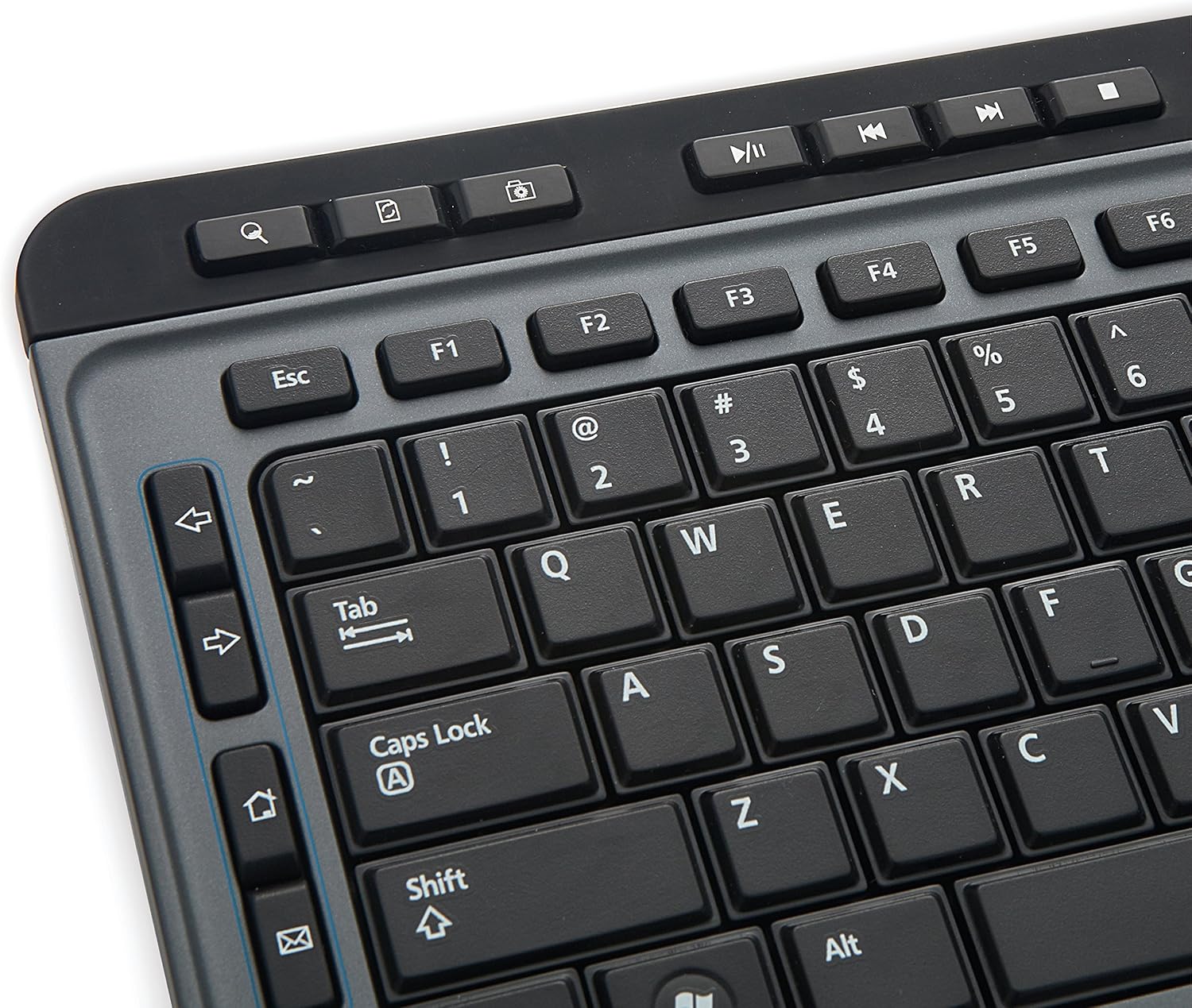
Image: Close-up of the keyboard showing multimedia hot keys and standard layout.
Característiques del ratolí:
- Disseny de 6 botons: Includes standard left and right click buttons, a scroll wheel, and additional buttons for back/forward navigation (webpages), zoom, and adjustable DPI.
- DPI ajustable: A dedicated DPI switch button allows you to adjust the mouse sensitivity for precise control.
- High-Resolution Optical Technology: The mouse utilizes Blue LED technology, enabling use on various surfaces including glass, wood, and granite.

Image: The 6-button mouse featuring a DPI switch for sensitivity adjustment.

Image: Diagram illustrating the six buttons on the mouse: Left, Right, Scroll Wheel, DPI Switch, Forward, and Backward.
Manteniment
- Neteja: Feu servir un drap suau i sec per netejar el teclat i el ratolí. Per a la brutícia persistent, feu servir un drap lleugerament sec.amp cloth can be used. Avoid harsh chemicals or abrasive cleaners.
- Substitució de la bateria: Replace batteries when the low battery indicator on the keyboard illuminates or when mouse/keyboard performance degrades. Always use fresh, high-quality batteries of the specified type (AAA for keyboard, AA for mouse).
- Emmagatzematge: When not in use for extended periods, remove batteries to prevent leakage and store the devices in a cool, dry place.
Resolució de problemes
- Cap resposta del teclat/ratolí:
- Assegureu-vos que les piles estiguin correctament inserides i que no estiguin esgotades. Substituïu-les si cal.
- Verify the nano receiver is securely plugged into a working USB port on your computer.
- Try plugging the nano receiver into a different USB port.
- Reinicieu l'ordinador.
- Lag or Intermittent Connectivity:
- Move the keyboard and mouse closer to the nano receiver.
- Ensure there are no large metal objects or other wireless devices interfering with the 2.4GHz signal.
- Avoid using the receiver with a USB hub if possible; connect directly to the computer.
- El cursor del ratolí salta o és inexacte:
- Netegeu el sensor òptic de la part inferior del ratolí.
- Ensure you are using the mouse on a suitable surface. Blue LED technology allows for use on many surfaces, but highly reflective or transparent surfaces may still cause issues.
- Ajusteu la configuració de DPI amb el botó DPI del ratolí.
- Les tecles multimèdia no funcionen:
- Assegureu-vos que el vostre sistema operatiu i el programari del reproductor multimèdia estiguin actualitzats.
- Some multimedia keys may require specific software or drivers, though this combo is generally plug-and-play.
Especificacions
| Característica | Detall |
|---|---|
| Marca | Verbatim |
| Número de model | 99788 |
| Tecnologia de connectivitat | 2.4GHz Wireless (Nano Receiver) |
| Tipus de teclat | Multimedia, Full-size with Numeric Keypad |
| Tipus de ratolí | 6-Button, High-Resolution Optical (Blue LED) |
| Dispositius compatibles | Personal Computer (Mac & PC Compatible) |
| Compatibilitat de sistemes operatius | Windows XP and later, Linux, Mac OS |
| Keyboard Power Source | 2 piles AAA (incloses) |
| Mouse Power Source | 1 bateries AA (incloses) |
| Color | Negre |
| Pes de l'article | 1.91 lliures |
| Dimensions del producte (LxWxH) | 18.3 x 7.28 x 0.88 polzades |
Informació important
Avís legal: Aquest producte conté productes químics coneguts per l'estat de Califòrnia per causar càncer i defectes de naixement o altres danys reproductius.
Garantia i Suport
This Verbatim product is covered by a 1-Year Limited Warranty. For technical support or warranty claims, please refer to the contact information provided with your purchase or visit the official Verbatim weblloc.
Image: Seal indicating a 1-Year Limited Warranty.


