1. Introducció
The EZON T023 Digital Sports Watch is specifically designed for fitness enthusiasts, athletes, and individuals engaged in various indoor and outdoor sports activities. This manual provides comprehensive instructions for the proper setup, operation, and maintenance of your watch, ensuring you can fully utilize its features for tracking your fitness journey.
The T023 is a classic black running watch with a clear digital display, offering core functions such as a pedometer, distance tracking, speed measurement, and calorie consumption calculation. It serves as a reliable tool for monitoring your health and exercise progress.
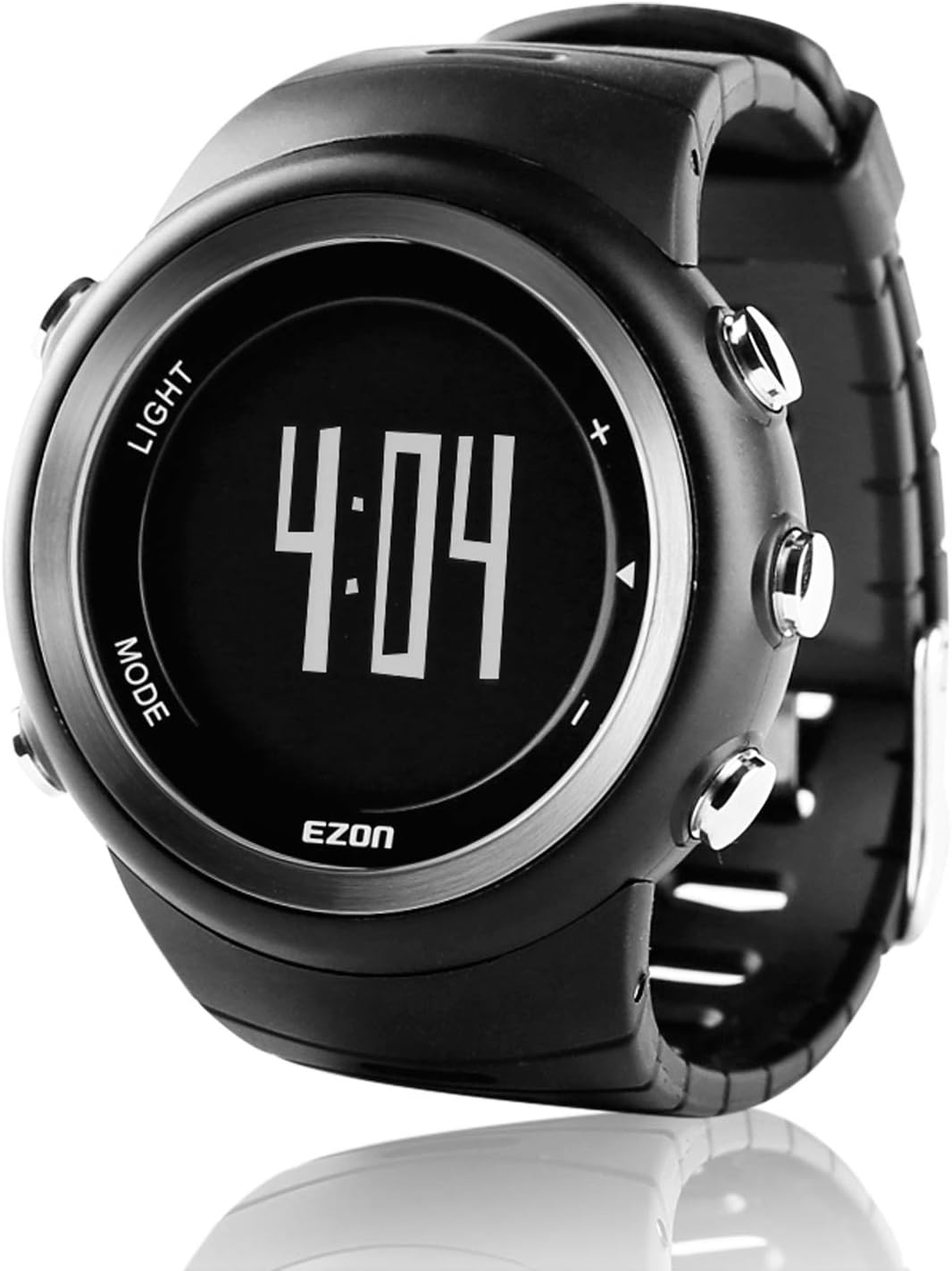
Figure 1.1: EZON T023 Digital Sports Watch. This image shows the watch face displaying the time 4:04, with 'LIGHT' and 'MODE' labels on the left side and control buttons on the right.
2. Producte acabatview
2.1 Característiques clau
- Podòmetre: Counts steps and displays real-time exercise distance.
- Distance/Speed Tracking: Monitors your movement and calculates speed.
- Consum de calories: Estimates calories burned during activity.
- BMI Index: Provides an indication of body mass index.
- Training Record: Stores exercise data for the last 10 days.
- 50-Year Calendar: Displays current date and year.
- 30-Lap Timer: Stopwatch function for timing intervals.
- Alarma: Alarma diària programable.
- Hourli Campana: Opcional hourly sound notification.
- Resistència a l'aigua 5ATM: Suitable for swimming and daily water exposure (up to 50 meters).
- Retroil·luminació EL: Retroil·luminació electroluminescent per a una major visibilitat amb poca llum.
- Tecla de bloqueig: Evita les pulsacions accidentals de botons.
- Recordatori de bateria baixa: Avisa quan la bateria és baixa.
- Bateria CR2032: Approximately 12 months battery life, user-replaceable.
2.2 Components del rellotge

Figure 2.1: Watch Components. This diagram illustrates the main functions and button locations: 'A' for Backlight/Button Lock, 'B' for Setting Menu/Cycle Review, 'C' for Record Menu, 'D' for Stopwatch, and 'E' for Pedometer.
Familiarize yourself with the watch's buttons and their corresponding functions as indicated in Figure 2.1. These buttons are essential for navigating menus and activating features.

Figure 2.2: Key Features in Use. The watch is shown on a wrist during an outdoor activity, with icons highlighting Pace Track, 30 Laps Record, Distance/Speed, and Hourly Chime functionalities.
3. Configuració
3.1 Initial Setup (Time, Date, User Profile)
Upon first use or after a battery replacement, you will need to set the time, date, and your personal profile for accurate pedometer and calorie tracking. Refer to the 'Setting Menu' (Button B in Figure 2.1) for these adjustments.
- Premeu el botó MODE button (typically Button B) repeatedly until you reach the 'Setting' mode.
- Utilitza el LLUM button (typically Button A) to select the parameter you wish to adjust (e.g., Hour, Minute, Year, Month, Day).
- Use the 'Up' and 'Down' buttons (typically on the right side, near D and E) to change the values.
- Confirmeu cada configuració prement la tecla MODE button again to move to the next parameter.
- For user profile, input your height, weight, and stride length for accurate pedometer and calorie calculations.
3.2 Instal·lació/substitució de la bateria
The EZON T023 watch uses a CR2032 Lithium-metal battery, which is included. The battery typically lasts for approximately 12 months. When the low battery reminder appears, it's time to replace the battery.
- Carefully remove the back cover of the watch using a small screwdriver.
- Gently remove the old CR2032 battery.
- Insert the new CR2032 battery with the positive (+) side facing up.
- Ensure the waterproof gasket is properly seated before securely fastening the back cover. Improper sealing can compromise water resistance.
4. Instruccions de funcionament
4.1 Navegació bàsica
Utilitza el MODE button to cycle through different display modes (Time, Pedometer, Stopwatch, Alarm, Setting, etc.). The LLUM button activates the backlight and can also be used for selection in setting modes. Other buttons are typically for 'Up', 'Down', 'Start', or 'Stop' functions depending on the active mode.
4.2 Funció del podòmetre
The built-in pedometer automatically counts your steps by detecting arm motion. Ensure your personal profile (height, weight, stride length) is accurately set for optimal precision. The watch displays your step count and estimated distance in real-time.
4.3 Distance and Speed Tracking
Based on your steps and stride length, the watch calculates the distance covered and your average speed during an activity. This data is accessible in the pedometer or training record modes.
4.4 Calorie Consumption
The watch estimates the calories you burn based on your activity level, steps, and personal profile data. This information helps you monitor your energy expenditure.
4.5 Training Record
The watch stores your exercise data for the past 10 days. To view your training records, navigate to the 'Record Menu' (Button C in Figure 2.1) and use the navigation buttons to scroll through past entries. This allows you to review el teu progrés al llarg del temps.
4.6 Stopwatch (30-Lap Timer)
To use the stopwatch, navigate to the 'Stopwatch' mode (Button D in Figure 2.1). Press the 'Start' button to begin timing. You can record up to 30 lap times by pressing the 'Lap' button during an active timing session. Press 'Stop' to pause and 'Reset' to clear the timer.
4.7 Alarm and Hourli Campana
Set your daily alarm in the 'Alarm' mode. Use the navigation buttons to set the desired time. The hourly chime can be toggled on or off in the settings menu, providing an audible alert at the top of each hour.
4.8 EL Retroil·luminació
Premeu el botó LLUM button (Button A in Figure 2.1) to activate the electroluminescent backlight, illuminating the display for easy reading in dark conditions.
4.9 Bloqueig de tecles
To prevent accidental button presses during activities, activate the key lock function. This is typically done by pressing and holding a specific button combination (refer to the watch's on-screen prompts or a quick reference guide if available). Deactivate by repeating the action.
4.10 Pautes de resistència a l'aigua
The watch is rated 5ATM (50 meters) water resistant, making it suitable for showering, swimming, and snorkeling. However, it is crucial to NOT press any buttons while the watch is submerged in water. Also, avoid exposing the watch to steam or hot water, as this can compromise the waterproof seals.

Figure 4.1: Water Resistance. The image shows the EZON T023 watch with water droplets, illustrating its water-resistant design.
5. Manteniment
5.1 Neteja
Per netejar el rellotge, netegeu-lo amb un drap suau iamp cloth. Avoid using harsh chemicals or abrasive materials, which can damage the watch's finish or seals. For the strap, a mild soap solution can be used, followed by rinsing and thorough drying.
5.2 Substitució de la bateria
As detailed in Section 3.2, the CR2032 battery is user-replaceable. Ensure you use a fresh, high-quality CR2032 battery and correctly re-seat the waterproof gasket to maintain the watch's water resistance.
5.3 Emmagatzematge
When not in use for extended periods, store the watch in a cool, dry place away from direct sunlight and extreme temperatures. If storing for a very long time, consider removing the battery to prevent leakage.
6. Solució De Problemes
6.1 Display Not Working or Faint
- Check the battery level. If a low battery reminder is active, replace the battery.
- Assegureu-vos que la bateria estigui instal·lada correctament.
- If the issue persists after battery replacement, contact customer support.
6.2 Inaccurate Pedometer Readings
- Verify that your personal profile (height, weight, stride length) is accurately entered in the settings.
- Ensure the watch is worn securely on your wrist during activity.
- Sudden, jerky movements not associated with walking may be misinterpreted.
6.3 Fuita d'aigua
- Immediately stop using the watch in water.
- Ensure the back cover was properly sealed after any battery replacement.
- Remember not to press buttons underwater.
- Contact customer support for repair or replacement if water damage occurs.
7. Especificacions
| Característica | Detall |
|---|---|
| Marca | EZON |
| Número de model | BD14547 (T023) |
| Franja d'edat | Adult |
| Forma | Ronda |
| Resistència a l'aigua | 5ATM (50 meters / 164 feet) |
| Tipus de bateria | 1 x CR2032 Liti-metall (inclosa) |
| Durada de la bateria | Aprox. 12 mesos |
| Dimensions del paquet | 11 x 7.8 x 7.6 cm |
| Pes de l'article | 68.04 g |
| UPC | 657228397315 |
8. Garantia i Suport
Your EZON T023 Digital Sports Watch comes with a warranty. Please refer to the warranty card included in your product packaging for specific terms, conditions, and duration of the warranty. For technical support, troubleshooting assistance beyond this manual, or warranty claims, please contact the retailer or EZON customer service through the contact information provided on your warranty card or the official EZON weblloc.


