Producte acabatview
The PowerLocus P2 Bluetooth Over-Ear Headphones offer a premium audio experience with versatile connectivity options. Designed for comfort and durability, these headphones are perfect for travel, sports, and everyday use. They feature high-definition stereo sound, deep bass, and noise reduction technology for an immersive listening experience.
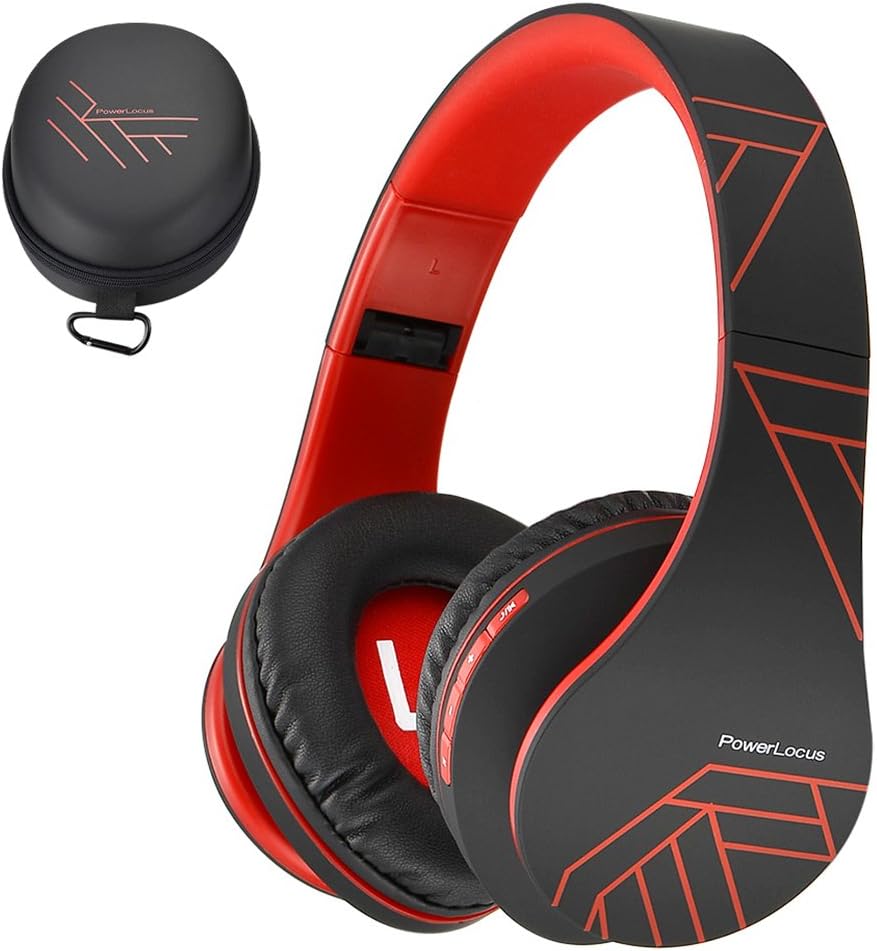
Figure 1: PowerLocus P2 Headphones and Protective Case (Black/Red)
Què s'inclou
- 1x PowerLocus P2 Wireless Over-Ear Headphones
- 1x cable de càrrega USB-C
- 1x cable d'àudio de 3.5 mm
- 1x funda protectora de transport
- 1 x manual d'usuari

Figure 2: All included components in the PowerLocus P2 package.
Característiques del producte
- High-Definition Stereo Sound: Equipped with 40mm audio drivers for deep bass and dynamic power sound, ensuring superior audio quality.
- Tecnologia de reducció de soroll: Advanced software and noise reduction for clear audio and hands-free communication via the built-in microphone.
- Disseny còmode: Foldable and stretchable over-ear design with super soft memory-protein foam leather earmuffs and headband for optimum comfort during extended wear.
- Connectivitat versàtil: Supports Bluetooth 5.3 for wireless connection and includes a 3.5mm jack for wired use when battery is low or for non-Bluetooth devices.
- Multifuncional: Features include Micro SD/TF card support and FM radio functionality.
- Portàtil: Comes with a durable protective case for easy and safe transport.

Figure 3: Key features of the PowerLocus P2 Headphones.
Configuració i funcionament
Carregant els auriculars
Before first use, fully charge your PowerLocus P2 headphones. A full charge takes approximately 2.5 hours and provides up to 15 hours of playtime.
- Localitza el port de càrrega USB-C als auriculars.
- Connecteu el cable de càrrega USB-C proporcionat al port d'auriculars.
- Plug the other end of the USB-C cable into a compatible USB power source (e.g., laptop, wall adapter not exceeding 5V).
- The LED indicator light will be RED while charging.
- When fully charged, the RED LED light will disappear.
Video 1: Instructions on how to charge the PowerLocus P2 Over-Ear Headphones. This video demonstrates plugging the USB-C cable into the headphone and a power source, showing the LED indicator light behavior during charging.
Emparellament Bluetooth
Follow these steps to pair your PowerLocus P2 headphones with a Bluetooth-enabled device:
- Assegureu-vos que els auriculars estiguin apagats.
- Slide the On/Off button to the "On" position. The LED indicator will flash blue/red, indicating pairing mode.
- Al dispositiu (telèfon intel·ligent, tauleta, ordinador portàtil), activeu el Bluetooth i cerqueu els dispositius disponibles.
- Select "PowerLocus P2" from the list of available devices.
- Un cop connectat, l'indicador LED dels auriculars es tornarà blau.
Video 2: Guide on how to connect PowerLocus P2 headphones via Bluetooth. The video shows the power switch, the flashing blue/red LED in pairing mode, and the solid blue LED once connected to a device.
Mode per cable
To use the headphones in wired mode, simply connect the provided 3.5mm audio cable to the headphone's audio jack and the other end to your audio source. This mode works even if the headphone battery is depleted.
Controls acabatsview
The PowerLocus P2 headphones feature intuitive controls located on the earcup for easy management of your audio and calls.

Figure 4: Detailed diagram of headphone controls.
- Botó Reproduir/Pausa: Premeu per reproduir o posar en pausa la música.
- Puja el volum/Següent cançó: Premeu breument per pujar el volum, premeu llargament per a la cançó següent.
- Baixar volum/Cançó anterior: Premeu breument per baixar el volum, premeu llargament per a la cançó anterior.
- Botó M: Mode switch (e.g., Bluetooth, FM Radio, Micro SD).
- Interruptor d'encesa/apagada: Powers the headphones on or off and initiates Bluetooth pairing.
- Micròfon integrat: Per trucades mans lliures.
Manteniment i cura
- Mantingueu els auriculars nets netejant-los amb un drap suau i sec.
- Eviteu exposar els auriculars a temperatures extremes, humitat o llum solar directa.
- Store the headphones in the provided protective case when not in use to prevent scratches and damage.
- Do not use abrasive cleaners or solvents on the headphones.
- Eviteu deixar caure els auriculars o sotmetre'ls a impactes forts.

Figure 5: Folding and storing headphones in the premium carry case.
Resolució de problemes
| Problema | Causa possible | Solució |
|---|---|---|
| Els auriculars no s'encenen. | Bateria baixa. | Carregueu els auriculars completament. |
| No es pot emparellar per Bluetooth. | Auriculars no en mode d'emparellament; Bluetooth del dispositiu desactivat; massa lluny del dispositiu. | Ensure headphones are flashing blue/red. Turn device Bluetooth off/on. Move closer to device (within 36 feet). |
| Sense so o amb un volum baix. | Volum massa baix als auriculars o al dispositiu; s'ha seleccionat una font d'àudio incorrecta. | Increase volume on both headphones and device. Check audio source connection (Bluetooth or 3.5mm cable). |
| Distorsió del so. | Senyal Bluetooth feble; àudio file qualitat. | Move closer to the paired device. Try a different audio file. |
Especificacions
| Característica | Detall |
|---|---|
| Nom del model | P2 |
| Tecnologia de connectivitat | Sense fil (Bluetooth 5.3), amb cable (connector de 3.5 mm) |
| Interval Bluetooth | Fins a 36 peus |
| Durada de la bateria | Fins a 15 hores de joc |
| Temps de càrrega | 2.5 hores |
| Mida del controlador d'àudio | 40 mm |
| Resposta de freqüència | 20 Hz - 20,000 Hz |
| Impedància | 32 ohms |
| Control de soroll | Aïllament acústic |
| Pes de l'article | 6.2 unces (175 grams) |
| Dimensions | 3.8 x 6 x 8.1 polzades |
| Característiques especials | Foldable, Built-in Mic, Micro SD/TF, FM Radio, Multipoint Pairing |
Garantia i Suport
PowerLocus provides a 24-month warranty for the P2 headphones, ensuring customer satisfaction. For any inquiries or support, please contact PowerLocus customer service. They offer 24/7 customer support to assist with any issues or questions you may have.
Visit the official PowerLocus Store for more information and support: PowerLocus Store


